
louis_stephen_carrozzi's Reviews

Easily amongst "The Best" (Which is always highly subjective.)
First off, I own licenses to probably 25 of the "top rated" VST synths on the market, some of which include Massive, FM8, Sylenth1, Rob Papen's (everything), Diva, Zebra and the Korg Legacy Collection (which still kick butt today) and DUNE 2, to name a few. So, I've had a chance to work with a lot of the big ones out there, and each are different, they are all good in their own right. I only point this out so people have a reference point.
I also have to admit that I am NOT a great sound designer. I'm just not. I can't hear something in my head and turn a few knobs and get what I want like some people can. It's just not that easy for me, and I DO understand the principles of sound design fairly well. There is always something wrong for me. Either the sound quality of the oscillator isn't what I expected which throws me off, because then I am trying to figure out how to fix it, or the filter and effects routing is limited, or I can't visualize how things are routed or related, or maybe the interface is just laid out in a clunky way that doesn't do anything to help me fiddle with what's going on with the sound. I'm a very visual learner which is one of the reasons I like synths like Rob Papen's Blue II (one of my other favorites) and why I like Ableton Live over a lot of other DAWs: Ableton is simple, streamlined, easy to work with etc. It's really frustrating to have a great sounding synth that I can't figure out how to program in an easy and straightforward way. It's even more annoying when the preset browser is clunky or badly organized.
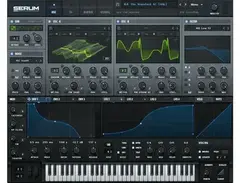
So first off, almost ALL of the functions in Serum are on 5 screens, and most of the important ones are on 1 screen.
The screens are:
- Main synthesis page
- Wavetable editor
- Effects rack
- Modulation Matrix
- Global Page
Serum doesn't suffer from a lot of shortcomings.
First, and often overlooked is the patch browser. The browser has a very "Rob Papen" multilevel style to it. One click gets you access to all of the sound folders in your presets folder, and they are organized exactly the same way on your hard drive. Adding new patches is as easy as dropping them into that folder, which you can access from the main menu. If you've worked with Zebra or and of the Rob Papen synths, you'll know what I'm talking about. As long as you organize your folders correctly you can get to ANY patch in the synth with 2 mouse clicks: One to open the menu, and a second to pick the preset.
Next, programming Serum is really as easy as I have found anywhere else, and where it concerns the main oscillators or the wavetables themselves, Serum is HUGELY visual. You can see the wavetable, and see exactly how the oscillator is cycling through the wavetable's frames as it’s playing in real time. It's like someone finally pulled back the curtain and let you see what's going on behind it. Serum has pulled some visual tricks from both Zebra and Razor.
Next, Serum sounds incredible. It's not trying to sound like "real" analogue, but you can get really good analogue sounding results with it. (Like Sylenth1, DUNE 2 or even Diva good.) You can also get sounds that sound NOTHING like analogue because it is a wavetable synth. So, the instrument has a HUGE range, but at it's heart there are only 2 main oscillators, one noise oscillator and one sub. You would think that this would seriously limit your creativity, but it's an illusion of simplicity because each of these oscillators has a trick up it's sleeve.
The two main oscillators can be set to use a single wave frame (like a saw, or square... or 150+ others!). These oscillators can also be run through the filter just like a subtractive synth. It sounds really good doing this! Next, the unison controls are right there, so you can take a saw, turn it into a super saw, and then play with the DYNAMICS of the super saw's unison voices. It's visual, it's clear. Most importantly, you can have something that sounds amazing in seconds, and it’s fun to experiment with. Serum has a giant collection of wavetables out of the box, but you can ALSO import wav files and slice them into a wavetable, so the oscillators are virtually unlimited in terms of wave tables.
The sub oscillator has a much more limited range of wave types at 6, but it's clear that these 6 wave types were picked on purpose to BE the SUB, and are extremely popular in genres such as electro-house (among others), and the genius is that there is bypass function that shoots the (clear) sub signal past the filters and directly to the main sound bus meaning that you DON'T have to stack basses on a track any more! With two great oscillators and a punchy sub that can be routed separately means you can do all your bass patch design inside Serum. The end result is something that sounds great and is usable immediately.
Next, you might expect the "noise" generator to be stuck with white, pink or blue noise, but there are around 100+ 'noises' that you can use for attacks, effects etc. It is a VERY versatile sound generator and is so useful, that it’s actually worth using for things OTHER than snare drums or claps. Now when you want to create transients for basses or kicks, you have a whole sound generator dedicated to that task. Again, it’s what you need.
Between these 4 sound generators there is almost limitless possibility. Add to that the fact that you can load in your own wavetables, and it just gets ridiculous. But all of it is SIMPLE!
Next up, is the wave table editor.
You can only use the wave table editor with the main two oscillators, but the editor is powerful and easy to use. It has a host of drawing aids to make it easy to build precision wave forms, or you can load your own. I haven’t completely dived into this section yet but did watch a tutorial video on it, and like the other parts of Serum, it is hugely flexible while being simple at the same time. You could spend hours in the wavetable editor just playing around. This screen is also BIG and easy to read. It’s one of the 5 “main pages” of Serum, and visually it works.
Then, there are the filters.
Serum doesn’t just have one filter, but two, and they are different. One filter is on the main synthesis page for immediate use and easy modulation from the envelopes and LFOs, but there is also a SECOND filter in the actual effects section. This section alone will keep you busy for HOURS because, like the oscillators, there are well over 100 filter presets! (See you next week.)
Next is the effects section.
I would say that this section has everything you need, and not anything more (or less) than what you need. By that, I mean that out of the 10 effects that are available, each are kept simple enough that they are EASY to work with. There are only a handful of controls on each, but those controls are powerful as well as simple. Also, routing is easy. You can drag and drop effects in the order you want them processed, and they are processed top to bottom. That’s it! Like everything else in Serum, the filters and effects sound fantastic.
Modulation:
There are basically a couple of ways that other synths have put together modulation controls. On a synth like Sylenth1, a lot of it is done via a “modulation matrix” as it is with DUNE, or Albino. But in other synths, like Massive or Zebra, you can drag and drop modulation sources onto modulation targets. Serum has BOTH of these functionalities. Most of the important modulation is directly accessible from the main synthesis page. There are 3 envelopes (including the main envelope) and 4 LFOs. This may not sound like a lot, and it’s certainly a lot less than Zebra, but again, the synth gives you what you are likely going to NEED and USE, and nothing to distract you. This is actually a good thing in my opinion because you can assign multiple modulation targets to a single LFO or ENV and keep your sound effects related and consistent.
Of course there are things that you can’t drag and drop that you need a modulation matrix for, and that’s why Serum has one included. If your style of sound design requires a matrix, you have one, and it’s got some nice features like showing (in real time) exactly what your modulation is doing with the aid of some nifty little “dancing lights” that go back and forth over your modulation parameters, and it also has “velocity curves”, for lack of a better term, to control how the modulation unfolds over time. Very cool and fun to watch. And it's EASY.
For those people who like Macro knobs, Serum comes with 4. It may not sound like a lot, but if you assign multiple modulation targets to the macro knob, you can get some great effects and again, there is enough for you to use, but not so much that you get distracted. I am picturing here that if you have a controller with 8 knobs on it, you can use those knobs to control 2 instances of Serum live. I think that was the thought behind it. Nice!
Finally, there is a ‘Global” page that has settings that pertain to the entire synth. I'm not going to go into that here, but it's there, out of the way when you need it.
Of course there are hundreds of other features and buttons that do various things, but the sections I listed above comprise the bulk of the instrument. All of the rest is fine tuning and all of the controls you would expect from a synth like filter controls and oscillator controls. Since there are "mouse tips" EVERYWHERE (which you can turn on and off from the global page), it's easy to figure out what something is, and what it does.
Overall, I would say that this synth is very straightforward, hugely flexible, streamlined to keep you on task and not distracted, and it all sounds jaw-on-the-floor amazing.
Now, after having spent two solid nights with Serum, I am in LOVE with this synth! WOW.
Having said that, and in the interest of being FAIR, there are some DOWNSIDES that you need to consider (although not many!)
First, the synth uses a LOT of processing power. I hit a note on a super saw and saw my i7 dual core processor spike at 20%-30%. That’s a lot of number crunching for one instrument! This can be mitigated somewhat by using effects to simulate “unison” voices and (MAYBE) using a lower draft quality global setting. It's just a function of math, if you want rich, fat, CLEAN sound, it’s just something we have to live with. If your computer isn’t beefy, you may have to drop your MIDI tracks to audio so you don’t kill your CPU.
Worth the extra steps? You bet! Absolutely worth it.
Another minor nit I have is that the envelope timing is in milliseconds and seconds. Why Steve didn’t include a toggle for note values is beyond me, it seems like a no brainer considering everything ELSE he put into this synth, but you are stuck with milliseconds so you’ll just have to do some math to get envelopes lined up perfectly with your beat. But this problem is actually easy to work around by using an LFO instead of an envelope and then just setting the LFO to Envelope mode which cycles it once just like a regular envelope, and you can even set it to stop or set a loop point, so in the end it doesn’t really matter.
You can get the job done, easily, and that's all that counts.
Finally, and this is REALLY IMPORTANT to understand, is WHY Serum doesn’t have a built in arpeggiator. You would think that Serum, with so much else going for it, would have a built in arpeggiator. Right?! It seems like a massive oversight, but in reality, it’s NOT.
Steve at Xfer has another tool that costs about $40 called Cthulhu. I would HIGHLY recommend getting Cthulhu along with Serum because it’s also a great tool like Serum (simple, easy and powerful) and Cthulhu is BOTH an arpeggiator AND a chord browser. The chord browser is kind of hard to explain, but it basically turns one note on the keyboard into a chord. By hitting one key at a time, you can create chord progressions, and then you can also create your own custom chord progressions as well. Since the chord browser is in the same plugin as the arpeggiator, you can arpeggiate the chords you are playing with one note! EASY and POWERFUL. Again, this is a bit of genius on the part of Steve Duda because by having the arpeggiator and chord browser separate from Serum, not only can you “arpeggiate” and “chord” Serum with Cthulhu, you can also use Cthulhu with any OTHER instrument as well just by dropping another on a MIDI control track.
So, by having these two tools separate from one another, you actually have MORE options than you would if Serum simply had a built in arpeggiator. Please don’t hesitate to get Cthulhu along with Serum! They work great together like they were designed for each other (which they kind of were!) and I am using both now. Cthulhu is a great plugin and only pushes the whole price to about $220 total, for both tools.
So, that’s about it! I keep trying to find out things I don’t like about Serum and I’m drawing a blank at the moment. This is an instrument designed by someone who does music and sound design for a living but it’s made to be worked with by total sound design idiots like myself. =)
If you are looking for a fantastic sounding synth that is easy as pie to work with, Serum should be near the top of the list, if not on top of that list.
9.9 out of 10