

Pricing and availability
We compare 600+ stores and found this item at 3 stores. Prices updated .
Store
Reviews
Price




Price History
Based on price data from 2 merchants for "Satechi Thunderbolt 4 Multimedia Pro Dock". Prices shown reflect NEW condition. Tracking began Apr 2, 2026.
* Product prices and availability are updated by Equipboard every 24hrs and are subject to change. Equipboard may receive compensation for purchases made at participating retailers linked on this site. This compensation does not affect what products or prices are displayed, or the order of prices listed. For more information, please refer to our affiliate disclosure.
Description
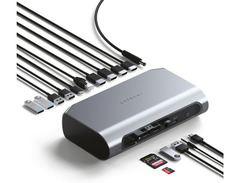
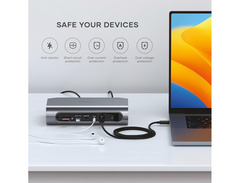
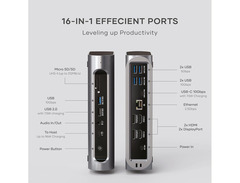
Enhance your creative workflow with the Satechi Thunderbolt 4 Multimedia Pro Dock, a versatile hub that seamlessly integrates with both Mac and Windows systems. This powerhouse of connectivity offers 16 ports, allowing you to connect a multitude of devices and peripherals, making it perfect for content creators who demand flexibility. With 40 Gbps Thunderbolt 4 bandwidth, experience lightning-fast data transfers and ultra-efficient communication between your computer and external monitors, storage devices, and more.
Designed with productivity in mind, the dock supports up to four additional displays on Windows systems, thanks to its dual HDMI 2.1 and DisplayPort 1.4 connections. Mac users can enjoy support for two external displays, offering 4K resolution at 60Hz. The dock’s 96W power delivery means your laptop and devices stay charged, even during intense work sessions. Built-in SD and MicroSD card slots ensure rapid media transfers, while the Gigabit Ethernet port provides stable network connectivity.
The dock's sleek, durable design features aircraft-grade aluminum and includes a vertical stand for space-saving setups. A Kensington Lock slot adds a layer of security, making it a reliable choice for both home offices and professional studios. Equip your workstation with the Satechi Thunderbolt 4 Multimedia Pro Dock and elevate your setup to a new level of efficiency and organization.
Key Features:
- 16-in-1 multifunctional Thunderbolt 4 dock
- 40 Gbps bandwidth for ultra-fast connectivity
- 96W power delivery for device charging
- Dual HDMI 2.1 and DisplayPort 1.4 for multiple 4K displays
- SD and MicroSD card slots for quick data transfers
- Gigabit Ethernet for stable internet connection
- Includes vertical stand and Kensington Lock slot for security and organization
Videos

Jerry Schulze
Good for Mac? Satechi Thunderbolt 4 Multimedia Pro Dock Review
Good for Mac? Satechi Thunderbolt 4 Multimedia Pro Dock Review
Jerry Schulze
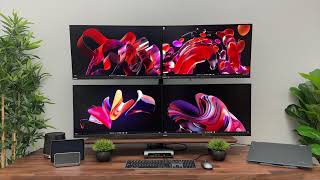
Satechi Thunderbolt 4 Multimedia Pro Dock Overview

Satechi
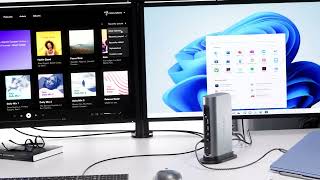
Satechi Thunderbolt 4 Multimedia Pro Dock ⚡️
Satechi
Thunderbolt 4 Multimedia Pro Dock by Satechi
Satechi
Reviews
Owner Insights
We analyzed real musician discussions from forums and Reddit to find what players love, question, and tweak about Satechi Thunderbolt 4 Multimedia Pro Dock.
Features and functionality
-
The dock's audio jack produces noticeable hiss due to impedance issues, which may affect your audio experience unless using high impedance headphones or an impedance adapter.
Source -
Ethernet adapter based on Realtek RTL8153 can cause high CPU usage in macOS due to driver issues, suggesting an alternative USB-A 2.5G ethernet adapter with Realtek RTL8156 for better performance.
Source -
The Satechi dock does come with a Thunderbolt 4 cable, contrary to some product listings that only mention a USB-C cable.
Source -
Monitors connected via USB-C to DisplayPort cables are recommended for better reliability than USB-C to HDMI, particularly for users with display stream compression needs.
Source -
The dock's Ethernet port is detected as USB rather than Thunderbolt Ethernet on macOS, affecting performance and suggesting a design limitation in its Thunderbolt implementation.
Source
Comparisons
-
The Satechi dock's single-layer port layout is favored over the CalDigit TS4's stacked layout for easier cable management and accessibility.
Source -
The CalDigit dock, costing slightly more than the Satechi, offers better performance due to its use of a PCIe NIC for Thunderbolt connections, unlike the Satechi's USB NIC.
Source
Setup and maintenance
-
Users have reported that connecting multiple 4K+ monitors through the dock may impact storage drive performance due to shared bandwidth constraints.
Source
Use cases and applications
-
The dock's inability to support Multi-Stream Transport (MST) suggests that using a DisplayPort connection for a second monitor might be more efficient than a Thunderbolt 4 port.
Source -
Dell Thunderbolt WD22TB4 dock, with 2 DP ports, 1 HDMI, and USB-C display out, is a potential alternative for multi-monitor setups needing high refresh rates.
Source -
Users looking to adapt ports should note that Dell docks max out at 60Hz for DP, HDMI, and USB-C, while TB4 ports can achieve 4K at 144Hz.
Source -
Users needing a reliable 2.5 Gbps Ethernet connection with macOS may find the Satechi underperforms compared to alternatives like the CalDigit.
Source
Software and compatibility
-
macOS users should verify display configurations due to DP multistream limitations and Apple M series CPU restrictions, which may affect connectivity options for multiple monitors.
Source -
The Satechi dock's Ethernet issues may be linked to how USB NICs using the ECM class driver perform poorly over Thunderbolt connections, which impacts macOS users specifically.
Source
Critic Reviews
Based on 0 Reviews and 0 Ratings
Popular Music Gear


Accessories & Related Items


Artist usage


Community setups


Similar


Most Popular Brands
-
Added to Equipboard on by
 equipboard
GearIQ 4934
-



