

Pricing and availability
We compare 600+ stores and found this item at 1 store. Prices updated .


* Product prices and availability are updated by Equipboard every 24hrs and are subject to change. Equipboard may receive compensation for purchases made at participating retailers linked on this site. This compensation does not affect what products or prices are displayed, or the order of prices listed. For more information, please refer to our affiliate disclosure.
Description
Unlock the true potential of your audio recordings with the Celemony Melodyne Editor 2, a cutting-edge pitch shifter plugin that revolutionizes music editing. Designed for both professional producers and enthusiastic amateurs, this software offers unparalleled control over pitch, timing, and note dynamics, allowing you to craft pristine audio tracks with precision. DNA Direct Note Access technology sets this plugin apart, enabling users to manipulate individual notes within polyphonic material, a feature that's not just impressive, but essential for detailed audio editing. Whether you're fine-tuning a vocal performance or adjusting instrument tracks, Melodyne Editor 2 provides the tools you need for flawless results.
The intuitive interface and powerful algorithms ensure that your workflow remains smooth and efficient. With its ability to handle complex audio tasks, this plugin seamlessly integrates into your existing setup, enhancing your creative process without compromising quality. Whether you're correcting pitch, timing, or shaping the sound of individual notes, the Celemony Melodyne Editor 2 is an indispensable tool in your music software arsenal.
Key Features:
- DNA Direct Note Access for editing individual notes within chords
- Comprehensive pitch and timing correction
- Intuitive user interface for efficient workflow
- Advanced algorithms for high-quality audio processing
- Compatibility with most DAWs and audio interfaces
- Multi-track note editing and tempo adjustment
- Supports ARA integration for enhanced performance
Elevate your music production with Melodyne Editor 2 and experience the freedom of detailed audio manipulation.
Videos

HarmonyCentral
Celemony Melodyne Editor 2.0
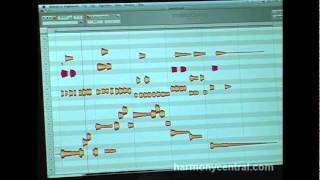
Celemony Melodyne Editor 2.0
HarmonyCentral
Celemony Melodyne Editor Features for DJs

DJ TechTools
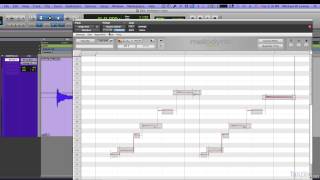
Altering Pitch with Celemony Melodyne Editor 2

Audiofanzine in English
Reviews
PROS
-
Effortlessly tunes individual notes for precise pitch correction
-
Visualizes chords as separate notes on a piano roll for detailed editing
-
Offers extensive flexibility and detailed features for audio editing
-
Considered the most convenient plug-in for vocal editing
-
Renowned as the best pitch editor on the market
-
Endless possibilities for creative audio manipulation
-
Perfects human vocal imperfections
-
Extremely powerful and versatile tool for music production
CONS
-
None
Owner Insights
We analyzed real musician discussions from forums and Reddit to find what players love, question, and tweak about Celemony Melodyne Editor 2.
Features and functionality
-
Melodyne Editor allows for polyphonic editing, enabling users to deconstruct chords into individual intervals for detailed manipulation.
Source -
The Studio version offers a multi-track interface, essential for working with multiple voices or instruments simultaneously.
Source -
The sibilants tool in certain versions provides precise de-essing control, enhancing vocal processing.
Source -
Melodyne can capture MIDI information from live drum loops, allowing users to replace drums while retaining the original rhythm for a live feel.
Source -
Users note that Melodyne's polyphonic identification is exceptionally accurate, providing superior pitch correction and manipulation compared to some other plugins.
Source
Comparisons
-
Users find Melodyne to be the most transparent tuning plugin compared to Waves Tune and Antares, emphasizing its flexibility and non-invasiveness when used correctly.
Source
Value and pricing
-
Upgrading from Melodyne Assistant to Editor costs $100, offering significant feature enhancements like polyphonic editing for a relatively moderate price increase.
Source
Use cases and applications
Software and compatibility
-
While FL Studio's Newtone offers similar features, users report that Melodyne provides a more professional and comprehensive experience, especially in polyphonic editing.
Source -
FL Studio plugins can be used as VSTs in other DAWs like Ableton, expanding Melodyne's functionality for users of different platforms.
Source -
Real-time processing during export in Melodyne can prevent artifacts, particularly when using pitch/time manipulation plugins.
Source
Setup and maintenance
4.5 out of 5
Based on 10 Reviews and 95 Ratings

199
Melodyne
I'm always blown away with how powerful Melodyne is. It's unreal that I can tune individual notes so effortlessly, and still can't believe I can view chords separated into individual notes on a piano roll, and tune those too! Crazy!


105
Celemony Melodyne Editor 2
for vocals I use Melodine, our judgment is the most convenient plug-in for vocals

114

Artist usage
Add artist
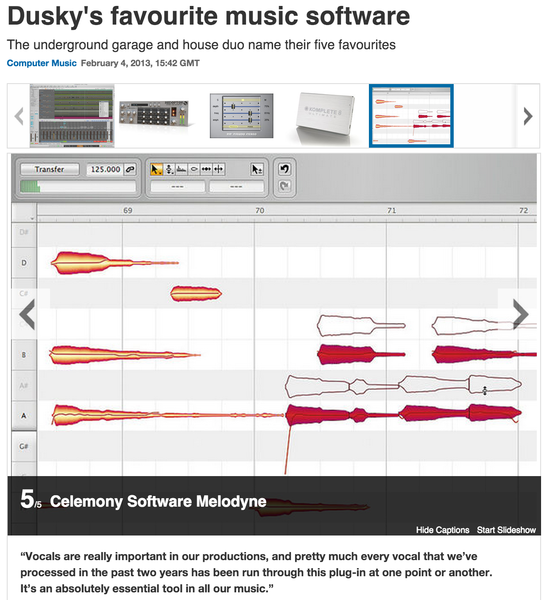
Dusky's take on Melodyne, which is one of their top pieces of software in the studio:
"Vocals are really important in our productions, and pretty much every vocal that we’ve processed in the past two years has been run through this plug-in at one point or another. It’s an absolutely essential tool in all our music."
Originally sourced here.



In this interview, Jack Patterson says "Oh, and melodyne on absolutely everything!!".

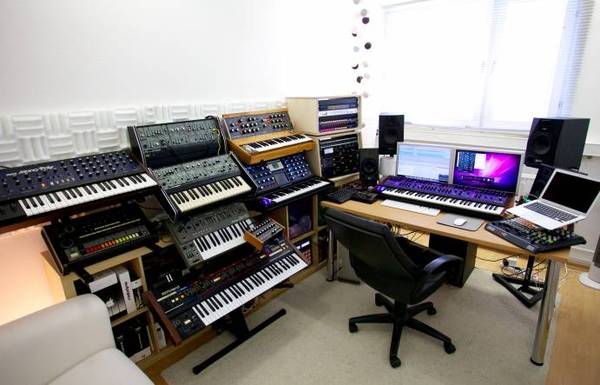
In a photo from Attackmagazine, Gregor Tresher's studio features the Celemony Melodyne Editor 2, a pitch-shifting plugin.


(@12:45) "I have Auto-Tune Pro, Melodyne and a couple other pitch correction plug-ins"


SOFTWARE: Sony ACID Pro, OpenMPT / ModPlug Tracker, GoldWave, Har-Bal, Celemony Melodyne, AnalogX SayIt, E-Phonic Retro Delay, SonicCharge Permut8, SonicCharge Bitspeek, Native Instruments Guitar Rig 4, Kjaerhus Audio Classic Suite, Ichiro Toda's Synth1, AudioRealism Bassline 2, SonicCharge Synplant, Arturia V Collection, KORG Legacy Collection, Illformed Glitch 2, Antares Harmony Engine


In the description of the video, AVINOID lists Melodyne under "Programs used".


Album Usage
The Celemony Melodyne Editor 2 has been featured on the following albums:




Genre Usage
Based on how artists on Equipboard use this gear, it is most commonly found in the following genres.
Used With
Based on how musicians on Equipboard use Celemony Melodyne Editor 2, it is most commonly used with the following gear.






Similar
Add recommendation1 alternative for Celemony Melodyne Editor 2, curated by the Equipboard community.

$99.00 - $102.00
More Celemony Pitch Shifter Plugins

$594.00 - $699.00
in Pitch Shifter Plugins Rank


$191.00 - $249.99
in Pitch Shifter Plugins Rank


$194.99 - $249.99
in Pitch Shifter Plugins Rank

$45.00 - $99.00
in Pitch Shifter Plugins Rank


$149.00
in Pitch Shifter Plugins Rank


$63.00 - $349.00
in Pitch Shifter Plugins Rank


$6.00
in Pitch Shifter Plugins Rank

$75.00 - $149.00
in Pitch Shifter Plugins Rank


$777.00 - $799.00
in Pitch Shifter Plugins Rank


$21.99 - $49.00
in Pitch Shifter Plugins Rank

$43.00 - $49.00
in Pitch Shifter Plugins Rank


$99.99
in Pitch Shifter Plugins Rank

$49.00 - $279.00
in Pitch Shifter Plugins Rank

$39.00 - $49.00
in Pitch Shifter Plugins Rank

$29.00
in Pitch Shifter Plugins Rank

$36.00
in Pitch Shifter Plugins Rank

$29.00 - $75.00
in Pitch Shifter Plugins Rank

$29.00 - $99.00
in Pitch Shifter Plugins Rank


$269.00 - $279.00
in Pitch Shifter Plugins Rank

$39.99
in Pitch Shifter Plugins Rank


in Pitch Shifter Plugins Rank


in Pitch Shifter Plugins Rank


$39.99
in Pitch Shifter Plugins Rank


$49.00 - $3,421.95
in Pitch Shifter Plugins Rank

$175.00 - $185.00
in Pitch Shifter Plugins Rank


$39.00
in Pitch Shifter Plugins Rank

$359.00 - $369.00
in Pitch Shifter Plugins Rank

$139.00 - $149.00
in Pitch Shifter Plugins Rank


$15.00
in Pitch Shifter Plugins Rank


$499.00
in Pitch Shifter Plugins Rank
.jpg?v=1783346559)

$29.00 - $30.00
in Pitch Shifter Plugins Rank


$388.00 - $399.00
in Pitch Shifter Plugins Rank


$54.00 - $55.00
in Pitch Shifter Plugins Rank

$144.00
in Pitch Shifter Plugins Rank
Community setups


Most Popular Pitch Shifter Plugins
Most Popular Brands
-
Added to Equipboard on by
 equipboard
Gear IQ 4934
-

