


Pricing and availability
We compare 600+ stores and found this item at 5 stores. Prices updated .
Store
Reviews
Price


Price History
Based on price data from 4 merchants for "Celemony Melodyne 5 Studio". Prices shown reflect NEW condition. Tracking began Apr 2, 2026.
* Product prices and availability are updated by Equipboard every 24hrs and are subject to change. Equipboard may receive compensation for purchases made at participating retailers linked on this site. This compensation does not affect what products or prices are displayed, or the order of prices listed. For more information, please refer to our affiliate disclosure.
Description
Unleash your creative potential with Celemony Melodyne 5 Studio, the ultimate pitch and timing correction software. Whether you're refining a solo vocal or orchestrating a symphony of harmonies, Melodyne 5 Studio equips you with precision tools to shape your audio with unparalleled finesse. Its Direct Note Access (DNA) technology grants you the power to manipulate individual notes within polyphonic audio, making it an indispensable tool for musicians and producers striving for perfection.
Dive into the world of seamless audio editing with Melodyne's intuitive interface, designed to cater to both seasoned pros and newcomers. The software's Melodic and Percussive Pitched algorithms ensure that each note maintains its natural character while offering the flexibility for more adventurous manipulations. With the Sibilant Tool, adjust vocal clarity per note, preserving your track's authenticity. And with ARA compatibility, integrating Melodyne into your DAW is not only smooth but transformative, providing a workflow that adapts to your creative process.
Explore new musical landscapes with features like the Chord Track and Chord Grid, which allow for real-time chord adaptation, and the Fade Tool, enabling dynamic fades even in the most complex polyphonic recordings. Whether you're enhancing a single track or orchestrating a grand ensemble, Melodyne 5 Studio provides the tools to bring your musical vision to life.
Key Features:
- Complete polyphonic tuning via Direct Note Access (DNA)
- Melodic algorithm for separate pitched/noise-like component editing
- Sibilant Tool for per-note vocal sound adjustment
- Multitrack Note Editing for simultaneous multi-track work
- Chord Track and Grid for harmonic alignment
- ARA interface for seamless DAW integration
- Works standalone or as a plugin in your DAW
Product specs
| Software Type | Pitch/Time Correction |
| Platform | Mac, PC |
| Upgrade/Full | Full |
| Download/Boxed | Download |
| Bit Depth | 64-bit |
| Format | AAX, VST3, AU, ARA, Standalone |
| Hardware Requirements - Mac | Intel Core 2 Duo or higher, 8GB RAM or more recommended |
| Hardware Requirements - PC | Intel Core 2 Duo / AMD Athlon 64 X2 or higher, 8GB RAM or more recommended |
| OS Requirements - Mac | macOS 10.12 or later |
| OS Requirements - PC | Windows 10 or later |
FAQs
-
What are the key features of Celemony Melodyne 5 Studio?
-
Celemony Melodyne 5 Studio offers advanced pitch and time correction, multi-track editing, and a sound editor for detailed audio manipulation. It also includes features like polyphonic note editing, audio-to-MIDI conversion, and tempo editing, making it a comprehensive tool for professional audio production.
-
Is Celemony Melodyne 5 Studio compatible with my DAW?
-
Melodyne 5 Studio is compatible with most major DAWs, supporting AAX, VST3, AU, and ARA formats. This ensures seamless integration with popular software like Pro Tools, Ableton Live, Logic Pro, and more.
-
Can I use Celemony Melodyne 5 Studio on multiple computers?
-
A standard Melodyne 5 Studio license allows installation on one computer. For simultaneous use on multiple workstations, additional activations must be purchased to convert it into a team license.
-
What are the system requirements for running Celemony Melodyne 5 Studio?
-
For Mac, you'll need an Intel Core 2 Duo or higher with macOS 10.12 or later. For PC, an Intel Core 2 Duo or AMD Athlon 64 X2 with Windows 10 or later is required. Both platforms recommend 8GB RAM or more for optimal performance.
-
How does Celemony Melodyne 5 Studio's polyphonic editing work?
-
Melodyne 5 Studio allows you to edit individual notes within polyphonic audio, such as chords, enabling precise pitch, timing, and dynamic adjustments. This feature is ideal for complex audio tasks like correcting individual notes in a chord played on a piano or guitar.
Videos

PRODUCE MUSIC NOW
Melodyne Tutorial - How To Use Melodyne 5 FAST
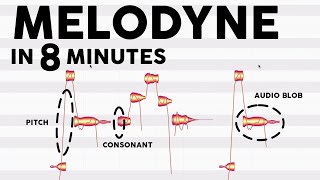
Melodyne Tutorial - How To Use Melodyne 5 FAST
PRODUCE MUSIC NOW
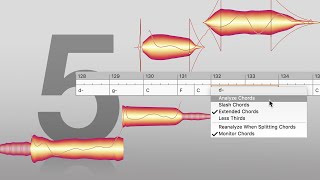
Melodyne 5: What’s new?

Celemony
Melodyne 5: The basic workflow
Celemony
Melodyne 5: The Sound Editor – reshape, recolor, redesign
Celemony
Melodyne 5: Editing multiple tracks simultaneously
Celemony
The BEST And MOST Comprehensive Beginner's Guide To Melodyne 5 - Vocals

Mr. Audio
Melodyne 5 Celemony / Как тюнить вокал?

MaximumGame
Reviews
PROS
-
Intuitive interface makes Melodyne easy to learn and use
-
Maintains sound quality even after extensive pitch corrections
-
Accurate recognition of notes and durations for precise editing
-
Versatile tools and algorithms for detailed audio manipulation
-
Capable of tuning polyphonic instruments like pianos and guitars
-
Superior vocal editing, including pitch correction and sibilant control
-
Allows MIDI mapping and tempo changes from live recordings
-
Offers comprehensive learning resources, including video tutorials
-
Exceptional for both minor corrections and extensive audio modifications
CONS
-
Learning curve due to unique Melodyne-like operation
-
Time-consuming manual tuning for complex instruments
Owner Insights
We analyzed real musician discussions from forums and Reddit to find what players love, question, and tweak about Celemony Melodyne 5 Studio.
Features and functionality
-
Melodyne 5 Studio struggles with accurately separating and adjusting individual voices in polyphonic choir stems, particularly when multiple singers perform the same note.
Source -
The Leveling Macro in Melodyne 5 automatically adjusts the dynamic range even in polyphonic recordings, enhancing quiet notes without needing separate compression.
Source
Use cases and applications
-
The software is primarily optimized for polyphonic instruments like pianos, where each note has a single dominant frequency, rather than complex vocal ensembles.
Source
User experience
-
Attempting to adjust individual singers' pitches within a choir section using Melodyne is often not feasible, as it can't isolate individual timbres effectively.
Source -
Users report that the new sibilance detection prevents pitch alteration of sibilants and breaths, allowing for precise sibilant volume control without external de-essing.
Source -
Some users find the navigation in Melodyne 5 cumbersome, with issues in zooming and scrolling, as well as inconvenient tool access and lack of keyboard shortcuts.
Source
Software and compatibility
-
For ensemble adjustments, using Melodyne's polyphonic mode may not be necessary if the goal is to uniformly shift pitch rather than isolate individual voices.
Source -
Installing Melodyne 5 can overwrite Melodyne 4; older edits may remain unchanged but new features might not apply retroactively.
Source
5.0 out of 5
Based on 2 Reviews and 41 Ratings

1874
MAGICAL
Magical
Alien Tech
We always DREAMED of being able to do all these things with Audio esp in POST
But to be able to construct MIDI Maps & Keys & Tempo Changes from LIVE Raw Acoustic MultiTimbral Recordings Intelligently - Out of this WORLD!
Version: Celemony Melodyne 4 Studio
143
Artist usage
Add artist

In a livestream titled "4.5.20 - Quick CoronaJam!" on YouTube, Mike Shinoda uses Celemony Melodyne 5 Studio, showcasing its capabilities during his session.


At 14:32 in this video from Future Music Magazine, Andrew Taggart of The Chainsmokers talks about using Melodyne for a small portion of the vocals in their track "Roses".


in the video link just after 4:20 he uses the program Melodyne to edit his friends voice. its pretty obvious because it has a unique and instantly recognisable interface. most likely uses studio because can do more than editor which he would need considering how much he's into music and probably studio 4 because it was in 2019 and studio 5 wasnt out yet.


Did you use Melodyne on these projects? In which songs, in which particular moment? Sure, used it mostly on vocal tracks of Rang de Basanti, in aim of creating fresh harmonies, reducing quivers, pitch correction etc.
How did Melodyne change the way you work with audio files? Well, we have been using Melodyne for most of the vocal corrections, but I also like fooling around with it, making harmonies and things like that. I think Melodyne is an ideal and very transparent solution for this. We also tried to make percussion sound bigger with it, using transpose and stacking functions.

In this YouTube video Tristam mentions at 00:23:43 that he had bought "Melodyne".
I bought "Melodyne", definitely, for vocals.


In an interview about Dua Lipa's vocal chain, audio engineer Ivan Meshcheriakov confirms the use of the Melodyne 5 software.


According to the official gear list on Darude's Website (Click on the studio tab), it says he owns a license for Melodyne.


8:30 Into the video. He clearly uses Melodyne 4 for editing the backing vocals.


At 1:16:59, Insan3lik3 opens up a list of his plugins. Melodyne 4 is visible.

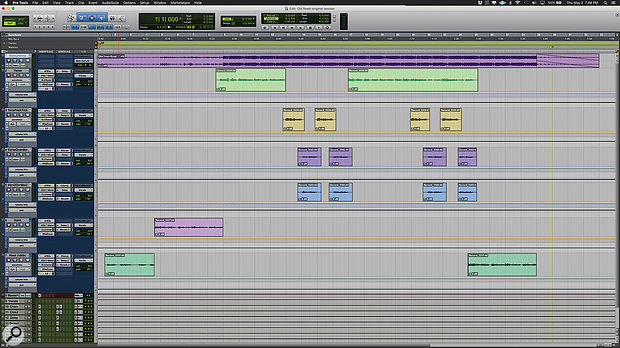
Used sparsely for Ray's vocals on "Old Town Road (Remix)", as stated by mix engineer Andrew "VoxGod" Bolooki in this August 2019 Sound on Sound interview.
"I comp with only a click track, and sometimes I'll put a low-pass filter on the beat, playing at very low volume, so you only hear the bass in the background. I'll have very little or no Auto‑Tune on the vocals, because it's easier to comp without Auto‑Tune, and zero effects. The vocal will be entirely dry, apart from that I'll add a ton of compression, to bring up all the room and microphone noises. When you comp with the high end only coming from the vocals, you select takes not only on performance, but also on tone, particularly if they're bright. The brighter ones tend to have the best emotion, too. They may not be in time or in tune, but those things are fixable. I'll also do a lot of clip gaining when comping. When you comp in this way, by the time you're done, it's perfect. If you make the vocal sound good with just a click track, you know you have nailed it. Very little EQ is necessary, and then all you have to do is add some tasteful effects, and your vocal rides, as well as tuning and timing. But you don't have to cover up any of what you did."
(...) "Also, the Melodyne plug-in is greyed out, because I printed it." (...) Bolooki explains that he makes frequent use of Celemony's Melodyne as well as Antares' Auto‑Tune. "I usually use both. My process depends on the song. For this song, I actually didn't use Auto‑Tune on Billy's verse at all. I am really proud of how hard he worked in the booth and how little tuning was needed. The Auto‑Tunes I used on some of his chorus tracks are extremely subtle and purposely on slow, automated retune speeds along with automated bypasses so they only kick in exactly when needed with the least amount of correction possible. There was really no stone left unturned when it came to his comps. I spent a ridiculous amount of time tediously combing through all of his takes down to the syllable, so little to no Auto‑Tune was necessary in the end.
"I used Melodyne to keep the timing of his doubled parts together, since they were all recorded separately. I always have Melodyne as the first insert, then basic EQ, de-essing, compression, and then Auto‑Tune if needed. I don't use the stand-alone version of Melodyne anymore, because I like to have Melodyne and Auto‑Tune running into each other at the same time. When I have Auto‑Tune after Melodyne, I tend to not over-tune things, because for me Melodyne is basically just a timing tool. Pitch-wise you have more flexibility with Melodyne than Auto‑Tune, but each has their own strengths. Also, Melodyne purposely does not make things perfect, which I like. When you stack vocals and use Melodyne for adjustments, even corrected vocals will stay somewhat naturally out of tune with each other. So instead I focus mostly on timing in Melodyne, and keep Auto‑Tune on after it, set to a slow retune speed, and I use the Flex-Tune knob quite a bit to allow a lot of humanising."
Album Usage
The Celemony Melodyne 5 Studio has been featured on the following albums:


Genre Usage
Based on how artists on Equipboard use this gear, it is most commonly found in the following genres.
Used With
Based on how musicians on Equipboard use Celemony Melodyne 5 Studio, it is most commonly used with the following gear.


-s.webp?v=1784331781)


Similar
Add recommendation2 alternative and related items for Celemony Melodyne 5 Studio, curated by the Equipboard community.

$189.00 - $249.99
Some less features (https://www.celemony.com/en/melodyne/melodyne-5-editions)

$99.00 - $101.00
More Celemony Pitch Shifter Plugins
$189.00 - $249.99
in Pitch Shifter Plugins Rank


$194.99 - $249.99
in Pitch Shifter Plugins Rank

$45.00 - $99.00
in Pitch Shifter Plugins Rank


in Pitch Shifter Plugins Rank


$149.00
in Pitch Shifter Plugins Rank


$139.00 - $349.00
in Pitch Shifter Plugins Rank


$90.00 - $149.00
in Pitch Shifter Plugins Rank


$15.00
in Pitch Shifter Plugins Rank


$21.99 - $49.00
in Pitch Shifter Plugins Rank


$39.00
in Pitch Shifter Plugins Rank

$49.00
in Pitch Shifter Plugins Rank

$29.99 - $50.00
in Pitch Shifter Plugins Rank


$149.00
in Pitch Shifter Plugins Rank


$15.00 - $20.00
in Pitch Shifter Plugins Rank

$29.50
in Pitch Shifter Plugins Rank

$758.00 - $799.00
in Pitch Shifter Plugins Rank


$122.50 - $185.00
in Pitch Shifter Plugins Rank


$143.00 - $158.00
in Pitch Shifter Plugins Rank


$43.00 - $49.00
in Pitch Shifter Plugins Rank


$99.99
in Pitch Shifter Plugins Rank

$49.00 - $279.00
in Pitch Shifter Plugins Rank

$29.00
in Pitch Shifter Plugins Rank

$39.00 - $49.00
in Pitch Shifter Plugins Rank

$55.00
in Pitch Shifter Plugins Rank

$29.00 - $39.00
in Pitch Shifter Plugins Rank

$29.00 - $99.00
in Pitch Shifter Plugins Rank


$269.00 - $279.00
in Pitch Shifter Plugins Rank

$39.99
in Pitch Shifter Plugins Rank


in Pitch Shifter Plugins Rank


in Pitch Shifter Plugins Rank


$39.99
in Pitch Shifter Plugins Rank


$49.00 - $3,421.95
in Pitch Shifter Plugins Rank

$19.00 - $39.00
in Pitch Shifter Plugins Rank

$359.00 - $369.00
in Pitch Shifter Plugins Rank

$499.00
in Pitch Shifter Plugins Rank
.jpg?v=1784733415)


$383.00 - $399.00
in Pitch Shifter Plugins Rank

Accessories & Related Items


Community setups


Gear Guides









Most Popular Pitch Shifter Plugins
Most Popular Brands
-
Added to Equipboard on by
 trakatiks
GearIQ 424
-


