

Pricing and availability
We compare 600+ stores and found this item at 3 stores. Prices updated .
Store
Reviews
Price




Price History
Based on price data from 1 merchant for "Logitech MX Ergo Plus Wireless Trackball". Prices shown reflect NEW condition. Tracking began Apr 2, 2026.
* Product prices and availability are updated by Equipboard every 24hrs and are subject to change. Equipboard may receive compensation for purchases made at participating retailers linked on this site. This compensation does not affect what products or prices are displayed, or the order of prices listed. For more information, please refer to our affiliate disclosure.
Description
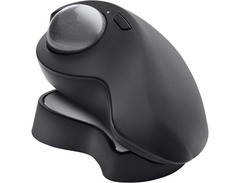
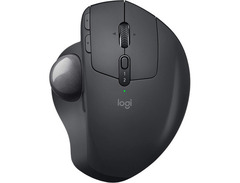
In the world of music production and digital creation, the Logitech MX Ergo Plus Wireless Trackball stands as a beacon of ergonomic innovation and precision. Crafted with the modern creative in mind, this trackball mouse offers a unique blend of comfort and control, making it an essential tool for musicians, producers, and designers alike. The sculpted shape fits naturally into your hand, offering a choice of a 0- or 20-degree tilt angle to align with your natural arm posture, significantly reducing muscle fatigue by up to 20% compared to a traditional mouse.
Not just a marvel of physical design, the MX Ergo Plus also boasts advanced functionality. It allows seamless switching between speed and precision tracking modes, perfect for those moments when you need pinpoint accuracy or swift navigation. With its Flow-enabled technology, you can effortlessly juggle tasks across two computers, streamlining your workflow like never before. Whether you’re mixing tracks at your home studio or sketching designs at a café, this trackball is your trusted companion, ensuring up to four months of use on a single charge.
Join the community of musicians and creatives who demand the best from their tools, and let the MX Ergo Plus empower your creative journey with its thoughtful design and unparalleled flexibility.
Key Features:
- Wireless trackball mouse for enhanced workflow
- Thumb control for instant switching between speed and precision modes
- Adjustable 0° or 20° angle for comfortable wrist and forearm positioning
- Flow-enabled functionality for seamless multi-computer use
- 8 customizable buttons for maximum control
- Rechargeable battery lasting up to 4 months
- Compatible with Windows and Mac systems
Product specs
| Type | Wireless Trackball Mouse |
| Compatibility | Windows 10/11, macOS 10.15 or later, ChromeOS, Linux |
| Computer Connectivity | Bluetooth, USB Reciever (included) |
| Power Source | Built-in Li-Po Battery, 500mAh |
| Dimensions | 5.22" x 3.93" x 2.02" |


Reviews
PROS
-
Adjustable tilt to 10, 20, or 30 degrees for personalized comfort
-
Precision mode for accurate cursor control in design programs
-
Programmable keys offer customizable functionality
-
Significantly reduces wrist and hand pain
-
Easy learning curve for trackball newcomers
-
Bluetooth connectivity leaves USB ports open
-
Simultaneous use with multiple devices via easy switch button
-
Adjustable trackball speed for tailored responsiveness
-
Wireless use during charging with standard micro USB
-
Heavier build reduces unintended movement
CONS
-
Right-click malfunction reported, requiring replacement
-
Lacks forward and backward tilt for varied desk setups
-
Riser can be slick, requiring a mouse pad for stability
-
Higher clearance may necessitate hand adjustment
-
Requires Logitech app for settings modification
Owner Insights
We analyzed real musician discussions from forums and Reddit to find what players love, question, and tweak about Logitech MX Ergo Plus Wireless Trackball.
Features and functionality
-
The MX Ergo Plus includes a rubber wedge for additional tilt, allowing closer to vertical hand positioning for improved ergonomics.
Source -
The MX Ergo S supports connection to only two devices, unlike some competitors that offer connections to three devices.
Source -
The MX Ergo is exclusively a trackball and cannot operate like a traditional mouse, requiring users to switch devices for certain activities like gaming.
Source
User experience
-
Owners with smaller hands find the MX Ergo Plus slightly large but still comfortable, though wrist pain can occur with extended use.
Source
Build quality
-
Some users experience recurring scroll wheel issues similar to those found in earlier M570 models.
Source -
Some users describe the scroll wheel and ball as feeling "woodier" and slightly louder, potentially due to differences in casing materials.
Source -
Users report rapid wear on left click-buttons due to inferior internal switches, necessitating potential replacements for durability.
Source
Comparisons
-
The M575 is larger than the M570 but smaller than the MX Ergo, offering a middle ground in size.
Source
Mods and upgrades
-
A Perixx ball replacement for the M575 can significantly improve trackball smoothness.
Source -
Owners have successfully converted older MX Ergo models to USB-C and replaced switches with Omron 20m, noting quieter operation post-modification.
Source -
Some owners replace original switches with higher-quality versions to resolve rapid wear issues and improve longevity.
Source
Value and pricing
-
There's no advantage to purchasing the MX Ergo Plus directly from Logitech; alternative retailers may offer better deals.
Source
Setup and maintenance
-
Users recommend "breaking in" the trackball with heavy rolling to reduce initial stiction and improve smoothness.
Source
Use cases and applications
-
Some users report that the hand positioning on the MX Ergo S can lead to soreness, especially when used at an angle, possibly due to the slipperiness of the new surface material.
Source -
Initial thumb strain is common with first-time trackball users, but many find it alleviates wrist pain over prolonged use.
Source
Based on 0 Reviews and 0 Ratings
Popular Music Gear

$149.99 - $179.99
in Computers & Peripherals Rank

$118.73 - $119.99
in Computers & Peripherals Rank


$32.99 - $189.95
in Computers & Peripherals Rank


$69.99
in Speakers & Accessories Rank


$99.99 - $119.99
in Computers & Peripherals Rank


$24.99 - $29.99
in Computers & Peripherals Rank


$99.99 - $179.99
in Computers & Peripherals Rank


$119.99 - $129.99
in Computers & Peripherals Rank

$99.99 - $119.99
in Portable Recorders Rank


$15.99 - $18.99
in Computers & Peripherals Rank


$63.99 - $69.99
in Portable Recorders Rank


$75.00 - $129.99
in Portable Recorders Rank


$206.70 - $244.00
in Computers & Peripherals Rank


$84.99 - $169.99
in Portable Recorders Rank
.jpg?v=1784890832)

$157.00 - $179.99
in Computers & Peripherals Rank


$34.99 - $69.99
in Computers & Peripherals Rank


$119.99 - $129.99
in Computers & Peripherals Rank

$54.99
in Computers & Peripherals Rank


$90.00
in Speakers & Accessories Rank

$44.90 - $59.99


$34.99
in Speakers & Accessories Rank


$49.99 - $95.95
in Portable Recorders Rank


$74.99
in Speakers & Accessories Rank

Accessories & Related Items


Artist usage


Community setups


Similar


Most Popular Brands
-
Added to Equipboard on by
 equipboard
GearIQ 4934
-



