

Pricing and availability
We compare 600+ stores and found this item at 1 store. Prices updated .




* Product prices and availability are updated by Equipboard every 24hrs and are subject to change. Equipboard may receive compensation for purchases made at participating retailers linked on this site. This compensation does not affect what products or prices are displayed, or the order of prices listed. For more information, please refer to our affiliate disclosure.
Description
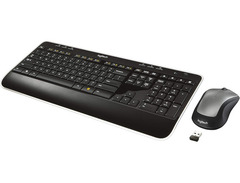
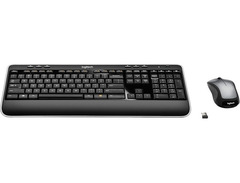
The Logitech K520 Wireless Keyboard is an ideal companion for musicians who blend digital precision with their creative workflow. Whether you're composing the next big hit or simply managing your music archives, this keyboard offers seamless integration with your setup. It connects effortlessly to your computer, allowing for a clutter-free workspace and giving you the freedom to move around without tangled wires weighing you down.
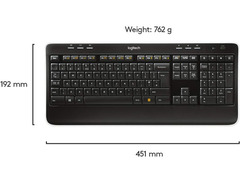
Designed with the modern musician in mind, the K520 features whisper-quiet keys that allow you to maintain focus on your music without distracting clicks and clacks. The keyboard's layout includes a full-size number pad and dedicated media controls, making it easy to manage your playlists and audio settings right at your fingertips.
Experience the convenience of extended battery life, ensuring that your creative impulses are never interrupted by constant recharging. The wireless range supports flexibility, giving you the freedom to control your setup from afar, whether you're across the room or right at your desk.
Key Features:
- Wireless connection for clutter-free setup
- Whisper-quiet keys enhance focus and minimize distractions
- Full-size layout with dedicated media controls
- Long-lasting battery life for uninterrupted use
- Compatible with multiple operating systems
- Easy USB receiver, no additional software needed
- Ergonomic design for comfortable extended use


Reviews
Owner Insights
We analyzed real musician discussions from forums and Reddit to find what players love, question, and tweak about Logitech K520 Wireless Keyboard.
Features and functionality
Software and compatibility
User experience
-
Contacting Logitech support with the keyboard's serial number may result in a free replacement dongle if you've lost yours.
Source -
Disconnecting the newer MX vertical mouse resolves input issues, suggesting possible interference or compatibility problems between the mouse and older K520 keyboard.
Source
Use cases and applications
-
The K520 may experience input delays during extended gaming sessions, particularly after 10-20 minutes of play, indicating possible limitations for gaming use.
Source
5.0 out of 5
Based on 1 Review and 2 Ratings

More Logitech Computers & Peripherals

$149.99 - $179.99
in Computers & Peripherals Rank

$118.15 - $119.99
in Computers & Peripherals Rank


$32.99 - $189.95
in Computers & Peripherals Rank


$78.90 - $119.99
in Computers & Peripherals Rank


$99.99 - $127.91
in Computers & Peripherals Rank


$23.99 - $24.99
in Computers & Peripherals Rank


$119.99 - $129.99
in Computers & Peripherals Rank

$13.99 - $18.99
in Computers & Peripherals Rank


$206.70 - $239.99
in Computers & Peripherals Rank


$157.00 - $159.99
in Computers & Peripherals Rank


$34.99 - $69.99
in Computers & Peripherals Rank


$26.99 - $40.99
in Computers & Peripherals Rank


$119.99 - $129.99
in Computers & Peripherals Rank


$44.90 - $59.99


$69.99 - $89.90


$59.99 - $64.99


Artist usage


Community setups


Similar


Gear Guides









Most Popular Computers & Peripherals
Most Popular Brands
-
Added to Equipboard on by
 jamesbutcher
GearIQ 307
-

