



Pricing and availability
We compare 600+ stores and found this item at 3 stores. Prices updated .
Store
Reviews
Price




Price History
Based on price data from 2 merchants for "Logitech MX Master 4 Wireless Mouse (Black)". Prices shown reflect NEW condition. Tracking began Apr 2, 2026.
* Product prices and availability are updated by Equipboard every 24hrs and are subject to change. Equipboard may receive compensation for purchases made at participating retailers linked on this site. This compensation does not affect what products or prices are displayed, or the order of prices listed. For more information, please refer to our affiliate disclosure.
Description
Unleash your creative flow with the Logitech MX Master 4 Wireless Mouse, a game-changer for musicians and producers who crave precision and efficiency. Designed with an 8000 DPI Darkfield optical sensor, this advanced mouse delivers exceptional tracking on any surface, including glass, ensuring your cursor lands exactly where you need it. Whether you're navigating through complex DAW projects or fine-tuning your audio mix, the MX Master 4's ergonomic silhouette and intuitive controls provide the comfort and accessibility needed for those marathon sessions in the studio.
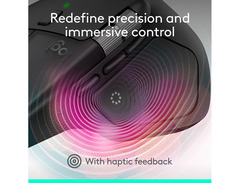
Experience the power of customization with Logi Options+ software, allowing you to configure the MX Master 4's eight buttons to streamline your workflow. The MagSpeed scroll wheel offers lightning-fast scrolling up to 1000 lines per second, perfect for sifting through expansive music libraries or detailed sheet music. Haptic feedback enriches your interaction, providing tactile cues for key actions and shortcuts.
Switch effortlessly between up to three devices using the Actions Ring, minimizing interruptions and keeping your creative momentum intact. Connectivity is a breeze with the Logi Bolt USB-C receiver, offering robust and secure wireless performance across Windows, macOS, and more. The sustainable design, featuring recycled materials, aligns with eco-conscious values, making this mouse as responsible as it is revolutionary.
Key Features:
- 8000 DPI Darkfield optical sensor for precise tracking on any surface
- Eight customizable buttons for tailored workflows
- MagSpeed scroll wheel for fast, precise navigation
- Haptic feedback for tactile action confirmation
- Switch between three devices with Actions Ring
- Compatible with Logi Options+ for advanced customization
- Sustainable design with recycled materials
Videos

ShortCircuit
The new standard office mouse - Logitech MX Master 4

The new standard office mouse - Logitech MX Master 4
ShortCircuit

I've Waited 3 Years for This Mouse - Logitech MX Master 4

Switch and Click
Logitech MX Master 4 vs MX 3S – Should You ACTUALLY Upgrade?

Dem Crumblies Tech
2025 Best Mouse for Productivity - Logitech MX Master 4 Unboxing

Daniel Sin

The Logitech MX Master 4 is a mouse you can buy.

Marc Taraz Steiner

MX Master 4 - BEST Mouse for Mac?!🖱️

Kevin Thai
MX Master 4 Review — The Upgrade That Actually Matters

Plaen Co.
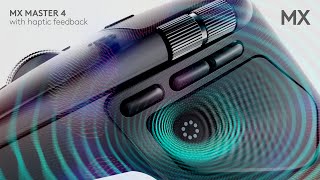
MX Master 4 with haptic feedback. Designed for Sustainability

Logitech

Watch Before Buying - Logitech MX Master 4 First Impressions

Matthew Manuel Reviews
Reviews
PROS
-
Durable materials ensure longevity even after accidental drops
-
Ergonomic design provides comfort during extended use
-
Unlimited button customization through Logi software enhances productivity
-
Second scroll wheel aids in precision tasks in Photoshop and Lightroom
-
Exceptional battery life reduces frequent charging interruptions
-
Can charge while in use due to front USB port placement
-
Quiet clicking adds to a peaceful work environment
-
Offers haptic feedback and customizable scroller click options
-
Sleek, aesthetically pleasing design
CONS
-
Heavier than other mice, which may affect ergonomic grip initially
-
Left side large bottom button is hard to use and often accidentally pressed
-
High sensitivity of side thumb area leads to accidental activations
-
Higher price point compared to some alternatives
-
USB-C cable not included in the package
Critic Reviews
Based on 0 Reviews and 0 Ratings
Artist usage
Add artist

Genre Usage
Based on how artists on Equipboard use this gear, it is most commonly found in the following genres.
Used With
Based on how musicians on Equipboard use Logitech MX Master 4 Wireless Mouse (Black), it is most commonly used with the following gear.


More Logitech Computers & Peripherals

$149.99 - $179.99
in Computers & Peripherals Rank

$32.99 - $189.95
in Computers & Peripherals Rank


$99.99 - $119.99
in Computers & Peripherals Rank


$24.99 - $29.99
in Computers & Peripherals Rank


$99.99 - $127.91
in Computers & Peripherals Rank


$119.99 - $129.99
in Computers & Peripherals Rank

$13.99 - $18.99
in Computers & Peripherals Rank


$206.70 - $244.00
in Computers & Peripherals Rank


$157.00 - $179.99
in Computers & Peripherals Rank


$34.99 - $69.99
in Computers & Peripherals Rank


$119.99 - $129.99
in Computers & Peripherals Rank

$54.99
in Computers & Peripherals Rank


$44.90 - $59.99


$69.99 - $89.90


$59.99 - $64.99


Accessories & Related Items


Community setups


Similar


Gear Guides







.jpg)
Most Popular Computers & Peripherals
Most Popular Brands
-
Added to Equipboard on by
 s_jino
GearIQ 33729
-



