
spaker's Reviews
43 reviews Back to spaker's Equipboard
-s.webp?v=1785250706)

462
Maybe the best Reverb Stomper
BlueSky is an unbelievable reverb pedal. It’s probably the best sounding and most versatile reverb pedal that I’ve used. The pedal is a stereo one so it has two ¼” connections for both input and output and is powered by a nine volt power supply. It’s not rackable at all since it’s a stomp box.
The sound of the BlueSky is some of the smoothest reverb I’ve heard come out of any device. It’s stunning how accurate it sounds and what’s more is its amazing versatility between the three reverb types and modes. It has a depth to it that I haven’t heard in any pedals before and only seems to be present in the real deal in things like true plate and spring reverbs.
The setup of this pedal is extremely easy, as is getting a good sound out of it. It has five knobs - one for to choose the type of reverb, one for tone, one for time, one for decay, and one of mix. These controls are basic and manipulating it is easy. Types of reverb include hall, chamber, gate, spring, and plate.
The BlueSky is the best sounding reverb unit I’ve used. It isn't cheap for a pedal but you pay for the best in ultimate control, fidelity, and versatility in reverb sound. It’s a pro’s pedal but that doesn’t mean us in the great unwashed masses can’t at least try it an pretend we are one of those "special people."
462
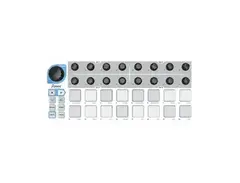
Easy to use 16 Step Sequencer
I have found many sequencers try too hard to be all things to all people. The Beatstep is a 16 step sequencer with all the basic necessary tools, no more and nothing missing either. It is well built- to last, has a great feel for manipulating the sequences while it is running: hitting the large rubber buttons feels like playing music. Beatstep takes about three minutes to learn, and is fun to use. It has MIDI, Gate and CV trigger 3.5mm jacks on the side (the MIDI 5 pin adapter comes with the Beatstep). It can store 16 patterns, run at 4 speeds (1/4, 1/8, 1/16 & 1/32) and has fine tuning to speed up or slow down with the big knob you see on the upper left of the unit. It has "Play" & "Stop" controls as well as a button for running sequences or in the stop mode, you can just trigger individual steps by hitting one of the corresponding 16 step buttons. The Beatstep can run sequence forward, backward, alternate forward to the last step and reverse back to the first and repeat, or can randomize playing steps. Beatstep can play in Chromatic, Major, Minor, Dorian, Mixolydian, Harm Minor, Blues or User defined modes. Each of the 16 small (8 over 8) knobs corresponds to each of the 16 (8 over 8) button steps below and can adjust tone for the corresponding step. Beatstep is really intuitive once you start messing around with it. Reading this review I'm typing now makes the Beatstep seem a lot more complicated than it is. You can pick it up, press play and understand that the moving lights across the buttons can be turned on or off to either make noise or not when the light reaches pad. I've used the Beatstep to sequence everything I can find with a Gate or CV trigger or MIDI input. Korg Volca units, Microbute, Moog Minitaur & Mother 32, Dave Smith Desktop Mopho, Rucci Handmade Instruments, Atari Punk Consoles and other 8 bit synths, Roland System-1m, Wave Signal Generators, MeeBlip, Arduino Synths, VST Synths... anything that makes a noise with MIDI, Gate or CV triggers. It's a perfect sequencer for anyone who wants "just a sequencer" and not a bunch of bells and whistles. And at $100- the price is low, if not perfect.
462
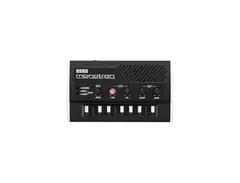
Size of a deck of cards real analog synth
Korg circuitry VCF, LFO, and VCO. Totally portable with internal speaker and battery power. It even has an input in case you'd like to apply another audio signal to those Korg circuitry Oscillators and Filter. Ribbon keyboard makes for cool sounding "slide while knob twisting" noises. I gave one of these to a young cousin who saw me playing with one. That was three years ago, before he had ever heard of a synth of any kind. He just filled his second modular rack last month and is trying to decide on either a third or one large rack to incorporate his dozens of synth modules. Everyone starts someplace.

41049
I got a duo for my kid but I use it too, mostly as a guitar effect of just a general effect to treat another synth like a DX7 or the fake Rhodes samples in my P88. Kids love these little fuckers. some how when I let my son play with my big synths he makes patches that sound like the monotron.
462
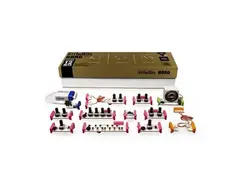
Tons of fun... with real Korg electronics
It's not a toy... but it' not studio gear either. It is a lot of fun though. My son loves it and I love making sounds with him using the kit. And how else wold a six year old know what an Oscillator does, or a sequencer, a filter or envelope controls?
41049
hahaha.... I dunno, I have my 3 year old trained to program a midi-moog with a little help and in his first year of piano lessons.... but he still gets a little mixed up about the oscillator versus filter and the envelopes baffle him
-s.webp?v=1785250675)
462
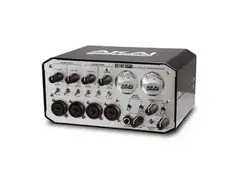
Great Interface with onboard USB hub and 5 pin MIDI DIN I/O
Akai EIE Pro is a great all aound companion for using a DAW and few or no external instruments, as it only has four mono in/out audio cnnections. It does, however have a four port USB hub and 5 pin MIDI DIN sockets. Some users run into issues after certain Windows updates with the EIE mysteriously halting any use and seeming dead. THIS IS NOT THE CASE. If this happens to you, REINSTALL the EIE Pro rivers from the original CD that came with the interface.Uninstall the EIE Pro driver that is not working first, then reinstall the original driver from CD. Many forums for this product are stumped and people pull their hair out over this- so hopefully Windows will fix this problem, if they have not by the time you read this. Send me a message or email if you do not have your install CD and I will send you a link to download an exact image of the install CD (you can no longer download the original drivers from AKAI, only updated ones) and you can either burn your own CD or extract the files from the download image to your hard drive and proceed. I have helped countless people ready to throw their EIE Pro against the wall with this issue and it works. Oh- yeah, the EIE Pro looks really cool with its lit up needle motion VU meters behind glass, chrome exterior and overall classic / classy look. And it sounds exactly as it should: perfect.
462
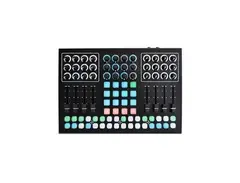
Richie Hawtin designed, Livid Fabricated "Do It All" MIDI Controller
This is my main controller. The more I learn about programming within Ableton and Max for Live, the more powerful this controller becomes. I mainly use the 32 step sequencing abilities of the two bottom rows of 16 buttons, and use the 8 faders, topped with three knobs over each fader performing within Ableton's clip-launch mode. The center section I tend to use for clip launching loops over the sequencing, unless I am using it for a drum rack. The 16 push encoders located top-center are invaluable when utilizing effect chains, automation, VST and effect manipulation... and in truth, none of this should be taken as permanent. I constantly change the functions of a lot of the controller because it is so versatile. I haven't delved past the very beginnings of what the CNTRL:R can do WITHOUT a PC. I've used it with my Dave Smith Mopho Desktop and a keyboard controller via straight 5 pin MIDI and was blown away for the short time I was just exploring the additional capabilities. And not that I know HOW to do this, but I know it can be a powerful Traktor controller, and for someone who knew what they were doing, this thing can even control performance LIGHTING via MIDI. It will take me years to learn and be able to confidently use all of the CNTRL:R features. For now, I love it as my Ableton centerpiece. I have added a Livid module via the available ribbon cable expansion jack. There are several models but I chose the XPC 4K2JS (4 Knob, 2 Joystick) The XPS modules are in rugged aluminum boxes and all have specialized additional controls. The "Joysticks" are especially useful in navigating around in device chains in Ableton. I have also added the Livid "Master Fader," a crossfader plugged into the CNTRL:R via 1/4" cable - into one of the two 1/4" jacks on the CNTRL:R. The other jack can be used to run a pedal- very useful for looping within Ableton while using both hands manipulating devices, effects, or other external gear. The Livid Instruments CNTRL:R continues to be my ideal Abelton MIDI controlling tool. It is a shame they have stopped production of CNTRL:R.
462
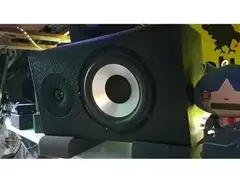
Hitmakers Reference Studio Monitors: Paul Carmody Design
These are my main studio reference monitors. I built them myself from a design by a master audiophile speaker designer. He designed these specifically to be used as reference studio monitors. Two way passive, ported cabinets using Dayton DA175 Woofers and Vifa BC25TG15 Tweeters. I power mine with a Samson Servo 200 Reference Amplifier. They are incredible and kick the crap out of anything that could be bought in a store. I will let the designer explain the technical details, direct from his website, complete with cabinet blueprints, and crossover schematics. You can make your own pair for under $300 in materials - https://sites.google.com/site/undefinition/hitmakers :
Cabinet Design
This is a simple 2-way bookshelf speaker, with an internal volume of approximately .5 cu ft. The vent is mounted on the back panel. It is 2" diameter by 6" long (the kit version uses this port, but ordinary PVC would work just as well). This tunes the box to 48 Hz, and gives an F3 around 42 Hz, with a bit of bass boost near 75 Hz. The interior of the cabinet is lined with convoluted (eggcrate) foam. I used ordinary mattress topper, cut it into pieces with scissors, and hot glued it in place on the sides, top, and back of the enclosure. Don't worry about lining the back of the baffle; and don't bother lining the bottom of the cabinet, since that's where the crossover will most likely sit. And if you can't get a hold of foam, you can get approximately the same effect with a light fill of polyfil. To clarify: the only purpose of the lining/stuffing in this vented speaker is to absorb any high-frequency stuff bouncing around inside the cabinet; it's not going to have any effect on the bass (unless you overdo it, in which case, the bass will start sounding choked or thin).
Crossover Design
Since these are relatively simple drivers to work with, I tried to keep the crossover as simple and straightforward as possible. The woofer is 2nd order electrical with capacitor C2 acting as a notch filter to remove the breakup from the aluminum cone of the woofer. The tweeter filter is a simple 2nd order electrical filter with an L-Pad. The crossover point occurs around 2000 Hz. The impedance load of this speaker would probably be labeled "8 Ohms nominal" if it were a commercial speaker. Any pro audio amp would have no problem driving these things all day.
Listening Impressions
These drivers are performing way out of their price class. When handled gracefully in a crossover, they provide a full, balanced, effortless sound. The Hitmakers have just enough detail without becoming fatiguing. Imaging is precise for such a speaker and the soundstage allows for natural placement of sounds. The bass is deeper than what you get from most nearfield studio monitors, which might come in handy for some musicians and producers. (Although if you need true "sub-bass"--that is, the 30 Hz and below stuff--you'll need an active subwoofer. This should come as no surprise.)
Let me close by saying this: I'm really glad to bring this project to the world, and for me it sort of brings things full-circle. See, in my pre-DIY days, I would use some really hacked-up speaker setups work work on and mix with. Seriously, it was shameful, and no one should ever know. So when I finally saved up and bought a good pair of nearfield studio monitors, it was a real turning point for me. I could finally hear the actual tonal balance of what I was trying to do and mix it accordingly. But I spent big bucks on those [brand name omitted]! And if there had only been a DIY option, I would have gladly jumped at it--and not just for the sake of cost savings. It was the principle of the thing. As with most home studio recorders, my whole "studio" consisted of cobbled-together gear of various quality and origin. But at the end of the day, it wasn't about the gear--it was about what it would let me do... which was to create a professional-sounding recording without having access to multi-million dollar studios. It was the ability to hear something done by a professional and be able to go home and make something that sounded just as good, then play it back, listen, and think to myself, "I did that."
This project is free to the public and you can make these yourself. If you aren't handy with woodworking, there are kits available online if you search around a bit. I coated mine with Duratex Speaker Coating, which is basically bulletproof and also available online.
462
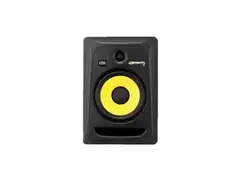
Great Studio Monitors
A proven classic used in studios worldwide as proven reference monitors. Powered 2-1ay , ported monitors with 8" kevlar reinforced woven woofers and fabric dome 1" tweeters. There is a reason these have sold millions of units and appear in studios the world over. They are near perfect reference representation of recorded sound.
462
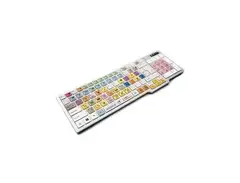
Great way to speed up workflow and keep off the mouse
One of the drawbacks of music production using a computer is FEELING like you're just using a computer. Mouse and keyboard and monitor are the tools for checking email and surfing Facebook and porn. Mouse and keyboard plus staring at a monitor certainly doesn't FEEL like playing an instrument. That said, one cannot deny the power of a great DAW and to avoid a jewel like Ableton Live. my DAW of choice, just because you don't like to look at a screen and use a mouse can certainly be overcome with the right tools. A good MIDI controller (or two or three!) plus the right VST plugins and digital keyboards, integration of drum machines, sequencers and other analog gear can make the screen, keys and mouse fade into the background very quickly. There are certain actions that are just necessary when using a computer, and certain options and actions within every DAW that are necessary evils. Saving your hard work, for example. You wouldn't want to forego that, now would you? Or zooming in or out of a grid while making some quick changes. Extending a MIDI note another quarter bar. Switching from session to arrangement view. Quantizing. 1/2, 1/4, 1/8 Quantizing. Grouping device chains. Turning on / off MIDI mapping mode. Loop selection. Saving every few minutes. All of these actions usually take your mind and eyes off of the music and to the menus and mouse. Not with the "EditorsKeys" for Ableton. A Color and Backlit USB keyboard has all of these actions along with about 40 more shortcuts ready to go at the press of a button. The keyboard also doubles as a normal USB keyboard you can type words and numbers with, though I do not use mine for that purpose, unless it is naming a file while saving something in Ableton Live. I've all but eliminiated the use of the mouse and have the keyboard strategically placed in my studio right below my main MIDI controller, sandwiched above another set of MIDI controllers. The keyboard is pricey and for sure something you do not see in the average "bedroom producer" studio. I have seen these keyboards in a lot of big, professional, for profit
462
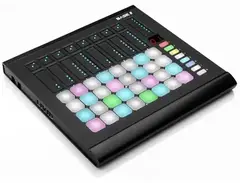
Designed to Perform, Built to Last
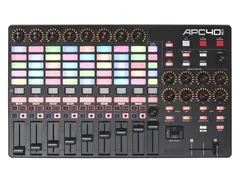
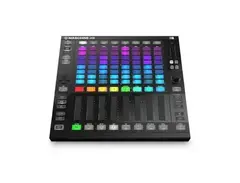
Base II puts your beats, synths, and effects under your hands, ready to tweak, play, and perform. It’s 32 pressure sensitive pads are built with a great feel for tapping out beats and delicate aftertouch for playing instruments. Nine sensitive touch sliders give you instant, responsive access to your effects. Onboard presets let you re-program the Base II on the fly and instantly re-map and update all the controls. Use the Base II Editor to make custom setting, maps, colors, and presets, no matter what software you use. Legendary Livid quality and a rugged build of aluminum makes sure your Base II works wherever you play.
462
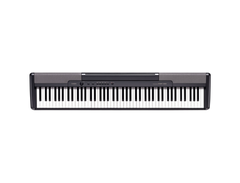
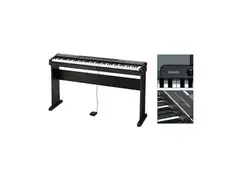
88 Key Digital Piano
Even for a non-classically trained piano player, like myself, having a full 88 key digital piano with weighted keys and simple, clean, reliable MIDI I/O controller is quite an honor. It belonged to my father, who was an amazing piano player, and who left it to me when he passed away. I will treasure it and keep it in my setup always.
462
Versitile FX Pedal perfect for sound design
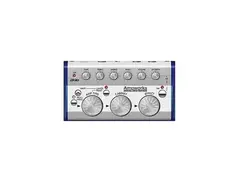
11 amp sounds 11 cab models Variety of effects 11 preset programs 2 programmable presets Knob-based interface Tap delay Headphone jack Selectable outputs Footswitch for bypass For masterful recordings and spot-on stage covers, this little unit can't be beat. At this price it's a steal. Order today. SPECIFICATIONS Ampworks Guitar Modeling Signal Processor
Amplifier types: BTQ CLN/BLK212/TWD410/AC15/AC30TB/BLUES/UK '70/UK '80/UK MDN/RECTO/FUZZ Cabinet types: 1X8TWD/112TWD/112BLK/112VOX/212BLK/212VOX/212DC/410TWD/412CLS/412VIN/412MDN Effect types: COMP/WAH/CHORUS/FLANGE/PHASER/TREM/ROTARY/DELAY/REVERB/CHO+DL/CHO+RV/NR Programs: 2 user, 1 manual, 11 preset Controls: Gain, Treble, Middle, Bass, Volume, Effect depth/Noise reduction, Tap switch Input: Guitar input (mono 1/4" jack) Output: Line/headphone dual-purpose output (stereo 1/4" jack) Power Supply: 2 AA alkaline batteries (allows approximately 10 hours of continuous use) or separately sold AC adapter (KA 191) Dimensions: 5.67"W x 1.89"H x 3.07"D
462
Perfect for a no frills Live Electronic Music Producer
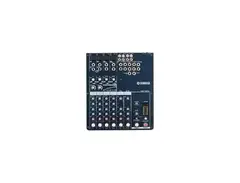
This compact mixer may not look very elaborate, but it's got a lot going on! On top of the ability to manage eight input sources (four via XLR inputs), the Yamaha MG102c fits into countless studio and live situations. Need to run a drum submix? The MG10c will do it! Running sound for a small event? No problem! But wait, there's more! The two mono mic channels are equipped with Yamaha's 1-button compressor, a flexible dynamics processor that takes the guesswork out of one of the most misused concepts in audio. You'll find a million and one uses for this great mixer, and at this price, there's no reason not to have a Yamaha MG102c!
462
Mackie ProFX12 Built In FX
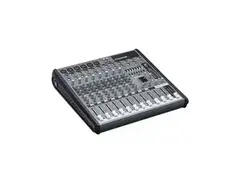
The Mackie ProFX12v2 12-channel USB mixer means you can stop sacrificing sound quality for portability at your smaller band and solo acoustic gigs. At Sweetwater we believe every gig you play can sound great, and the ProFX12v2 packs that great sound along with the features of a large format mixer into a size that makes sense. You get six of Mackie's Vita preamps for your mic, guitar, keyboard, or anything else you need for your show. After you've plugged in, tap into the powerful ReadyFX effects engine to add excitement to your mix. Show your audience you care by giving them the best sound you can with the Mackie ProFX12v2 USB mixer.
Mackie ProFX12v2 Professional Effects USB Mixer at a Glance: All the tools you need for great sound Versatility you may not have considered Gear that stands the test of time Record and stream via USB All the tools you need for great sound Like the name says, the ProFX12v2 is a professional mixer, with convenient features and sound that rival some larger format mixers. Mackie designed the Vita preamps with live sound in mind to provide the quality of sound that is lacking in some compact mixers. Each channel features its own individual 3-band EQ and 100Hz low-cut filter for shaping the sound of your inputs. The ReadyFX digital effects engine gives you access to 16 different effects including reverbs and delays - Mackie even added chorus effects for your guitar. A 7-band graphic EQ can be assigned either to your main outputs so you can fine tune the PA, or to the aux output to easily get rid of feedback in your monitors. If you perform with backing tracks, there are inputs (including USB) for your laptop or MP3 player, a headphone output with individual level control, and even phantom power for your condenser mics. With the added convenience of a hi-Z input for direct instrument input, you have no reason NOT to own a ProFX12v2.
Versatility you may not have considered Yes, the ProFX12v2 is exactly what you need for mixing when the gig calls for minimal inputs, but that's not where its usefulness ends. Since you'll be mixing from the stage, keep the ProFX12v2 right next to you, and you can use the headphone output with a set of in-ear monitors for your performance and just leave your floor monitors at home. Drummers can use it for monitoring, too - take the aux mix from the front of house board that would have gone to your wedges and plug it in to a channel on the ProFX12v2. Once your mix is set, you have complete control over sound shaping and volume without having to get the attention of the mix engineer. Keyboard players, you can use it to mix your multi-instrument rig straight into your amp onstage. Even audio-visual professionals working in conference breakout rooms and convention general sessions will find the functionality and connectivity of the ProFX12v2 an easy, great-sounding solution - when you're working in a room with a 70-volt system, the 7-band graphic EQ will come in especially handy!
Gear that stands the test of time Ever walked into a venue to set up and been pointed to an old Mackie mixer in the corner, covered in years of smoke, dust, and bar goo? Are you surprised when you plug in, fire it up, and rock your gig? You shouldn't be! Mackie has been making solid, roadworthy gear for decades, and the ProFX12v2 is no different. In fact, the gear just keeps getting better. Built like a tank? Indeed! With solid steel chassis construction and super-tough ABS side protection, you'll be playing through your ProFX12v2 for years to come.
Record and stream via USB With all the right tools for the job, the ProFX12v2 allows you to create memorable mixes, but even with all those features, portability is paramount, and you can't be burdened with lugging around additional equipment. No worries, integrated USB I/O takes the pain out of recording. Just connect the ProFX12v2 to a laptop, start up your included copy of Tracktion music production software, (or almost any DAW software) and you can record the whole mix. You can even stream music from your laptop during breaks.
The innovative USB Thru switch allows for an impressive live/recording setup when using performance software like Ableton Live or Reason. When gigging, stream the output of your performance software (or iTunes, for that matter) into the ProFX12v2. Combine that signal with anything plugged into the mixer, and send the whole thing back to the computer for recording. Archiving your integrated live performances has never been easier!
Mackie ProFX12v2 Professional Effects USB Mixer Features: 6 low-noise Mackie Vita mic preamps add life to any input ReadyFX effects engine with 16 effects including reverbs, delays, and choruses 7-band graphic EQ for tuning mains or monitors Aux output for monitor mixes, venue 70-volt systems, and more 3-band EQ and 100Hz low-cut filter on all channels hi-Z input lets you directly connect guitar, bass, and other instruments 48-volt phantom power on all mic channels Headphone output with separate level control for easy monitoring Roadworthy design with steel chassis and ABS side protection 4 stereo channels plus a stereo return for external effects or stereo playback devices Balanced XLR and balanced/unbalanced 1/4" main outputs FX mute with remote control via footswitch Break switch mutes all channels for music playback between sets USB for playback music and recording via Mac or PC Includes user-friendly Tracktion recording software
41049
can you post your own reviews instead of the marketing department propaganda in future?