



Pricing and availability
We compare 600+ stores and found this item at 1 store. Prices updated .
Store
Reviews
Price




Average Price: $108
Budget/Beginner
$150
$501+
Price Tier
Budget
Standard
High-end
* Product prices and availability are updated by Equipboard every 24hrs and are subject to change. Equipboard may receive compensation for purchases made at participating retailers linked on this site. This compensation does not affect what products or prices are displayed, or the order of prices listed. For more information, please refer to our affiliate disclosure.
Description
For musicians and producers who demand portability without sacrificing quality, the Akai EIE Pro is your ideal companion. This Electromusic Interface Expander is a robust and versatile 4-in/4-out USB audio interface that seamlessly integrates with your Mac or PC. With professional-grade 24-bit audio recording at up to 96kHz, the EIE Pro ensures every nuance of your performance is captured with precision.
Designed for flexibility, the EIE Pro features four front-mounted XLR/TRS combo jacks, each equipped with dedicated gain pots and Mic/Line/Guitar switches. Whether you're plugging in a microphone, instrument, or line-level source, this interface has you covered. Its rugged aluminum chassis isn't just for show; it's built to withstand the rigors of mobile recording, making it as tough as it is functional.
Adding to its practicality, the EIE Pro also acts as a USB hub with three additional ports, letting you connect controllers, hard drives, or other peripherals with ease. Traditional MIDI In and Out jacks expand your setup further, allowing for seamless integration with keyboards and other MIDI-compatible gear. The interface also offers direct monitoring and a dedicated headphone output with zero-latency monitoring, ensuring you hear your recordings in real-time.
Key Features:
- 4-in/4-out USB audio interface with 24-bit/96kHz resolution
- Durable cast-aluminum chassis for on-the-go recording
- Four front-mounted XLR/TRS combo jacks with phantom power
- Built-in 3-port USB hub for additional connectivity
- High-quality VU meters for monitoring levels
- MIDI In/Out jacks for expanded control options
- Zero-latency monitoring with headphone output and switchable source
Product specs
| Brand | Akai |
| Model | EIE Pro USB 2.0 Audio Interface |
| Finish | Silver |
| Year | 2010s |
| Categories | Audio Interfaces |
| Bit Depth | 24-bit |
| Bus-Powered | No |
| Compatibility | Windows, macOS |
| Computer Connectivity | USB |
| Electronics | Analog, Digital, Solid State |
| Format | Desktop Standalone |
| Number of Analog Inputs | 4 |
| Number of Analog Outputs | 4 |
| Number of Channels | 8 |
| Number of Digital Inputs | 0 |
| Number of Digital Outputs | 0 |
| Number of Headphone Outputs | 1 |
| Number of MIDI Inputs | 1 |
| Number of MIDI Outputs | 1 |
| Number of Mic Preamps | 4 |
| Sample Rate | 96 khz |
FAQs
-
Is the Akai EIE Pro compatible with both Windows and macOS?
-
Yes, the Akai EIE Pro is compatible with both Windows and macOS, making it versatile for various computer setups.
-
Does the Akai EIE Pro require an external power source?
-
Yes, the Akai EIE Pro is not bus-powered and requires an external power source to operate.
-
How many microphone preamps does the Akai EIE Pro have?
-
The Akai EIE Pro features four mic preamps, allowing you to connect multiple microphones simultaneously.
-
What sample rates does the Akai EIE Pro support?
-
The Akai EIE Pro supports standard sample rates including 44.1kHz, 48kHz, 88.2kHz, and 96kHz, with up to 24-bit recording resolution.
-
Can I connect MIDI devices to the Akai EIE Pro?
-
Yes, the Akai EIE Pro includes a 5 Pin DIN MIDI interface with one MIDI input and one MIDI output for connecting MIDI devices.
-
Does the Akai EIE Pro offer direct monitoring?
-
Yes, the Akai EIE Pro provides a headphone output with a switchable source and a direct monitoring dial for latency-free monitoring.
-
How does the Akai EIE Pro handle additional USB devices?
-
The Akai EIE Pro includes three additional USB ports, allowing you to connect other devices through to a computer.
Videos

RainComputersUK
Akai EIE Pro - Review
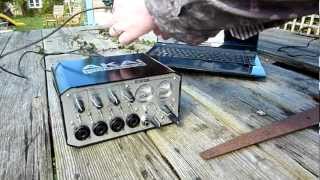
Akai EIE Pro - Review
RainComputersUK
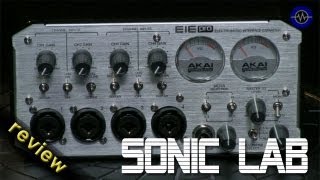
Akai EIE Pro Hi Resolution Audio Interface

sonicstate
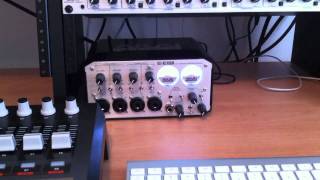
Akai EIE Pro

Nick Abel
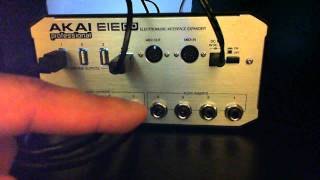
Akai Professional EIE Pro Tutorial Part 2.wmv

Nikk NoFilter
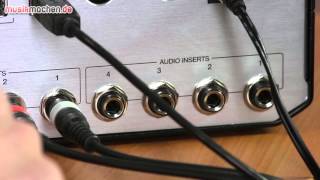
Akai EIE Pro im Test

musikmachen.de
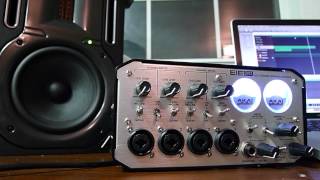
Akai EIE Pro overview

Darko Bulatovic
Reviews
PROS
-
Includes a four-port USB hub, enhancing connectivity
-
Features 5 pin MIDI DIN sockets for versatile connections
-
Classic, stylish design with lit VU meters adds aesthetic value
-
Built like a tank, indicating robust construction
-
Functions effectively for basic studio setups with minimal external instruments
CONS
-
Only supports USB 1.0, leading to latency issues with multiple connections
-
Prone to driver-related issues, especially after Windows updates
-
Inconsistent functionality over time, with some inputs ceasing to work
-
Not recommended for advanced users due to better alternatives at similar prices
-
Headphone jack compatibility issues, especially with adapters
-
Audio dropouts reported by multiple users, affecting reliability
Owner Insights
We analyzed real musician discussions from forums and Reddit to find what players love, question, and tweak about Akai EIE Pro.
Build quality
-
Some users report popping and clicking sounds after prolonged use, indicating potential durability issues over time.
Source
Features and functionality
Software and compatibility
-
Users often resort to ASIO4ALL due to poor proprietary driver support, affecting the interface's performance on Windows 10.
Source -
Some users experience issues with the EIE Pro driver downloads on Chrome, but report success using Microsoft Edge due to security prompts.
Source -
Some users have noted success using ASIO drivers before installing EIE Pro drivers to resolve installation issues on Windows 11.
Source
Comparisons
-
Some users speculate that an Apollo Twin might offer superior sound quality, suggesting the EIE Pro's performance may not be top-tier.
Source
Value and pricing
-
Despite feature richness and aesthetic appeal, its age and driver issues deter some users from purchasing, even at low prices.
Source
Use cases and applications
-
The EIE Pro is praised for on-location recording, offering 4 XLR inputs and 3 USB hub connectors for clean, noise-free tracks.
Source
Setup and maintenance
-
Users advise disabling +48V phantom power when using 1/4" guitar inputs to avoid high-pitched noise.
Source
Critic Reviews
4.0 out of 5
Based on 10 Reviews and 53 Ratings

462
Great Interface with onboard USB hub and 5 pin MIDI DIN I/O
Akai EIE Pro is a great all aound companion for using a DAW and few or no external instruments, as it only has four mono in/out audio cnnections. It does, however have a four port USB hub and 5 pin MIDI DIN sockets. Some users run into issues after certain Windows updates with the EIE mysteriously halting any use and seeming dead. THIS IS NOT THE CASE. If this happens to you, REINSTALL the EIE Pro rivers from the original CD that came with the interface.Uninstall the EIE Pro driver that is not working first, then reinstall the original driver from CD. Many forums for this product are stumped and people pull their hair out over this- so hopefully Windows will fix this problem, if they have not by the time you read this. Send me a message or email if you do not have your install CD and I will send you a link to download an exact image of the install CD (you can no longer download the original drivers from AKAI, only updated ones) and you can either burn your own CD or extract the files from the download image to your hard drive and proceed. I have helped countless people ready to throw their EIE Pro against the wall with this issue and it works. Oh- yeah, the EIE Pro looks really cool with its lit up needle motion VU meters behind glass, chrome exterior and overall classic / classy look. And it sounds exactly as it should: perfect.

115
Was great at first and the USB hub is super convenient but the preamps are mediocre and various functions have stopped working or worked inconsistently over time
Like the summary says, I loved this interface at first but the longer I owned it the less I liked it. The first thing I noticed I didn't like was that the latency wasn't very good. Especially so when you have a lot of devices plugged into the USB hub since it's only USB 1.0. This would probably be remedied if they had released it with USB 3.0 but even 2.0 would be a big step up. Different functions of my interface started acting wonky or inconsistent after owning it for a long while before completely ceasing to work at all. Some examples of this would be various input channels failing on either of the inputs available with the combo jack. This means that on one channel it would be the quarter inch input that quit working and on another it would be the XLR input instead.

Good for Begginers but better ones out there
Id say this is an overall good product and would suggest it strictly to beginners or those on a budget if at all. I could only imagine there are better products out there for roughly the same price.
I must say. I love the USB hub in the back of this thing. Its so handy!!

121
Quite ok for a beginner
I like the oldschool look of this interface, besides that I had a lot of issues without knowing exactly from where these came from, maybe because of the ASIO Drivers but I don't have a clue. It is still very practical when it works, I won't recommand using the USB HUB that will cause lots of crackling then some growing numerical distortion then you'll have to press the power off button! (I tried to plug a M-Audio usb midi keyboard)


275
Sounds good.
I'm not really picky when it comes to sound cards, because I don't use much outboard gear, but it sounds nice I guess. I've been having trouble using headphones though, especially when using 3.5mm to 1/4" adapters. I've only been able to get the headphone jack working with a small guitar amp connected using a 1/4" cable.

Broken once already...
Its well built but I often have issues with latency and audio dropouts.


141
you are not alone

213
AKAI EIE pro
AKAI EIE pro I only use this for midi because the Apogee Ensemble don't have midi in or out
Artist usage
Add artist

In this studio picture a Akai EIE Pro can be seen between the laptop and the monitor, its the Pro beacuse of the silver color.


You can see it during this whole video as Haywyre plays, on the right below the Focusrite Scarlett.


HARDWARE: AKAI EIE, Alesis Q61, Arturia MicroBrute, Audio Technica AT-LP60, Behringer Eurorack EBB1002, Behringer Ultra Shifter, Behringer Ultra Tremolo, Biyang Phase Pro, Biyang Tri Reverb, Catalinbread Teaser Stallion, EGX Voice Box, EHX Freeze, Ernie Earplugs Feedback Processor, KORG Miku Stomp, KORG Volca series, KORG microKORG, Patec FM Transmitter, Pioneer RX-530, Roland DR-50, Statikstramentz Megaphone, Suzuki Omnichord 200m, T-Cube Fuzz, Time Space Echo Delay, ZOOM H1

.jpg)
Genre Usage
Based on how artists on Equipboard use this gear, it is most commonly found in the following genres.
Used With
Based on how musicians on Equipboard use Akai EIE Pro, it is most commonly used with the following gear.


-s.webp?v=1754871182)


Community setups
Show yours

More Akai Audio Interfaces


$159.99 - $224.99
in Audio Interfaces Rank


-m.webp?v=1784804580)
$749.99
in Audio Interfaces Rank


$59.38 - $239.00
in Audio Interfaces Rank


$79.00 - $299.99
in Audio Interfaces Rank


$385.00 - $799.00
in Audio Interfaces Rank


$239.00 - $495.00
in Audio Interfaces Rank


$80.00
in Audio Interfaces Rank


$79.99 - $149.99
in Audio Interfaces Rank
.jpg?v=1784763257)


$749.00 - $999.00
in Audio Interfaces Rank

.png?v=1785048585)


$799.00 - $1,299.00
in Audio Interfaces Rank


$1,000.00
in Audio Interfaces Rank


$239.00 - $799.00
in Audio Interfaces Rank


$85.00 - $391.13
in Audio Interfaces Rank


$118.00 - $189.99
in Audio Interfaces Rank


$256.00 - $872.49
in Audio Interfaces Rank


$689.00 - $899.00
in Audio Interfaces Rank


$224.99
in Audio Interfaces Rank


$1,468.00 - $1,999.00
in Audio Interfaces Rank

.jpeg?v=1785102997)

$99.99 - $299.99
in Audio Interfaces Rank


$859.00 - $1,199.00
in Audio Interfaces Rank

.jpg?v=1785168946)
-m.webp?v=1784331838)
$70.00
in Audio Interfaces Rank


$69.54 - $159.99
in Audio Interfaces Rank


in Audio Interfaces Rank


$699.00 - $1,899.00
in Audio Interfaces Rank


$400.00
in Audio Interfaces Rank


$350.00
in Audio Interfaces Rank


$1,000.00
in Audio Interfaces Rank


$199.99 - $369.99
in Audio Interfaces Rank


$440.00
in Audio Interfaces Rank

.jpg?v=1785070565)


$144.08 - $279.00
in Audio Interfaces Rank


$20.00
in Audio Interfaces Rank


$1,990.00 - $2,799.00
in Audio Interfaces Rank


$325.00
in Audio Interfaces Rank


$2,190.00 - $3,399.00
in Audio Interfaces Rank


$100.00 - $599.00
in Audio Interfaces Rank


$117.58 - $499.99
in Audio Interfaces Rank


.jpg?v=1785048589)

$130.00 - $819.00
in Audio Interfaces Rank


Accessories & Related Items



Similar


Gear Guides







.webp)
Most Popular Audio Interfaces
Most Popular Brands
-
Added to Equipboard on by
 merkomusic
GearIQ 46
-


