

Pricing and availability
We compare 600+ stores and found this item at 1 store. Prices updated .
Store
Reviews
Price




Price History
Based on price data from 1 merchant for "EditorsKeys Shortcut Keyboard for Ableton Live". Prices shown reflect NEW condition. Tracking began Apr 25, 2026.
* Product prices and availability are updated by Equipboard every 24hrs and are subject to change. Equipboard may receive compensation for purchases made at participating retailers linked on this site. This compensation does not affect what products or prices are displayed, or the order of prices listed. For more information, please refer to our affiliate disclosure.


Videos

SadowickProduction
Editors Keys - Ableton Live Backlit PC Keyboard Review
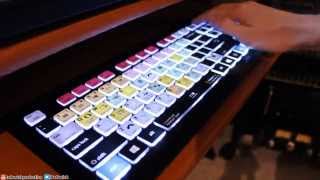
Editors Keys - Ableton Live Backlit PC Keyboard Review
SadowickProduction
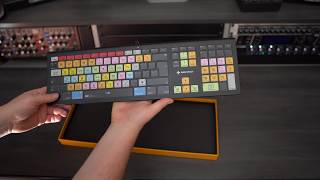
Unboxing the Best Ableton live keyboard for Mac or PC by EditorsKeys

Matthew S

Editor Keys Ableton Keyboard (PC/MAC) A must have for Ableton users.

Alex H
Reviews
Critic Reviews
5.0 out of 5
Based on 1 Review and 1 Rating

462
Great way to speed up workflow and keep off the mouse
One of the drawbacks of music production using a computer is FEELING like you're just using a computer. Mouse and keyboard and monitor are the tools for checking email and surfing Facebook and porn. Mouse and keyboard plus staring at a monitor certainly doesn't FEEL like playing an instrument. That said, one cannot deny the power of a great DAW and to avoid a jewel like Ableton Live. my DAW of choice, just because you don't like to look at a screen and use a mouse can certainly be overcome with the right tools. A good MIDI controller (or two or three!) plus the right VST plugins and digital keyboards, integration of drum machines, sequencers and other analog gear can make the screen, keys and mouse fade into the background very quickly. There are certain actions that are just necessary when using a computer, and certain options and actions within every DAW that are necessary evils. Saving your hard work, for example. You wouldn't want to forego that, now would you? Or zooming in or out of a grid while making some quick changes. Extending a MIDI note another quarter bar. Switching from session to arrangement view. Quantizing. 1/2, 1/4, 1/8 Quantizing. Grouping device chains. Turning on / off MIDI mapping mode. Loop selection. Saving every few minutes. All of these actions usually take your mind and eyes off of the music and to the menus and mouse. Not with the "EditorsKeys" for Ableton. A Color and Backlit USB keyboard has all of these actions along with about 40 more shortcuts ready to go at the press of a button. The keyboard also doubles as a normal USB keyboard you can type words and numbers with, though I do not use mine for that purpose, unless it is naming a file while saving something in Ableton Live. I've all but eliminiated the use of the mouse and have the keyboard strategically placed in my studio right below my main MIDI controller, sandwiched above another set of MIDI controllers. The keyboard is pricey and for sure something you do not see in the average "bedroom producer" studio. I have seen these keyboards in a lot of big, professional, for profit
Artist usage
Add artist
Genre Usage
Based on how artists on Equipboard use this gear, it is most commonly found in the following genres.
More EditorsKeys Accessories

$108.00
in Accessories Rank

$2,499.00 - $2,880.00
in Accessories Rank


$229.00 - $329.00
in Accessories Rank


$3,690.00 - $3,999.00
in Accessories Rank


$219.00 - $275.50
in Accessories Rank


$57.00 - $699.00
in Accessories Rank


$299.00 - $388.00
in Accessories Rank


$24.99 - $149.99
in Accessories Rank


$57.00 - $71.00
in Accessories Rank


$419.99 - $498.00
in Accessories Rank


$2,756.96
in Accessories Rank


$95.00 - $205.95
in Accessories Rank

$37.55 - $73.90
in Accessories Rank
-m.webp?v=1784933789)
$279.99 - $315.00
in Accessories Rank


$50.47 - $75.00
in Accessories Rank

$987.32 - $995.00
in Accessories Rank


$1,230.25 - $1,295.00
in Accessories Rank


$12.25
in Accessories Rank


$66.00 - $390.00
in Accessories Rank

$319.00 - $393.18
in Accessories Rank


$24.99 - $29.99
in Accessories Rank

$43.30 - $72.99
in Accessories Rank


$179.99 - $211.00
in Accessories Rank


$221.60 - $399.99
in Accessories Rank


$399.99 - $431.00
in Accessories Rank


$2,850.00 - $3,225.00
in Accessories Rank

$73.69 - $99.99
in Accessories Rank

$169.99 - $198.99
in Accessories Rank

$350.00
in Accessories Rank


$1,024.99 - $1,269.99
in Accessories Rank


$479.00 - $679.00
in Accessories Rank

$1,590.00 - $1,799.00
in Accessories Rank

$7,395.00
in Accessories Rank

Community setups


Similar


Gear Guides








Most Popular Accessories
Most Popular Brands
-
Added to Equipboard on by
spakerGearIQ 462
-

