

Pricing and availability
We compare 600+ stores and found this item at 5 stores. Prices updated .
Store
Reviews
Price






Price History
Based on price data from 3 merchants for "Boz Digital Labs Pan Knob". Prices shown reflect NEW condition. Tracking began Apr 2, 2026.
* Product prices and availability are updated by Equipboard every 24hrs and are subject to change. Equipboard may receive compensation for purchases made at participating retailers linked on this site. This compensation does not affect what products or prices are displayed, or the order of prices listed. For more information, please refer to our affiliate disclosure.
Description
Unlock the true potential of your mixes with the Boz Digital Labs Pan Knob, an essential utility plugin designed to revolutionize your panning techniques. While every DAW offers basic panning controls, this plugin transcends conventional methods by employing an advanced algorithm that enhances stereo imaging, especially when using headphones.
Traditional panning merely adjusts volume levels between the left and right channels, often resulting in a disjointed experience on headphones. The Pan Knob alleviates this by preserving low frequencies in both ears, creating a natural head-filtering effect while allowing high frequencies to be panned with precision. It even incorporates a subtle delay to mimic the natural arrival times of sound waves to your ears, ensuring a rich, immersive soundstage without the common pitfalls of earbud listening.
Dare to defy the norms of panning with confidence. Whether you want to position your bass to the left or have your snare pop from the right, the Pan Knob maintains a natural sound, enabling you to push creative boundaries without compromising mix integrity. It offers the flexibility to toggle between Balance or Pan modes, select pan laws, and position your panning controls anywhere within your signal chain, all while enhancing your workflow efficiency.
Join the community of mix engineers who’ve discovered the freedom to innovate with Boz Digital Labs Pan Knob—a plugin that doesn’t just change your mix, it revolutionizes it.
Key Features:
- Superior panning algorithm for all listening formats
- Centers low frequencies for a balanced stereo field
- Selectable micro delay for natural sound wave simulation
- Choose between Balance or Pan modes
- Customizable pan laws
- Compatible with VST2, VST3, AU, AAX Native on macOS and Windows
Owner's manual
Boz Digital Labs Pan Knob User ManualFAQs
-
What is the main function of the Boz Digital Labs Pan Knob?
-
The Boz Digital Labs Pan Knob is a plugin designed to enhance audio panning capabilities, allowing you to adjust the spatial distribution of sound within your mix with improved precision and flexibility.
-
Can the Boz Digital Labs Pan Knob be used in any DAW?
-
Yes, the Boz Digital Labs Pan Knob is compatible with most major DAWs, making it a versatile tool for any digital audio workstation setup.
-
How does the Pan Knob plugin's panning algorithm differ from standard DAW panning?
-
The Pan Knob offers a superior panning algorithm that provides more accurate sound placement across all listening formats, giving you better control over your mix's spatial dynamics.
-
What is the difference between Balance and Pan modes in the Boz Digital Labs Pan Knob?
-
The Balance mode adjusts the volume of the left and right channels, while the Pan mode shifts the audio signal's position across the stereo field, offering different approaches to sound positioning.
-
Does the Boz Digital Labs Pan Knob allow you to choose different pan laws?
-
Yes, the Pan Knob plugin lets you select various pan laws, enabling you to tailor how the audio signal attenuates as it moves across the stereo field.
Videos

BozDigitalLabs
Pan Knob Demonstration
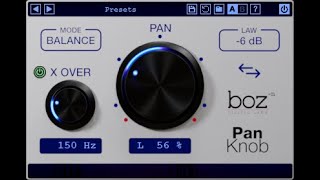
Pan Knob Demonstration
BozDigitalLabs

Mixing for Headphones | Boz Digital Labs Pan Knob Plugin

Green Light Sound
Pan Knob beyond 100%
BozDigitalLabs

Pan Knob
BozDigitalLabs

Boz Digital Labs Pan Knob plugin - Mixing Plugin

KdW Mixing & Mastering

Pan Knob vs Traditional Panning
BozDigitalLabs
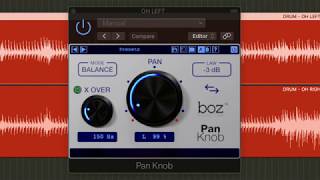
BOZ PAN KNOB - WHY AND WHEN IT ROCKS

TOURNA-MIX
Reviews
Owner Insights
We analyzed real musician discussions from forums and Reddit to find what players love, question, and tweak about Boz Digital Labs Pan Knob.
Features and functionality
-
The Pan Knob's 120% panning introduces a slight delay between channels to enhance width, especially useful for higher frequencies.
Source -
Users find the Pan Knob delivers a "natural" panning effect by excluding low frequencies, preventing harshness and improving mix cohesion.
Source -
It allows for natural panning by keeping lower frequencies centered, which some users find crucial for maintaining mix clarity.
Source
Use cases and applications
-
Found effective for mixing acoustic instruments, offering better results than using m/s equalizer as a high-pass filter for sides.
Source -
The plugin effectively prevents low frequencies from skewing mix balance, enhancing clarity and integration of elements.
Source -
The Pan Knob is favored for quick automation of stereo signals, particularly in Pro Tools, enhancing workflow efficiency.
Source -
The ability to pan past 100% is seen as an "effect," useful for placing elements in dense mixes, such as making guitar licks sound like they're "wrapped around" the mix.
Source
User experience
-
Users report improved sound quality over standard DAW panning, despite the inconvenience of integrating a plugin into workflow.
Source
Value and pricing
-
Initial skepticism often turns to surprise as users find significant improvements in their mixes, viewing it as a worthwhile investment at the intro price.
Source
Comparisons
Based on 0 Reviews and 0 Ratings
More Boz Digital Labs Utility Plugins

$0.00
in Utility Plugins Rank

$0.00
in Utility Plugins Rank


$0.00
in Utility Plugins Rank

$37.00 - $39.99
in Utility Plugins Rank


$10.00
in Utility Plugins Rank


$49.00
in Utility Plugins Rank


$33.00 - $35.99
in Utility Plugins Rank


$19.00
in Utility Plugins Rank

in Utility Plugins Rank


$0.00
in Utility Plugins Rank


$0.00
in Utility Plugins Rank


$99.00
in Utility Plugins Rank


$199.00
in Utility Plugins Rank


$0.00
in Utility Plugins Rank


$0.00 - $39.90
in Utility Plugins Rank


$39.00 - $258.47
in Utility Plugins Rank


$0.00 - $99.00
in Utility Plugins Rank

$0.00
in Utility Plugins Rank


$29.99 - $39.99
in Utility Plugins Rank


$0.00
in Utility Plugins Rank

$85.00 - $99.00
in Utility Plugins Rank

$39.99 - $149.00
in Utility Plugins Rank


$79.00
in Utility Plugins Rank

$60.00 - $99.99
in Utility Plugins Rank

-m.webp?v=1783844408)


$48.00 - $50.00
in Utility Plugins Rank

$24.99
in Utility Plugins Rank


$59.00 - $66.00
in Utility Plugins Rank
Accessories & Related Items




Artist usage


Community setups


Similar


Gear Guides










Most Popular Utility Plugins
Most Popular Brands
-
Added to Equipboard on by
 equipboard
GearIQ 4934
-


