
Pricing and availability


* Product prices and availability are updated by Equipboard every 24hrs and are subject to change. Equipboard may receive compensation for purchases made at participating retailers linked on this site. This compensation does not affect what products or prices are displayed, or the order of prices listed. For more information, please refer to our affiliate disclosure.
Description
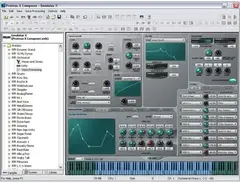
Unleash your sonic creativity with the E-Mu Emulator X3, a powerhouse in the realm of sampler plugins. Building on the legacy of its predecessors, this third-generation software instrument offers a comprehensive suite of tools designed for musicians and producers who demand precision and versatility in their audio production. Whether you're crafting beats, designing soundscapes, or remixing tracks, Emulator X3 provides the high-resolution 24-bit/192kHz processing necessary to bring your ideas to life with unparalleled clarity.
The E-Mu Emulator X3 is equipped with an advanced Xstream Streaming Engine, enabling seamless integration with both 32-bit and 64-bit applications and optimized for multi-core processors. Its Region Xplode Beat Slicer turns recorded drum parts into MIDI files with ease, while the Tempo Map Export feature ensures your rhythm tracks stay in perfect sync. The innovative Xtractor tool offers unique audio manipulation capabilities, allowing you to isolate and process specific elements within a mix. Plus, the Translator Convertor expands your creative possibilities by converting various popular sampler formats into the Emulator X's native format.
With over 3.3 GB of included sounds and presets from E-MU's premier library, the Emulator X3 is not just a sampler—it's a complete sound design solution. Dive into the world of sound with classic Emulator banks, a stunning 1.4 GB grand piano, and an array of drum kits, loops, and more.
Key Features:
- High-resolution 24-bit/192kHz processing
- Xstream Streaming Engine for optimal performance
- Region Xplode Beat Slicer for MIDI conversion
- Tempo Map Export for seamless synchronization
- Xtractor tool for audio manipulation
- Translator Convertor for multiple sampler formats
- Over 3.3 GB of sounds and presets included
FAQs
-
What are the system requirements for the E-Mu Emulator X3?
-
The E-Mu Emulator X3 requires a Windows operating system, a minimum of 1 GB RAM, and a compatible ASIO audio interface. Ensure your computer meets these specifications for optimal performance.
-
Is the E-Mu Emulator X3 compatible with popular DAWs like Ableton Live and Pro Tools?
-
Yes, the E-Mu Emulator X3 is compatible with most major DAWs, including Ableton Live and Pro Tools, as it operates as a VST plugin.
-
What makes the E-Mu Emulator X3's sound engine unique?
-
The E-Mu Emulator X3 features a powerful sound engine that offers advanced synthesis capabilities, including Z-Plane filters and comprehensive modulation options, allowing for highly customizable sound design.
-
Can the E-Mu Emulator X3 import and manipulate my own samples?
-
Yes, the Emulator X3 allows you to import your own samples and provides extensive editing tools to manipulate them, offering flexibility in sound creation.
-
Does the E-Mu Emulator X3 support polyphonic sampling?
-
Yes, the Emulator X3 supports polyphonic sampling, enabling you to create rich, layered sounds and complex musical textures.
-
How does the E-Mu Emulator X3 handle multi-timbral operation?
-
The Emulator X3 is capable of multi-timbral operation, allowing you to play multiple patches simultaneously, which is ideal for creating complex arrangements and live performances.
Videos

Audiofanzine in English
[Musikmesse 2008]E-Mu Emulator X3
![Video thumbnail for [Musikmesse 2008]E-Mu Emulator X3 by Audiofanzine in English](https://img.youtube.com/vi/zdt-mc9cF6U/mqdefault.jpg)
[Musikmesse 2008]E-Mu Emulator X3
Audiofanzine in English
E-MU Emulator X3© TwistaLoop

aRMAN J.ANDO& GMSoundFonts Factory™+E-MU SYSTEMS
E-MU Emulator X3 Demo

revokdaryl1
Emulator X3 Jungle Freight Train

Architecture
Reviews
Owner Insights
We analyzed real musician discussions from forums and Reddit to find what players love, question, and tweak about E-Mu Emulator X3.
Software and compatibility
Features and functionality
-
The "Master Tuning" and "Master Volume" settings in Emulator X3 save globally, not per project, potentially disrupting multiple projects' settings.
Source -
Patch editing in Emulator X3 requires saving changes directly to the bank file, which can be time-consuming and cumbersome for large banks.
Source -
Emulator X3 is praised for its unique Z-Plane filters, which are not commonly found in other samplers, providing distinctive sound design capabilities.
Source -
The software offers a robust modulation matrix with approximately 32 points per preset, enhancing its sound design potential significantly.
Source -
Real-time timestretching is achievable with Emulator X3 when using a tracker by setting the modwheel to control sample start position, reminiscent of older Akai samplers.
Source
Setup and maintenance
-
For modern compatibility, running Emulator X3 on Windows 11 may require compatibility mode settings like Win8-mode for successful installation.
Source
User experience
-
Load times for banks in Emulator X3 can take up to 30 seconds, even on fast hardware, affecting workflow efficiency.
Source
Mods and upgrades
-
Users have found success running Emulator X3 on older systems or through WINE on Linux to avoid compatibility issues with modern Windows versions.
Source
Use cases and applications
-
Emulator X3 can be integrated into a complex setup using an Emu 1820m sound card for 8 analog and 8 digital output, effectively mimicking a hardware sampler environment.
Source
Critic Reviews
4.0 out of 5
Based on 1 Review and 4 Ratings

41028
super cool sampler thingy
this came with my soundcard back when I got it and its super cool but it doesn't sound like an emaulator or emax, its so fucking pristine and nice so tis not like you can use it to do the emu thing, you can't... but its a great sampler/editor and comes standalone or as a plugin.
Artist usage
Add artist

Genre Usage
Based on how artists on Equipboard use this gear, it is most commonly found in the following genres.
More E-Mu Sampler Plugins


$124.00 - $199.00
in Sampler Plugins Rank


$599.00
in Sampler Plugins Rank


$349.99
in Sampler Plugins Rank


$359.00
in Sampler Plugins Rank


$95.00 - $99.99
in Sampler Plugins Rank


$575.00
in Sampler Plugins Rank


$99.00 - $149.00
in Sampler Plugins Rank


$0.00
in Sampler Plugins Rank

$437.00 - $495.00
in Sampler Plugins Rank


$283.00 - $395.00
in Sampler Plugins Rank


$57.00 - $59.00
in Sampler Plugins Rank


$149.00
in Sampler Plugins Rank

$179.00
in Sampler Plugins Rank

$33.00 - $34.99
in Sampler Plugins Rank

$60.00 - $100.00
in Sampler Plugins Rank


$299.99 - $333.00
in Sampler Plugins Rank

$99.00
in Sampler Plugins Rank


$99.00 - $199.00
in Sampler Plugins Rank


$29.00 - $79.99
in Sampler Plugins Rank


$95.00
in Sampler Plugins Rank

$26.00 - $29.00
in Sampler Plugins Rank

Accessories & Related Items


-s.webp?v=1784871752)
Community setups


Similar


Gear Guides









Most Popular Sampler Plugins
Most Popular Brands
-
Added to Equipboard on by
 cronikdnb
GearIQ 204
-


