This page about Apple Logic's Tape Delay is a stub. You can help improve it:


Pricing and availability


* Product prices and availability are updated by Equipboard every 24hrs and are subject to change. Equipboard may receive compensation for purchases made at participating retailers linked on this site. This compensation does not affect what products or prices are displayed, or the order of prices listed. For more information, please refer to our affiliate disclosure.
Description
Step into the world of vintage soundscapes with Apple Logic's Tape Delay, a versatile plugin that brings the iconic warmth and character of analog tape effects to your digital audio workstation. This delay plugin is a must-have for producers and musicians seeking to infuse their tracks with the classic echo and modulation synonymous with the golden age of music production. Its intuitive interface allows users to easily tweak parameters, offering a seamless integration into your creative workflow.
The Apple Logic Pro X integration ensures that Tape Delay works effortlessly within your existing setup, providing a smooth user experience whether you're enhancing guitars, vocals, or synths. With a range of adjustable settings like delay time, feedback, and modulation, this plugin offers a wide palette of sonic possibilities, enabling you to craft everything from subtle, ambient echoes to intense rhythmic patterns.
Apple Logic's Tape Delay also includes unique features such as the LFO-based modulation section, which adds dynamic movement to your sound, mimicking the natural, evolving qualities of tape machines. This attention to detail allows for a rich and immersive audio experience, making it a favorite among sound designers and music producers alike.
Key Features:
- Seamless integration with Apple Logic Pro X
- Adjustable delay time, feedback, and mix levels
- LFO-based modulation for dynamic sound shaping
- High and low cut filters for precise tonal control
- Vintage-inspired tape machine emulation
- User-friendly interface for quick and intuitive adjustments
Product specs
| Operating Systems | Mac |
Videos

Nick Christopherson
Tape Saturation in Logic Pro X - Stock Tape Delay Plug-In
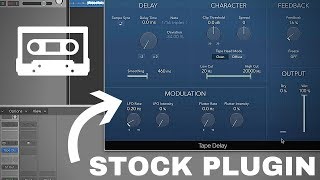
Tape Saturation in Logic Pro X - Stock Tape Delay Plug-In
Nick Christopherson
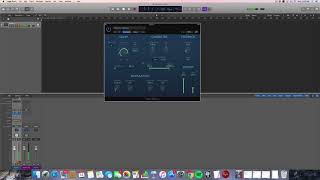
Tape Delay Simulation in Logic 10, building walls of sound/feedback loops

Signal-to-Noise
Reviews
Owner Insights
We analyzed real musician discussions from forums and Reddit to find what players love, question, and tweak about Apple Logic's Tape Delay.
Features and functionality
-
The Clip Threshold in the Character section adds grit and is more visible in the updated Logic Tape Delay plugin.
Source -
Importing certain Apple loops like "16mm Film Electric Piano" automatically applies the Tape Delay with customizable settings.
Source -
Adjusting the LFO and widening the filter can help restore the desired sound, as default presets may change after updates.
Source -
Users find Logic's Tape Delay effective for adding tape warble to drum tracks and the master bus, enhancing warmth and subtle compression.
Source
Use cases and applications
Comparisons
-
Logic's Tape Delay lacks the extensive features of dedicated emulators like RC-20 but offers a simpler setup for tape-like effects.
Source -
Chromaglow and the vintage EQ plugin are recommended alternatives for adding warmth, color, and compression, especially after upgrading to Logic 11.
Source -
Some users prefer the u-he Satin plugin for its superior control and realistic sound, avoiding the digital imitation often found in other plugins.
Source
Mods and upgrades
-
Unhiding the distortion setting in Logic Tape Delay can enhance the tape effect with additional grit.
Source
Setup and maintenance
-
For saturation effects without delay, set the delay time to 0ms and turn off tempo sync, while playing with LFO and modulation settings.
Source
User experience
5.0 out of 5
Based on 0 Reviews and 1 Rating
Artist usage
Add artist

In this video Moti explains the effects he used on his track named LION. He is seen using the Logic Tape delay effect's plugin. Check it out!!

Album Usage
The Apple Logic's Tape Delay has been featured on the following albums:

Genre Usage
Based on how artists on Equipboard use this gear, it is most commonly found in the following genres.
Used With
Based on how musicians on Equipboard use Apple Logic's Tape Delay, it is most commonly used with the following gear.




More Apple Delay Plugins


-m.webp?v=1784642521)
$69.00 - $199.00
in Delay Plugins Rank


$32.00 - $34.99
in Delay Plugins Rank


$139.00 - $149.00
in Delay Plugins Rank

.jpeg?v=1784574735)

-m.webp?v=1784612528)
$80.00 - $99.00
in Delay Plugins Rank

.jpg?v=1784591665)


$138.00 - $149.00
in Delay Plugins Rank


$29.99 - $30.00
in Delay Plugins Rank


$0.00 - $40.00
in Delay Plugins Rank


$19.00 - $89.00
in Delay Plugins Rank


$50.00 - $99.00
in Delay Plugins Rank


$0.00
in Delay Plugins Rank

$30.00 - $50.00
in Delay Plugins Rank

-m.webp?v=1784455253)
$53.00 - $89.00
in Delay Plugins Rank

$66.00 - $69.00
in Delay Plugins Rank


$29.99 - $34.99
in Delay Plugins Rank


$69.00
in Delay Plugins Rank


$25.00
in Delay Plugins Rank


$0.00
in Delay Plugins Rank

$99.00
in Delay Plugins Rank


$49.00
in Delay Plugins Rank


$0.00
in Delay Plugins Rank

$63.00 - $69.00
in Delay Plugins Rank


Community setups


Similar


Most Popular Delay Plugins
Most Popular Brands
-
Added to Equipboard on by
 jasonrodrigues
GearIQ 1349
-


