

Pricing and availability
We compare 600+ stores and found this item at 4 stores. Prices updated .
Store
Reviews
Price


Price History
Based on price data from 4 merchants for "Waves Audio X-Noise Plugin". Prices shown reflect NEW condition. Tracking began Apr 2, 2026.
* Product prices and availability are updated by Equipboard every 24hrs and are subject to change. Equipboard may receive compensation for purchases made at participating retailers linked on this site. This compensation does not affect what products or prices are displayed, or the order of prices listed. For more information, please refer to our affiliate disclosure.
Description
In the world of audio production, unwelcome noise is the nemesis of pristine sound, but with the Waves Audio X-Noise Plugin, you'll have a formidable ally. This precision broadband noise reduction tool is designed to effortlessly eliminate everything from preamp hiss on vocals to the rumble infiltrating your ribbon mics. Whether you're battling computer interference or the exaggerated noise of high-gain amp simulations, X-Noise steps in with a “noiseprint”-based solution, ensuring your tracks remain as clean as a whistle.
The plugin learns the unwanted noise profile from an isolated section, then cleverly subtracts it from your entire signal, allowing for smooth, artifact-free processing. The real-time control and monitoring features make it a breeze to clean up individual tracks on the fly or even entire mixes. With intuitive dynamics processor-like controls, you can fine-tune your noise reduction with precision, and the spectral display provides visual feedback to guide your adjustments.
Whether you're a seasoned pro or just starting out, X-Noise caters to all with its simple yet powerful interface, offering 13 factory presets for typical scenarios when isolated noise isn't available. Plus, with two storable noise prints, you can easily A/B compare to ensure the best possible outcome for your audio project.
Key Features:
- Noiseprint-based targeted noise removal
- Real-time control for individual tracks or entire mixes
- Threshold, Reduction, Attack, and Release controls
- Spectral display for visual noise reduction feedback
- High-shelf filter for treble adjustments
- Two storable noise prints for easy A/B comparisons
- 13 factory presets for common applications
- Compatible with AAX Native, RTAS, AudioSuite, VST, AU, SoundGrid
- Supports resolutions up to 24-bit/96kHz
Product specs
| Software Type | Noise Reduction |
| Platform | Mac, PC |
| Upgrade/Full | Full |
| Download/Boxed | Download |
| Bit Depth | 64-bit |
| Format | AAX, AU, VST, AudioSuite, SoundGrid |
| Hardware Requirements - Mac | Intel Core i7 or higher (M1 support), 8GB RAM minimum |
| Hardware Requirements - PC | Intel Core i5 / AMD Quad-core or higher (AVX required), 8GB RAM minimum |
| OS Requirements - Mac | macOS 13 or later |
| OS Requirements - PC | Windows 10 (22H2) or later |
FAQs
-
What type of noise can the Waves X-Noise Plugin remove from audio recordings?
-
The Waves X-Noise Plugin is designed to reduce constant background noises such as hiss, hum, and static without significantly affecting the audio quality of the original recording.
-
Is the Waves X-Noise Plugin compatible with both Mac and PC systems?
-
Yes, the Waves X-Noise Plugin is compatible with both Mac (macOS 13 or later) and PC (Windows 10 22H2 or later) systems.
-
What are the system requirements for running the Waves X-Noise Plugin on a Mac?
-
For Mac, the Waves X-Noise Plugin requires an Intel Core i7 or higher processor (including M1 support) and a minimum of 8GB RAM.
-
Can the Waves X-Noise Plugin be used with popular DAWs?
-
Yes, the Waves X-Noise Plugin is available in AAX, AU, VST, AudioSuite, and SoundGrid formats, making it compatible with most popular DAWs.
-
Is the Waves X-Noise Plugin suitable for professional audio restoration projects?
-
Yes, the Waves X-Noise Plugin is designed for professional use, effectively reducing noise while preserving the integrity and quality of the original audio.
Videos

MusicTechHelpGuy
Waves X-Noise - Noise Reduction Tutorial
Waves X-Noise - Noise Reduction Tutorial
MusicTechHelpGuy
Как удалить шум из звука - Обзор Waves X-Noise

wikisound
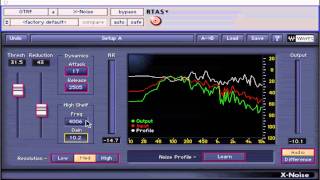
Waves Mastering Lesson 30 - X-Noise Tool

Gabriel Toma
Waves X Noise - Tutorial and Overview

Unders
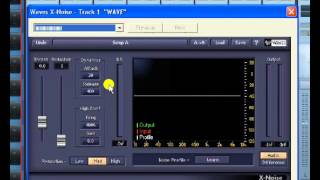
Waves X-Noise

Hamidu Music Gh
X-Noise from Waves || Tuesday Review Day

Topmop Productions
Reviews
PROS
-
Effectively reduces high-frequency hiss from amp simulations
-
Offers precise frequency targeting for noise reduction
-
Simple and intuitive plug-and-play functionality
-
Softens distortion for cleaner sound without harsh cut-offs
CONS
-
Can introduce significant latency (100-200 ms)
-
May reduce gain, affecting overall sound dynamics
Owner Insights
We analyzed real musician discussions from forums and Reddit to find what players love, question, and tweak about Waves Audio X-Noise Plugin.
Features and functionality
-
The plugin's "listen" feature is essential for monitoring what's being eliminated, ensuring no integral sound parts are removed alongside the noise.
Source
Use cases and applications
Software and compatibility
-
Users combining it with DPA 2011 and Cascade Fathead mics through a Grace 201 preamp into RME Fireface 800 find effective results in noise reduction.
Source
Setup and maintenance
-
Using the "Learn" function with empty space and applying minimal reduction achieves optimal noise reduction without compromising sound quality.
Source
User experience
Based on 0 Reviews and 0 Ratings
Artist usage
Add artist

In the video titled "Welcome to my AMBIENT music STUDIO TOUR - Gear - Instruments & production workflow" by A Last Picture From Voyager, the artist is observed at 8:16 using the Waves Audio X-Noise Plugin to remove unwanted noise. This demonstration is part of a detailed walkthrough of the artist's studio setup, as presented on their YouTube channel.
Genre Usage
Based on how artists on Equipboard use this gear, it is most commonly found in the following genres.
Used With
Based on how musicians on Equipboard use Waves Audio X-Noise Plugin, it is most commonly used with the following gear.

-s.webp?v=1784213844)
-s.webp?v=1784213871)

-s.webp?v=1783954622)


More Waves Audio Restoration Plugins

$37.00 - $39.99
in Audio Restoration Plugins Rank


$29.99 - $94.00
in Audio Restoration Plugins Rank


$75.00 - $79.99
in Audio Restoration Plugins Rank

$32.00 - $34.99
in Audio Restoration Plugins Rank

$32.00 - $34.99
in Audio Restoration Plugins Rank

$32.00 - $34.99
in Audio Restoration Plugins Rank


$222.00 - $279.00
in Audio Restoration Plugins Rank


$51.00 - $59.99
in Audio Restoration Plugins Rank

$19.99 - $105.00
in Audio Restoration Plugins Rank


$74.99 - $99.00
in Audio Restoration Plugins Rank


$229.00 - $279.00
in Audio Restoration Plugins Rank

$24.00 - $237.00
in Audio Restoration Plugins Rank

$94.00 - $99.00
in Audio Restoration Plugins Rank

$24.00 - $237.00
in Audio Restoration Plugins Rank

$599.50 - $1,349.00
in Audio Restoration Plugins Rank


$40.00 - $100.00
in Audio Restoration Plugins Rank

$199.50 - $399.00
in Audio Restoration Plugins Rank

$24.00 - $239.00
in Audio Restoration Plugins Rank


$29.00 - $29.90
in Audio Restoration Plugins Rank

$114.00 - $129.00
in Audio Restoration Plugins Rank

$585.00 - $599.00
in Audio Restoration Plugins Rank

$68.00 - $99.00
in Audio Restoration Plugins Rank

$399.00 - $411.00
in Audio Restoration Plugins Rank


$83.00 - $99.00
in Audio Restoration Plugins Rank

in Audio Restoration Plugins Rank


$99.00
in Audio Restoration Plugins Rank


Accessories & Related Items


-s.webp?v=1784180844)


Community setups


Similar


Most Popular Audio Restoration Plugins
Most Popular Brands
-
Added to Equipboard on by
 soundsmith
GearIQ 65714
-


