

Pricing and availability
We compare 600+ stores and found this item at 1 store. Prices updated .


Price History
Based on price data from 1 merchant for "Antares Auto-Tune Vocal Prep Noise Reduction Software". Prices shown reflect NEW condition. Tracking began Apr 2, 2026.
* Product prices and availability are updated by Equipboard every 24hrs and are subject to change. Equipboard may receive compensation for purchases made at participating retailers linked on this site. This compensation does not affect what products or prices are displayed, or the order of prices listed. For more information, please refer to our affiliate disclosure.
Description
Transform your vocal recordings into pristine, studio-quality tracks with the Antares Auto-Tune Vocal Prep Noise Reduction Software. Whether you're capturing vocals in a bustling urban apartment or a soundproof studio, this software is your ticket to crystal-clear audio. Leveraging AI-powered processing, it seamlessly eliminates unwanted hum, buzz, and ambient noise, while preserving the natural character and dynamics of your vocal performances.
Designed for ease of use, Auto-Tune Vocal Prep is a standalone application that doesn't require a DAW, making it perfect for musicians on the go. With its intuitive 1-click operation, even those new to audio editing can achieve professional results without the hassle of complex settings or a steep learning curve. Import audio effortlessly from any device—be it your smartphone, tablet, or computer—and experience the freedom of recording high-quality vocals anywhere, anytime.
An essential tool for content creators, podcasters, and musicians, this software allows you to focus on your creativity, leaving the technicalities of noise reduction to its cutting-edge technology. Say goodbye to imperfect recordings and hello to clear, professional-grade audio with Antares Auto-Tune Vocal Prep.
Key Features:
- AI-powered processing eliminates unwanted noise while retaining vocal quality
- Simple 1-click operation for quick, high-quality results
- Standalone application—no DAW required
- Import audio from any device, including smartphones, tablets, and computers
- Ideal for use in various acoustic environments, from professional studios to home setups
Product specs
| Software Type | Post Production Restoration |
| Platform | Mac, PC |
| Upgrade/Full | Full |
| Download/Boxed | Download |
| Bit Depth | 64-bit |
| Format | Standalone |
| Authorization Type | iLok Account Required |
| OS Requirements - Mac | macOS 14 or later |
| OS Requirements - PC | Windows 10 or later |
FAQs
-
What does the Antares Auto-Tune Vocal Prep Noise Reduction Software do?
-
This software is designed to reduce noise in vocal recordings, providing a cleaner and more polished sound before further processing with pitch correction or effects.
-
Is Antares Auto-Tune Vocal Prep compatible with both Mac and PC?
-
Yes, it is compatible with both Mac (macOS 14 or later) and PC (Windows 10 or later) systems.
-
Does Antares Auto-Tune Vocal Prep require any special hardware for authorization?
-
Yes, it requires an iLok account for software authorization.
-
Can Antares Auto-Tune Vocal Prep be used as a standalone application?
-
Yes, it is available as a standalone application, allowing you to use it independently from a DAW.
-
What is the bit depth of the Antares Auto-Tune Vocal Prep Noise Reduction Software?
-
The software operates at a 64-bit depth, ensuring high-quality audio processing.
Videos

Reid Stefan
Fix Noisy Vocals with AI 🎙️VocalPrep by AutoTune
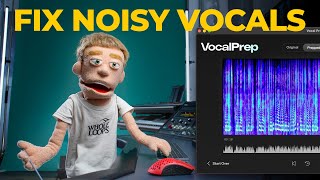
Fix Noisy Vocals with AI 🎙️VocalPrep by AutoTune
Reid Stefan
Reviews
Owner Insights
We analyzed real musician discussions from forums and Reddit to find what players love, question, and tweak about Antares Auto-Tune Vocal Prep Noise Reduction Software.
Software and compatibility
-
Vocal Prep functions as a standalone app and not as a plugin, which can confuse users expecting a traditional plugin setup.
Source -
Ensure the AAX version is installed for Pro Tools compatibility; it may appear under audio effect or noise reduction categories, not as "Vocal Prep."
Source -
The default installation location for Vocal Prep on Windows is C:/Program Files/Antares Audio Technologies/Vocal Prep, which may not show up in file searches until run once.
Source
Based on 0 Reviews and 0 Ratings
More Audio Restoration Plugins

$37.00 - $39.99
in Audio Restoration Plugins Rank


$69.00 - $279.00
in Audio Restoration Plugins Rank


$27.00 - $30.00
in Audio Restoration Plugins Rank

$19.99 - $105.00
in Audio Restoration Plugins Rank


$74.99 - $99.00
in Audio Restoration Plugins Rank


$29.99 - $95.00
in Audio Restoration Plugins Rank


$76.00 - $79.99
in Audio Restoration Plugins Rank

$33.00 - $34.99
in Audio Restoration Plugins Rank

$33.00 - $34.99
in Audio Restoration Plugins Rank


$230.00 - $279.00
in Audio Restoration Plugins Rank

$24.00 - $237.00
in Audio Restoration Plugins Rank

$95.00 - $99.00
in Audio Restoration Plugins Rank

$24.00 - $237.00
in Audio Restoration Plugins Rank

$599.50 - $1,349.00
in Audio Restoration Plugins Rank


$37.00 - $39.99
in Audio Restoration Plugins Rank


$40.00 - $100.00
in Audio Restoration Plugins Rank

$199.50 - $399.00
in Audio Restoration Plugins Rank

$24.00 - $239.00
in Audio Restoration Plugins Rank


$33.00 - $34.99
in Audio Restoration Plugins Rank

$29.00 - $29.90
in Audio Restoration Plugins Rank

$114.00 - $129.00
in Audio Restoration Plugins Rank

$585.00 - $599.00
in Audio Restoration Plugins Rank

$68.00 - $99.00
in Audio Restoration Plugins Rank


$399.00 - $411.00
in Audio Restoration Plugins Rank

$83.00 - $99.00
in Audio Restoration Plugins Rank


in Audio Restoration Plugins Rank


$99.00
in Audio Restoration Plugins Rank


Accessories & Related Items


-s.webp?v=1784872185)


Artist usage


Community setups


Similar


Gear Guides






Most Popular Audio Restoration Plugins
Most Popular Brands
-
Added to Equipboard on by
 equipboard
GearIQ 4934
-

