A
andyborek
GearIQ 127
Joined Nov 2017
0 Followers
Follow
0 Followers
Every rig tells a story. Start yours.
Catalog your gear, wishlist what's next, and share the setups behind your sound — free.
Create your EquipboardKeyboards and Synthesizers 11

-m.webp?v=1784127638)


-m.webp?v=1784181107)


Don't be fooled by the look, this is a real palm size mono synth. It has 2 oscillators per voice and an LFO with six destinations. When you twist the knobs it sends MIDI CC messages to your other gear or DAW. A resonant configurable filter is at your disposal as well (LP, BP, HP). MIDI syncable delay is a god send feature as well. Of course it's class compliant, so you just have to plug in and play. Pair with an effect processor and you'll be blown away how huge can it sound. I use with Zoom CDR and it can produce really lush drone like carpets or screaming lead sounds. The only thing that I might say on a negative side that it can collect noise via USB, so it is strongly recommended to use a high end noiseless USB hub (you've been warned).

The Modal CRAFTrhythm is an 8 track drum sampler kit with a 16 step sequencer which can be assembled (without need to solder) in less than 10 minutes. The CRAFTrhythm can store up to 64 16bit mono samples with a sample rate of 44.1kHz and using the CRAFTapp users can upload their own sounds. Each track features a mixer, sample select, a tune control with 3 pitch modes, low pass resonant filter and 3 envelopes for amplitude, filter and pitch. 16 preset patterns can be stored on CRAFTrhythm with up to 16 part pattern chaining along with 8 kits that recalls track parameters.
Studio Equipment 6


This little piece of affordable gear was well thought and could support your ever growing gear collection. It's an innocent looking 3 IN/3 OUT USB powered MIDI interface with one trick under the sleeve: using the USB female connector on the back of the device you could daisy chain up to three unit that fits into a 1U space in your rack.
Of course it's USB connection is class compliant and even I tested with an OTG cable on an Android tablet and phone as well without any problem. Not to mention that it sports FPT (Fast Processing Technology) for ultra-low latency and fast, stable MIDI transmission.
Get one (two, three) if you can and you'll not regret your choice. I have two of them and long for the third one big time.

As the specification says:
"1.4GHz 64-bit quad-core processor, dual-band wireless LAN, Bluetooth 4.2/BLE, faster Ethernet, and Power-over-Ethernet support (with separate PoE HAT) and 4 USB 2.0 connection."
Wow. It runs Linux so it is a perfect candidate to make use of it as a very smart MIDI router, data mangler. I have couple of instruments with traditional 5 pin midi connections and a few with USB MIDI only. With a computer it is easy to connect them, route and modify MIDI information on the fly. As I'm trying to build a completely DAWless setup I just felt, this little puppy will be a prefect candidate to provide a solution for my ever increasing MIDI itch. So I went ahead and purchased one. It was working out of the box... Well almost. It has a limitation in the stock kernel to handle only 7 USB audio devices. I have more than that, so with a help from RPI forum and a little bit of elbow grease I managed to compile a custom kernel that support up to 32 devices. I made few test run, and work just flawlessly.
If you have an appetite to hack your own solution go ahead, bite the bullet and compile a custom kernel.
More info about how to remove the limitation:
https://www.raspberrypi.org/forums/viewtopic.php?t=177458

Effects Pedals 3


Guitars 1

Software Plugins and VSTs 6

I was looking for a DAW, that is simple to use, portable, runs on linux, scriptable and yet professional.
It has a learning curve for sure, but it customizable like nothing else and you can tweak it to your exact needs.
Did I mentioned it's portable? You can install onto a USB stick and bring your production environment in your pocket to everywhere. The stock plugins are... minimalistic to say the least, however with a little elbow grease you can build a very powerful config and setup, you just need to drop into your next project. Routing is also superb and can be used not only for audio, but midi as well. Start using it a creative way along with folders. This way I built my very own 808 with the stock sampler pulugin on our first night. Of course Reaper can host your favorite VST too without any problem. I could praise this DAW for hours, I really love it. Worth every penny.


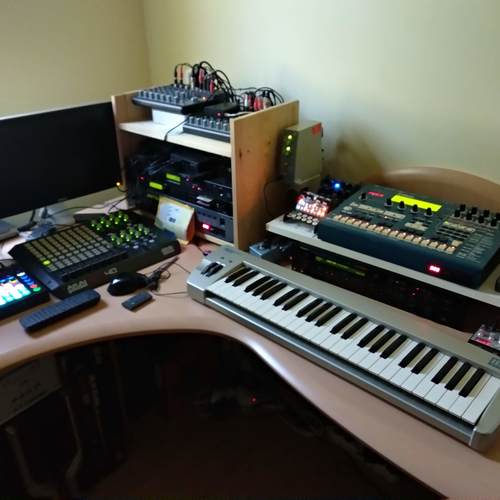
What is it? It has couple of tricks under it's sleeves and you can mix and blend those as you need. I'm using the midi routing capability to route midi messages from one midi source to an other one without any limitation. Sources and destinations can be USB MIDI devices, regular 5 pin MIDI equipment or even any virtual MIDI devices defined in IAC. That is just the tip of the iceberg. Once an input received, you can apply various filters and transformations to the incoming data before you send it out. I'm heavily using these features receiving data from my RM1X (which serves as the main production hub). MIDI clock and transport messages coming from RM1X routed to the USB connected equipment (Novation Circuit, Modal Craft Rhythm) and they are happily slaving themselves to the master, starting and stopping their sequencers when start or stop button pressed on the RM1X.
Well, that's not a big deal you might think, but there's more. RM1X can command equipment that is hooked onto it, but the chances are quite high that, you need to change at least the MIDI channel info, before the message hits the other equipment on the output. Sometimes you have to remove unwanted parts of the MIDI messages as well (RM1X very well known to spit out some MIDI gibberish, that can be overheard by external gears). Channel filter and message filter capabilities are here to save your life. I really don't know how anyone can live without this gem in a dawless setup. If you check my gear list, I can tell, that all of my MIDI equipment hooked up to RM1X and controlled perfectly. Combine MIDIPipe with PD (pure data) and you have not limits using your gears. Sure it requires some elbow grease and time to get familiar with it, but I can tell you, you'll not regret the time you invested into mastering this tool.


CopperLan is technically a framework as per definition, but it comes with all the bells and whistles when you download the package and you can use as a standalone software via CopperLan Manager, that comes with the entire package. When you install the package, CopperLan Manager gets installed too and with that, you can configure and connect Virtual MIDI driver and define your own Virtual MIDI ports. Via the manager you can define routing between those virtual ports on a per channel basis and system messages too as a separate channel. It's a merger, splitter and router instantly out of the box.
My use case for CopperLan Virtual MIDI drivers and ports can be described as follows:
I want to use [AKAI APC 40](https://equipboard.com/items/akai-professional-apc40-ableton-performance-controller) controller to be connected to the following softwares at the same time:
- Reaper 6
- Native Instruments Traktor Pro 3
Unfortunately when softwares are configured to use an external hardware, they grab an exclusive connection wich has the following drawbacks:
- Only single software can use the controller, the other one is not
- No sysex message can be sent from the software (Traktor) to change the operation mode of the controller
- When controller get disconnected, it is almost impossible to reconnect with the software without restarting it, during the restart the application crash (Traktor)
- You can not control the messages sent back and forth between the controller and the software
- If the controller not an officially supported one, your possibilities are fairly limited
Overcoming on these limitations and annoyances I configured CopperLan via the manager to create 32 Virtual MIDI ports. My controller MIDI IN/OUT connected in the Manager to a pair of Virtual MIDI port, and in the softwares (Reaper 6, Traktor) I also configured to use different Virtual MIDI port pairs for input and output. In the CopperLan manager I can easily connect those Virtual MIDI IN/OUT ports and establish a full MIDI communication between these elements. This is already worth the effort to design your connections. The benefit I'm getting out of it, is that I can freely turn off my controller, unplug, re-plug and the softwares do not crash. Moreover when the controller reconnected, CopperLan automatically restores the connection defined in the CopperLan Manager and you can use it as nothing has happened. The interconnection between the softwares work the very same way. If I want use Traktor, APC 40 and Reaper at the same time I can. But when I close for instance Reaper, I do not need to restart anything Traktor and APC 40 still communicates with each other.
Of course I'll take an extra step as well and I migrate my custom (Pure Data)[https://equipboard.com/items/pure-data] programs and I connect CopperLan Virtual MIDI ports via Pure Data. This gives me limitless options to use the external controller way beyond the possibilities that those softwares offer. This was not easily possible in Windows until I started to use CopperLan. On Mac I used IAC, Pure Data to connect all my external gears, softwares. On Linux I used Mididings and Pure Data for the very same reason, but on Windows it was not possible (at least in an easy way). Something I'll use CopperLan too in the future, to connect via LAN my Mac based environment and control from my main PC via CopperLan manager remotely in a headless manner. My Mac based home studio in a separate room with all the synths, mixers, outboard effects and I have a second place in the house with my main PC workstation with the digital piano. I'd like to consolidate all my tactile groove boxes, controllers, keyboards to performs music while I'm controlling all my hardwares and softwares too, that are maybe physically not even there. I also want this setup to be fail safe and flexible enough to add remove elements as I want without the need to reconfigure everything. CopperLan and Pure Data just gives me this possibility to use my PC workstation in a very heterogenous environment.
Having said all that I would look on CopperLan as a complete ecosystem which you can use standalone, in a networked environment too and if you are adventurous, in embedded bespoke development projects as well, depending on your level of experties connecting various elements via MIDI.
The only negative point is the CopperLan Manager interface. It's not my cup of tea, but once you get used to it, it does the job effectively and you can manage the connection between the Virtual MIDI interfaces.
Other Gear 0
Nothing in this list yet.
Wishlist 0
Nothing here yet.