This page about Apple Logic Bitcrusher is a stub. You can help improve it:


Pricing and availability


* Product prices and availability are updated by Equipboard every 24hrs and are subject to change. Equipboard may receive compensation for purchases made at participating retailers linked on this site. This compensation does not affect what products or prices are displayed, or the order of prices listed. For more information, please refer to our affiliate disclosure.
Description
Transform your music with the Apple Logic Bitcrusher, an essential plugin for producers seeking to add a unique edge to their tracks. This powerful bit crusher plugin, available in the Music Software category, offers unparalleled flexibility and precision for those looking to degrade audio quality intentionally for creative effect. Designed for seamless integration with Apple Logic Pro, this plugin offers an easy-to-use interface that allows you to manipulate sound with precision.
The Apple Logic Bitcrusher excels in creating a wide range of effects, from subtle vintage warmth to harsh digital distortion. With its ability to reduce the bit rate and sample rate of your audio, you can achieve gritty, lo-fi textures reminiscent of classic 8-bit video games or aggressive, cutting-edge tones perfect for modern electronic music. Ideal for producers who want to explore the sonic possibilities of digital degradation, this plugin is versatile enough to be used in various genres, from hip-hop to electronic to experimental music.
Key Features:
- Precise control over bit rate and sample rate reduction for customizable effects
- Seamless integration with Apple Logic Pro for an intuitive user experience
- Wide range of effects from vintage warmth to modern digital distortion
- Perfect for adding lo-fi textures or aggressive tones to your music
- Suitable for various genres, including hip-hop, electronic, and experimental music
Videos

Mitchel Pigsley
Logic Pro 9 Tutorial - BitCrusher Plugin Overview
Logic Pro 9 Tutorial - BitCrusher Plugin Overview
Mitchel Pigsley
Logic Tips – Bitcrusher

MusicTech
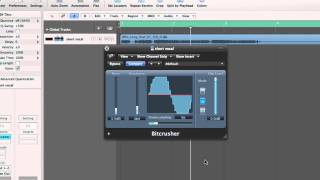
Logic Pro Tutorial - Bitcrusher

Eddshed
Logic Pro X - Bit Crusher Tutorial

Audio Sharp
Reviews
Owner Insights
We analyzed real musician discussions from forums and Reddit to find what players love, question, and tweak about Apple Logic Bitcrusher.
Software and compatibility
-
Switching between DAWs on a Mac, especially when running Ableton in Rosetta mode, can cause audio degradation in Logic Pro on M1 chips.
Source -
Logic Pro may encounter issues if another DAW is using the system's sound drivers, requiring a computer restart to resolve sound quality problems.
Source -
Sample rate mismatches between Logic Pro and audio interfaces can cause distorted audio playback, necessitating consistent sample rate settings across devices.
Source
Setup and maintenance
-
Set Logic Pro's I/O Buffer Size to 1024 samples to reduce CPU strain and potential audio issues during mixing, despite increased latency.
Source -
To reduce the original signal volume before it reaches plugins, adjust the "Gain" in the inspector panel or use a gain plugin from the "Utility" folder.
Source
Features and functionality
-
Disabling plugins by holding "option" unloads them from resources, which can help identify CPU-intensive plugins in Logic Pro.
Source -
The mix knob in Logic Pro's bitcrusher functions as a dual control, simultaneously increasing wet signal volume and decreasing dry signal volume as it's turned up.
Source
Critic Reviews
5.0 out of 5
Based on 0 Reviews and 1 Rating
Artist usage
Add artist

Mentioned by sound engineer Trevor Muzzy in this Sound on Sound interview about the production of "Starships". An image of the settings can be seen here.
"You can see that the pre-chorus and chorus vocals have a lot of timing and comp edits. They were imported directly from the session I cut the vocals in. I did not merge or consolidate them, they just are the way they are. There's quite a lot going on with the vocals. I tried to create a nice basic vocal sound using the inserts, and once they sat well in the track, most of the sonic variations between the sections came from the sends. There was no tuning on the rapping, but the sung vocals in this track had a fair amount of tuning with the Logic Pitch Corrector plug-in on the inserts. The tuning is part of the sound of the record, with vocals needing to be very, very precise. In some cases, we pitched them up or down for vocal effects. Logic Pitch Corrector is a little harder-sounding than Auto-Tune, but it has its own distinct sound that we liked for the vocals in this track. It really fits the song.
"The other inserts on most of the vocals were all Waves: the C1 compressor, SSL Channel, Renaissance Channel, De-Esser, Renaissance Compressor, API 2500, and the Logic Channel EQ. The C1 compressor is the first in line on several lead vocals, and it does the same Pensado trick I used on the guitars, which is to compress a specific band — in the case of the verse lead vocal, around 2849Hz — focusing on notes that sounded a little harsh. It smooths this problem out more elegantly than using an EQ. Then the signal goes through the R Channel with some basic EQ, cutting significantly at 281Hz. Again, it was a matter of removing some less pleasant things to let the nice aspects shine. I bypassed the compressor in the R Channel. I needed a bit of de-essing, and the Waves De-Esser is a great all-purpose de-esser, in this case working at 5634Hz with the side-chain set to high-pass.
"There were two more compressors on her vocal. There was no science behind this, it was just a matter of experimenting to find a unique sound. The first is the Renaissance Compressor, which I love and which is set to a fast attack time and takes off about 6dB, so quite subtle, not too intense. The API 2500 is set pretty aggressively and you can hear it pumping a little bit on the vocal. It was already in the session — it had been used on the demo vocal. I pulled it over to Nicki's channel and liked what it was doing, so I adjusted it to fit her vocal. Finally, the Channel EQ notches quite a lot around 600Hz and a little bit more around 235Hz, just carving out some low-mids to make the vocal sit better in the track.
"Regarding the sends, there are some really distinct things happening here. The main lead vocal was similar throughout the song, but I tweaked it as it went along. The pre-chorus and chorus vocals all have Bus 1, which went to the same Altiverb effect that I had on the drums, to add some ambience to the vocal. The rap verses are much drier. Bus 35 is the Waves Doubler, which gives a bit of spread to the lead vocal — I used this on the rap as well as on the sung vocals. Bus 4 is the Waves CLA with a drastic telephone effect. That was another effect that was there from the demo version and added a cool quality. Bus 50 is the [Sound Toys] Echo Boy, which is the main plug-in I use for delay throws, whenever I want to repeat a word. In this case it's on a quarter-note Echoplex setting. It's a single, mono echo that I panned a little bit to the side. Bus 7 has the Waves VX1 Maserati Vocal Enhancer, and that was, again, a plug-in I inherited. It is set to a very compressed, bright vocal sound that I brought in and out to add some sparkle to the sound when necessary.
"Bus 6 has the main reverb in the track, which you are hearing in the pre-chorus and chorus, and which is a Lexicon Plate plug-in on the 'VocalPlate2' preset. It's a really bright, over-the-top plate sound that is not trying to blend in but that's actually brightening the vocal up a lot. It's loud and wet. Busses 16 and 29 are different stereo delays: the Waves SuperTap was already in the session and I kept it, and the other is a standard Logic stereo delay that I use all the time on vocals. Bus 3 is the Logic Bitcrusher, which gives the vocals a grainy sound. The vocals already had an aggressive sonic quality to them because of the 251-TG2-1176 chain, and the Bitcrusher enhanced that. It's nasty, there's nothing nice about a bit-crusher, and it adds a bit of attitude. I used it on some of the background vocals as well, like in the second verse, where you have the pitch effects. You can hear it in the very processed harmony vocals that come in. That was something we added when we were doing the final vocal comp and arrangement. It gave that second verse some more life and helped the track build. The background vocals are a very big part of the hook vocal sound as well, and, for example, track 140 has many effects on it. That actually contains the vocals of the demo singers. Nicki's lead and background vocals are dominant, but in the chorus the background vocals from Mohombi and Wayne Hector added to the crowd feeling. The chorus vocals are really big in this track, and they were part of that.”


Album Usage
The Apple Logic Bitcrusher has been featured on the following albums:

Genre Usage
Based on how artists on Equipboard use this gear, it is most commonly found in the following genres.
Used With
Based on how musicians on Equipboard use Apple Logic Bitcrusher, it is most commonly used with the following gear.


-s.webp?v=1784124154)


More Apple Bit Crusher Plugins

$45.00 - $65.00
in Bit Crusher Plugins Rank


$0.00
in Bit Crusher Plugins Rank


$0.00
in Bit Crusher Plugins Rank


$0.00
in Bit Crusher Plugins Rank

$31.00 - $49.00
in Bit Crusher Plugins Rank

$86.00 - $87.00
in Bit Crusher Plugins Rank

$69.00
in Bit Crusher Plugins Rank

$69.00 - $80.82
in Bit Crusher Plugins Rank

$19.00
in Bit Crusher Plugins Rank


Community setups


Similar


Most Popular Bit Crusher Plugins
Most Popular Brands
-
Added to Equipboard on by
 thagerty
GearIQ 122
-


