

Pricing and availability


* Product prices and availability are updated by Equipboard every 24hrs and are subject to change. Equipboard may receive compensation for purchases made at participating retailers linked on this site. This compensation does not affect what products or prices are displayed, or the order of prices listed. For more information, please refer to our affiliate disclosure.
Description
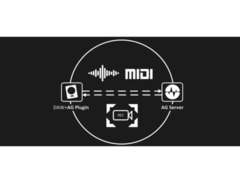
AudioGridder is a network bridge for audio and MIDI that allows for offloading the DSP processing of audio plugins to remote computers. This can come in handy when mixing complex projects or running CPU intensive instruments.
HOW DOES IT WORK?
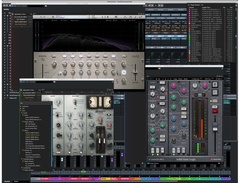
AudioGridder Server runs on a computer hosting your effect and instrument plugins. On your workstation, on which you run your DAW, you use the AudioGridder FX or instrument plugin to access your plugin library over the network. The plugin is looking for available servers on your network and once connected allows you to create insert chains or load instruments. Midi and audio data from your DAW will be streamed over the network, processed on the server and streamed back.
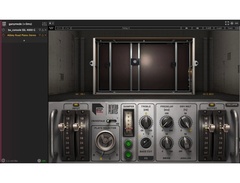
To control a plugin and adjust its settings, AudioGridder is capturing the plugin UI on the server side and streaming it to the client. At the same time it is capturing mouse and keyboard events on the client and replaying them on the server.
Alternatively, AudioGridder supports a Generic Editor, that allows for direct access to the parameters of a plugin.
HIGHLIGHTS
FEATURES
- VST2 / VST3 / AAX / AudioUnit (macOS only)
- Effect & Instrument plugins
- Latency compensation
- Sandboxing (chains or single plugins)
- 32/64 bit float sample processing
- Audio over network
- Midi over network
- Remote control of plugin UIs
- Generic Plugin Parameter Editor
- Automation
- Plugin search
COMPATIBILITY
- Server: macOS 10.7+ (Intel/Apple), Windows 7+, Linux 64bit (experimental)
- Plugin: macOS 10.7+ (Intel/Apple), Windows 7+, Linux 64bit
- The server supports AudioUnit (macOS only) and VST2/VST3 plugins
- The plugin is available as AudioUnit (macOS only) and VST2/VST3/AAX
- Tested DAWs: Cubase, Pro Tools 12+, Logic Pro X, Reaper, Ableton Live, Gig Performer, Studio One, but others are being used too
Instructions for setting up AudioGridder for use with Gig Performer can be found here.
SERVER
The server supports VST2, VST3 and AudioUnit (on macOS only) plugin formats and is available for macOS and Windows. There are multiple possibilities for your setup. It is suggested, that you dedicate each server instance to a single remote DAW workspace. That is because each server can only stream a single UI at the same time.
The server is implemented as tray application on all platforms. Just click on the tray icon to bring up the settings, plugin manager or statistics window.
You can run multiple parallel UI user sessions on macOS and Windows. Setup a user for each remote workspace, create a UI session (via VNC, note that RDP might not be working reliably with AudioGridder) and run a separate server instance in each session. You need to assign a different server ID to each instance (in the server settings). In your DAW you can address each server instance from the AudioGridder plugin via “server[:ID]” notation.
PLUGIN
The plugin is currently supported on macOS, Windows and Linux as VST2, VST3, AAX and AudioUnit (on macOS only).
With the AudioGridder FX plugin you can plug a remote insert effect chain into your DAW’s channel inserts. From there you can insert any FX plugin available on the connected server.
Instruments work similarly. Create a software instrument track in your DAW and select the AudioGridder plugin as instrument. Now you can load any of the instrument plugins available on the server.
The MIDI plugin can be used for MIDI effects.
Each AudioGridder plugin instance will connect to a single remote server instance. But each separate loaded plugin instance can connect to a different server, so you can connect to multiple servers from your DAW at the same time.
Product specs
| Plugin Format | VST, AU, AAX |
| Operating Systems | Mac, Windows |
| Downloadable | free |
Videos

Andreas Pohl
Mixing with AudioGridder (Demo)
Mixing with AudioGridder (Demo)
Andreas Pohl

Free Extra CPU Power For Plugins?? | AudioGridder

DECAP
AudioGridder setup with Acustica Plugins

JALPINIST

Audio Gridder - Outsourcing DSP Processing of VST Plugins to Remote Computers

AMW Music
Dennis Braunsdorf - Can Audiogridder replace Vienna Ensemble Pro?

Private Kitchen
Improve your DAW with AudioGridder

Frankie Tedesco
DSP load distribution with Audiogridder and control using the MP Controller

MP Midi Controller
Reviews
Owner Insights
We analyzed real musician discussions from forums and Reddit to find what players love, question, and tweak about AudioGridder.
Features and functionality
Comparisons
Use cases and applications
-
Users suggest that AudioGridder could be beneficial during the mixdown phase where latency is less of a concern.
Source
Software and compatibility
-
It is unclear if the secondary computer needs to have Logic installed, raising questions about compatibility requirements for AudioGridder.
Source -
Running plugins outside of Cubase using AudioGridder can circumvent plugin-related crashes, though it may introduce new processing management challenges.
Source -
High CPU usage observed in Logic Pro when using AudioGridder without loading instruments, primarily involving AUhostingService and AudiogridderPluginTray processes.
Source -
Downgrading to AudioGridder version 1.1.1 resolves the CPU usage problem, suggesting potential issues in newer versions.
Source -
It's noted that AudioGridder may use an entire CPU core during operation, potentially explaining high CPU usage without active plugins loaded.
Source
User experience
-
Some users express hesitation due to past issues with similar tools like Logic Node, highlighting concerns about stability and reliability.
Source -
Users have mixed experiences with performance; some report improved stability while others note potential process conflicts when offloading plugins.
Source -
Users report minimal support and maintenance from the developer, with bug reports on GitHub remaining unaddressed.
Source
5.0 out of 5
Based on 0 Reviews and 1 Rating
More Virtual Patchbay Plugins

$95.00 - $104.10
in Virtual Patchbay Plugins Rank


$49.00
in Virtual Patchbay Plugins Rank


in Virtual Patchbay Plugins Rank


$399.00
in Virtual Patchbay Plugins Rank


Artist usage


Community setups


Similar


Most Popular Brands
-
Added to Equipboard on by
 thatlkjguy
GearIQ 4716
-


