

Pricing and availability


* Product prices and availability are updated by Equipboard every 24hrs and are subject to change. Equipboard may receive compensation for purchases made at participating retailers linked on this site. This compensation does not affect what products or prices are displayed, or the order of prices listed. For more information, please refer to our affiliate disclosure.
Description
Max4Live is the ultimate tool for musicians and producers looking to push the boundaries of their creative potential within Ableton Live. Co-developed by Ableton and Cycling '74, this powerful plugin integrates seamlessly into your Live environment, transforming it into a dynamic playground for audio experimentation. Whether you're a seasoned producer or just starting out, Max4Live offers an intuitive interface that allows you to build custom audio and MIDI effects, instruments, and more, without needing extensive programming knowledge.
Dive into an expansive library of over 40 pre-built Max devices, or explore your own creations with the help of step-by-step tutorials. From designing unique synths to crafting bespoke effects, Max4Live empowers you to visually assemble elements like frequency controls, gain stages, and filters with ease. The music never stops as you edit—devices continue to play within Live, ensuring a non-stop workflow.
Max4Live also includes unique elements like the Step Sequencer, Buffer Shuffler, and Loop Shifter, expanding your toolkit for creating innovative sounds. Additionally, it supports video synthesis and animation via Jitter objects, opening up new dimensions for multimedia projects. Connect with a vibrant community of creators and share your inventions, making Max4Live not just a tool, but a gateway to a world of sonic exploration.
Key Features:
- Seamless integration with Ableton Live
- Co-developed by Ableton and Cycling '74
- Build custom audio effects, MIDI effects, and instruments
- Includes over 40 pre-built Max devices
- Unique elements: Step Sequencer, Buffer Shuffler, Loop Shifter
- Supports video synthesis and animation via Jitter objects
- Continuous playback while editing in Live
- Comprehensive step-by-step tutorials
Videos

LNA Does Audio Stuff
Getting Started With Max For Live
Getting Started With Max For Live
LNA Does Audio Stuff
These will 10X Your Workflow (5 INSANE Max for Live Devices)

TheCosmicAcademy
10 Max for Live Devices You Should Know (2024) | Side Brain

Side Brain
These Max 4 Live Devices Shouldn't Be Legal...

Zdrewe
Copy Machine Max for Live Device Walkthrough

ringtone . tools
5 Max for Live Devices You Should Know

EDM Tips
Learn How To Build Max For Live Devices, A Beginner's Guide (Ableton User Group, Cape Town)

ELPHNT
Top Max For Live Devices of 2023!

Fearless Beatz
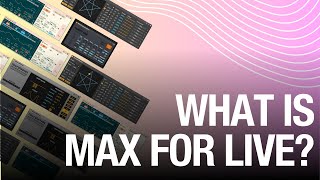
What Is Max For Live?

Attack Magazine
Reviews
Owner Insights
We analyzed real musician discussions from forums and Reddit to find what players love, question, and tweak about Max4Live.
User experience
Use cases and applications
-
MDD__SNAKE v3 serves as an acid-style bass line generator, resembling a sequencer, and is particularly noted for its engaging and experimental sound outputs.
Source -
The Loop Flip device by XY Studio Tools excels at generating vocal chop variations, especially useful during breakdowns or 8-bar bridges for added musical intrigue.
Source -
TapPanZeit offers customizable delay with modulatable delay voice volume, creating unique sounds, particularly suitable for dub music production.
Source -
A user crafted a patch to use a Guitar Hero controller as a MIDI device, showcasing M4L's flexibility in unconventional musical applications.
Source -
The device "Roulette" is appreciated for its unique arpeggiator capabilities, allowing for creative, predictable convolutions in music production.
Source -
The device Tiramisu is valued for sound effect design, particularly for gunshots, kicks, and snares, though it's broken in Live 11 without updates.
Source
Features and functionality
-
Tintinnabulator applies Arvo Pärt's tintinnabulation technique in real-time MIDI processing, offering unique automatic harmony generation with four T-voice inversions and mirroring.
Source -
The RM Spacebar device enables MIDI mapping of the transport function to a single button, allowing for footswitch control of start/stop, unlike traditional two-button setups.
Source -
M4L enables project-wide macros to modulate parameters across all channels, a feature some users find crucial for complex setups.
Source -
Fors devices are noted for their minimalist yet distinctive interfaces, enhancing user experience, especially when used with Ableton's Push.
Source -
Users highlight the ability to trigger audio clips with specific MIDI notes, enhancing live performance setup possibilities.
Source -
NTPD2 by ELPHNT serves as an effective notepad for tracks, enhancing workflow efficiency in music projects.
Source -
Duck Buddy is highlighted as an unmatched sidechain solution, outperforming other market options for its ease of use and effectiveness.
Source
Comparisons
-
Some users compare M4L to Bitwig's built-in modulation capabilities, noting that Bitwig offers modulation of all DAW parameters without external devices.
Source
Software and compatibility
-
It's noted that some M4L devices may stop functioning after Ableton updates if the developer no longer supports them.
Source -
Several users recommend the device LoadeR by ValiumDuPeuple for its capability to load effects and plugins via key mapping, streamlining the production process.
Source -
The Chiral synth by Fors is praised for its simplicity and MPE compatibility, offering a unique playing experience akin to an alien instrument.
Source
Critic Reviews
4.5 out of 5
Based on 1 Review and 5 Ratings

147
so deep
I gave this a five because this is what I think it can be if I was able to dig deep enough into it.. the crazy and sometimes cooky devices from the user library available for download and the devices that come with it in Ableton are worth the 5 alone.. but good luck building anything in here unless you are a genius.. building from scratch in Reaktor is more manageable..
Artist usage
Add artist
I don’t use or own too much outboard gear so I can actually take a lot of my studio with me when I go on stage. Therefore, the focus is not on compressing my studio setup but rather on solving problems, simply because there are things I can do in the studio that are not possible in the live environment. To do this, I work with my assistant, Nibo, to build instruments, both software and hardware, that will serve a specific purpose in my live set. Where necessary, we will program Max for Live and build stand-alone applications for the live set, even if they’re only used for one or two songs. It’s a lot of effort for only a little use, but it’s important for me to work.


"I use Max For Live a little but I've never got too deep into creating my own devices with it"

Genre Usage
Based on how artists on Equipboard use this gear, it is most commonly found in the following genres.
Used With
Based on how musicians on Equipboard use Max4Live, it is most commonly used with the following gear.


-s.webp?v=1783695508)


More Virtual Patchbay Plugins

$94.00 - $104.10
in Virtual Patchbay Plugins Rank


$49.00
in Virtual Patchbay Plugins Rank


in Virtual Patchbay Plugins Rank


$399.00
in Virtual Patchbay Plugins Rank


Accessories & Related Items


Community setups


Similar


Most Popular Brands
-
Added to Equipboard on by
 smallcolin
Gear IQ 90
-


