This page about Waves StudioRack is a stub. You can help improve it:

Pricing and availability

* Product prices and availability are updated by Equipboard every 24hrs and are subject to change. Equipboard may receive compensation for purchases made at participating retailers linked on this site. This compensation does not affect what products or prices are displayed, or the order of prices listed. For more information, please refer to our affiliate disclosure.

Description

Step into the world of limitless audio possibilities with the Waves StudioRack. This virtual patchbay plugin is a must-have for any music producer looking to streamline their plugin chain management. Designed to integrate seamlessly with any DAW, StudioRack allows you to create intricate effects chains without altering your original session. This tool is perfect for those who enjoy experimenting with complex signal routing, offering a creative playground where your ideas can truly flourish.

With the ability to host up to eight plugins per chain, Waves StudioRack gives you full control over your audio processing. The powerful macro controls let you assign multiple parameters to a single knob, enabling dynamic and intuitive sound shaping. Whether you're a seasoned professional or just starting out, StudioRack's user-friendly interface makes it easy to transform your creative visions into reality.

Perfect for live performances or studio sessions, StudioRack supports both stereo and mono tracks and is compatible with Waves plugins and third-party VST3 plugins. Its advanced parallel processing capabilities allow for the creation of split racks and multiband processing all within one plugin, providing a comprehensive solution for intricate audio routing and effects stacking.

Key Features:

  • Host up to eight plugins per chain
  • Compatible with Waves and third-party VST3 plugins
  • Intuitive macro controls for dynamic sound shaping
  • Supports stereo and mono tracks
  • Advanced parallel processing with split racks and multiband capabilities
  • Seamless integration with any DAW
  • User-friendly interface for all skill levels
Waves Audio

Waves Audio

Creating Plugin Chains with the New Waves StudioRack
Video thumbnail for Creating Plugin Chains with the New Waves StudioRack by Waves Audio

Creating Plugin Chains with the New Waves StudioRack

Waves Audio

Waves Audio

Video thumbnail for Holy Grail Rap Vocal Chain | Waves StudioRack Edition by Sean Divine

Holy Grail Rap Vocal Chain | Waves StudioRack Edition

Sean Divine
Sean Divine

Video thumbnail for Waves StudioRack Review by Production Expert

Waves StudioRack Review

Production Expert
Production Expert

Video thumbnail for 5 reasons why you need the FREE Waves Studio Rack V14 by White Noise Studio

5 reasons why you need the FREE Waves Studio Rack V14

White Noise Studio
White Noise Studio

Video thumbnail for 4 Reasons Why You Should Use The Waves StudioRack In Every Session by Audio Sorcerer

4 Reasons Why You Should Use The Waves StudioRack In Every Session

Audio Sorcerer

Audio Sorcerer

Reviews

Owner Insights

We analyzed real musician discussions from forums and Reddit to find what players love, question, and tweak about Waves StudioRack.

Software and compatibility

  • Users report potential compatibility issues between Waves StudioRack and Studio One 5, possibly impacting CPU performance negatively.

    Source
  • StudioRack V14 supports only Waves V13 and V14 plugins on Windows 10/11 and macOS 10.15.7, 11.6.5, and 12.4, requiring correct version alignment.

    Source

Features and functionality

  • High sample rates might exacerbate CPU overload issues when using Waves StudioRack, suggesting users consider adjusting their sample rate settings.

    Source
  • Some users found that reinstalling the Waves bundle and allowing auto-run applications resolved plugin recognition issues in StudioRack.

    Source

User experience

  • Some users recommend consulting Waves' compatibility and system requirements to troubleshoot CPU overload issues with StudioRack.

    Source

Use cases and applications

  • Users experiencing issues with StudioRack suggest reconsidering its placement in the signal chain, possibly moving EQs outside of the plugin.

    Source

Setup and maintenance

  • Troubleshooting plugin visibility issues in StudioRack may involve checking and aligning plugin versions, ensuring all necessary components are installed.

    Source

Critic Reviews

Waves StudioRack & StudioVerse Review: Free Mix-Ready Chains for Your DAW | Headliner Magazine

headlinerhub.com

Waves StudioRack is a game-changer for audio professionals, offering an intuitive way to create and save complex VST3 plugin chains across various DAWs. Its ability to integrate third-party plugins and the innovative StudioVerse feature—leveraging AI for tailored suggestions—makes it a standout tool. However, it does require users to navigate a substantial library of plugins, which can be overwhelming. Additionally, while it excels in flexibility and workflow efficiency, some may find it limited to only VST3 compatibility. Overall, this plugin is a must-have for anyone looking to streamline their audio production process, but be prepared for a learning curve.

positive

Waves StudioRack - Attack Magazine

attackmagazine.com

Waves StudioRack shines as a versatile and intuitive plugin chainer, perfect for anyone deeply invested in Waves' ecosystem. Its ability to create complex effects chains through parallel and multiband processing is a significant advantage, making it a powerful tool for mixing. The user-friendly interface and the inclusion of macros streamline the workflow, allowing for creative possibilities without overwhelming complexity. However, the limitation of only supporting Waves plugins may deter those who use a broader range of software. Despite this, the free price tag and excellent stereo imaging features make it a valuable asset for both dedicated users and casual experimenters alike. Overall, StudioRack is a must-try, especially for those looking to enhance their mixing process.

positive

New Review: Waves StudioVerse and StudioRack Plug-in Chainer - Synth and Software

synthandsoftware.com

Waves StudioRack shines as a powerful plug-in chainer, particularly for users already invested in Waves' ecosystem. Its ability to create complex effect chains with VST3 compatibility enhances creativity and efficiency. While the free offering is enticing, the reliance on Waves-only plug-ins for full benefits can be limiting for non-Waves users. The AI-driven suggestions in StudioVerse provide a glimpse into professional mixing techniques but require a commitment to Waves products for optimal use. Overall, StudioRack is a clever and useful tool, especially for those ready to dive deeper into the Waves universe.

positive

Based on 0 Reviews and 0 Ratings

5 star
4 star
3 star
2 star
1 star

Artist usage

Add artist
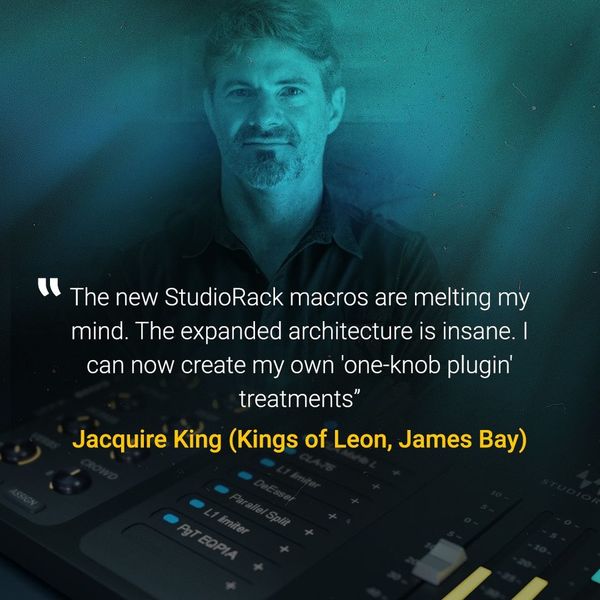
See how Jacquire King uses Waves StudioRack

Jacquire King

Music Producer, Audio Engineer

...
Verified via Photo

Featured in this August 19, 2020 Facebook post by Waves.

The new StudioRack macros are melting my mind. The expanded architecture is insane. I can now create my own "one-knob" plugin treatments.

Genre Usage

Based on how artists on Equipboard use this gear, it is most commonly found in the following genres.

More Waves Virtual Patchbay Plugins

Community setups

Similar