
By Gear Experts
Table of Contents

Equipboard
Equipboard is the world's largest community of artists and their gear. Read our review process.
We are reader-supported. When you buy through links on our site, we may earn an affiliate commission. Learn more.
Our Picks


Covers all bases. Mixing is streamlined yet precise.
Read more


Unique control over the filter chain for resonant sounds. Warns about clipping.
Read more
Lush sound in a small package. Infinite decay expands textural possibilities.
Read more

Automatically tailors sound to suit mix. Blendable algorithms.
Read more

Performs well above its price point. Assorted features for harmony and filtering.
Read more
Inexpensive, no-frills sound transformer. One-click mix solutions.
Read more
Enormous IR collection. Feature set considers every need.
Read more


Diverse feature set. Great for mixing.
Read more
Beautiful plate sounds. Three release modes for varied activation.
Read moreReverb is an underappreciated enhancer. It adds stylistic depth to any song, filling in the gaps between instruments for a thicker, fuller sound. Drums thunder, synths wail, vocals ring out as if accompanied by a whisper. All of this is reverb at play.
The advent of the digital age has made reverb widely available to us in compact software. This article aims to bring the best of the bunch to the forefront, saving you time in your search for that perfect atmospheric flourish.
What is a reverb plugin?
The word “reverb” is an abbreviation of “reverberation”, referring to the momentary accumulation of acoustic reflections within a given space. In other words, reverb is made up of the reflections of echoes.
Reverb plugins attempt to replicate this acoustical phenomenon digitally. They replay minute, filtered samples of a sound source sometime after the original, gradually decreasing in volume and frequency. The result does not always sound authentic, but the distinct timbre has become desirable in recent years for its high treble content.
There are two main types of reverb plugins, both of which produce the same effect. Algorithmic reverbs mathematically sequence samples of the input signal, creating the illusion of reflections. Convolution reverbs sample acoustic signatures known as impulse responses (IRs) to accurately model real spaces. Some plugins combine the attributes of both and are called hybrid reverbs.
Understanding Reverb
The sound of natural reverb varies with the physical properties of the environment. A bigger room with smooth, dense walls means longer, more sustained reflections. A smaller room with more porous walls means a much shorter reverberation. These factors are accounted for in reverb plugins under different parameters, each with their own names.
Decay: When a sound wave reflects off of a surface, it transfers some of its kinetic energy to that surface. The sound wave will continue to do this until it has lost all of its kinetic energy, dissipating into silence. This gradual dissolution is called a decay. In reverb plugins, this is the duration of the echo according to a volume and feedback curve.
Room Size: Decay duration is usually proportional to the size of a space; the greater the distance between two surfaces, the longer a sound wave can go without losing kinetic energy to surface contact. This is why larger spaces like churches and arenas have more prolonged and apparent echoes. In plugins, this is imitated by varying the length of each delay sample.
Diffusion: When sound waves diffuse (scatter off in different directions), the sound of their collective reverberations is less concentrated. The opposite holds true for sound waves that reflect uniformly. Reverb plugins simulate this variation by adjusting the intervals between sample playback.
Damping: Damping is the outcome of friction between sound waves and particular surfaces. The more friction between the sound wave and a material, the more quickly the sound wave transfers its kinetic energy and decays. Certain venues take advantage of this to tame reverb intensity, setting up treatments like foam or felt at key points of surface contact. Materials like foam are used because they are porous, having pockets in which sound waves can get trapped for longer periods. Treble frequencies are the first to go during damping, imparting a duller sound quality to the remaining reflections, so some reverb plugins have gradual filters in imitation.
Pre-Delay: Reverb doesn’t always happen immediately and depending on your taste, you may not want it to. Instead, you may want the reverb to fade in shortly after the original signal. Pre-Delay allows you to do this, controlling the amount of time before the reverb activates.
Tail: The nickname given to the later reflections of the reverb.
The Selection Process
There are many reverb plugins that attempt to emulate classic hardware with the greatest accuracy. For this guide, such reverbs are avoided due to their overlap. We would be splitting hairs over which does it better otherwise.
There were three main factors in the selection criteria. First was the tonality; if you won’t enjoy the sound of the reverb, you won’t use it. Second was usability, whether that be a well-rounded feature set or general compatibility in a mix. Third was the uniqueness of those features, qualities that distinguished these plugins from other run-of-the-mill reverbs.
Valhalla VintageVerb
5.0 (127)


- Exceptional vintage sound, perfect for 80s-inspired music
- Transforms dry sounds into massive, smooth textures
- Versatile presets for various reverb styles
- Minimalistic, user-friendly interface
- See 6 more
| Plugin Format | AU, VST |
| Operating Systems | Mac, Windows |
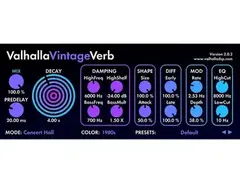
With an intuitive control layout and a gorgeous GUI, ValhallaVintageVerb is quickly becoming a top choice among producers and mix engineers. Its whopping 18 modes improve upon the early hardware reverbs of the 1970s and 1980s, adjusting bandwidth and the sample rate to simulate their artifacts. This can be tweaked to taste with the Color control and three selectable voices. Every mode comes with 70 seconds of decay time, a very generous amount.
Most of ValhallaVintageVerb’s parameters are just two knobs each, expediting workflow. Decay is the one exception: the main knob handles the mids, with all else handled by damping and shape. The “BassMult” parameter sets the lower frequencies’ decay proportional to the mids for an even, complimentary fadeout. This approach keeps ValhallaVintageVerb from sounding boomy, preparing it for the mix ahead of time.
See how artists use this


FabFilter Pro-R
5.0 (31)

- Competes with top hardware like AMS and Lexicon 480/960
- Natural and dynamic stereo effect enhances sound
- Easy-to-use interface with visually appealing design
- Extensive and high-quality presets, including unique spaces
- See 2 more
- Doesn't behave like traditional reverb, which may confuse some users
True to Fabilter’s model of highly tweakable plugins, Pro-R’s aim is maximum customizability. Standout features are a parametric decay and EQ for surgical fine tuning, tempo-syncable pre-delay, a “character” control for added tail echoes and pitch modulation, and a distinct “distance” control. A real-time spectral analyzer is the cherry on top.
Pro-R’s “Space” control is wonderfully unorthodox, combining the parameters for decay time and room size for intelligent acoustic modelling. The “Distance” control goes a step further, simulating how far an echo must travel to the listener in a physical space. This shifts emphasis onto the early echoes, the tail or in between depending on the setting. Both “Space” and “Distance” are independent of the decay rate and the pre-delay, so the timing of this reverb is quite fluid.
See how artists use this








Kushview Roboverb
4.0 (1)

| Plugin Format | VST, AU, AAX |
| Operating Systems | Mac, Windows |
Roboverb is a standard Schroeder reverb with an inventive twist: you can turn on and off each of the eight comb filters and four all-pass filters. This produces a metallic, resonant echo that ranges from stuttery delays to rippling buzzes. It’s great for sound design, since the filter variation can make your instrument sound like it’s in a PVC pipe or a basketball. That’s a whole other level of acoustic simulation that few reverbs possess.
Not all sounds from this reverb are out of left field, however. Roboverb functions just fine as a regular reverb that doesn’t get too in-your-face. This works best for light ambience that sits neatly in mixes, especially considering the independent controls for wet and dry levels. The eye-like display in the middle measures gain, going from green to red when the signal approaches clipping.
Soundtoys Little Plate
4.5 (27)
- Beautiful and high-quality reverb sound
- Exceptionally easy to use and quick to dial in
- Infinite reverb feature for creative possibilities
- Sounds fantastic on a wide range of tracks and genres
- See 5 more
- Lacks advanced features like predelay
- Limited tweaking options for in-depth sound design
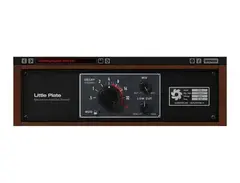
Little Plate is deceptively simple; with only four controls and a compact UI, you’ll be surprised by the lush atmospheres that come pouring out of it. The plugin is based on painstaking analysis of five EMT 140s, updated with an infinite decay and intensity modulation for the tail. The former is unusually smooth for such a feature, lacking artifacts and the robotic feeling of a loop.
Little Plate’s massive decay range is fantastic for automated reverbs, giving you extended control over how long a phrase rings out at any given time. Since there is a continuous tail at infinite decay, combining it with the modulation is also great for generating pulsating pads.
See how artists use this






iZotope Neoverb
4.0 (4)



- Intuitive interface with a fun central control for sound exploration
- Integrated EQ offers extensive and user-friendly sound shaping
- Reverb Assistant provides helpful starting points for different situations
- Machine learning adapts reverb needs to specific musical contexts
- See 2 more
- Some users prefer the sound of competing reverb plugins for organic qualities
- Regular price considered high without discounts
- Noticeable latency when used during live recording sessions
- Can be demanding on CPU in more complex projects
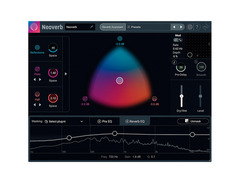
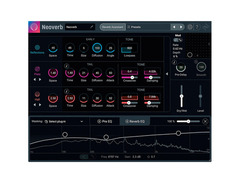
Neoverb utilizes iZotope’s intelligent EQ engine to tailor your reverb to the mix. All it takes is two steps; configure what you’re going for, then let the plugin listen to your tracks. Neoverb will proceed to pre-EQ the input to tame harsh frequencies, before equalizing the reverb itself.
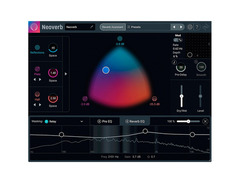
What sets Neoverb further apart from the rest is that you can blend three algorithms at once, each with their own parameters. This mix and match functionality works via a three-way grid, across which one can manually adjust intensity and ratio with a slider. It’s much faster and more hands-on than flipping through presets.
Audiority GrainSpace v2
4.5 (2)

GrainSpace is an instant gateway to cavernous, cinematic soundscapes. The flexibility of this granular reverb is incredible, with controls for how long in milliseconds each sample lasts and a pitch shifter ranging two octaves in either direction. Duration can be dually shaped with decay and a freeze control.
Users can get very creative with GrainSpace’s automation. Parameters can be assigned to two LFOs with 11 waveforms and two randomizers, while the freeze control can be synced to tempo. Filters are also in abundance, starting with the grain controls and ending at the “Smear” control, a chain of all-pass filters. The “Chord Resonator” harmonizes the output or functions as a comb filter.
AudioThing Things Texture

The first in AudioThing’s compact “Thing” series, Texture is an impressively efficient granular reverb. Pre-delay, volume and duration controls are exchanged for a wet/dry, a granule/reverb balance and a granule octave, stripping the plugin down to its bare essentials.
The mid/side button is an invaluable mixing tool. Activating it relegates the granular effects to the left and right channels, attenuating the center for quick stereo separation. Diffusion increases stereo width and reverb feedback, effectively functioning as a two-mode decay/damping switch. The simplicity of these controls make Texture an ideal entry point for getting to learn reverb, but even experienced producers will appreciate them as one-click fixes.
Audio Ease Altiverb 7
5.0 (21)
| Plugin Format | VST, AU, AAX |
| Operating Systems | Mac, Windows |
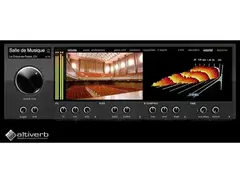
NOTE: Requires an iLok dongle. This convolution reverb, beloved by audio engineers for its astounding IR collection, is not for the faint of heart or wallet. Everything from Wendy Carlos’ personal EMT 140 to the Great Pyramid of Giza’s King’s Chamber has been sampled, with new IRs added every month. You can even create or import your own using one of three generation engines. The XL edition is compatible with Avid’s TDM technology and 5.1 surround sound.
Every parameter in Altiverb can be automated, including the IR, such that you can switch between reverbs in real time. Each can be reversed, gated in sync with the tempo at different note divisions, or given more treble with an additional algorithmic reverb. Room distance can be simulated independently in the left and right channels for custom spread.
See how artists use this


Waves H-Reverb
5.0 (13)


- Pristine and musical sound quality enhances synths and mixes
- Highly customizable with extensive parameter control
- User-friendly graphical interface with visual feedback
- Diverse and high-quality presets for quick setup
- See 4 more
- High processing power requirement
- Max reverb length limited to 12 seconds
Complete with a compressor, a de-esser, resonant filters and an analog-modeled input drive, H-Reverb is a hybrid reverb built for mix engineers. The reverb comes in two stages for thickening: the main “Input Echoes” signal can itself be reverberated with the “Output Echoes” control. Each IR can be auditioned with the “Test” button before you settle on it.
The IRs in H-Reverb are highly malleable. Even the side processing has its own EQ! Nonlinear decays are achieved easily with crossover gain, an ADSR envelope and the reverse button. Modulate the input amplitude and frequency to spice things up.
See how artists use this




Boscomac Floodverb

NOTE: Requires a full Reaktor license. Floodverb recalls the spaciest of plate reverbs, inundating your signal in a smooth, airy cascade. Besides the three band-stop filters that shape the tone, you really don’t need more than the diffusion and intensity controls for an incredible sound. The fun actually begins with Floodverb’s three interactive decay modes.
“Fixed” gives you the choice between a linear decay or a fixed infinite stream; “Ducked” keeps the reverb going until a dynamic threshold is met; and the “Controlled” mode turns the reverb on and off with MIDI. “Controlled” is useful for keeping feedback from getting out of hand; stack layer upon layer of sustained reverb and then cancel it with a single note. The “Smooth” knob adjusts the quickness of this fadeout. Setting it short while rapidly alternating the MIDI command creates a light stutter effect.
Honorable Mentions
Smartelectronix Ambience
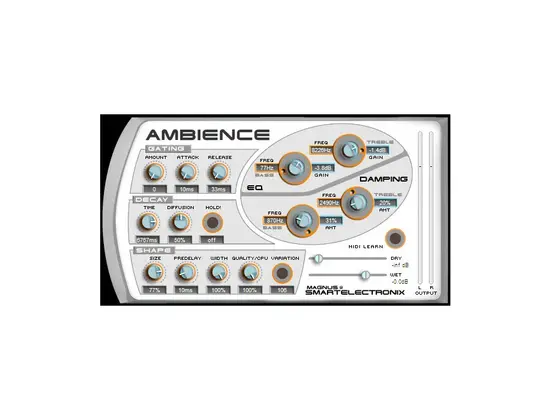
Ambience is one of the earliest free reverb plugins and still one of the most versatile. Unfortunately, its age means that certain DAWs have stopped supporting its VST formatting. Those who are able to use it may find the reverb to be too grainy at longer decays.
MeldaProduction MReverbMB
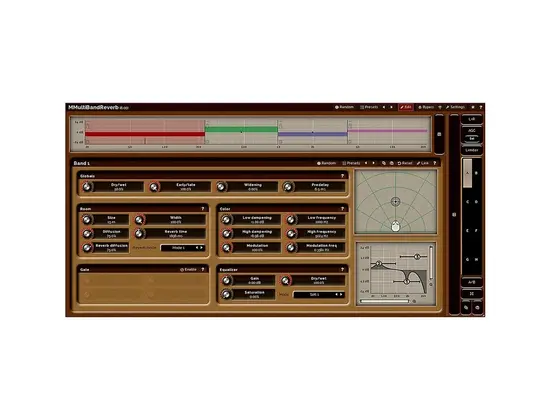
A neatly-organized six-band reverb with stereo visualization. Adjusting the EQ and band crossover can generate provocative filter sweeps, but overall the digital quality is too apparent.
Acon Digital Verberate 2
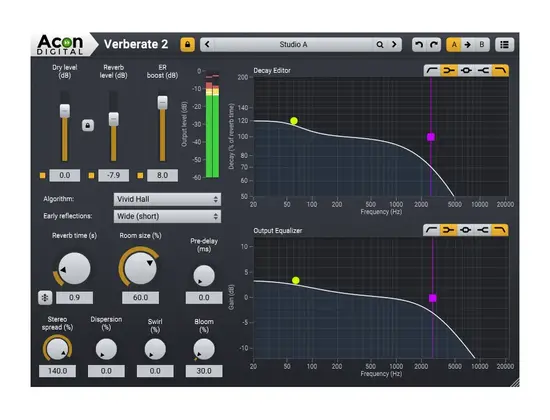
Verberate 2 has a very realistic reverb engine that is free of comb filtering, but only two algorithms for it. However, the parametric EQ and decay make it a cheaper alternative to Pro-R. The pitch-modulating “Swirl” control is another fun feature.
Top Ranked Reverb Plugins on Equipboard

$37.00 - $349.00
5.0 (24)
5.0 (24)


About the authors
Thomas resides in Southern Connecticut. He is a graduate of Boston College with a B.S. in Neuroscience and a double minor in Finance and Philosophy. At BC, Thomas was a DJ and hosted his own two-hour show, The Holtz Effect, for WZBC Newton, curating song sets, spotlighting underground talent and interviewing Grammy-nominated artists. Additionally, he was a member of the Electronic State of Mind DJ/production club, moving from Treasurer to Vice President and finally serving as President. As a vocalist, Thomas sang as a baritone with the BC bOp! Jazz Ensemble and has also performed solos at The Jazz Corner in Hilton Head, SC and Birdland in NYC. Thomas has written for various media outlets as a freelance contributor. In his free time, he enjoys volunteering and is an advocate for Alzheimer's research and for serving patients and families facing a pediatric health crisis. Thomas’ hobbies include running, hiking, guitar and rare bird sightings. He is always up for a good meal and good conversation. Read more
New in Reverb Plugins


-m.webp?v=1781711865)


-m.webp?v=1783581851)


-m.webp?v=1781674226)


$49.00 - $199.00
in Reverb Plugins Rank


$29.99 - $49.99
in Reverb Plugins Rank


$29.99 - $30.00
in Reverb Plugins Rank


-m.webp?v=1784268517)