

Pricing and availability
We compare 600+ stores and found this item at 3 stores. Prices updated .
Store
Reviews
Price




Price History
Based on price data from 1 merchant for "ESI MoCo". Prices shown reflect NEW condition. Tracking began Apr 7, 2026.
* Product prices and availability are updated by Equipboard every 24hrs and are subject to change. Equipboard may receive compensation for purchases made at participating retailers linked on this site. This compensation does not affect what products or prices are displayed, or the order of prices listed. For more information, please refer to our affiliate disclosure.
Description
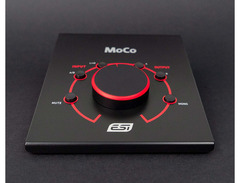
In the bustling world of studio recording, precision and control are paramount. Enter the ESI MoCo, a passive monitor controller that ensures every frequency and nuance of your audio is accurately represented. This elegantly designed device allows seamless switching between two sets of inputs and outputs, making it perfect for a versatile studio setup. With its high-quality potentiometer, you can finely adjust your monitor levels without compromising the sound integrity.
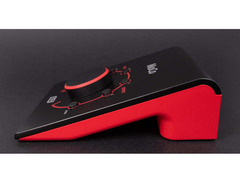
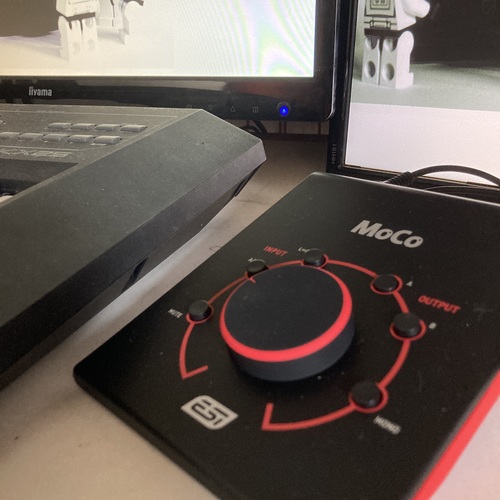
The ESI MoCo’s layout is intuitive, featuring a centralized large knob for easy volume adjustments, alongside dedicated buttons for input and output selection. The mono downmix button offers additional flexibility by providing the ability to blend left and right channels, while the L/R switch swaps these channels effortlessly. Need to silence your monitors swiftly? The mute button has you covered. Whether you're working with balanced or unbalanced outputs, the ESI MoCo streamlines your workflow by eliminating unnecessary conversions, offering a pure and unaltered sound path.
Designed with simplicity and functionality in mind, this controller is an essential addition to any studio environment where precision and ease of use are valued. Whether you’re a seasoned producer or an aspiring engineer, the ESI MoCo elevates your monitoring experience to professional heights.
Key Features:
- Passive volume control with high-quality potentiometer
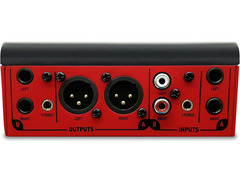
- Two sets of inputs: 2 x Jack and 2 x RCA with 3.5 mm mini-jack
- Two sets of outputs: 2 x XLR male and 2 x mono jack with stereo 3.5 mm mini-jack
- A/B input selection switch
- L/R switch for channel swapping
- Mono downmix button
- Instant mute button for output silence
Owner's manual
ESI MoCo User ManualProduct specs
| Available since | November 2017 |
| Number Of Monitoring Outputs (Stereo) | 2 |
| Headphone connection | 0 |
| Talkback Function | No |
| Built-in AD / DA converter | No |
| Incl. Remot control | No |
| Level Meter | No |
| Number of 2 track inputs | 0 |
| Summing Function | No |
| Surround | No |
| Design | Desktop |
FAQs
-
What is the primary function of the ESI MoCo Passive Monitor Controller?
-
The ESI MoCo is designed to provide precise volume control for studio monitors, allowing you to easily switch between two stereo outputs without adding any coloration to the sound, thanks to its passive design.
-
Does the ESI MoCo require any power source to operate?
-
No, the ESI MoCo is a passive monitor controller and does not require any external power supply, which ensures a transparent audio path without additional noise.
-
Can the ESI MoCo be used to control multiple sets of studio monitors?
-
Yes, the ESI MoCo features two stereo outputs, allowing you to switch between two sets of studio monitors for A/B testing and comparison.
-
Does the ESI MoCo include a talkback function for communication during recording sessions?
-
No, the ESI MoCo does not include a talkback function. It is solely focused on passive volume control and switching between monitor outputs.
-
How does the ESI MoCo affect audio quality when switching between monitors?
-
The ESI MoCo maintains audio quality by using a passive design, ensuring that there is no added coloration or distortion when switching between different sets of monitors.
Videos

Sound On Sound magazine
ESI Audiotechnik MoCo - AES 2017
ESI Audiotechnik MoCo - AES 2017
Sound On Sound magazine
ESI MOCO Monitor Controller

Greville's Review
Monitor Controller für aktive Studiomonitore - ESI MoCo

musotalk

MoCo Monitor Controller by ESi. Upgrade.

GROC MEDIA Recording
MoCo | Passive Monitor Controller with 2 stereo I/O

ESI Audiotechnik GmbH

ESI MOCO VS MACKIE Big KNOB Which one you should buy

Manit Sony
Reviews
PROS
-
Solid build quality, doesn't slide around the desk
-
Flexible input/output configurations accommodate various setups
-
Smooth, noise-free volume knob operation
-
Can control up to two monitor sets efficiently
-
Mono and mute buttons enhance control
-
Transparent sound with no added noise or color
-
Allows simultaneous use of both outputs
-
Handy L/R switch for channel reversal
CONS
-
Some TRS sockets are overly tight
-
Left output channel prone to failure over time
-
Mute circuit may cause issues
-
Engaging both outputs can dim the signal
-
Tiny, hard-to-see volume indicator line
Owner Insights
We analyzed real musician discussions from forums and Reddit to find what players love, question, and tweak about ESI MoCo.
Features and functionality
-
ESI MoCo allows seamless switching between multiple monitor pairs, enhancing workflow without needing to manually toggle each monitor on or off.
Source -
Passive monitor controllers, like the ESI MoCo, may develop balance issues over time, especially at low volume levels, though this primarily concerns professional-grade applications.
Source -
ESI MoCo's analog preamp maintains high SNR by attenuating both signal and noise, unlike digital volume controls that reduce SNR at lower volumes.
Source -
ESI MoCo's passive design avoids digital volume control pitfalls, preventing signal degradation by not "bit stripping" during volume adjustments.
Source -
The ESI MoCo allows rapid switching between speakers and headphones with a simple button press, streamlining the recording process for vocalists who produce and rap simultaneously.
Source
Comparisons
-
While the Mackie Big Knob is a popular choice, the ESI MoCo is highlighted as a cost-effective alternative for monitor control.
Source -
Users note the ESI MoCo as a preferable choice over cheap potentiometers, offering a significant upgrade in sound quality.
Source -
The ESI MoCo is noted as an alternative to interfaces like the Scarlett 4i4, providing simpler control over multiple outputs without rerouting tracks manually in the DAW.
Source
Use cases and applications
-
Some owners use the ESI MoCo to route signals to both active speakers and headphone amps, showcasing its versatility in studio setups.
Source -
Users effectively employ ESI MoCo for setups where speakers and headphones are driven by the same hardware output, offering a practical solution for avoiding feedback during vocal recording.
Source
Critic Reviews
Based on 0 Reviews and 0 Ratings
Genre Usage
Based on how artists on Equipboard use this gear, it is most commonly found in the following genres.
Community setups
Show yours
More ESI Studio Monitor Management

$209.00 - $349.99
in Studio Monitor Management Rank
.jpeg?v=1784519019)


$563.00 - $692.99
in Studio Monitor Management Rank


$2,499.00 - $2,749.00
in Studio Monitor Management Rank


$52.50 - $69.99
in Studio Monitor Management Rank


$269.00 - $367.99
in Studio Monitor Management Rank


$56.22 - $367.99
in Studio Monitor Management Rank


$180.92 - $249.99
in Studio Monitor Management Rank


$799.00 - $999.00
in Studio Monitor Management Rank


$765.00 - $899.00
in Studio Monitor Management Rank


$185.00 - $199.00
in Studio Monitor Management Rank


$174.04 - $189.00
in Studio Monitor Management Rank


$1,549.00
in Studio Monitor Management Rank


$352.00 - $719.99
in Studio Monitor Management Rank


$262.09 - $349.99
in Studio Monitor Management Rank


$35.79 - $108.32
in Studio Monitor Management Rank

$103.80 - $269.99
in Studio Monitor Management Rank


$217.00 - $299.00
in Studio Monitor Management Rank

$91.70 - $139.00
in Studio Monitor Management Rank

$825.00 - $999.00
in Studio Monitor Management Rank


$1,099.00 - $1,399.00
in Studio Monitor Management Rank


$39.00 - $299.00
in Studio Monitor Management Rank

$333.00 - $399.00
in Studio Monitor Management Rank

$45.00 - $107.99
in Studio Monitor Management Rank

$4,749.00
in Studio Monitor Management Rank


$3,598.00 - $4,749.00
in Studio Monitor Management Rank


$169.00
in Studio Monitor Management Rank

$699.00 - $999.00
in Studio Monitor Management Rank

$4,749.00
in Studio Monitor Management Rank


$1,999.00 - $2,395.00
in Studio Monitor Management Rank


$235.00 - $349.99
in Studio Monitor Management Rank


$6,997.00
in Studio Monitor Management Rank


$197.87 - $379.99
in Studio Monitor Management Rank

$46.90 - $500.00
in Studio Monitor Management Rank

$3,356.00 - $4,194.00
in Studio Monitor Management Rank


$2,499.00 - $2,749.00
in Studio Monitor Management Rank

.jpg?v=1784379076)

$298.28 - $679.00
in Studio Monitor Management Rank

$38.00
in Studio Monitor Management Rank

$34.85 - $63.90
in Studio Monitor Management Rank

$80.00
in Studio Monitor Management Rank


$459.00 - $499.00
in Studio Monitor Management Rank
Artist usage


Similar


Most Popular Studio Monitor Management
Most Popular Brands
-
Added to Equipboard on by
 pkennethk
GearIQ 27243
-





