
Pricing and availability


* Product prices and availability are updated by Equipboard every 24hrs and are subject to change. Equipboard may receive compensation for purchases made at participating retailers linked on this site. This compensation does not affect what products or prices are displayed, or the order of prices listed. For more information, please refer to our affiliate disclosure.
Description
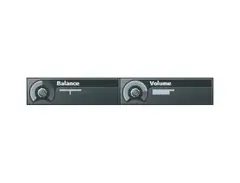
Transform your audio experience with the Image Line Fruity Balance Volume/Panning Plugin. This intuitive plugin is a versatile tool designed for musicians and producers looking to achieve precise control over their stereo image and volume levels. Whether you're mixing a full track or fine-tuning a single instrument, Fruity Balance offers a streamlined interface that makes adjusting volume and panning as straightforward as possible.
Fruity Balance is a staple within the FL Studio environment, offering seamless integration and low CPU usage, ensuring your computer's resources are reserved for the creative process. The plugin's simple design belies its powerful capabilities, allowing for real-time manipulation of sound dynamics and stereo field with minimal latency. Its compatibility with both Windows and Mac systems makes it a flexible choice for any home or professional studio setup.
Perfect for both novices and seasoned producers, Fruity Balance's user-friendly interface simplifies the complex art of mixing, enabling you to focus on crafting your unique sound. Whether you're adjusting the subtle nuances of a vocal track or balancing the energy between left and right channels in a complex mix, this plugin provides the precision and clarity needed to bring your audio vision to life.
Key Features:
- Intuitive interface for easy volume and panning adjustments
- Seamless integration with FL Studio
- Low CPU usage for optimized performance
- Real-time manipulation with minimal latency
- Compatible with both Windows and Mac systems
- Ideal for both beginner and experienced producers
Videos

SeamlessR
FL Studio 12 Basics 22: Fruity Balance

FL Studio 12 Basics 22: Fruity Balance
SeamlessR

FL Studio Tutorial- How to Use Fruity Balance

Beat School

A Unique Way To Use Fruity Balance | How To Remove Clicks From Samples

Shamshir Sound
Reviews
Owner Insights
We analyzed real musician discussions from forums and Reddit to find what players love, question, and tweak about Image-Line Fruity Balance Volume/Panning Plugin.
Features and functionality
-
Automating both pan and volume in a V shape can create the illusion of sound moving around the listener, particularly effective with headphones.
Source -
Using EQ, pre-delay, and early reflections can enhance depth perception, making instruments feel closer or further away in a mix.
Source -
Riding the gain with Automation Clips via the Fruity Balance plugin allows for dynamic volume adjustment across Mixer Tracks.
Source
Use cases and applications
-
Combining volume automation with panning and shifting their alignment can simulate front-to-back sound movement in stereo mixes.
Source -
Reverb and delay settings can significantly alter perceived distance; more reverb/delay increases perceived space, while less brings sound forward.
Source -
Separation panning can effectively prevent instrument crowding by spreading them within a +/- 40% range, enhancing mix openness and interest.
Source
Software and compatibility
-
A free plugin from Dear Reality can help replicate front-to-back panning effects, offering additional spatial audio capabilities.
Source
Critic Reviews
5.0 out of 5
Based on 2 Reviews and 4 Ratings

41031
if you need to add an extra trim and pan pot to a channel
this adds an extra trim and pan pot to a channel, 5 stars for functioning adequately in a basic role... most useful for slapping after a mono effect like a guitar amp plugin into a stereo delay with saturation where panning and trim might be something you want to be able to automate between the mono source and stereo insert delay instead of creating another send bus or something for the delay

454
My go-to plugin for sidechaining synths
When I'm sidechaining my hi-hats, I usually go to the Fruity Limiter. But when I'm sidechaining basses or pads, I use this. It's rather simple, but very effective. (It's also very good for cutting out naughty words in your vocals ;3)
Artist usage
Add artist



At 10:36, Rogue opens up Fruity Balance so he can automate the volume.


Album Usage
The Image-Line Fruity Balance Volume/Panning Plugin has been featured on the following albums:

Genre Usage
Based on how artists on Equipboard use this gear, it is most commonly found in the following genres.
Used With
Based on how musicians on Equipboard use Image-Line Fruity Balance Volume/Panning Plugin, it is most commonly used with the following gear.

More Image-Line Stereo Width Plugins

in Stereo Width Plugins Rank


$14.90
in Stereo Width Plugins Rank

$80.00 - $99.00
in Stereo Width Plugins Rank

.jpg?v=1785048582)


$83.50 - $99.00
in Stereo Width Plugins Rank


$39.99
in Stereo Width Plugins Rank


$80.00
in Stereo Width Plugins Rank

$0.00
in Stereo Width Plugins Rank


$20.00
in Stereo Width Plugins Rank


$59.00
in Stereo Width Plugins Rank


$0.00
in Stereo Width Plugins Rank


$0.00
in Stereo Width Plugins Rank


$49.00
in Stereo Width Plugins Rank

$0.00
in Stereo Width Plugins Rank


$25.00
in Stereo Width Plugins Rank

$190.00 - $199.00
in Stereo Width Plugins Rank
![time off audio dime[ms]](https://images.equipboard.com/uploads/item/image/171470/time-off-audio-dime-ms-m.webp?v=1784973690)
$29.00 - $33.00
in Stereo Width Plugins Rank

$54.00 - $55.00
in Stereo Width Plugins Rank


$85.00 - $87.00
in Stereo Width Plugins Rank

$37.00 - $39.99
in Stereo Width Plugins Rank


$59.99
in Stereo Width Plugins Rank

$37.00 - $39.99
in Stereo Width Plugins Rank


$16.00 - $39.00
in Stereo Width Plugins Rank

$0.00
in Stereo Width Plugins Rank

$33.00 - $34.99
in Stereo Width Plugins Rank


$181.00
in Stereo Width Plugins Rank

$91.00 - $109.00
in Stereo Width Plugins Rank

$89.00 - $129.60
in Stereo Width Plugins Rank


$0.00
in Stereo Width Plugins Rank


$47.00 - $50.00
in Stereo Width Plugins Rank

$19.00
in Stereo Width Plugins Rank


$398.00 - $699.00
in Stereo Width Plugins Rank


$33.00 - $39.99
in Stereo Width Plugins Rank

$29.00
in Stereo Width Plugins Rank

$85.00 - $87.00
in Stereo Width Plugins Rank

$249.00
in Stereo Width Plugins Rank

$59.90
in Stereo Width Plugins Rank

$109.00
in Stereo Width Plugins Rank

$43.00 - $45.00
in Stereo Width Plugins Rank
Community setups


Similar


Gear Guides









Most Popular Stereo Width Plugins
Most Popular Brands
-
Added to Equipboard on by
circuitmindGearIQ 454
-


