

Pricing and availability
We compare 600+ stores and found this item at 2 stores. Prices updated .
Store
Reviews
Price




* Product prices and availability are updated by Equipboard every 24hrs and are subject to change. Equipboard may receive compensation for purchases made at participating retailers linked on this site. This compensation does not affect what products or prices are displayed, or the order of prices listed. For more information, please refer to our affiliate disclosure.
Description
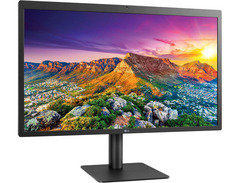
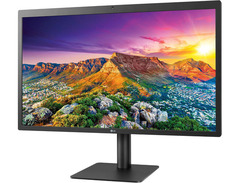
For musicians and producers seeking crystal-clear visuals and seamless connectivity, the LG UltraFine 5K Display is your ideal creative companion. This 27" monitor, featuring a stunning 5120 x 2880 resolution, delivers breathtaking image quality, ensuring every detail of your composition is vibrant and precise. Whether you're tweaking sound waves or editing video, the 5K IPS panel offers consistent color reproduction and wide viewing angles, crucial for meticulous work.
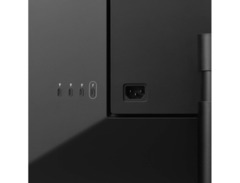
The Thunderbolt 3 and USB-C connectivity streamline your setup, enabling up to 40 Gb/s data transfer, display, and power through a single cable. Say goodbye to tangled wires and power up your MacBook with ease thanks to its 94W power delivery capability. Integrated with a built-in camera and speakers, the LG UltraFine 5K Display is not just a monitor but a comprehensive multimedia station, perfect for virtual collaborations and video conferencing.
Mac users will appreciate the seamless macOS integration, allowing on-screen adjustments of brightness and volume without the need for physical buttons. The versatile stand and included VESA mount option ensure your workspace is as ergonomic as it is efficient.
Key Features:
- 27" 5K IPS Display with 5120 x 2880 resolution
- Thunderbolt 3 and USB-C connectivity
- 94W power delivery for MacBooks
- Built-in camera and speakers
- Seamless macOS integration
- VESA mount compatible with included mount back cover
Owner's manual
LG UltraFine 5K Display User ManualVideos

Linus Tech Tips
LG 5K Display for Mac - A PC User's Perspective

LG 5K Display for Mac - A PC User's Perspective
Linus Tech Tips

LG UltraFine 5K Review: 15 Million Pixels!

Marques Brownlee

LG 27 Inch UltraFine 5K IPS Monitor Review - Worth it in 2024 & better than an Apple Studio Display?

Love What You Do

Is the Lg Ultrafine 5k still worth it in 2023 - Long Term Review

David McCombs

LG Ultrafine 5K USB C Monitor FAQs & Everything You Need to Know

The Inventar
Reviews
PROS
-
Exceptional 5K resolution, perfect for text, CAD, and detailed graphics
-
Single-cable Thunderbolt 3 connection simplifies setup
-
USB-C ports enable use as a peripheral hub
-
Height-adjustable stand offers ergonomic flexibility
-
Bright, vivid display with impressive color accuracy
-
Superior picture quality for professionals and casual users alike
-
Compatible with Mac's brightness control via keyboard
-
Reliable and stable build quality with a heavy, steady stand
-
Provides power delivery for charging compatible MacBooks
-
Noticeably better camera quality compared to other monitors
CONS
-
Connectivity issues with USB-C ports are common
-
No daisy-chaining support for additional monitors
-
Build quality feels plasticky compared to premium alternatives
-
Lacks a headphone jack, requires an adapter for audio
-
Brightness settings may reset randomly on wake-up
-
Built-in speakers lack depth and richness
-
Potential for burn-in with static images over time
Owner Insights
We analyzed real musician discussions from forums and Reddit to find what players love, question, and tweak about LG UltraFine 5K Display.
Features and functionality
-
The LG UltraFine 5K lacks an on-screen display; users can download an LG app to control brightness, as keyboard shortcuts are ineffective.
Source -
The monitor's controls are limited without the LG app, as it doesn't come with an on-screen display for adjustments.
Source -
The camera and speakers are considered subpar, suitable for basic tasks like FaceTime.
Source -
Some units have Thunderbolt port issues; a simple soldering fix is possible if they lose connection.
Source
User experience
Comparisons
-
5K resolution displays more detail than 4K in direct photo comparisons, but the difference is less noticeable from normal viewing distances.
Source -
Users report the LG UltraFine 5K's screen quality matches Apple Studio Display, but the latter offers superior build, sound, and embedded camera.
Source -
It's noted that while it shares the same panel as the Studio Display, contrast is lower due to lack of fused cover glass.
Source
Setup and maintenance
Build quality
Software and compatibility
-
An external Thunderbolt card may require two DisplayPort cables from the GPU to the card's inputs, with the Thunderbolt output connecting to the monitor for 5K resolution.
Source -
Owners report needing to install specific Thunderbolt drivers from the motherboard's support site to enable proper functionality with compatible setups.
Source -
Using a DisplayPort to USB-C cable often limits output to 4K; for 5K, a Thunderbolt connection is necessary, as Windows treats 5K as two monitors.
Source
5.0 out of 5
Based on 1 Review and 1 Rating

144
It's really beautiful display ever...
I really want Apple Cinema Display. But, the resolution is 1080p. Then, i see Apple Store Orchard Road sell LG UltraFine 5K. I pick up 2 Displays for video editing, Photo editing, etc... and it's has a really cool technology, you can charge your MacBook and using as external display at the same time... so, i don't need to take out my charging cable on my bag...
Artist usage
Add artist

Genre Usage
Based on how artists on Equipboard use this gear, it is most commonly found in the following genres.
More Computers & Peripherals

$1,319.55
in Computers & Peripherals Rank


$69.59 - $79.00
in Computers & Peripherals Rank


$399.15 - $596.86
in Computers & Peripherals Rank


$134.00 - $249.99
in Computers & Peripherals Rank


$1,191.98 - $1,914.49
in Computers & Peripherals Rank


$54.99
in Computers & Peripherals Rank


$579.99 - $799.00
in Computers & Peripherals Rank


$83.83 - $99.00
in Computers & Peripherals Rank


$149.99 - $179.99
in Computers & Peripherals Rank

$109.99 - $129.99
in Computers & Peripherals Rank


$1,299.00
in Computers & Peripherals Rank


$149.99 - $191.00
in Computers & Peripherals Rank


$44.99 - $89.00
in Computers & Peripherals Rank


$389.00
in Computers & Peripherals Rank


$106.69
in Computers & Peripherals Rank


$91.08 - $179.99
in Computers & Peripherals Rank


$509.00 - $867.00
in Computers & Peripherals Rank

$649.99 - $919.99
in Computers & Peripherals Rank


$118.73 - $119.99
in Computers & Peripherals Rank


$1,488.71 - $1,999.00
in Computers & Peripherals Rank


$25.00 - $1,999.99
in Computers & Peripherals Rank

$87.00 - $199.00
in Computers & Peripherals Rank


$549.00
in Computers & Peripherals Rank
.png?v=1784921366)


$128.00
in Computers & Peripherals Rank


$32.99 - $189.95
in Computers & Peripherals Rank


$210.99 - $379.99
in Computers & Peripherals Rank

$19.99 - $29.99
in Computers & Peripherals Rank


$1,399.00 - $1,569.99
in Computers & Peripherals Rank


$189.99 - $249.99
in Computers & Peripherals Rank


$69.00 - $403.00
in Computers & Peripherals Rank


$22.00
in Computers & Peripherals Rank


$94.99 - $294.99
in Computers & Peripherals Rank


$99.99 - $119.99
in Computers & Peripherals Rank


$45.95
in Computers & Peripherals Rank


$24.99 - $29.99
in Computers & Peripherals Rank

$99.99 - $179.99
in Computers & Peripherals Rank

Community setups


Similar


Gear Guides







.jpg)
Most Popular Brands
-
Added to Equipboard on by
 josephdbae
GearIQ 72
-



