


Pricing and availability
We compare 600+ stores and found this item at 2 stores. Prices updated .


Price History
Based on price data from 1 merchant for "MAGIX Vegas Pro 22 Video Editing Software". Prices shown reflect NEW condition. Tracking began Apr 2, 2026.
* Product prices and availability are updated by Equipboard every 24hrs and are subject to change. Equipboard may receive compensation for purchases made at participating retailers linked on this site. This compensation does not affect what products or prices are displayed, or the order of prices listed. For more information, please refer to our affiliate disclosure.
Description
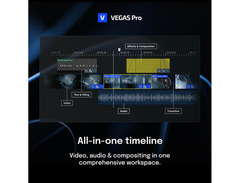
In the dynamic world of music and video production, MAGIX Vegas Pro 22 is your ultimate companion for crafting visually stunning content. Designed exclusively for Windows, this powerful video editing software is a beacon for creators seeking precision and creativity. With its cutting-edge AI features, Vegas Pro 22 transforms complex editing processes into intuitive experiences. Whether you're polishing an indie film, a music video, or a viral clip, this software equips you with tools that are both innovative and easy to use.
At its core, Vegas Pro 22 offers AI-driven text-based editing, making it a breeze to tackle interview footage with lightning speed. The software's speech-to-text and text-to-speech capabilities are a dream for generating transcriptions, subtitles, and voice-overs. Need to sync audio across multiple cameras? Vegas Pro 22 has you covered. Its audio synchronization and beat detection features ensure precision in every cut, while its media management optimizes your workflow.
But it doesn't stop there. Dive into a world of creativity with an expansive library of effects and 3D model integrations. From realistic lens flares to seamless shadow casting, your footage will shine with professional-grade polish. Plus, with superior color correction functions, you have total control over hue, saturation, and luminance, guaranteeing your visuals pop with vibrancy and clarity.
Key Features:
- AI-driven text-based editing for efficient video creation
- Speech-to-text and text-to-speech for easy subtitle and voice-over generation
- Audio synchronization and beat detection for precise editing
- Robust color correction tools for hue, saturation, and luminance control
- Expansive library of effects and 3D model integration
- Seamless media management for optimized workflow
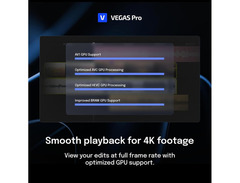
- Smooth video previews for a wide range of codecs
Product specs
| Software Type | Video Editing |
| Platform | PC |
| Upgrade/Full | Full |
| Download/Boxed | Download |
| Bit Rate | 64-bit |
| Format | VST2, VST3, Standalone |
| Hardware Requirements - PC | Intel Core i5 / AMD Quad-core or higher, 16GB RAM minimum |
| OS Requirements - PC | Windows 10 or later |
FAQs
-
What are the system requirements for MAGIX Vegas Pro 22 Video Editing Software?
-
MAGIX Vegas Pro 22 requires a Windows 10 or later operating system, an Intel Core i5 or AMD Quad-core processor or higher, and at least 16GB of RAM for optimal performance.
-
Is MAGIX Vegas Pro 22 compatible with VST plugins?
-
Yes, MAGIX Vegas Pro 22 supports both VST2 and VST3 plugin formats, allowing for enhanced audio processing and effects integration within your video projects.
-
Can MAGIX Vegas Pro 22 be used for audio editing as well as video?
-
Yes, MAGIX Vegas Pro 22 is an all-in-one software solution that includes tools for both video and audio editing, making it suitable for comprehensive post-production tasks.
-
Is MAGIX Vegas Pro 22 available as a download or physical boxed version?
-
MAGIX Vegas Pro 22 is available as a downloadable software, providing immediate access upon purchase without the need for physical media.
-
Does MAGIX Vegas Pro 22 offer any unique features for video editing?
-
MAGIX Vegas Pro 22 includes advanced features such as Z-Depth estimation and Text to Speech capabilities, enhancing creative possibilities in video production.
Videos

VEGAS Creative Software
VEGAS Pro 22 | New release
VEGAS Pro 22 | New release
VEGAS Creative Software
YoAspire on VEGAS Pro 22: New features explained in 6 minutes!
VEGAS Creative Software
What's New with VEGAS Pro 22: REVIEW

Tech Dive AVCLUB
Reviews
PROS
-
AI-powered features simplify tasks like masks, voiceovers, and subtitles
-
User-friendly timeline interface for easy access to essential editing tools
-
Text-based editing feature is a game-changer for dialogue-heavy projects
-
Ability to expand with OFX and VST plug-ins for customization
-
Perpetual license means no subscription fees
-
Runs smoothly on modest system requirements
-
Seamless integration of video and audio editing for efficient workflow
-
Ideal for both beginners and advanced users with scalable tools
-
No ownership of user-created content by the software company
CONS
-
AI modules can be resource-intensive, potentially leading to crashes
-
Steep learning curve for beginners
-
Some features can be overwhelming initially
Owner Insights
We analyzed real musician discussions from forums and Reddit to find what players love, question, and tweak about MAGIX Vegas Pro 22 Video Editing Software.
Features and functionality
-
NVENC GPU rendering is significantly improved in version 22, reducing a 4K render time with a LUT from 1.5 hours to about 15 minutes.
Source -
Adjustment clips and layers in version 22 are highlighted as a game changer by users, enhancing the editing workflow significantly.
Source -
The Color Grading panel in Vegas Pro 22 includes a Hue vs. Hue curve, allowing precise color adjustments, particularly useful for underwater footage to maintain natural hues of sea life.
Source -
Vegas Pro 22 allows copying and pasting specific attributes like event pan/crop settings or FX between clips, streamlining the editing workflow.
Source
User experience
-
Some users report no crashes in version 22, a significant improvement from previous versions, although occasional black or frozen playback issues may occur.
Source -
Users find Vegas Pro 22's interface more intuitive compared to DaVinci Resolve, preferring its layout and timeline for ease of use.
Source -
Owners report stuttering playback in Vegas Pro 22 with v-log footage and LUTs, while DaVinci Resolve 19 handles the same tasks smoothly on equivalent hardware.
Source
Software and compatibility
-
Vegas 22 can import .mkv files, but performance may be janky and require proxy files for smoother editing, especially on older machines.
Source -
Some users mention that VST support was overhauled in version 20, causing issues with Waves plugins, which require the latest versions to work effectively.
Source -
Some users report that Vegas Pro 22 incorrectly detects video frame rates, such as misreading 23.97 fps as 24 fps, affecting the editing process.
Source -
There's a reported issue where Vegas Pro 22 sometimes fails to open videos that are accessible in version 21, suggesting potential compatibility or read errors.
Source -
Vegas Pro 22 struggles with Sony A7 IV XAVC S 4K 10-bit files, with users recommending Avidemux for audio compliance issues and legacy mode for AVC decoding.
Source
Use cases and applications
-
Users note that Vegas 22 handles 1080p video rendering extremely fast, completing a 5-minute video with a LUT in 3 minutes.
Source -
Users find the AI style transfer FX in Vegas Pro 22 beneficial for creating experimental video edits, adding creative flexibility to their projects.
Source -
Corporate video editors face challenges with Vegas Pro 22's preview playback, even with proxies, suggesting limitations for high-bitrate 4K content editing.
Source
Critic Reviews
Based on 0 Reviews and 0 Ratings
More MAGIX Video Editing Software


$229.99 - $249.00
in Video Editing Software Rank

$146.00
in Video Editing Software Rank


$259.00 - $325.00
in Video Editing Software Rank


$263.88
in Video Editing Software Rank


in Video Editing Software Rank


.png?v=1784755332)


$699.95
in Video Editing Software Rank


$239.00 - $539.99
in Video Editing Software Rank


Accessories & Related Items


Artist usage


Community setups


Similar


Gear Guides










Most Popular Video Editing Software
Most Popular Brands
-
Added to Equipboard on by
 equipboard
GearIQ 4934
-


