

Pricing and availability
We compare 600+ stores and found this item at 1 store. Prices updated .


* Product prices and availability are updated by Equipboard every 24hrs and are subject to change. Equipboard may receive compensation for purchases made at participating retailers linked on this site. This compensation does not affect what products or prices are displayed, or the order of prices listed. For more information, please refer to our affiliate disclosure.
Description
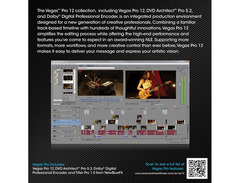
Sony Vegas Pro 12 is your ultimate gateway to crafting stellar video content, whether you're a seasoned professional or just embarking on your media journey. This feature-rich video production suite seamlessly integrates video editing, compositing, multitrack audio mixing, and disc authoring, all within a user-friendly interface. Its intuitive drag-and-drop functionality and customizable workspace streamline your workflow, so you can focus more on creativity and less on complexity.
Dive into the depths of visual creativity with HitFilm integration, allowing you to infuse your projects with dramatic and realistic special effects like smoke and fire. With support for resolutions up to 4K, Sony Vegas Pro 12 ensures your visuals are as crisp as your vision. Meanwhile, the expansive audio capabilities let you master sound with unlimited tracks and compatibility with your favorite VST or DirectX plug-ins.
DVD Architect Pro and Dolby Digital Professional Encoder enhance your production suite, offering high-definition delivery options with Blu-ray and DVD authoring. The bundled NewBlue Titler Pro enables you to add professional-grade titles and effects, making your projects truly stand out.
Whether you're editing in 2D or stereoscopic 3D, the Vegas Pro 12 Suite's sophisticated tools, including the innovative Expanded Edit Mode, offer precision and flexibility. Automate tedious tasks with the Production Assistant, and enrich your projects with 100 royalty-free soundtracks from the Sony Sound Series. With Sony Vegas Pro 12, bringing your creative vision to life has never been more effortless.
Key Features:
- Intuitive drag-and-drop interface
- Integration with HitFilm for advanced visual effects
- Unlimited audio tracks and VST/DirectX plug-in compatibility
- 4K resolution support
- DVD Architect Pro and Dolby Digital Professional Encoder included
- NewBlue Titler Pro for 2D/3D titling
- Production Assistant for workflow automation
- 100 royalty-free soundtracks included
Product specs
| GPU-accelerated video processing and rendering require an OpenCL„¢-supported NVIDIA®, AMD/ATI„¢, or Intel® GPU with 512MB memory or more. Detailed specifications and driver requirements can be found at | http://www.sonycreativesoftware.com/vegaspro/gpuacceleration |
FAQs
-
What are the system requirements for Sony Vegas Pro 12?
-
Sony Vegas Pro 12 requires a Windows operating system, a multicore processor, 4GB of RAM (8GB recommended), and a GPU with at least 512MB of memory for GPU acceleration. Ensure your system meets these specifications for optimal performance.
-
Does Sony Vegas Pro 12 support 3D video editing?
-
Yes, Sony Vegas Pro 12 includes advanced 2D and 3D titling features, allowing you to create and edit 3D video content effectively.
-
Can I use Sony Vegas Pro 12 for audio editing and mixing?
-
Absolutely, Sony Vegas Pro 12 offers comprehensive audio editing, mixing, and processing tools, making it suitable for integrating high-quality audio into your video projects.
-
What type of video effects does Sony Vegas Pro 12 offer?
-
Sony Vegas Pro 12 provides powerful visual effects and compositing tools, including color grading and lighting effects, to enhance your video projects creatively.
-
Is GPU acceleration available in Sony Vegas Pro 12?
-
Yes, Sony Vegas Pro 12 supports GPU-accelerated video processing and rendering, requiring an OpenCL-supported NVIDIA, AMD/ATI, or Intel GPU with at least 512MB memory.
-
Does Sony Vegas Pro 12 have batch processing capabilities?
-
Yes, Sony Vegas Pro 12 includes batch processing and workflow automation features, allowing you to efficiently manage and process multiple video files simultaneously.
Videos

Domingo
How to use Sony Vegas Pro 12
How to use Sony Vegas Pro 12
Domingo
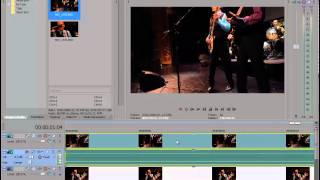
Sony Vegas Pro 12 Review | Video Editing Software

Damn Good Reviews
Sony Vegas Pro 12: What's New

Robert's Productions
Reviews
Owner Insights
We analyzed real musician discussions from forums and Reddit to find what players love, question, and tweak about Sony Vegas Pro 12.
Software and compatibility
-
Owners note that Sony Vegas Pro 12 lags significantly on modern systems and lacks GPU optimization found in newer versions like Vegas Pro 22.
Source -
Vegas Pro 12 does not take full advantage of powerful GPUs like the RTX 3070, which function optimally with version 22.
Source -
Version 12 lacks high DPI awareness, causing layout issues on high-resolution displays, which can be partially mitigated by adjusting Windows scaling options.
Source -
Compatibility troubleshooter can improve, but not fully resolve, display issues on Windows 11 laptops with Sony Vegas Pro 12.
Source -
Running Sony Vegas Pro 12 on a virtual machine (VM) like VirtualBox or VMware is suggested as a workaround for compatibility issues on modern systems.
Source -
Vegas Pro 12 cannot work with newer file formats and lacks a LUT loader, limiting advanced color grading capabilities on modern projects.
Source
Features and functionality
-
Upgrading to Vegas Pro 22 offers improved masking tools, enhancing editing ease and efficiency, a feature not available in version 12.
Source -
Vegas Pro 12 struggles with high-resolution displays, leading to unreadable menus and workspace, particularly on modern laptops with Intel Iris XE graphics.
Source
User experience
Value and pricing
5.0 out of 5
Based on 0 Reviews and 2 Ratings
Artist usage
Add artist

Genre Usage
Based on how artists on Equipboard use this gear, it is most commonly found in the following genres.
More Sony Video Editing Software

.png?v=1784755332)


$259.00 - $325.00
in Video Editing Software Rank


$263.88
in Video Editing Software Rank


$229.99 - $249.00
in Video Editing Software Rank


in Video Editing Software Rank


$146.00
in Video Editing Software Rank


$239.00 - $539.99
in Video Editing Software Rank


Accessories & Related Items


Community setups


Similar


Gear Guides










Most Popular Video Editing Software
Most Popular Brands
-
Added to Equipboard on by
 rubenemblem
GearIQ 299
-

