
Pricing and availability
We compare 600+ stores and found this item at 1 store. Prices updated .


* Product prices and availability are updated by Equipboard every 24hrs and are subject to change. Equipboard may receive compensation for purchases made at participating retailers linked on this site. This compensation does not affect what products or prices are displayed, or the order of prices listed. For more information, please refer to our affiliate disclosure.
Description
Product specs
| Downloadable | free |
Videos

Curve Radio
Mixxx Tutorial - Beginner's Guide

Mixxx Tutorial - Beginner's Guide
Curve Radio

Mixxx is an incredible FOSS DJ-ing program

unfa🇺🇦

MIXXX 2.2.4 How To Set Up And Use Auto DJ

Mara Winterhydes Online Adventures

Beat Matching using Mixxx

Surrey Arts
Mixxx Tutorial 02 - Basic setup #mixxx #dj #tutorial

OsZ
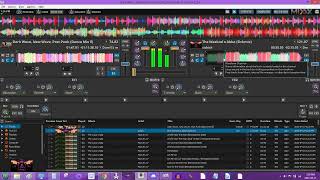
How to Cue Up Songs in Mixxx
Mara Winterhydes Online Adventures

Intro to DJing with Mixxx

David Shimel
Reviews
PROS
-
Free to use, saving on high DJ software costs
-
Quad mixing decks for versatile mixing
-
MIDI controller compatibility enhances user experience
-
HID support broadens hardware options
-
Virtual vinyl feature for a classic DJ feel
-
Excellent option for Linux users
CONS
-
Buggy performance on Windows systems
-
Limited advanced effects compared to paid alternatives
Owner Insights
We analyzed real musician discussions from forums and Reddit to find what players love, question, and tweak about Mixxx.
Use cases and applications
-
A live Ubuntu Studio boot on a USB with Mixxx pre-installed can transform nearly any computer into a DJ rig, showcasing its portability and adaptability.
Source -
For a rugged outdoor setup, a ThinkPad X200 is appreciated for its durability and compact form, aligning well with the aesthetics of outdoor raves.
Source -
Mixxx runs effectively on Raspberry Pi 4 with DietPi, though it experiences video lag and requires a lightweight setup without CPU-intensive features like keyshifting or complex waveform rendering.
Source -
Mixxx allows hybrid live/DJ sets with DAWs like REAPER or Ableton through MIDI and audio stream data routing, enhancing creative possibilities.
Source
Value and pricing
-
Older MacBooks from 2011 paired with a Numark Mixtrack Pro II controller provide a cost-effective solution under $100 without performance issues, making them a budget-friendly choice.
Source
Features and functionality
-
Mixxx can perform without common audio systems like pulseaudio, ALSA, and JACKD on certain setups, highlighting its flexibility in various environments.
Source -
Despite sharing the same source code, users report that Mixxx appears more polished and stable on Linux than on Windows, potentially due to platform-specific performance variances.
Source -
Mixxx supports multiple controllers from different brands simultaneously, with custom controller mapping options available.
Source -
Mixxx supports real-time track analysis, allowing DJs to download and play tracks mid-set without needing external software like Rekordbox.
Source
User experience
-
A user running Mixxx 2.5.0 on an i5-4200u with 8GB RAM and Windows 11 noted very responsive performance, indicating good compatibility with moderately powered systems.
Source -
Some users find the Linux version of Mixxx more professional and visually appealing, comparing it favorably to Traktor, especially with the right skin settings.
Source -
When using older hardware like a Thinkpad T420, avoiding keymatching can prevent UI lag and audio skipping issues.
Source
Comparisons
-
While Mixxx performs well for track playback on Linux, users have encountered issues when using microphones live while streaming, a problem not seen on Windows.
Source -
Mixxx offers more suitable sound effects for radio applications compared to Rekordbox or VDJ, with customizable effect chains.
Source
Software and compatibility
-
Mixxx is compatible with Windows, OS X, and Linux, with Ubuntu Studio preferred for its stable audio driver stack and low system resource usage.
Source -
Mixxx on Linux, especially with Ubuntu Studio, offers significantly faster performance and stability compared to Windows due to less intrusive system processes.
Source -
Mixxx does not have a mobile app due to open-source licensing challenges, but it's lightweight and easy to install on desktop systems.
Source
Critic Reviews
4.5 out of 5
Based on 5 Reviews and 20 Ratings

Mixxx 2.0 Is Great!
Early versions of Mixxx were pretty bare bones, but the current version now contains some basic effects. Since the full versions of most DJing programs cost $100+ this is a great program to use for those who don't really want to lay that kind of cash down, at least not just yet.

492
Freeeeeeeee!!!
this is crazy, just nuts that you can have this much DJ app for freeeeeee!!!
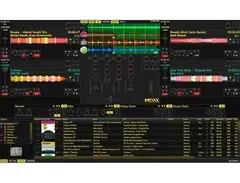
quad mixing decks, midi controller love, hid support, and virtual vinyl.
just too much win here
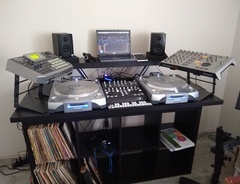

A free Dj Software
Its a top free Dj Software. You can connect the Midi Controller and some more normal things


Artist usage
Add artist

Check out Mixxx - Free MP3 DJ mixing software for Windows, Mac OS X, and Linux http://www.mixxx.org via @mixxxdj
Genre Usage
Based on how artists on Equipboard use this gear, it is most commonly found in the following genres.
Used With
Based on how musicians on Equipboard use Mixxx, it is most commonly used with the following gear.



Community setups
Show yoursMore DJ Software

$189.00 - $349.99
in DJ Software Rank


$99.00 - $199.00
in DJ Software Rank


$649.00 - $1,099.96
in DJ Software Rank


$74.50 - $149.00
in DJ Software Rank


$199.99
in DJ Software Rank


$244.74 - $349.99
in DJ Software Rank


$299.00
in DJ Software Rank

$119.00
in DJ Software Rank


in DJ Software Rank


in DJ Software Rank


in DJ Software Rank


$45.00
in DJ Software Rank