
Pricing and availability
We compare 600+ stores and found this item at 1 store. Prices updated .


* Product prices and availability are updated by Equipboard every 24hrs and are subject to change. Equipboard may receive compensation for purchases made at participating retailers linked on this site. This compensation does not affect what products or prices are displayed, or the order of prices listed. For more information, please refer to our affiliate disclosure.
Description
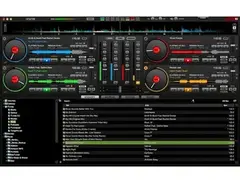
Step into the world of seamless digital mixing with the Numark Virtual DJ LE. This intuitive software is designed for both budding DJs and seasoned professionals, providing a robust platform for creating dynamic sets. With its easy-to-navigate interface and powerful features, Virtual DJ LE allows you to focus on your creativity while it handles the intricate details of audio mixing.
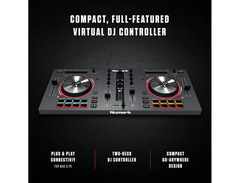
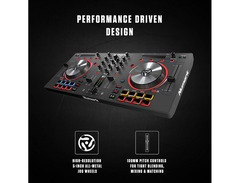
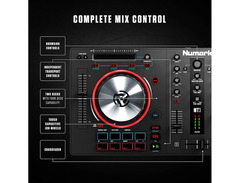
Harness stunning real-time audio effects and an extensive library of samples to craft the perfect sound. The software's compatibility with a wide range of controllers ensures you have the flexibility to mix the way you want, whether you're scratching, looping, or mixing tracks. Its user-friendly design means you spend less time learning the setup and more time bringing your musical visions to life.
The Numark Virtual DJ LE is not just about mixing; it's about delivering a complete performance experience. Enjoy features such as automatic BPM detection and synchronization, which ensures your transitions are always flawless. Whether you're mixing at home or performing live, this software provides the tools you need to keep the dance floor moving.
Key Features:
- Intuitive interface designed for easy navigation
- Real-time audio effects for dynamic sound manipulation
- Compatibility with a wide range of DJ controllers
- Extensive library of samples and loops
- Automatic BPM detection and synchronization
- Supports a variety of audio formats for flexibility
- Comprehensive mixing tools for professional sound quality


Reviews
PROS
-
Seamless integration with compatible DJ controllers
-
Allows mixing from iTunes library
-
Excellent for beginners learning DJ software
-
Includes recording functionality
-
Supports 2 to 4 track mixing, depending on controller
CONS
-
Outdated compared to latest versions
-
Limited effects and samples compared to competitors
-
Full version is expensive at $300
-
Reduced features in the LE version
-
Lacks advanced options for professional DJs
Owner Insights
We analyzed real musician discussions from forums and Reddit to find what players love, question, and tweak about Numark Virtual DJ LE.
Features and functionality
Setup and maintenance
Software and compatibility
-
Configuring Virtual DJ's soundcard options is crucial; users suggest setting master and cue outputs separately for proper audio routing.
Source -
Users suggest upgrading to the full version of Virtual DJ to improve audio engine performance, noting improvements from versions prior to 7.3.
Source -
Advanced Stretching in Virtual DJ enhances sound quality but requires higher CPU, potentially affecting latency settings and scratch responsiveness.
Source
User experience
Mods and upgrades
-
Some users resolved headphone cueing issues by purchasing a $20 USB soundcard.
Source
Comparisons
-
Some users prefer MacBook Pro for DJ software due to Windows being less reliable for real-time audio streaming, particularly with Windows 8.
Source
4.0 out of 5
Based on 3 Reviews and 5 Ratings

166
Convenient to own, but awful effects
If you're a DJ, you more than likely know about this piece of software, especially if you got it with the controller(s) you recently bought or are planning to get. It's really nice to have. You can record with it, use the EQ parameters, and most importantly mix tracks together. Depending on the controller you get, you can have from 2 to 4 separate tracks. It'll even let you DJ off of your iTunes purchases and playlists, and record them! I have some minor complaints about the software though. My first problem with it is that it's outdated! They just released the 8th version of this software, and I hate being out of the loop. My second complaint is that the effects and samples in this software are no where near the standard for most other modern DJ's out there. There are other pieces of DJing software that are completely free and offer more than VirtualDJ can. But I still recommend this product. Why? Because without it, you have literally just a hunk of junk with knobs, faders, and maybe some jogs. This software introduced me to DJing, and without it, I never would have learned how to use any other software out there. It's a great amateur tool, good for anybody just getting started. But if you want to sound like Skrillex, or anyone you know who's play big time gigs, you're gonna want to invest in either Ableton, or Serato.

Works great with DJ controller, otherwise really Limited
Since VDJ LE is released with your controller, it works perfectly with it. But since the options are all but cut off to you and there is very limited options otherwise, I would recommend not using this. Also the full version is $300, so maybe go with Mixxx or Traktor instead.


68
I agree... I use it all the time when im remixing tracks
Genre Usage
Based on how artists on Equipboard use this gear, it is most commonly found in the following genres.
More Numark DJ Software

$189.00 - $349.99
in DJ Software Rank


$99.00 - $199.00
in DJ Software Rank


$649.00 - $1,099.96
in DJ Software Rank


$74.50 - $149.00
in DJ Software Rank


$199.99
in DJ Software Rank


$244.74 - $349.99
in DJ Software Rank


$299.00
in DJ Software Rank

$119.00
in DJ Software Rank


in DJ Software Rank


in DJ Software Rank


in DJ Software Rank


$45.00
in DJ Software Rank


Artist usage


Community setups


Similar


Gear Guides






Most Popular DJ Software
Most Popular Brands
-
Added to Equipboard on by
MmalardmikeGearIQ 54
-

