

Pricing and availability
We compare 600+ stores and found this item at 2 stores. Prices updated .
Store
Reviews
Price


Average Price: $75
Standard/Professional
$49
$130+
Price Tier
Budget
Standard
High-end
Price History
Based on price data from 2 merchants for "PROCESS.AUDIO Ripple Delay Plug-in". Prices shown reflect NEW condition. Tracking began Apr 2, 2026.
* Product prices and availability are updated by Equipboard every 24hrs and are subject to change. Equipboard may receive compensation for purchases made at participating retailers linked on this site. This compensation does not affect what products or prices are displayed, or the order of prices listed. For more information, please refer to our affiliate disclosure.
Description
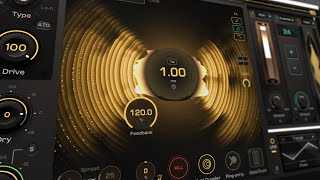
Unleash a universe of sonic possibilities with the PROCESS.AUDIO Ripple Delay Plug-in. This dynamic tool is not just another delay; it’s a revolutionary sound-shaping powerhouse designed to elevate your tracks with ease. Whether you're aiming for classic analog vibes or modern digital echoes, Ripple offers a spectrum of five distinct delay colors, ready to enhance any mix. Choose between two delay modes to suit your style—traditional feedback loops or programmable repeats. The intuitive visual interface ensures you have real-time insight into your sound, making it easier than ever to sculpt your audio creations to perfection.
Dive into deep customization with two fully adjustable LFOs and updated gate and ducking controls, providing you with unparalleled dynamic control. The Ripple Delay also boasts an extensive FX rack, featuring eight built-in effects including filters, flanger, chorus, reverb, and more, all accessible through a streamlined drag-and-drop interface. To kickstart your creativity, explore over 100 factory presets tailored for both classic and cutting-edge production techniques. Whether you're a seasoned producer or just getting started, the Ripple Delay Plug-in is your ticket to crafting unique, immersive soundscapes.
Key Features:
- Visual-based delay plug-in with modern and classic effects
- 5 delay colors from analog-inspired to modern echoes
- 2 selectable delay modes: feedback loop and repeat mode
- Enhanced gate and ducking controls on send and return lines
- Real-time visual display of your sound
- 2 fully customizable LFOs for dynamic modulation
- 100+ factory presets for instant inspiration
- 8 built-in effects racks: filters, flanger, chorus, reverb, phaser, pitch, EQ, and ensemble
Product specs
| Software Type | Delay |
| Platform | Mac, PC |
| Upgrade/Full | Full |
| Download/Boxed | Download |
| Bit Depth | 64-bit |
| Format | AAX Native, VST, AU, Standalone |
| Hardware Requirements - Mac | Intel Core 2 Duo or higher, 4GB RAM minimum |
| Hardware Requirements - PC | Intel Core 2 Duo / AMD Athlon 64 X2 or higher, 4GB RAM minimum |
| OS Requirements - Mac | macOS 10.13 or later |
| OS Requirements - PC | Windows 8.1 or later |
FAQs
-
Is the PROCESS.AUDIO Ripple Delay Plug-in compatible with my DAW?
-
The Ripple Delay Plug-in supports AAX Native, VST, and AU formats, making it compatible with most major DAWs such as Pro Tools, Ableton Live, and Logic Pro.
-
What are the system requirements for running the Ripple Delay Plug-in on a Mac?
-
To run the Ripple Delay Plug-in on a Mac, you need macOS 10.13 or later, an Intel Core 2 Duo processor or higher, and at least 4GB of RAM.
-
Can the Ripple Delay Plug-in be used as a standalone application?
-
Yes, the PROCESS.AUDIO Ripple Delay Plug-in can be used as a standalone application, providing flexibility for various production setups.
-
How does the Ripple Delay Plug-in enhance my audio tracks?
-
The Ripple Delay Plug-in offers versatile delay effects that can add depth and dimension to your audio tracks, allowing for creative manipulation of time-based effects.
-
Does the Ripple Delay Plug-in work on Windows systems?
-
Yes, the Ripple Delay Plug-in is compatible with Windows 8.1 or later, requiring an Intel Core 2 Duo or AMD Athlon 64 X2 processor and at least 4GB of RAM.
Videos

MixbusTv
YOU WILL WANT THIS: Process Audio RIPPLE DELAY

YOU WILL WANT THIS: Process Audio RIPPLE DELAY
MixbusTv
Ripple Delay - Crazy new Resonator

Polarity Music

Le plugin de delay le plus complet : @PROCESSAUDIO Ripple (FR)

AUDIOBLEND STUDIO
Reviews
Owner Insights
We analyzed real musician discussions from forums and Reddit to find what players love, question, and tweak about PROCESS.AUDIO Ripple Delay Plug-in.
Features and functionality
-
Ripple Delay includes ducking, kill/throw buttons, a custom FX rack in the feedback loop, LFO, and an anti-doppler feature to alter delay time without pitch-shifting.
Source -
Users appreciate the ability to rearrange effects due to the plugin's modular design, enhancing flexibility in sound design.
Source -
The "All Your Bass Are Belong To Haas" preset is highlighted for its unique nod to classic video game culture, adding a playful element to the plugin.
Source
User experience
Value and pricing
-
Existing Process Audio plugin owners may receive a loyalty offer of $49, providing a discount from the introductory price.
Source
Comparisons
-
Ripple Delay is compared favorably to Sandman Pro by Unfiltered Audio for those seeking more experimental sound manipulation.
Source
Based on 0 Reviews and 0 Ratings
More PROCESS.AUDIO Delay Plugins
-m.webp?v=1784624893)
$69.00 - $199.00
in Delay Plugins Rank


$32.00 - $39.99
in Delay Plugins Rank


$139.00 - $149.00
in Delay Plugins Rank

.jpeg?v=1784574735)

-m.webp?v=1784612528)
$80.00 - $99.00
in Delay Plugins Rank
.jpg?v=1784591665)


$138.00 - $149.00
in Delay Plugins Rank


$29.99 - $30.00
in Delay Plugins Rank


$0.00 - $40.00
in Delay Plugins Rank


$19.00 - $89.00
in Delay Plugins Rank


$50.00 - $99.00
in Delay Plugins Rank


$0.00
in Delay Plugins Rank

$30.00 - $50.00
in Delay Plugins Rank

-m.webp?v=1784455253)
$53.00 - $89.00
in Delay Plugins Rank

$66.00 - $69.00
in Delay Plugins Rank


$29.99 - $34.99
in Delay Plugins Rank


$69.00
in Delay Plugins Rank


$25.00
in Delay Plugins Rank


$0.00
in Delay Plugins Rank

$99.00
in Delay Plugins Rank


$49.00
in Delay Plugins Rank


$63.00 - $69.00
in Delay Plugins Rank

$0.00
in Delay Plugins Rank


$42.00 - $49.00
in Delay Plugins Rank

Accessories & Related Items


-s.webp?v=1784455253)


Artist usage


Community setups


Similar


Most Popular Delay Plugins
Most Popular Brands
-
Added to Equipboard on by
 equipboard
GearIQ 4934
-


