

Pricing and availability
We compare 600+ stores and found this item at 2 stores. Prices updated .


Average Price: $112
Standard/Professional
$49
$150+
Price Tier
Budget
Standard
High-end
Price History
Based on price data from 2 merchants for "PROCESS.AUDIO Sugar". Prices shown reflect NEW condition. Tracking began Apr 2, 2026.
* Product prices and availability are updated by Equipboard every 24hrs and are subject to change. Equipboard may receive compensation for purchases made at participating retailers linked on this site. This compensation does not affect what products or prices are displayed, or the order of prices listed. For more information, please refer to our affiliate disclosure.
Description
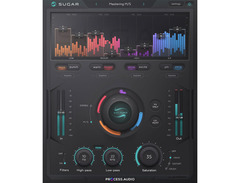
Unleash the full potential of your tracks with the PROCESS.AUDIO Sugar, the ultimate full-spectrum audio sweetener designed for musicians and producers who demand professional-grade results. Crafted by award-winning engineers, Sugar is a comprehensive audio color palette that brings together essential harmonic enhancement techniques in one intuitive plugin. Whether you're aiming for punchy kick drums, thick basslines, or creamy vocals, Sugar offers a fast lane to achieving those sought-after pro sounds.
With Sugar, you can save time without sacrificing quality. Its streamlined interface combines four distinct processing bands—Low, Mid, High, and Air—each with two unique color options, allowing you to tailor your sound precisely. The plugin's signal flow is straightforward, blending selected effects with the dry signal and routing them through high-pass and low-pass linear phase filters. This ensures that while Sugar adds depth and warmth, it also maintains the integrity of your original sound.
At the heart of Sugar is its powerful saturation section, featuring three carefully chosen algorithms—Drive, Distort, and Destroy—that allow you to refine your sound with an authentic analogue feel or push it to creative extremes. And with the unique jog wheel control, adjusting the intensity of Sugar's effects has never been more intuitive.
Sugar's linear phase filters make it suitable for mastering-grade processing, ensuring your mixes are both expansive and precise. Whether you're working in mono, stereo, or M/S mode, Sugar provides the flexibility and control you need to breathe new life into your music.
Key Features:
- 4 bands of processing (Low, Mid, High, Air) with 2 colors per band
- 8 Colors: Thick, Punch, Warm, Broad, Shine, Excite, Yin, Yang
- Unique jog wheel blending knob
- High-pass and low-pass filters for fine-tuning
- 3 saturation circuits: Drive, Distort, Destroy
- Linear phase mode for 4 band crossovers and 2 filters
- FX-only switch to isolate Sugar's effects
- Works in mono, stereo, and M/S mode
- Compatible with major DAWs: Pro Tools, Logic Pro X, Cubase, Ableton, Studio One
Product specs
| Software Type | Spectrum Enhancer |
| Platform | Mac, PC |
| Upgrade/Full | Full |
| Download/Boxed | Download |
| Bit Depth | 64-bit |
| Format | AAX, VST, AU |
| Authorization Type | iLok Account Required |
| Hardware Requirements - Mac | Intel Core 2 Duo or higher, 4GB RAM minimum |
| Hardware Requirements - PC | Intel Core 2 Duo / AMD Athlon 64 X2 or higher, 4GB RAM minimum |
| OS Requirements - Mac | OS X 10.9 or later |
| OS Requirements - PC | Windows 7 SP1 or later |
FAQs
-
What is the primary function of the PROCESS.AUDIO Sugar plugin?
-
The PROCESS.AUDIO Sugar plugin is a spectrum enhancer designed to add clarity and punch to your mix by enhancing specific frequency bands, making it suitable for both individual tracks and full mixes.
-
Is the PROCESS.AUDIO Sugar plugin compatible with my DAW?
-
The Sugar plugin is compatible with DAWs that support AAX, VST, or AU formats, making it suitable for use with popular software like Pro Tools, Ableton Live, and Logic Pro.
-
What are the system requirements for installing the PROCESS.AUDIO Sugar plugin on a Mac?
-
To install the Sugar plugin on a Mac, you'll need macOS 10.9 or later, an Intel Core 2 Duo processor or higher, and at least 4GB of RAM.
-
Does the PROCESS.AUDIO Sugar plugin require any special authorization for use?
-
Yes, the Sugar plugin requires an iLok account for authorization, but no physical iLok dongle is necessary.
-
Can the PROCESS.AUDIO Sugar plugin be used on both Mac and PC?
-
Yes, the Sugar plugin is compatible with both Mac and PC platforms, supporting 64-bit systems on each.
Videos

White Sea Studio
AWARD WINNING?! || PROCESS.AUDIO - Sugar

AWARD WINNING?! || PROCESS.AUDIO - Sugar
White Sea Studio

Sugar by Process.Audio | One of the Best VST Plugin 2020

PROCESS.AUDIO

Using Sugar To Mix Vocals | Mix Vocals Like Pros
PROCESS.AUDIO

Using Sugar on Mix Buses | Mix Buss Processing Tips
PROCESS.AUDIO
Puremix Mentors | Mixing Live | Using Process.Audio Sugar Plugin On A Song

Puremix
Process Audio 'Sugar' Review

Creative Sauce
Mixing with Sugar | New Plugin from Process.Audio and PureMix

Green Light Sound

Using Sugar To Mix Female Vocals | Tips for Recording Pro Vocals
PROCESS.AUDIO
Reviews
Owner Insights
We analyzed real musician discussions from forums and Reddit to find what players love, question, and tweak about PROCESS.AUDIO Sugar.
Features and functionality
-
PROCESS.AUDIO Sugar operates on four bands, offering a combination of processes for general "sweetening" that users find worth exploring for unique results.
Source -
Sugar offers M/S processing, HPF/LPF, and two variants per band with a separate saturation knob having three sound options, enhancing customization.
Source -
Sugar is described as a multi-band compressor with resonant EQ, providing additional layers of control beyond typical sound enhancement.
Source
Use cases and applications
-
Sugar is recommended for those interested in experimenting with its processes to replicate and understand its effects better, particularly useful for mix enhancement.
Source
Comparisons
-
Some users find Sugar's impact comparable to Gullfoss and Soothe, but with a broader focus on "sweetening" rather than specific frequency correction or resonance control.
Source -
Sugar is compared to Andrew Scheps Parallel Particles but offers more customization options, though both provide color and saturation.
Source -
It's compared to four individual soundgoodizers, each targeting a major frequency band for a comprehensive enhancement approach.
Source
User experience
-
It's suggested to try Sugar's demo for an experiential understanding, as users note its unique processing that is not easily replicated with other plugins.
Source -
Some users find Sugar CPU-intensive, making it challenging to use in projects despite its quality sound.
Source -
Some users find the interface user-friendly and intuitive, making it a preferred choice for quick and effective sound processing.
Source
Critic Reviews
Based on 0 Reviews and 0 Ratings
Genre Usage
Based on how artists on Equipboard use this gear, it is most commonly found in the following genres.
More PROCESS.AUDIO Multi-Effect Plugins


$29.99 - $34.99
in Multi-Effect Plugins Rank
.jpeg?v=1784002496)


-m.webp?v=1783581565)
-m.webp?v=1783894867)
$79.00
in Multi-Effect Plugins Rank

$32.00 - $39.99
in Multi-Effect Plugins Rank


$99.00
in Multi-Effect Plugins Rank


$39.99 - $149.00
in Multi-Effect Plugins Rank


$32.00 - $34.99
in Multi-Effect Plugins Rank


$0.00
in Multi-Effect Plugins Rank

$63.00 - $139.00
in Multi-Effect Plugins Rank

$39.90
in Multi-Effect Plugins Rank


$114.00 - $129.00
in Multi-Effect Plugins Rank


$114.00 - $129.00
in Multi-Effect Plugins Rank


$39.00 - $49.00
in Multi-Effect Plugins Rank

$9.90 - $39.90
in Multi-Effect Plugins Rank

$14.90 - $69.00
in Multi-Effect Plugins Rank

$32.00 - $35.99
in Multi-Effect Plugins Rank


in Multi-Effect Plugins Rank


$142.00 - $149.00
in Multi-Effect Plugins Rank


$0.00
in Multi-Effect Plugins Rank

$32.00 - $39.99
in Multi-Effect Plugins Rank


$12.90 - $49.90
in Multi-Effect Plugins Rank

$29.50
in Multi-Effect Plugins Rank

$0.00
in Multi-Effect Plugins Rank

$32.00 - $39.99
in Multi-Effect Plugins Rank


$32.37 - $129.50
in Multi-Effect Plugins Rank

$29.99 - $34.99
in Multi-Effect Plugins Rank


$66.00 - $69.00
in Multi-Effect Plugins Rank


$79.50
in Multi-Effect Plugins Rank

$29.99 - $148.00
in Multi-Effect Plugins Rank

$0.00
in Multi-Effect Plugins Rank

$99.99 - $299.99
in Multi-Effect Plugins Rank


$95.00 - $99.00
in Multi-Effect Plugins Rank


Accessories & Related Items




-s.webp?v=1784093888)


Artist usage


Community setups


Similar


Most Popular Multi-Effect Plugins
Most Popular Brands
-
Added to Equipboard on by
 equipboard
GearIQ 4934
-


