

Pricing and availability
We compare 600+ stores and found this item at 2 stores. Prices updated .
Store
Reviews
Price




Price History
Based on price data from 1 merchant for "TP-Link MC220L". Prices shown reflect NEW condition. Tracking began Apr 22, 2026.
* Product prices and availability are updated by Equipboard every 24hrs and are subject to change. Equipboard may receive compensation for purchases made at participating retailers linked on this site. This compensation does not affect what products or prices are displayed, or the order of prices listed. For more information, please refer to our affiliate disclosure.
Description
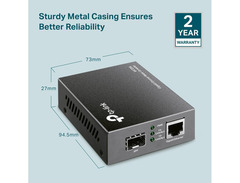
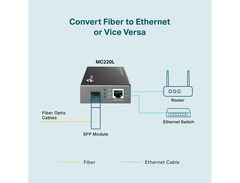
In the world of music production and live performance, seamless connectivity is paramount. Enter the TP-Link MC220L, a Gigabit SFP Media Converter that bridges the gap between fiber optics and traditional Ethernet, ensuring that your musical creativity flows without interruption. Perfect for studio setups and live events, this converter supports industry standards like 802.3ab and 802.3z, making it a versatile addition to any musician's toolkit.
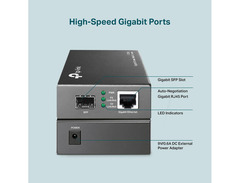
This compact and efficient device extends your network's reach, allowing data transfer up to 0.31 miles on multi-mode fiber and an impressive 6.21 miles on single-mode fiber. Whether you're streaming high-quality audio files or collaborating in real-time with bandmates across the globe, the MC220L ensures data rates up to 1000 Mbps in Full-Duplex mode, maintaining the integrity of your sound. Installation is a breeze with its plug-and-play design, featuring a single Gigabit SFP port and a Gigabit Ethernet port, complemented by an external power adapter.
For musicians who value precision and reliability, the TP-Link MC220L is the unseen hero that powers your performances and productions.
Key Features:
- Supports 1000 Mbps in Full-Duplex mode for both TX and FX ports
- Auto MDI/MDIX support for TX port
- Switch configuration for force/auto transfer mode on FX port
- Hot-swappable FX port
- Extends fiber distance up to 0.31 miles (multi-mode) and 6.21 miles (single-mode)
- LED indicators for easy network monitoring
- Includes external power supply
Owner's manual
TP-Link MC220L User Manual

Reviews
PROS
-
Easy plug-and-play installation with no complex configuration needed
-
Supports multiple SFP modules, increasing setup versatility
-
Delivers high-speed data transfer, maintaining near gigabit speeds
-
Compact and durable design that fits neatly into setups
-
Reliable performance for home and office network environments
-
Cost-effective solution for bridging fiber and Ethernet
-
Solid build quality with secure and quiet operation
-
Mountable design with screw slot holes for easy wall installation
-
Provides a simple and effective alternative to WiFi extenders
-
Compatible with various SFP brands for flexible networking needs
CONS
-
Does not correctly propagate link state, affecting certain network protocols
-
Requires separate purchase of SFP modules, which may not be immediately obvious
-
Limited status feedback on SFP modules when in use
-
9VDC adapter can be a point of failure, limiting flexibility in power options
Owner Insights
We analyzed real musician discussions from forums and Reddit to find what players love, question, and tweak about TP-Link MC220L.
Setup and maintenance
Features and functionality
-
The device works with multimode fiber, but you must ensure proper alignment of transmit and receive sides by swapping fibers if necessary.
Source
Use cases and applications
Mods and upgrades
-
Compatible with 1000Base-SX transceivers for multimode fiber, enhancing its adaptability for specific networking setups.
Source
Comparisons
-
The single-mode fiber option is recommended for future-proofing, even though it costs marginally more, as it supports all standards and is compatible with potential future upgrades.
Source
Based on 0 Reviews and 0 Ratings
More Computers & Peripherals

$1,319.55
in Computers & Peripherals Rank


$69.59 - $79.00
in Computers & Peripherals Rank


$399.15 - $596.86
in Computers & Peripherals Rank


$134.00 - $249.99
in Computers & Peripherals Rank


$1,191.98 - $1,914.49
in Computers & Peripherals Rank


$54.99
in Computers & Peripherals Rank


$579.99 - $799.00
in Computers & Peripherals Rank


$83.83 - $99.00
in Computers & Peripherals Rank


$149.99 - $179.99
in Computers & Peripherals Rank

$109.99 - $129.99
in Computers & Peripherals Rank


$1,299.00
in Computers & Peripherals Rank


$149.99 - $191.00
in Computers & Peripherals Rank


$44.99 - $89.00
in Computers & Peripherals Rank


$389.00
in Computers & Peripherals Rank


$106.69
in Computers & Peripherals Rank


$91.08 - $179.99
in Computers & Peripherals Rank


$509.00 - $867.00
in Computers & Peripherals Rank

$649.99 - $919.99
in Computers & Peripherals Rank


$118.73 - $119.99
in Computers & Peripherals Rank


$1,488.71 - $1,999.00
in Computers & Peripherals Rank


$25.00 - $1,999.99
in Computers & Peripherals Rank

$87.00 - $199.00
in Computers & Peripherals Rank


$549.00
in Computers & Peripherals Rank
.png?v=1784921366)


$128.00
in Computers & Peripherals Rank


$210.99 - $379.99
in Computers & Peripherals Rank

$32.99 - $189.95
in Computers & Peripherals Rank


$19.99 - $29.99
in Computers & Peripherals Rank


$1,399.00 - $1,569.99
in Computers & Peripherals Rank


$189.99 - $249.99
in Computers & Peripherals Rank


$69.00 - $403.00
in Computers & Peripherals Rank


$22.00
in Computers & Peripherals Rank


$94.99 - $294.99
in Computers & Peripherals Rank


$99.99 - $119.99
in Computers & Peripherals Rank


$45.95
in Computers & Peripherals Rank


$24.99 - $29.99
in Computers & Peripherals Rank

$99.99 - $179.99
in Computers & Peripherals Rank

Artist usage


Community setups


Similar


Gear Guides







.jpg)
Most Popular Brands
-
Added to Equipboard on by
 thatlkjguy
GearIQ 4716
-



