
Pricing and availability




* Product prices and availability are updated by Equipboard every 24hrs and are subject to change. Equipboard may receive compensation for purchases made at participating retailers linked on this site. This compensation does not affect what products or prices are displayed, or the order of prices listed. For more information, please refer to our affiliate disclosure.
Description
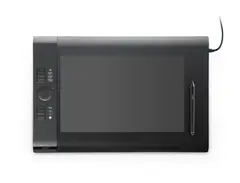
Unleash your creative potential with the Wacom Intuos4 Large Pen Tablet, a dynamic tool designed for musicians who integrate digital artistry into their craft. This versatile tablet bridges the gap between analog and digital creativity, providing a seamless experience for music producers, sound designers, and composers who rely on precision and control in their workflow. Ideal for detailed editing tasks, the Intuos4 offers a professional-grade pen interface that captures every nuance with accuracy, ensuring your music projects are polished to perfection.
The Intuos4 features a large active area that gives you ample space to arrange, sculpt, and fine-tune your compositions. With its customizable ExpressKeys and Touch Ring, you can streamline your creative process by setting up shortcuts to your most-used functions, allowing for an efficient and uninterrupted music production experience. Whether you are manipulating waveforms or designing soundscapes, the tablet’s responsive pen pressure sensitivity ensures that every stroke translates into the digital realm with precision.
The tablet is also compatible with most major music production software, making it a flexible addition to your studio setup. Its ergonomic design ensures that long sessions remain comfortable, reducing strain and allowing you to focus solely on the task at hand.
Key Features:
- Professional-grade pen interface with high precision
- Large active area for enhanced creative freedom
- Customizable ExpressKeys and Touch Ring for efficiency
- Compatible with major music production software
- Ergonomic design for comfortable extended use
- High pen pressure sensitivity for accurate input
Videos

dablet
first impression with the wacom intuos 4

first impression with the wacom intuos 4
dablet

Review of the Wacom Intuos 4 tablet

dave cross

2021 review of the Wacom Intuos 4 Large

EyekooDrawsStuff
Reviews
Owner Insights
We analyzed real musician discussions from forums and Reddit to find what players love, question, and tweak about Wacom Intuos4 Large Pen Tablet.
Software and compatibility
-
Wacom Intuos4 may not be supported by the latest drivers; older drivers are necessary for functionality on newer systems.
Source -
OpenTabletDriver is recommended for Windows users, as Wacom no longer updates the drivers for the Intuos4.
Source -
The PTH-x60 nibs are incompatible with Intuos4, though the latter's nibs work with most current Wacom tablets.
Source
Features and functionality
-
Users report lines appearing on the OLED display, a common issue with Intuos4.
Source -
The Intuos4's hard buttons are preferred over newer models' rubber-coated ones for better tactile feedback.
Source -
The wider bezel on the Intuos4 provides a comfortable resting place for the hand while working.
Source -
The Intuos4 is noted for having a better touch ring sensitivity compared to newer Intuos Pro models.
Source
Build quality
Use cases and applications
-
Larger size may alleviate hand strain compared to smaller tablets like a 6'' x 4'' Huion.
Source
User experience
-
Owners express satisfaction with pressure sensitivity when using OpenTabletDriver on Linux systems.
Source -
Users find the Intuos4 still perfectly functional and reliable even after a decade of use.
Source -
Many users prefer the Intuos4's LED display over the Bluetooth functionality in newer models due to lag issues.
Source
Comparisons
-
The Intuos4 is considered superior to the Intuos3 but not as good as the Intuos Pro 1st gen.
Source -
The PTH-660 (Intuos Pro) is cited as a great tablet but not necessarily a significant upgrade from the Intuos4 for many users.
Source -
The CTL-670 or CTL-671 models are suggested as suitable replacements for those not using side buttons and needing a medium size.
Source
Critic Reviews
5.0 out of 5
Based on 1 Review and 1 Rating

Genre Usage
Based on how artists on Equipboard use this gear, it is most commonly found in the following genres.
More Computers & Peripherals

$1,319.55
in Computers & Peripherals Rank


$69.59 - $79.00
in Computers & Peripherals Rank


$399.15 - $596.86
in Computers & Peripherals Rank


$134.00 - $249.99
in Computers & Peripherals Rank


$1,191.98 - $1,914.49
in Computers & Peripherals Rank


$54.99
in Computers & Peripherals Rank


$579.99 - $799.00
in Computers & Peripherals Rank


$83.83 - $99.00
in Computers & Peripherals Rank


$149.99 - $179.99
in Computers & Peripherals Rank

$109.99 - $129.99
in Computers & Peripherals Rank


$1,299.00
in Computers & Peripherals Rank


$149.99 - $191.00
in Computers & Peripherals Rank


$44.99 - $89.00
in Computers & Peripherals Rank


$389.00
in Computers & Peripherals Rank


$106.69
in Computers & Peripherals Rank


$91.08 - $179.99
in Computers & Peripherals Rank


$509.00 - $867.00
in Computers & Peripherals Rank

$649.99 - $919.99
in Computers & Peripherals Rank


$118.73 - $119.99
in Computers & Peripherals Rank


$1,488.71 - $1,999.00
in Computers & Peripherals Rank


$25.00 - $1,999.99
in Computers & Peripherals Rank

$87.00 - $199.00
in Computers & Peripherals Rank


$549.00
in Computers & Peripherals Rank
.png?v=1784921366)


$128.00
in Computers & Peripherals Rank


$210.99 - $379.99
in Computers & Peripherals Rank

$32.99 - $189.95
in Computers & Peripherals Rank


$19.99 - $29.99
in Computers & Peripherals Rank


$1,399.00 - $1,569.99
in Computers & Peripherals Rank


$189.99 - $249.99
in Computers & Peripherals Rank


$69.00 - $403.00
in Computers & Peripherals Rank


$22.00
in Computers & Peripherals Rank


$94.99 - $294.99
in Computers & Peripherals Rank


$99.99 - $119.99
in Computers & Peripherals Rank


$45.95
in Computers & Peripherals Rank


$24.99 - $29.99
in Computers & Peripherals Rank

$99.99 - $179.99
in Computers & Peripherals Rank

Artist usage


Community setups


Similar


Gear Guides






.jpg)
Most Popular Brands
-
Added to Equipboard on by
brokenballroomsGearIQ 100
-


