

Pricing and availability
We compare 600+ stores and found this item at 4 stores. Prices updated .
Store
Reviews
Price


Price History
Based on price data from 4 merchants for "Waves eMotion LV1 Live Mixer – 32 Stereo Channels". Prices shown reflect NEW condition. Tracking began Apr 2, 2026.
* Product prices and availability are updated by Equipboard every 24hrs and are subject to change. Equipboard may receive compensation for purchases made at participating retailers linked on this site. This compensation does not affect what products or prices are displayed, or the order of prices listed. For more information, please refer to our affiliate disclosure.
Description
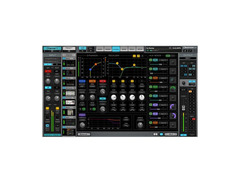
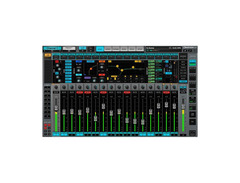
Unleash the power of professional live sound with the Waves eMotion LV1 Live Mixer – 32 Stereo Channels. Perfectly designed for front-of-house engineers, broadcast mixers, and venue sound specialists, this cutting-edge software console offers an intuitive interface that seamlessly integrates into your existing workflow. Enjoy the flexibility of running up to eight plugins per channel, empowering you with limitless creative possibilities. The LV1's SoundGrid audio networking ensures you can take your mixer anywhere, connecting effortlessly to compatible servers and I/O for complete portability.
The eMotion LV1's 32-bit double-precision audio engine provides exceptional headroom and clarity, ensuring your mixes sound pristine. Each mixer channel includes its own plug-in rack, allowing you to utilize Waves' renowned plugins or your favorite third-party effects. With eMo Series plugins like the eMo D5 Dynamics, eMo Q4 Equalizer, and eMo F2 Filter included, you have all the tools for a transparent and efficient live mix at your fingertips.
Whether you're mixing on a laptop, a multi-touch screen, or remotely via a mobile device, the eMotion LV1 offers a consistent and smooth experience. Create custom layers for quick access to your most-used functions, and enjoy remote control capabilities from anywhere in the venue. This software mixer redefines live sound, making it an essential tool for any serious audio professional.
Key Features:
- 32 stereo/mono input channels
- 32-bit double-precision audio engine
- Run up to 8 plugins per channel
- Includes eMo D5 Dynamics, eMo Q4 Equalizer, eMo F2 Filter
- SoundGrid audio networking for portability
- Customizable layers for personalized workflow
- Remote control via mobile/tablet
- Compatible with Windows and Mac 64-bit systems
- Supports sample rates from 44.1 to 96 kHz
- Seamless integration with Waves and third-party plugins
Product specs
| Software Type | Live Sound mixing |
| Platform | Mac, PC |
| Upgrade/Full | Full |
| Download/Boxed | Download |
| Bit Depth | 64-bit |
| Format | SoundGrid |
| Hardware Requirements - Mac | Intel Core i7 or higher (M1 support), 8GB RAM minimum |
| Hardware Requirements - PC | Intel Core i5 / AMD Quad-core or higher (AVX required), 8GB RAM minimum |
| OS Requirements - Mac | macOS 13 or later |
| OS Requirements - PC | Windows 10 (22H2) or later |
FAQs
-
What are the key features of the Waves eMotion LV1 Live Mixer – 32 Stereo Channels?
-
The Waves eMotion LV1 Live Mixer offers 32 stereo channels for live sound mixing, utilizing SoundGrid technology for real-time processing. It supports both Mac and PC platforms and requires a 64-bit system for optimal performance.
-
Is the Waves eMotion LV1 Live Mixer compatible with both Mac and PC?
-
Yes, the Waves eMotion LV1 Live Mixer is compatible with both Mac and PC. It requires macOS 13 or later for Mac users and Windows 10 (22H2) or later for PC users.
-
What are the system requirements for running the Waves eMotion LV1 Live Mixer on a Mac?
-
For Mac, the Waves eMotion LV1 Live Mixer requires an Intel Core i7 or higher processor (M1 support included), with a minimum of 8GB RAM, and macOS 13 or later.
-
Does the Waves eMotion LV1 Live Mixer require any specific hardware for PC use?
-
Yes, on a PC, the Waves eMotion LV1 Live Mixer requires an Intel Core i5 or AMD Quad-core processor with AVX support, at least 8GB of RAM, and Windows 10 (22H2) or later.
-
Can the Waves eMotion LV1 Live Mixer be used for studio mixing?
-
While primarily designed for live sound mixing, the Waves eMotion LV1 Live Mixer can also be used in studio environments thanks to its robust SoundGrid processing capabilities.


Reviews
Owner Insights
We analyzed real musician discussions from forums and Reddit to find what players love, question, and tweak about Waves eMotion LV1 Live Mixer – 32 Stereo Channels.
User experience
-
Owners note that the LV1 system demands constant attention, with several builds needed to achieve stability, making it less user-friendly for volunteers.
Source -
Some users experience CPU spikes with certain plugins, leading to creative solutions like replacing H-verb with IRLive using Bricasti IRs.
Source
Comparisons
-
LV1 setups can be built cost-effectively using existing equipment like Behringer X32 and Midas stage boxes, although costs can increase with incremental upgrades.
Source -
The LV1 lacks weather resistance and is considered less reliable compared to Yamaha CL5, which is seen as more robust and stable in live settings.
Source
Use cases and applications
-
LV1 is praised for its scalability, allowing users to adjust setups from small acoustic tours to 64-input shows, all fitting into two medium Peli cases.
Source -
LV1 is ideal for small touring acts needing portable setups, offering native plugin integration and compact FOH rigs that can be easily flown.
Source -
The mixer excels in creating studio-quality sound for live shows, with users finding it indispensable for bands focused on high-quality audio production.
Source
Value and pricing
Software and compatibility
-
SoundGrid driver issues on Mac OS can cause packet loss when running LV1 alongside other programs, necessitating a separate laptop for multi-track use.
Source -
Sharing I/O across multiple devices with LV1 is unsupported, requiring careful planning and redundancy for reliable operation in complex setups.
Source -
Version 16 has improved stability with zero frame drops, whereas version 15 occasionally triggered frame drops during plugin loads/unloads.
Source -
Lack of full remote control and OSC support limits integration with systems like Bitfocus Companion, affecting use in larger productions.
Source
Setup and maintenance
-
Users often employ two distinct VLANs to separate SoundGrid and IP networks to prevent interference and maintain stability.
Source -
Using the wrong type of network cable, such as Cat5 instead of Cat6, can cause significant issues within the LV1 system network.
Source -
Setting the clock can be counterintuitive; the expansion card should be the master clock, with other devices synced accordingly.
Source
Features and functionality
-
Luminex switches, officially supported by Waves, offer network cable redundancy but are heavy, which can be a drawback for portable setups.
Source -
LV1 cannot crossfade between snapshots, a feature present in older consoles like D-show since 2005.
Source -
The LV1's bus-to-bus routing is tricky but versatile, offering 64 stereo channels, 8 groups, and 16 stereo auxes, suitable for complex setups.
Source
Based on 0 Reviews and 0 Ratings
More Waves Utility Plugins

$37.00 - $39.99
in Utility Plugins Rank


$33.00 - $35.99
in Utility Plugins Rank


$29.99 - $39.99
in Utility Plugins Rank


$81.00 - $99.00
in Utility Plugins Rank

$39.99 - $149.00
in Utility Plugins Rank


$48.00 - $50.00
in Utility Plugins Rank

$24.99
in Utility Plugins Rank


$525.00 - $599.00
in Utility Plugins Rank

$24.99 - $29.99
in Utility Plugins Rank


$37.00 - $39.99
in Utility Plugins Rank

$943.00 - $999.00
in Utility Plugins Rank

$33.00 - $199.00
in Utility Plugins Rank

$29.99 - $34.99
in Utility Plugins Rank

$1,248.00 - $1,399.00
in Utility Plugins Rank

$34.99 - $79.00
in Utility Plugins Rank

$33.00 - $34.99
in Utility Plugins Rank


$33.00 - $34.99
in Utility Plugins Rank


$1,629.00 - $11,899.00


$0.00
in Utility Plugins Rank


$10.00
in Utility Plugins Rank


$49.00
in Utility Plugins Rank


$19.00
in Utility Plugins Rank

in Utility Plugins Rank


$0.00
in Utility Plugins Rank


$0.00
in Utility Plugins Rank

Accessories & Related Items


Artist usage


Community setups


Similar


Gear Guides










Most Popular Utility Plugins
Most Popular Brands
-
Added to Equipboard on by
 equipboard
GearIQ 4934
-


