

Pricing and availability
We compare 600+ stores and found this item at 5 stores. Prices updated .
Store
Reviews
Price


Price History
Based on price data from 5 merchants for "Waves Sub Align". Prices shown reflect NEW condition. Tracking began Apr 2, 2026.
* Product prices and availability are updated by Equipboard every 24hrs and are subject to change. Equipboard may receive compensation for purchases made at participating retailers linked on this site. This compensation does not affect what products or prices are displayed, or the order of prices listed. For more information, please refer to our affiliate disclosure.
Description
Achieving sonic perfection in live sound environments can often feel like a daunting task, especially when dealing with subwoofer and top speaker misalignments. Enter the Waves Sub Align plugin, a versatile tool for live sound engineers that seamlessly addresses these challenges. Designed to bring clarity and punch to your performance, this plugin allows you to time-align subs with full-range speakers effortlessly, even in venues where access to the system processor is limited.
With its intuitive user interface, Waves Sub Align empowers you to control the delay and crossover point between your subs and tops. This ensures optimal positioning, allowing the sound to snap into focus without the need for tedious manual adjustments. Additionally, this plugin provides you with control over subwoofer volume and polarity, enabling you to fine-tune your setup for any venue, big or small.
Key Features:
- Virtual alignment of bass-top signals for improved PA system sound
- Control over delay, volume, and polarity/phase for subwoofers
- Intuitive user interface for quick setup
- Supports up to 24-bit/96 kHz resolution
- Compatible with SoundGrid and multiple mixing platforms
- Essential tool for live sound engineers to enhance clarity and punch
Owner's manual
Waves Sub Align User ManualProduct specs
| Software Type | Speaker alignment |
| Platform | Mac, PC |
| Upgrade/Full | Full |
| Download/Boxed | Download |
| Bit Depth | 64-bit |
| Format | AAX Native, AU, VST, SoundGrid |
| Hardware Requirements - Mac | Intel Core i7 or higher (M1 support), 8GB RAM minimum |
| Hardware Requirements - PC | Intel Core i5 / AMD Quad-core or higher (AVX required), 8GB RAM minimum |
| OS Requirements - Mac | macOS 10.15.7 or later |
| OS Requirements - PC | Windows 10 or later (21H2), 64-bit |
FAQs
-
What is the primary function of the Waves Sub Align plugin?
-
The Waves Sub Align plugin is designed to align subwoofers with main speakers to ensure accurate phase and timing, enhancing the overall sound clarity and coherence in live sound setups.
-
Is Waves Sub Align compatible with my DAW software?
-
Waves Sub Align is compatible with most major DAWs as it supports AAX Native, AU, VST, and SoundGrid formats, allowing for seamless integration into your existing workflow.
-
Can Waves Sub Align be used on both Mac and PC systems?
-
Yes, Waves Sub Align is compatible with both Mac (macOS 10.15.7 or later) and PC (Windows 10 or later, 64-bit) systems, ensuring flexibility across different setups.
-
What are the system requirements for running Waves Sub Align on a Mac?
-
To run Waves Sub Align on a Mac, you need an Intel Core i7 or higher (M1 support), with at least 8GB of RAM, and macOS 10.15.7 or later.
-
Does Waves Sub Align require any specific hardware to function properly?
-
Waves Sub Align requires a computer with an Intel Core i5 / AMD Quad-core or higher processor (AVX support needed) and a minimum of 8GB RAM for optimal performance.
Videos

Waves Audio
How to Align Subs in PA Systems using the Waves Sub Align Plugin
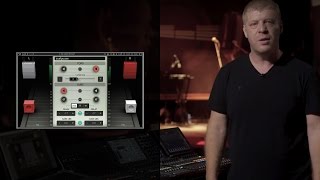
How to Align Subs in PA Systems using the Waves Sub Align Plugin
Waves Audio
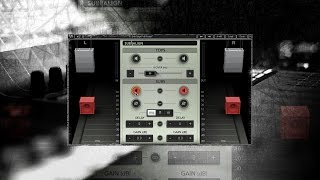
Introducing Waves Sub Align – A Plugin for Live Sound Engineers
Waves Audio

AES 2015 : Waves Sub Align , Element2 by Rock oN

RockoNCompany
Reviews
Owner Insights
We analyzed real musician discussions from forums and Reddit to find what players love, question, and tweak about Waves Sub Align.
Features and functionality
-
Some users find the plugin's sub harmonics barely noticeable even with adequate monitoring setups, questioning its effectiveness for enhancing low-end frequencies.
Source
Use cases and applications
-
The plugin may be redundant if users can effectively manage low-end frequencies with EQ adjustments or by selecting different samples/patches.
Source -
The plugin might not be necessary for those who can achieve desired low-end results through traditional mixing techniques like side-chaining or using sine waves.
Source
Comparisons
-
Some suggest Tone2 Icarus for comprehensive resynthesis tasks, which may offer more versatility than Waves Submarine for bass enhancement.
Source
Critic Reviews
Based on 0 Reviews and 0 Ratings
Genre Usage
Based on how artists on Equipboard use this gear, it is most commonly found in the following genres.
More Waves Utility Plugins

$34.99 - $39.99
in Utility Plugins Rank


$33.00 - $35.99
in Utility Plugins Rank


$29.99 - $39.99
in Utility Plugins Rank


$85.00 - $99.00
in Utility Plugins Rank

$39.99 - $149.00
in Utility Plugins Rank


$48.00 - $50.00
in Utility Plugins Rank

$24.99
in Utility Plugins Rank


$479.00 - $599.00
in Utility Plugins Rank

$24.99 - $29.99
in Utility Plugins Rank


$37.00 - $39.99
in Utility Plugins Rank

$943.00 - $999.00
in Utility Plugins Rank

$33.00 - $199.00
in Utility Plugins Rank

$29.99 - $34.99
in Utility Plugins Rank

$1,250.00 - $1,399.00
in Utility Plugins Rank

$1,539.00 - $1,699.00
in Utility Plugins Rank

$34.99 - $79.00
in Utility Plugins Rank

$33.00 - $34.99
in Utility Plugins Rank


$33.00 - $34.99
in Utility Plugins Rank


$1,629.00 - $11,899.00


$0.00
in Utility Plugins Rank


$10.00
in Utility Plugins Rank


$49.00
in Utility Plugins Rank


$19.00
in Utility Plugins Rank

in Utility Plugins Rank


$0.00
in Utility Plugins Rank


$0.00
in Utility Plugins Rank

Accessories & Related Items




-s.webp?v=1784526320)

Artist usage


Community setups


Similar


Most Popular Utility Plugins
Most Popular Brands
-
Added to Equipboard on by
 jamesonrd
GearIQ 199
-



