

Pricing and availability
We compare 600+ stores and found this item at 3 stores. Prices updated .
Store
Reviews
Price


Price History
Based on price data from 3 merchants for "Celemony Melodyne 5 Editor Update from older Melodyne Editor". Prices shown reflect NEW condition. Tracking began Apr 2, 2026.
* Product prices and availability are updated by Equipboard every 24hrs and are subject to change. Equipboard may receive compensation for purchases made at participating retailers linked on this site. This compensation does not affect what products or prices are displayed, or the order of prices listed. For more information, please refer to our affiliate disclosure.
Description
Unlock the full potential of your audio editing with the Celemony Melodyne 5 Editor Update. This upgrade elevates your music production by enhancing both monophonic and polyphonic audio processing, ensuring top-notch sound quality. Whether you're a seasoned professional or an ambitious hobbyist, Melodyne's cutting-edge tools offer a seamless way to refine vocals and instruments with precision.
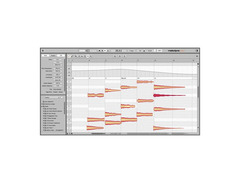
The Melodyne 5 Editor Update introduces a host of features designed to streamline your workflow. The revolutionary DNA (Direct Note Access) technology allows you to dive deep within chords, giving you individual control over each note. Perfect your tracks with the Melodic and Percussive Pitched algorithms, designed to handle both pitched and percussive sounds. The Chord Track and Grid offer automatic chord recognition, enabling you to adapt notes instantly to suit your song’s harmony.
With the intuitive interface, you can easily edit pitch, timing, and dynamics. The new Fade Tool and Sibilant Tool provide advanced control over note-based fades and vocal nuances, while the Leveling Macro balances volume disparities effortlessly. Whether you're crafting a polished single or reworking complex arrangements, Melodyne 5 Editor Update is your go-to solution for achieving professional audio quality.
Key Features:
- DNA Direct Note Access for individual note editing within chords
- Melodic and Percussive Pitched algorithms for diverse audio material
- Chord Track and Chord Grid with automatic chord recognition
- Fade Tool for note-based dynamics control
- Sibilant Tool for detailed vocal sound editing
- Leveling Macro for adjusting volume disparities
- Supports VST3, AU, AAX, and ARA integration
- Polyphonic audio-to-MIDI export capabilities
Product specs
| Software Type | Pitch/Time Correction |
| Platform | Mac, PC |
| Upgrade/Full | Full |
| Download/Boxed | Download |
| Plug-in Formats | Standalone, AAX, AU, VST |
| Additional Compatibility | ARA |
| Bit Depth | 64-bit |
| Hardware Requirements - Mac | Intel Core 2 Duo or higher, 8GB RAM or more recommended |
| Hardware Requirements - PC | Intel Core 2 Duo / AMD Athlon 64 X2 or higher, 8GB RAM or more recommended |
| OS Requirements - Mac | macOS 10.12 or later |
| OS Requirements - PC | Windows 10 or later |
FAQs
-
What are the key features of the Celemony Melodyne 5 Editor Update?
-
The Melodyne 5 Editor Update offers advanced pitch and time correction capabilities, polyphonic editing, and tempo manipulation. It supports ARA integration, making it seamless to use with compatible DAWs.
-
Is the Celemony Melodyne 5 Editor Update compatible with my DAW?
-
The Melodyne 5 Editor Update is compatible with DAWs that support AAX, AU, and VST plug-in formats, as well as those with ARA integration, such as Logic Pro, Studio One, and Cubase.
-
What are the system requirements for installing the Melodyne 5 Editor Update?
-
For Mac, you'll need macOS 10.12 or later with an Intel Core 2 Duo processor or better, and at least 8GB of RAM is recommended. For PC, Windows 10 or later is required, with similar processor and RAM specifications.
-
How does the Melodyne 5 Editor Update improve my workflow?
-
The update enhances workflow with its intuitive interface for precise pitch and timing adjustments, and ARA compatibility allows for efficient integration and editing within your DAW.
-
Can I use the Melodyne 5 Editor Update for polyphonic audio editing?
-
Yes, the Melodyne 5 Editor Update supports polyphonic audio editing, allowing you to manipulate individual notes within chords for detailed pitch and time correction.


Reviews
PROS
-
Excellent for tightening up tracks and experimenting creatively
-
Essential for solo musicians needing pitch correction and harmony generation
-
Improves vocal performance without needing multiple takes
-
Intuitive after initial learning curve, with supportive online tutorials
-
Efficient for editing multiple vocal stems simultaneously
CONS
-
Upgrade cost is considered high by some users
Owner Insights
We analyzed real musician discussions from forums and Reddit to find what players love, question, and tweak about Celemony Melodyne 5 Editor Update from older Melodyne Editor.
Value and pricing
-
By bundling Melodyne Assistant 5 with iZotope Nectar 3 for $132 and upgrading from Assistant to Editor, users save $168 on Melodyne Editor 5.
Source -
An upgrade path from Melodyne Essential to Assistant costs $69, making the Assistant and Nectar 3 bundle at $132 a cost-effective option for additional plugins.
Source -
Users found the $49 upgrade from Essential to Assistant a "no-brainer," highlighting the value of additional features at a low cost.
Source
Features and functionality
-
Melodyne is preferred for its natural-sounding pitch correction compared to autotune's characteristic sound, offering more precise manual control without realtime automatic mode.
Source -
Upgrading to Melodyne Assistant introduces pitch modulation and drift tools, considered significant enhancements over the Essential version.
Source -
Melodyne 5's sibilance detection prevents pitch adjustment on breaths and sibilants, allowing individual level control without separate automation.
Source -
The Leveling Macro in Melodyne 5 automatically adjusts dynamic range, even in polyphonic recordings, unlike the Dynamics slider in previous versions.
Source -
Unlike previous versions, Melodyne 5 Editor includes a polyphonic leveling feature, enhancing volume adjustment capabilities for individual notes in chords.
Source
Use cases and applications
-
For vocal alignment, users suggest Synchro Arts Vocalign Project 5, as it allows multiple tracks to align to a guide track for tight harmonies and doubles.
Source -
Melodyne Essential provided with Pro Tools can be used as a regular plugin in other DAWs like Reaper, enhancing its versatility across different software.
Source
Software and compatibility
-
Pro Tools users must register Melodyne Essential on Celemony's website to access upgrades, suggesting a potentially permanent license even if Pro Tools is canceled.
Source -
Melodyne 5 reportedly replaces Melodyne 4 upon installation, potentially affecting ongoing projects and requiring data re-import if not backed up.
Source -
Concerns exist about file management in Melodyne 5, particularly with its default storage settings and file naming conventions complicating project synchronization.
Source
Based on 0 Reviews and 0 Ratings
More Celemony Audio Editor Plugins

$17.20 - $19.00
in Audio Editor Plugins Rank

$27.00 - $149.00
in Audio Editor Plugins Rank

$45.00 - $99.00
in Audio Editor Plugins Rank

$309.00 - $399.00
in Audio Editor Plugins Rank

$27.00 - $149.00
in Audio Editor Plugins Rank


$179.00
in Audio Editor Plugins Rank

$345.00 - $1,199.00
in Audio Editor Plugins Rank


$275.00
in Audio Editor Plugins Rank

$180.00 - $199.00
in Audio Editor Plugins Rank

$44.00 - $399.00
in Audio Editor Plugins Rank

$74.00
in Audio Editor Plugins Rank

$0.00 - $99.00
in Audio Editor Plugins Rank

$50.00 - $70.00
in Audio Editor Plugins Rank

$399.00
in Audio Editor Plugins Rank

$37.00 - $49.00
in Audio Editor Plugins Rank


$399.00
in Audio Editor Plugins Rank

$199.00
in Audio Editor Plugins Rank

$799.00
in Audio Editor Plugins Rank


$138.00 - $149.00
in Audio Editor Plugins Rank


$49.50 - $129.00
in Audio Editor Plugins Rank

$119.00
in Audio Editor Plugins Rank

$90.00 - $99.00
in Audio Editor Plugins Rank

$999.00
in Audio Editor Plugins Rank

$215.00 - $239.00
in Audio Editor Plugins Rank
-m.webp?v=1784336641)


in Audio Editor Plugins Rank


in Audio Editor Plugins Rank


$349.99
in Audio Editor Plugins Rank


in Audio Editor Plugins Rank


Accessories & Related Items


Artist usage


Community setups


Similar


Gear Guides









Most Popular Audio Editor Plugins
Most Popular Brands
-
Added to Equipboard on by
 equipboard
GearIQ 4934
-


