

Pricing and availability
We compare 600+ stores and found this item at 2 stores. Prices updated .
Store
Reviews
Price




* Product prices and availability are updated by Equipboard every 24hrs and are subject to change. Equipboard may receive compensation for purchases made at participating retailers linked on this site. This compensation does not affect what products or prices are displayed, or the order of prices listed. For more information, please refer to our affiliate disclosure.
Description
Elevate your digital music production with the Kensington Expert Trackball Mouse, a perfect blend of ergonomic design and precision engineering tailored for musicians and producers. This device redefines how you interact with your digital audio workstations, offering a seamless experience that keeps your focus on creativity, not on control.
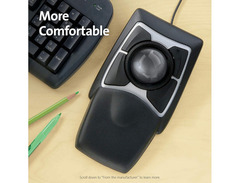
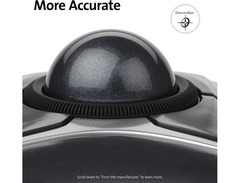
The Kensington Expert Trackball Mouse features an innovative scroll ring that hugs the trackball, allowing for effortless navigation through your music tracks. Its Diamond Eye Optical Technology ensures pinpoint accuracy, making it a breeze to tweak those intricate sound waves or adjust minute details in your compositions. The built-in wrist rest adds a layer of comfort, reducing strain during those extended studio sessions.
Cross-platform compatibility means you can plug and play with both Windows and macOS systems, catering to a diverse range of setups. Whether you’re editing complex arrangements or managing a live performance, this trackball mouse provides the flexibility and precision you need to excel.
Key Features:
- Ergonomic design with built-in wrist rest for enhanced comfort
- Diamond Eye Optical Technology for superior precision
- Scroll ring for seamless navigation
- Four customizable buttons for quick access to essential functions
- Compatible with both Windows and macOS platforms
- Includes a detachable wrist rest
- Comes with a limited 5-year manufacturer warranty
Videos

Tech Bytes
Kensington Expert: Simple Design Done Right
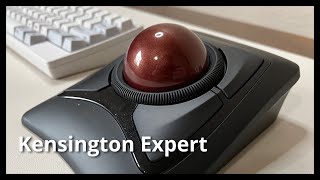
Kensington Expert: Simple Design Done Right
Tech Bytes
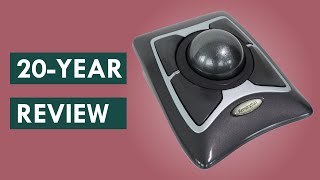
Kensington Expert Mouse trackball review: Why you'll love it

Markus Presents
![Video thumbnail for Kensington Expert Trackball [for Workflow 2021] by Anvill Music & Media](https://img.youtube.com/vi/dJ8dTO39llY/mqdefault.jpg)
Kensington Expert Trackball [for Workflow 2021]

Anvill Music & Media
Reviews
PROS
-
Comfortable finger-only movement enhances ergonomic use
-
Large ball offers easy and precise cursor control
-
Four programmable buttons for custom actions
-
Wrist rest extension provides natural hand positioning
-
TrackBallWorks software allows for speed and action customization
-
Cheaper alternative for precision editing compared to a Wacom tablet
CONS
-
Incompatibility with Adobe Photoshop's Selection Tool
-
Rough, inconsistent scroll ring movement
-
Feels cheaply made with plastic components
-
Cannot program different button functions for different applications
-
Uncomfortable ergonomics with awkward button positioning
-
Too large for portable use with laptops
-
No replacement ball available for worn-out units
Owner Insights
We analyzed real musician discussions from forums and Reddit to find what players love, question, and tweak about Kensington Expert Trackball Mouse.
Features and functionality
-
The Expert uses replaceable batteries, which are seen as advantageous for longevity compared to the Slimblade's internal battery, which could degrade over time.
Source -
The Slimblade's button layout is criticized for unclear delineation, but some find clicking near the ball reliably registers inputs without issue.
Source -
The scroll wheel's sensitivity is sometimes criticized, with some users finding it too sensitive or imprecise for their needs.
Source -
The jog wheel is frequently used for side scrolling and zooming, highlighting its utility in detailed editing work.
Source
Other
-
Some users suspect the trackball firmware might be at fault when experiencing connectivity issues with Windows 11, particularly when it works fine on older systems.
Source
Software and compatibility
-
The Kensington Expert Mouse may not require a specific driver to function on some Windows 11 machines, indicating variability in driver necessity across different setups.
Source -
Microsoft drivers can be used successfully for the Kensington Expert Mouse if Kensington's own drivers fail, although they might not offer full functionality.
Source -
The older TrackballWorks drivers may resolve connection issues temporarily, but rebooting can cause disconnection, suggesting potential compatibility issues with Windows 11.
Source -
Some users experience disconnection issues with the Kensington Expert Mouse on Windows 11, requiring unplugging and replugging the device for it to function properly.
Source -
Mouse acceleration can be adjusted on both Windows and Mac using specific settings or software like MouseWorks for fine-tuning speed and sensitivity.
Source
User experience
-
The Expert is noted for better tracking accuracy, particularly for small, precise movements, which is crucial for detailed work in applications like Illustrator or Photoshop.
Source -
Owners note the Expert's slanted design can be uncomfortable initially, requiring an adjustment period and possible use of a wrist rest for optimal comfort.
Source -
Transitioning from a mouse to the Kensington trackball takes about a week of consistent use for most users to become comfortable and efficient.
Source -
The trackball mouse is praised for reducing wrist fatigue compared to traditional mice, with many users experiencing less strain over extended use.
Source
Mods and upgrades
-
A silent switch mod is popular among users for reducing noise; however, it requires soldering expertise to implement effectively.
Source
Comparisons
-
Some users prefer the Slimblade's software scroll feature for its modern look and adjustable elevation, while others favor the Expert's mechanical scroll for better precision in long-term use.
Source -
Users mention the Logitech G502 as a preferable alternative for gaming, citing better accuracy and comfort with programmable buttons and a glide toggle switch.
Source
Setup and maintenance
-
Adjusting the wrist rest or using a separate memory foam rest can improve comfort, as some find the default angle uncomfortable.
Source
Based on 0 Reviews and 0 Ratings
Artist usage
Add artist
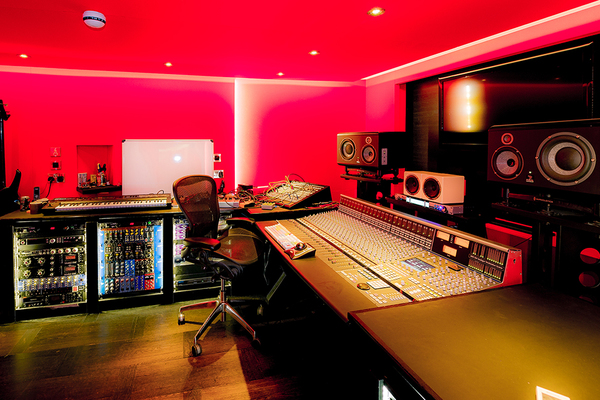


At 2:25 in the video titled "How Patrick Carney Gets His Drum Sound" by Reverb on YouTube, the Kensington Expert Trackball Mouse can be clearly seen on the work desk to the right of the screen in Patrick Carney’s mixing room.


At 0:14 in the YouTube video titled "How Ryan Tedder Builds a Dark Pop Track from Scratch," a Kensington Expert Trackball Mouse can be seen on Ryan Tedder's desk, confirming its use in his music production setup. This video is provided by Studio.


At 1:07:11 in the studio tour video titled "My Synth Studio Revealed | Studio Tour 2025," the Kensington Expert Trackball Mouse is clearly visible on the work desk in Anthony Marinelli’s studio, confirming its use by the artist. This visual evidence is provided by Anthony Marinelli Music on YouTube.


The Kensington Expert Trackball Mouse is seen all over Seth's studio footage and Instagram feed. It was an essential in the studio for him to increase workflow in his primary DAW, Avid Pro Tools.


Genre Usage
Based on how artists on Equipboard use this gear, it is most commonly found in the following genres.
Used With
Based on how musicians on Equipboard use Kensington Expert Trackball Mouse, it is most commonly used with the following gear.




More Kensington Computers & Peripherals


$1,319.55
in Computers & Peripherals Rank


$69.59 - $79.00
in Computers & Peripherals Rank


$399.15 - $596.86
in Computers & Peripherals Rank


$134.00 - $249.99
in Computers & Peripherals Rank


$1,191.98 - $1,914.49
in Computers & Peripherals Rank


$54.99
in Computers & Peripherals Rank


$579.99 - $799.00
in Computers & Peripherals Rank


$83.83 - $99.00
in Computers & Peripherals Rank


$149.99 - $179.99
in Computers & Peripherals Rank

$109.99 - $129.99
in Computers & Peripherals Rank


$1,299.00
in Computers & Peripherals Rank


$149.99 - $191.00
in Computers & Peripherals Rank


$44.99 - $89.00
in Computers & Peripherals Rank


$389.00
in Computers & Peripherals Rank


$106.69
in Computers & Peripherals Rank


$91.08 - $179.99
in Computers & Peripherals Rank


$509.00 - $867.00
in Computers & Peripherals Rank

$649.99 - $919.99
in Computers & Peripherals Rank


$118.73 - $119.99
in Computers & Peripherals Rank


$1,488.71 - $1,999.00
in Computers & Peripherals Rank


$25.00 - $2,119.99
in Computers & Peripherals Rank

$87.00 - $199.00
in Computers & Peripherals Rank


$549.00
in Computers & Peripherals Rank
.png?v=1784891692)


$128.00
in Computers & Peripherals Rank


$210.99 - $379.99
in Computers & Peripherals Rank

$32.99 - $189.95
in Computers & Peripherals Rank


$19.99 - $29.99
in Computers & Peripherals Rank


$1,399.00 - $1,569.99
in Computers & Peripherals Rank


$189.99 - $249.99
in Computers & Peripherals Rank


$69.00 - $403.00
in Computers & Peripherals Rank


$22.00
in Computers & Peripherals Rank


$94.99 - $294.99
in Computers & Peripherals Rank


$99.99 - $119.99
in Computers & Peripherals Rank


$45.95
in Computers & Peripherals Rank

Community setups


Similar


Gear Guides






.jpg)
Most Popular Computers & Peripherals
Most Popular Brands
-
Added to Equipboard on by
 tunaman008
GearIQ 986
-



