



Pricing and availability
We compare 600+ stores and found this item at 3 stores. Prices updated .
Store
Reviews
Price




Price History
Based on price data from 1 merchant for "Kensington Expert Wireless Trackball Mouse". Prices shown reflect NEW condition. Tracking began Jun 2, 2026.
* Product prices and availability are updated by Equipboard every 24hrs and are subject to change. Equipboard may receive compensation for purchases made at participating retailers linked on this site. This compensation does not affect what products or prices are displayed, or the order of prices listed. For more information, please refer to our affiliate disclosure.
Description
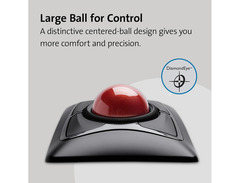
Revolutionize your digital music creation experience with the Kensington Expert Wireless Trackball Mouse. Designed for musicians who demand precision and comfort, this trackball mouse offers a seamless blend of technology and ergonomic design. Say goodbye to tangled cables with dual wireless connectivity via a 2.4 GHz USB nano receiver or Bluetooth 4.0 Smart (LE). The DiamondEye optical tracking technology ensures pinpoint accuracy for navigating complex digital audio workstations or scoring software.
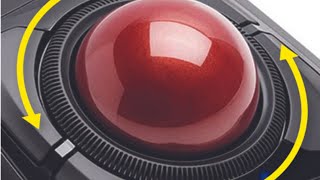
Its intuitive scroll ring allows you to effortlessly glide through lengthy compositions or detailed sheet music, while the ambidextrous design caters to both left and right-handed users. An included detachable wrist rest provides additional support during those marathon sessions in the studio, minimizing strain and maximizing productivity. Personalize your workflow with the TrackballWorks software, which lets you customize all four buttons and adjust cursor speed to match your unique creative process.
Perfect for the evolving musician, this trackball also features an auto-sleep function to conserve battery life, ensuring that it's ready whenever inspiration strikes.
Key Features:
- Dual wireless connectivity: Bluetooth 4.0 Smart (LE) and 2.4 GHz USB nano receiver
- DiamondEye optical sensor for precise cursor control
- Easy navigation with a built-in scroll ring
- Ambidextrous design with a detachable wrist rest for ergonomic comfort
- TrackballWorks software for button customization and cursor speed adjustment
- Auto-sleep feature for battery conservation
- Large 55 mm trackball for enhanced control and precision
Videos

Kensington
Kensington Expert Mouse® Wireless Trackball
Kensington Expert Mouse® Wireless Trackball
Kensington

Kensington Expert Wireless Trackball Review & Unboxing - Better than your Mouse?

Arthur Brassart

Kensington Expert Wireless Trackball Mouse: Say Bye Bye To Normal Mice!

Sypnotix
Reviews
PROS
-
Ergonomic design reduces hand movement
-
Ambidextrous, easy switch between right and left-handed use
-
Wireless convenience compared to previous wired models
CONS
-
Software compatibility issues with Mac and Windows
-
Requires USB dongle for full functionality, lacks reliable Bluetooth support
-
Sleep mode design flaw causes accidental clicks upon waking
-
Scroll ring feels cheaper and less smooth than wired version
-
Cursor movement is inconsistent during slow, precise tasks
-
Setup instructions are unclear and not user-friendly
-
Limited button functionality without software on Mac systems
-
Requires USB reconnection to wake up after sleep mode
Owner Insights
We analyzed real musician discussions from forums and Reddit to find what players love, question, and tweak about Kensington Expert Wireless Trackball Mouse.
Mods and upgrades
-
A silent switch mod for the Expert, which requires soldering, is popular among users seeking quieter button clicks.
Source
Comparisons
-
The Expert model with Bluetooth is often confused with the Orbit model, which is 2.4GHz wireless only and requires a dongle.
Source -
The Expert's mechanical scroll ring reportedly has improved build quality over older models and may outperform the Slimblade's dual-sensor solution in the long term.
Source
Software and compatibility
-
Users occasionally experience connectivity issues with Bluetooth, requiring reconnection, suggesting a need for a reliable backup dongle.
Source -
Replacing Kensington Works with Steermouse can offer smoother scrolling options for the Expert, enhancing user experience.
Source -
Windows users can adjust mouse acceleration directly in settings without registry edits; however, some users prefer custom fixes for better control.
Source -
Kensington's MouseWorks software allows for fine-tuning of speed and scroll settings on both Windows and Mac platforms.
Source
Features and functionality
-
Older models of the Expert Wireless Trackball lack Bluetooth capability, identifiable by the absence of the switch below the battery compartment.
Source -
The Kensington Expert Wireless Trackball has a Bluetooth switch under the battery compartment, necessary for connecting without a dongle.
Source -
The scroll wheel around the ball may disengage dragging, causing frustration for some users who require precise control.
Source -
The Expert wireless trackball uses standard replaceable batteries, potentially offering longer lifespan compared to the Slimblade's built-in battery, which limits longevity.
Source
Setup and maintenance
-
Applying a small amount of Vaseline to the Expert's trackball can improve its glide and reduce initial stickiness.
Source -
The Expert's slanted design requires a wrist rest or careful arm support positioning, but users acclimate after about a week of use.
Source -
Some users report needing to unplug and replug the wireless USB receiver on startup for proper functionality.
Source
User experience
-
Some owners find the Expert's button sound and feel superior to the Slimblade's single-piece top chassis, enhancing the tactile experience.
Source -
Trackball use reduces wrist fatigue and provides more control, with the ability to perform large movements by flicking fingertips.
Source -
The trackball's slope may require adjustment for comfort, with some users flipping the wrist rest to achieve a flat surface.
Source
Based on 0 Reviews and 0 Ratings
Artist usage
Add artist

At 32:18 in the video "EPIC HOME STUDIO Setup 2022 | Butch Walker (studio tour)" by Andrew Masters on YouTube, a Kensington Expert Wireless Trackball Mouse can be seen on Butch Walker's computer desk.


At 0:20 in the YouTube video titled "I Built My DREAM Home Studio - 2025 Home Studio Tour," Mike Bello can be seen using a Kensington Expert Wireless Trackball Mouse, as it is visibly placed on his studio desk. The video is authored by Mike Bello and details the essential gear he uses for music production.

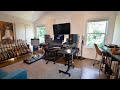
In the video titled "EPIC HOME STUDIO Setup | Colin Sipos (studio tour)" by Andrew Masters, at 0:04, a Kensington Expert Wireless Trackball Mouse is visible on the right side of Colin Sipos' work desk in his home studio, confirming his use of this gear.
Genre Usage
Based on how artists on Equipboard use this gear, it is most commonly found in the following genres.
Used With
Based on how musicians on Equipboard use Kensington Expert Wireless Trackball Mouse, it is most commonly used with the following gear.


-s.webp?v=1784333778)


More Kensington Computers & Peripherals


$1,319.55
in Computers & Peripherals Rank


$69.59 - $79.00
in Computers & Peripherals Rank


$399.15 - $596.86
in Computers & Peripherals Rank


$134.00 - $249.99
in Computers & Peripherals Rank


$1,191.98 - $1,914.49
in Computers & Peripherals Rank


$54.99
in Computers & Peripherals Rank


$579.99 - $799.00
in Computers & Peripherals Rank


$83.83 - $99.00
in Computers & Peripherals Rank


$149.99 - $179.99
in Computers & Peripherals Rank

$109.99 - $129.99
in Computers & Peripherals Rank


$1,299.00
in Computers & Peripherals Rank


$149.99 - $191.00
in Computers & Peripherals Rank


$44.99 - $89.00
in Computers & Peripherals Rank


$389.00
in Computers & Peripherals Rank


$106.69
in Computers & Peripherals Rank


$91.08 - $179.99
in Computers & Peripherals Rank


$509.00 - $867.00
in Computers & Peripherals Rank

$649.99 - $919.99
in Computers & Peripherals Rank


$118.73 - $119.99
in Computers & Peripherals Rank


$1,488.71 - $1,999.00
in Computers & Peripherals Rank


$25.00 - $2,119.99
in Computers & Peripherals Rank

$87.00 - $199.00
in Computers & Peripherals Rank


$549.00
in Computers & Peripherals Rank
.png?v=1784891692)


$128.00
in Computers & Peripherals Rank


$210.99 - $379.99
in Computers & Peripherals Rank

$32.99 - $189.95
in Computers & Peripherals Rank


$19.99 - $29.99
in Computers & Peripherals Rank


$1,399.00 - $1,569.99
in Computers & Peripherals Rank


$189.99 - $249.99
in Computers & Peripherals Rank


$69.00 - $403.00
in Computers & Peripherals Rank


$22.00
in Computers & Peripherals Rank


$94.99 - $294.99
in Computers & Peripherals Rank


$99.99 - $119.99
in Computers & Peripherals Rank


$45.95
in Computers & Peripherals Rank

Community setups


Similar


Gear Guides







.jpg)
Most Popular Computers & Peripherals
Most Popular Brands
-
Added to Equipboard on by
 konokami1
GearIQ 1251
-





