

Pricing and availability
We compare 600+ stores and found this item at 2 stores. Prices updated .
Store
Reviews
Price




Price History
Based on price data from 2 merchants for "Glyph Blackbox Pro 20TB Desktop Hard Drive". Prices shown reflect NEW condition. Tracking began Apr 2, 2026.
* Product prices and availability are updated by Equipboard every 24hrs and are subject to change. Equipboard may receive compensation for purchases made at participating retailers linked on this site. This compensation does not affect what products or prices are displayed, or the order of prices listed. For more information, please refer to our affiliate disclosure.
Description
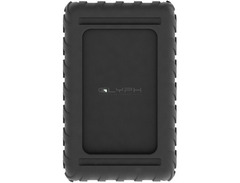
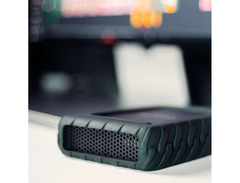
For musicians and producers who need reliable data storage, the Glyph Blackbox Pro 20TB Desktop Hard Drive is your go-to solution. Engineered for those who demand both durability and performance, this hard drive houses a 7,200 rpm Enterprise-class internal drive, ensuring rapid data transfer rates perfect for handling high-resolution audio files and complex project files. Its robust aluminum enclosure doubles as a heatsink, maintaining optimal temperatures even during demanding sessions, and making it a trusted companion for both studio and field work.
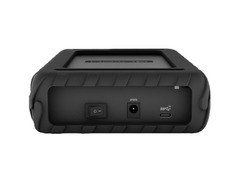
Connectivity is seamless with the Blackbox Pro's USB 3.2 Gen 2 interface, which is backward compatible with USB 3.1 and 3.0, and also accommodates Thunderbolt 3 ports. Preformatted for macOS and Time Machine ready, this drive can be easily reformatted for Windows, offering flexibility across different operating systems. Whether you're mixing tracks in your home studio or capturing live performances on location, its rugged design ensures your valuable data is well-protected from the rigors of travel.
The Blackbox Pro also comes with Glyph's comprehensive 3-2-1 warranty, providing peace of mind with three years of hardware coverage, two years of Level-1 data recovery, and one year of advanced replacement.
Key Features:
- 20TB storage capacity
- 7,200 rpm Enterprise-class internal drive
- USB 3.2 Gen 2 interface with support for Thunderbolt 3 connectivity
- Preformatted for macOS, easily reformatted for Windows
- Rugged aluminum enclosure that acts as a heatsink
- Includes USB-C to USB-C cable, USB-C to USB-A cable, removable external cover, and external power adapter
- Comprehensive 3-2-1 warranty from Glyph Technologies
Product specs
| Form | Desktop |
| Storage Type | Hard Disk Drive |
| Capacity | 20TB |
| Rotational Speed | 7200 RPM |
| Connectivity Type | USB-C 3.1 Gen2 (Thunderbolt 3 compatible) |
| Sustained Transfer Rate | Up to 250MB/s |
| OS Requirements - Mac | OS X 10.9.5 or later |
| OS Requirements - PC | Windows 7 SP1 or later (requires format) |
| Power | DC power supply (included) |
| Height | 1.7" |
| Width | 5.1" |
| Depth | 8.2" |
| Weight | 4.65 lbs. |
FAQs
-
What connectivity options does the Glyph Blackbox Pro 20TB Desktop Hard Drive offer?
-
The Glyph Blackbox Pro 20TB Desktop Hard Drive features USB-C 3.1 Gen2 connectivity, which is also compatible with Thunderbolt 3, providing versatile and high-speed data transfer options.
-
Is the Glyph Blackbox Pro 20TB suitable for both Mac and Windows systems?
-
Yes, the Glyph Blackbox Pro 20TB is compatible with both Mac and Windows systems. It comes pre-formatted for macOS, but can be reformatted for Windows 7 SP1 or later.
-
What is the sustained transfer rate of the Glyph Blackbox Pro 20TB Desktop Hard Drive?
-
The Glyph Blackbox Pro 20TB Desktop Hard Drive offers a sustained transfer rate of up to 250MB/s, making it suitable for large file transfers and data-intensive applications.
-
Does the Glyph Blackbox Pro 20TB require an external power source?
-
Yes, the Glyph Blackbox Pro 20TB Desktop Hard Drive requires a DC power supply, which is included with the product.
-
How durable is the Glyph Blackbox Pro 20TB Desktop Hard Drive for travel use?
-
The Glyph Blackbox Pro 20TB is designed with a robust build, making it a reliable choice for both desktop use and travel, though it is primarily intended for stationary use due to its size and weight.
Videos

Robert Silver Photography
Is This The Best Hard Drive for Photos and Video? | GlYPH Blackbox Pro Review
Is This The Best Hard Drive for Photos and Video? | GlYPH Blackbox Pro Review
Robert Silver Photography
Reviews
PROS
-
Sleek design and solid construction
-
Compatible with Macbook Pro 2016
-
Easy plug-and-play setup
CONS
-
High failure rate, even with light usage
-
Frequent disconnections disrupt data transfers
-
Audible and annoying clicking noises
-
Drives may turn off and on unexpectedly
-
Replacement drives also show defects
-
Poor performance with large data transfers
-
Difficulty in data recovery after failure
Owner Insights
We analyzed real musician discussions from forums and Reddit to find what players love, question, and tweak about Glyph Blackbox Pro 20TB Desktop Hard Drive.
User experience
-
Owners have found Glyph's customer service to be extremely responsive and accommodating, with quick replacements offered for defective units.
Source -
Some owners report that the Glyph Blackbox Pro can be unexpectedly loud, suggesting that this might vary between units.
Source -
Drives with 7200RPM or capacities over 4TB generally produce noticeable noise, with full spinning and needle sounds being common.
Source
Comparisons
Features and functionality
-
The drive is noted for being heavy and large, suitable for massive project backups or as an edit drive with reliable speed performance.
Source
Use cases and applications
-
It's commonly used for "lukewarm" storage, holding archived projects and requiring occasional access for media retrieval or revisions.
Source
Setup and maintenance
-
A user mentioned firing up the drive periodically to grab media or make revisions, indicating it's not intended for continuous editing use.
Source -
For noise reduction, it's recommended to use a longer cable to position the drive away from the workspace or inside a cabinet, ensuring adequate airflow.
Source
Based on 0 Reviews and 0 Ratings
More Glyph Computers & Peripherals

$489.99 - $619.99
in Computers & Peripherals Rank


$1,319.55
in Computers & Peripherals Rank


$69.59 - $79.00
in Computers & Peripherals Rank


$399.15 - $596.86
in Computers & Peripherals Rank


$135.00 - $239.99
in Computers & Peripherals Rank


$579.99 - $799.00
in Computers & Peripherals Rank


$1,192.00 - $1,914.49
in Computers & Peripherals Rank


$54.99
in Computers & Peripherals Rank


$149.95 - $179.99
in Computers & Peripherals Rank

$83.83 - $99.00
in Computers & Peripherals Rank


$109.99 - $129.99
in Computers & Peripherals Rank


$1,299.00
in Computers & Peripherals Rank


$149.99 - $187.99
in Computers & Peripherals Rank


$39.99 - $89.00
in Computers & Peripherals Rank


$365.00
in Computers & Peripherals Rank


$509.00 - $867.00
in Computers & Peripherals Rank

$25.00 - $1,614.91
in Computers & Peripherals Rank

$119.98 - $119.99
in Computers & Peripherals Rank


$115.25
in Computers & Peripherals Rank


$1,369.99 - $1,399.00
in Computers & Peripherals Rank


$210.99 - $379.99
in Computers & Peripherals Rank


$1,488.71 - $1,999.00
in Computers & Peripherals Rank


$87.00 - $199.00
in Computers & Peripherals Rank


$17.91 - $22.80
in Computers & Peripherals Rank


$128.00
in Computers & Peripherals Rank


$32.99 - $189.95
in Computers & Peripherals Rank


$629.99 - $919.99
in Computers & Peripherals Rank


$449.00
in Computers & Peripherals Rank
.png?v=1783050948)


Accessories & Related Items


Artist usage


Community setups


Similar


Gear Guides









Most Popular Computers & Peripherals
Most Popular Brands
-
Added to Equipboard on by
 equipboard
Gear IQ 4934
-



