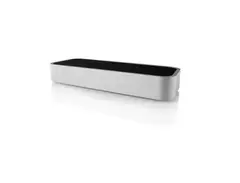

Pricing and availability
We compare 600+ stores and found this item at 2 stores. Prices updated .
Store
Reviews
Price




* Product prices and availability are updated by Equipboard every 24hrs and are subject to change. Equipboard may receive compensation for purchases made at participating retailers linked on this site. This compensation does not affect what products or prices are displayed, or the order of prices listed. For more information, please refer to our affiliate disclosure.
Description
Leap into a new dimension of musical creativity with the Leap Motion controller, a pioneering device that redefines how musicians interact with digital environments. Originally launched as the first optical hand-tracking device for consumers, Leap Motion has evolved into the backbone of natural hand-based interactions in virtual and augmented realities. Perfect for musicians seeking a touch-free, immersive experience, this device seamlessly integrates with your setup to offer an unparalleled level of control and expression.
Imagine orchestrating your digital audio workstation with the wave of a hand or adding dynamic effects to your live performance simply by moving your fingers. Leap Motion's precision and responsiveness make these innovations a reality. Whether you're composing in your studio or performing on stage, this controller empowers you to push the boundaries of what's possible with your music.
Part of the visionary Project North Star, Leap Motion is more than just a tool—it's a catalyst for creativity, encouraging you to explore and develop software tailored to your unique musical style. Join a vibrant community of musicians and developers who are transforming the landscape of interactive music technology.
Key Features:
- Optical hand-tracking device with exceptional precision
- Compatible with a wide range of digital audio workstations
- Seamless integration for a hands-free, immersive experience
- Part of the open-source Project North Star initiative
- Encourages development of AR software for creative expression
Videos

Leap Motion
Introducing the Leap Motion

Introducing the Leap Motion
Leap Motion
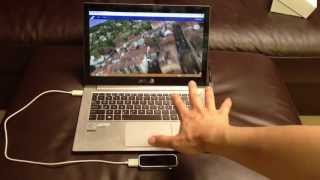
Leap Motion Controller Hands-on Review (Retail Consumer Version)

Shaun W

Is The Leap Motion Worth It In 2020? - Control Your Computer With Air Gestures

The Mysticle
First Look: Leap Motion - Gesture Controller for Computers!

OSReviews

Tips For Using Your Leap Motion Controller
Leap Motion
Leap Motion - Is it still good in 2022 and what has changed?

Official Krale
Reviews
PROS
-
Allows gesture-based control for VR and music software
-
Compact and lightweight, easy to integrate into setups
-
Can enhance music performance with GECO MIDI software
-
Offers a unique, hands-free input method for computing
-
Works from a surprisingly far distance when positioned correctly
CONS
-
Requires a robust computer for optimal performance
-
Narrow field of view can limit tracking capabilities
-
Software can be buggy and does not always start reliably
-
Poor compatibility with other infrared-based devices
-
Limited app support and outdated software options
-
Struggles with hand differentiation and complex gestures
-
High learning curve and extensive calibration needed for smooth operation
-
Often seen as a novelty rather than a practical tool
Owner Insights
We analyzed real musician discussions from forums and Reddit to find what players love, question, and tweak about Leap Motion.
Use cases and applications
-
Leap Motion is deemed ineffective for complex VR simulations like DCS, with users opting for physical panels and button boxes for better immersion and functionality.
Source -
The Fingers app, when working, can emulate a mouse pointer without displaying hands, suitable for users wanting a PointCTRL-like experience.
Source -
The Leap Motion is primarily focused on VR, which may deter users interested in desktop applications despite its hand tracking capabilities.
Source
Features and functionality
-
A custom-built ring-mouse-button device can replace PointCTRL, using the Fingers app to project a mouse pointer without showing hands.
Source -
Leap Motion 2.0 requires USB 3.0 for optimal performance; USB 2.0 results in a 75% frame rate but still outperforms version 1.
Source -
Leap Motion Controller 2 offers higher resolution cameras, increased range, and reduced power consumption compared to the original version.
Source
User experience
-
Mixed reactions in DCS VR; while some find Leap Motion 2.0 effective, others report it as unusable, citing issues with finger clicks in the cockpit.
Source -
Oculus Quest 2's hand tracking, integrated with Leap Motion via OpenXR, offers somewhat reliable functionality but struggles with gestures like middle finger snapping for right-clicks.
Source -
Leap Motion struggles with precise button interaction in DCS VR, causing significant challenges in pointing and clicking accurately.
Source -
Some users express nostalgia for discontinued apps like the pottery app, which offered unique experiences with the original Leap Motion.
Source
Comparisons
Software and compatibility
-
Leap's 5.2 software appears to break the compatibility of older apps like Fingers, which was built on the 4.0x SDK.
Source -
The "Fingers" app inaccurately tracks the entire hand rather than the finger, complicating its use as a mouse emulator.
Source -
The original Leap Motion Controller is compatible with Gemini V5 software on Windows, MacOS, and Linux Ubuntu, but may not support older apps like HandWave.
Source -
GecoMIDI, TouchDesigner, and MIMU Glover have updated their apps for compatibility with new hand tracking software, unlike many older apps.
Source
4.0 out of 5
Based on 3 Reviews and 11 Ratings
106
Coupled with Geco MIDI, an amazing live tool.
I bought the Leap Motion after seeing it on display in a robotics design lab at a university open day. I use mine for music performance though, not robotics - by using the GECO MIDI software and a virtual MIDI port, the Leap Motion can turn hand gestures into powerful automation effects. In fact, anything that is MIDI mappable can be controlled with a Leap Motion (to varying degrees of success). The controller itself is small, light, and works relatively well in most lighting. The motion sensitivity using GECO is alright, but can be temperamental if you don't optimise the software - the more gestures you put in the less reliable it is! However, I've got mine to work pretty well, and it's a great addition to my setup.

252
Using hand gestures to control your music software
The leap motion is a great extra for your studio equipment to control your music software with hand gestures. However I would not advise to use this in a live setup. Till so far GECO seems to be the best application and easiest to setup.

165
Fun, but not actually that useful.
I rarely actually use this, but it is fun to use sometimes and it can sometimes be quicker than using a mouse. Note that you actually have to buy further apps for the leap motion to actually work within a DAW. It's not expensive though. Around £20.
Artist usage
Add artist

"Q: What’s your setup for when you perform live?
SL: Right now, it’s Ableton, Roland MX-1, SPD-SX drum pad, and a Leap Motion controller."
SL On Leap Motion: "You basically change elements of the beat with the wave of your hand, by moving your hand in space: left or right, up or down."
Genre Usage
Based on how artists on Equipboard use this gear, it is most commonly found in the following genres.
Used With
Based on how musicians on Equipboard use Leap Motion, it is most commonly used with the following gear.
More Computers & Peripherals

$1,319.55
in Computers & Peripherals Rank


$69.59 - $79.00
in Computers & Peripherals Rank


$399.15 - $596.86
in Computers & Peripherals Rank


$134.00 - $249.99
in Computers & Peripherals Rank


$1,191.98 - $1,914.49
in Computers & Peripherals Rank


$54.99
in Computers & Peripherals Rank


$579.99 - $799.00
in Computers & Peripherals Rank


$83.83 - $99.00
in Computers & Peripherals Rank


$149.99 - $179.99
in Computers & Peripherals Rank

$109.99 - $129.99
in Computers & Peripherals Rank


$1,299.00
in Computers & Peripherals Rank


$149.99 - $191.00
in Computers & Peripherals Rank


$44.99 - $89.00
in Computers & Peripherals Rank


$389.00
in Computers & Peripherals Rank


$96.31 - $179.99
in Computers & Peripherals Rank

$85.39
in Computers & Peripherals Rank


$509.00 - $867.00
in Computers & Peripherals Rank

$118.15 - $119.99
in Computers & Peripherals Rank


$649.99 - $919.99
in Computers & Peripherals Rank


$25.00 - $1,567.91
in Computers & Peripherals Rank

$1,488.71 - $1,999.00
in Computers & Peripherals Rank


$87.00 - $199.00
in Computers & Peripherals Rank


$210.99 - $379.99
in Computers & Peripherals Rank

$1,399.00 - $1,599.00
in Computers & Peripherals Rank


$128.00
in Computers & Peripherals Rank

$32.99 - $189.95
in Computers & Peripherals Rank


$499.00
in Computers & Peripherals Rank
.png?v=1784293637)


$19.99 - $22.80
in Computers & Peripherals Rank


$189.99 - $249.99
in Computers & Peripherals Rank


$69.00 - $403.00
in Computers & Peripherals Rank


$22.00
in Computers & Peripherals Rank


$94.99 - $284.31
in Computers & Peripherals Rank


$78.90 - $119.99
in Computers & Peripherals Rank


$99.99 - $127.91
in Computers & Peripherals Rank

$45.95
in Computers & Peripherals Rank


$23.99 - $29.99
in Computers & Peripherals Rank

$119.99 - $129.99
in Computers & Peripherals Rank
Community setups


Similar


Gear Guides









Most Popular Brands
-
Added to Equipboard on by
EelbertbautistaGearIQ 41
-