

Pricing and availability




* Product prices and availability are updated by Equipboard every 24hrs and are subject to change. Equipboard may receive compensation for purchases made at participating retailers linked on this site. This compensation does not affect what products or prices are displayed, or the order of prices listed. For more information, please refer to our affiliate disclosure.
Description
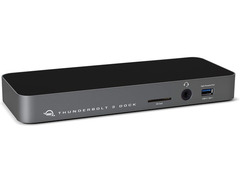
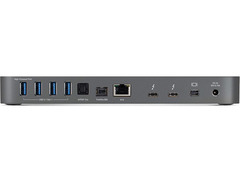
Elevate your studio or on-the-go setup with the OWC Thunderbolt 3 Pro Dock, the ultimate solution for musicians, producers, and videographers who demand seamless integration and uncompromising performance. Designed with the modern creative professional in mind, this dock provides a 10Gb Ethernet connection for lightning-fast network access and includes a versatile array of ports to cater to your every need. From managing multiple card uploads with its front-facing CFast and SD 4.0 card readers to expanding your visual workspace with a DisplayPort for a second 4K display, the OWC Thunderbolt 3 is your go-to mission control.
Whether you're orchestrating a live concert or crafting your next hit in the studio, the Thunderbolt 3 Pro Dock keeps you connected and powered with ease. With two Thunderbolt 3 ports, three USB 3.1 ports, and full support for eSATA devices, you'll have the flexibility to connect and manage complex workflows without missing a beat. Its compact aluminum casing not only saves space but also enhances portability, making it a perfect companion for location setups.
Moreover, the dock's exclusive OWC Dock Ejector software ensures that you can safely disconnect all connected drives with just a click—protecting your data and your peace of mind. Free your workspace from clutter while maintaining connectivity and efficiency to focus on what truly matters: your music.
Key Features:
- 10Gb Ethernet connection for high-speed networking
- Two Thunderbolt 3 ports for versatile connectivity
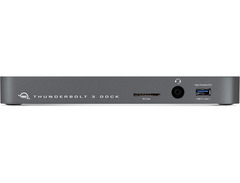
- Front-side CFast and SD 4.0 card readers
- Three USB 3.1 ports and eSATA support
- DisplayPort for an additional 4K display
- Compact, lightweight aluminum design
- Exclusive OWC Dock Ejector software for safe drive disconnection
Product specs
| Thunderbolt 3 | Up to 5K @ 60Hz via a native Thunderbolt 3 display or 4K @ 60Hz via a Thunderbolt display or a USB-C display adapter |
| DisplayPort 1.2 | Up to 4K @ 60Hz |
| RoHS Compliant | Yes |
| IEEE Specification | 802.1AB |
| Support | 802.1Qav |
| Certifications | CE, FCC, VCCI, BSMI, LVD, RCM and Thunderbolt |
| Data Rate | Thunderbolt 3: Up To 40Gb/s |
| Power supply | External UL-listed universal auto-switching power supply |
| AC input | 100-240, 50-60, 2.2 |
| DC output | +12, 12.5 |
| Wattage | 150 Watts |
| External Power Adapter | Yes |
| Security slot | Yes |
| Housing color | Black |
| Housing material | Aluminum |
| Height | 1.4" |
| Length | 8.3" |
| Width | 4.3" |
| Weight | 1.72 lbs. |
Videos

iftibashir
OWC ThunderBolt 3 Dock : Best MacBook Dock EVER?! : REVIEW
OWC ThunderBolt 3 Dock : Best MacBook Dock EVER?! : REVIEW
iftibashir
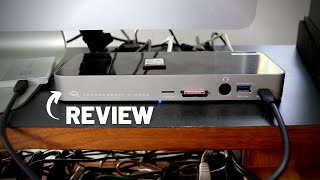
OWC Thunderbolt 3 Dock Review

Joe Gilder • Home Studio Corner

Using the OWC Thunderbolt 3 Dock - My Desk Setup 2018

Eric Welander

OWC Thunderbolt 3 Dock - Reviewed

Dave Taylor
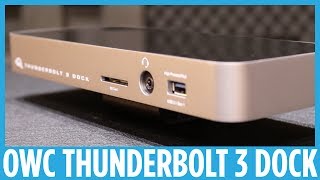
OWC Thunderbolt 3 Dock: Hands-on

YourTechReport
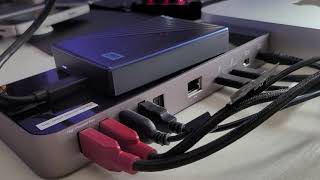
Best Mac Mini Macbook Dock OWC Thunderbolt 3 Dock Review

GregglesTV
Reviews
Owner Insights
We analyzed real musician discussions from forums and Reddit to find what players love, question, and tweak about OWC Thunderbolt 3.
Features and functionality
-
Using the Mini DisplayPort on the OWC Thunderbolt 3 dock helps keep Thunderbolt/USB-C ports available for other peripherals.
Source -
The dock lacks an HDMI port, prompting users to utilize alternative connection methods like Mini DP to HDMI or USB-C adapters.
Source -
The OWC Thunderbolt 3 dock is not designed for sharing peripherals between multiple systems; it generally connects to a single upstream system like a laptop.
Source -
A Thunderbolt 4 dock is recommended for a streamlined one-cable connection to laptops, providing video outputs, USB outputs, and power delivery, minimizing cable wear and tear.
Source
User experience
-
Owners report no noticeable difference in display quality when using Mini DisplayPort to VGA versus USB-C to HDMI connections.
Source -
Users with complex setups involving both desktop PCs and laptops often use a KVM switch in tandem with the dock to manage video and peripheral sharing efficiently.
Source
Critic Reviews
Based on 0 Reviews and 0 Ratings
Artist usage
Add artist

Mentioned in this October 26, 2020 OWC Radio interview.
I’ve got generations and generations of OWC stuff. So I have ThunderBays that go back to neanderthal times were spinning hard drives and stacks of big ones and little ones. When SSDs came out in the two and a half-inch format, then I was using box; they’re taking the little mini ones. And that was transformative because it meant I could carry libraries with. Previously we were running external RAIDS, and they became bigger and heavier and noisier, and everything else, and suddenly these little boxes could outperform them. And why for instance, the Accelsior cards are working so well for me in terms in my new Mac Pro, is that it allows me to have a system now where I don’t have all these boxes hanging off the outside of my Mac Pro as much as I love the trash cans because they were very compact and transportable. The problem was you ended up with this spaghetti of stuff that was running off them. The 4M2s were great because they were the first time I could get the NVMe up to size to like, actually get some NVMe RAIDs that were big enough for me to use them properly. And then, of course, I’ve got all the sort of hubs. The different Thunderbolt 3 and Thunderbolt 2 hubs that I’ve had for years. I mean, I’ve been buying stuff from OWC for 15 years. I’m going to guess since it first appeared, it was the place where I would buy all the bits and pieces. And Larry’s wonderful. But I also know that when we were having some issues, there was a bug in the 10.15.4 Apple release of Catalina that was affecting large data transfers. And the guys at SoftRAID and the guys at OWC worked tirelessly with me to try and solve. We nailed it down with a fix, and the guys could not have been better. I think that’s the thing that I would say about OWC, and the reason I agree to talk to you about it is that they’ve gone the extra mile. And I think that for someone like me, that’s worth in gold.
Genre Usage
Based on how artists on Equipboard use this gear, it is most commonly found in the following genres.
Used With
Based on how musicians on Equipboard use OWC Thunderbolt 3, it is most commonly used with the following gear.


Similar
Add recommendation1 alternative for OWC Thunderbolt 3, curated by the Equipboard community.

More OWC Computers & Peripherals

in Computers & Peripherals Rank


$1,319.55
in Computers & Peripherals Rank


$69.59 - $79.00
in Computers & Peripherals Rank


$399.15 - $596.86
in Computers & Peripherals Rank


$134.00 - $249.99
in Computers & Peripherals Rank


$1,191.98 - $1,914.49
in Computers & Peripherals Rank


$54.99
in Computers & Peripherals Rank


$579.99 - $799.00
in Computers & Peripherals Rank


$83.83 - $99.00
in Computers & Peripherals Rank


$149.99 - $179.99
in Computers & Peripherals Rank

$109.99 - $129.99
in Computers & Peripherals Rank


$1,299.00
in Computers & Peripherals Rank


$149.99 - $191.00
in Computers & Peripherals Rank


$44.99 - $89.00
in Computers & Peripherals Rank


$389.00
in Computers & Peripherals Rank


$168.99 - $179.99
in Computers & Peripherals Rank

$116.47
in Computers & Peripherals Rank


$509.00 - $867.00
in Computers & Peripherals Rank

$115.46 - $119.99
in Computers & Peripherals Rank


$649.99 - $919.99
in Computers & Peripherals Rank


$25.00 - $1,567.91
in Computers & Peripherals Rank

$1,488.71 - $1,999.00
in Computers & Peripherals Rank


$87.00 - $199.00
in Computers & Peripherals Rank


$210.99 - $379.99
in Computers & Peripherals Rank


$1,399.00 - $1,599.00
in Computers & Peripherals Rank


$2.00
in Computers & Peripherals Rank

$32.99 - $189.95
in Computers & Peripherals Rank


$449.94
in Computers & Peripherals Rank
.png?v=1784293637)


$19.99 - $22.80
in Computers & Peripherals Rank


$189.99 - $249.99
in Computers & Peripherals Rank


$69.00 - $403.00
in Computers & Peripherals Rank

Community setups


Gear Guides









Most Popular Computers & Peripherals
Most Popular Brands
-
Added to Equipboard on by
 eyeseeofficial
GearIQ 161592
-


