

Pricing and availability




* Product prices and availability are updated by Equipboard every 24hrs and are subject to change. Equipboard may receive compensation for purchases made at participating retailers linked on this site. This compensation does not affect what products or prices are displayed, or the order of prices listed. For more information, please refer to our affiliate disclosure.
Description
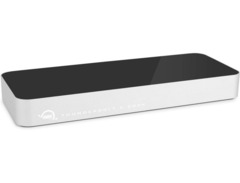
The OWC Thunderbolt 2 Dock is a versatile solution designed for musicians and audio professionals seeking to streamline their digital workspace. This dock is the perfect companion for those who need to expand their connectivity options without compromising on speed or reliability. Equipped with Thunderbolt 2 technology, it allows for high-speed data transfer, ensuring that your music files and sessions load quickly and efficiently.
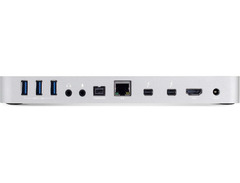
Offering a wide range of ports, the OWC Thunderbolt 2 Dock connects your audio gear, MIDI controllers, and other peripherals with ease. Whether you're in the studio or on stage, this dock helps you maintain an organized and efficient setup. The plug-and-play functionality ensures that you can connect multiple devices without the hassle of complex configurations.
Its compact design means it won't clutter your workspace, and its robust construction ensures durability for consistent performance. Ideal for musicians who rely on a seamless workflow, the OWC Thunderbolt 2 Dock is the practical choice that enhances productivity and creativity.
Key Features:
- Thunderbolt 2 technology for high-speed data transfer
- Supports up to five Thunderbolt devices in daisy-chain
- 5 USB 3.0 ports for connecting audio peripherals
- HDMI 1.4b port supporting 4K displays
- Gigabit Ethernet for stable internet connectivity
- Audio in/out ports for seamless integration with audio gear
- SD card reader for quick access to media files
- Plug-and-play functionality for easy setup without drivers
Videos

Danny Winget
Best Mac Dock Ever? OWC Thunderbolt 2 Dock Unboxing and Review!
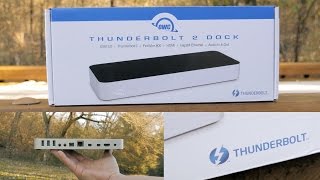
Best Mac Dock Ever? OWC Thunderbolt 2 Dock Unboxing and Review!
Danny Winget

Closer Look: OWC Thunderbolt 2 Dock

Other World Computing

OWC Thunderbolt 2 Dock for all your connection needs

The Audacity to Podcast
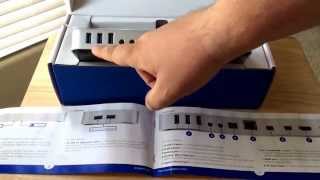
OWC Thunderbolt 2 Dock With 12 Ports Unboxing 4-27-15

SEOMarketing
OWC Thunderbolt 2 Dock

tech128
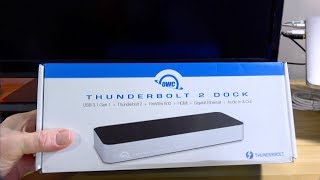
OWC Thunderbolt 2 Dock & A Mea Culpa

The Boomer Consumer
Reviews
PROS
-
Supports multiple peripherals with one Thunderbolt port
-
High-powered USB ports for efficient device charging
-
Can be used with Thunderbolt 3 Macs using an adapter
-
Aesthetically pleasing design with clean lines
-
Offers more USB ports than most comparable docks
-
Separate jacks for audio in/out, reducing interference
-
Space-saving vertical orientation option
-
Reliable performance with updated models
CONS
-
Does not include a Thunderbolt cable
-
Prone to intermittent disconnects in some units
-
Some audio noise when using high-power USB devices
-
Bulky power adapter design
-
Incompatibility with Apple Super Drive
Owner Insights
We analyzed real musician discussions from forums and Reddit to find what players love, question, and tweak about OWC Thunderbolt 2 Dock.
Software and compatibility
-
The OWC Thunderbolt 2 Dock requires an Apple Thunderbolt 3 to Thunderbolt 2 adapter for compatibility with newer Macs like the M2pro Mac mini 2023.
Source -
It's confirmed that the adapter works for connecting Thunderbolt 1 and 2 devices to Thunderbolt 3 and 4 ports, though the true bottleneck is often outdated audio drivers.
Source -
Using USB 3.0 ports on the dock results in nearly half the speed compared to direct iMac connection, which could affect workflows requiring fast data transfers.
Source
Use cases and applications
-
Owners used the dock to connect older Thunderbolt 1 audio gear and FireWire mixers, emphasizing the importance of checking for Ventura-compatible drivers for audio interfaces.
Source
User experience
-
Some users faced latency issues with audio interfaces when using the dock, suggesting potential compatibility challenges with specific audio setups.
Source -
A user noted a minimal speed drop of only 5MB on read and write speeds when connecting a Thunderbolt SSD through the dock compared to direct iMac connection.
Source
Features and functionality
-
The Belkin F4U085 Thunderbolt 2 Dock, purchased for $25 on eBay, includes HDMI, RJ45, and USB 3.0 ports, with confirmed bidirectional compatibility for external drives.
Source -
A Thunderbolt dock allows for one display via HDMI or mini DisplayPort, with the potential to run two displays if one is a Thunderbolt connection.
Source
Critic Reviews
4.5 out of 5
Based on 1 Review and 3 Ratings

Artist usage
Add artist

In the video titled "Linkin Park Rig Rundown with Mike Shinoda, Dave 'Phoenix' Farrell & Alex Feder (Brad Delson)" by Premier Guitar, at the timestamp 45:08, Mike Shinoda's rack setup is shown to include a pair of OWC Thunderbolt 2 Docks.

In the video "Linkin Park Rig Rundown with Mike Shinoda, Dave 'Phoenix' Farrell & Alex Feder (Brad Delson)" by Premier Guitar, at timestamp 1:03:02, an OWC Thunderbolt 2 Dock is clearly visible in Dave Farrell's rack setup, confirming its use in his equipment array.


Mentioned in this October 26, 2020 OWC Radio interview.
I’ve got generations and generations of OWC stuff. So I have ThunderBays that go back to neanderthal times were spinning hard drives and stacks of big ones and little ones. When SSDs came out in the two and a half-inch format, then I was using box; they’re taking the little mini ones. And that was transformative because it meant I could carry libraries with. Previously we were running external RAIDS, and they became bigger and heavier and noisier, and everything else, and suddenly these little boxes could outperform them. And why for instance, the Accelsior cards are working so well for me in terms in my new Mac Pro, is that it allows me to have a system now where I don’t have all these boxes hanging off the outside of my Mac Pro as much as I love the trash cans because they were very compact and transportable. The problem was you ended up with this spaghetti of stuff that was running off them. The 4M2s were great because they were the first time I could get the NVMe up to size to like, actually get some NVMe RAIDs that were big enough for me to use them properly. And then, of course, I’ve got all the sort of hubs. The different Thunderbolt 3 and Thunderbolt 2 hubs that I’ve had for years. I mean, I’ve been buying stuff from OWC for 15 years. I’m going to guess since it first appeared, it was the place where I would buy all the bits and pieces. And Larry’s wonderful. But I also know that when we were having some issues, there was a bug in the 10.15.4 Apple release of Catalina that was affecting large data transfers. And the guys at SoftRAID and the guys at OWC worked tirelessly with me to try and solve. We nailed it down with a fix, and the guys could not have been better. I think that’s the thing that I would say about OWC, and the reason I agree to talk to you about it is that they’ve gone the extra mile. And I think that for someone like me, that’s worth in gold.
Genre Usage
Based on how artists on Equipboard use this gear, it is most commonly found in the following genres.
Used With
Based on how musicians on Equipboard use OWC Thunderbolt 2 Dock, it is most commonly used with the following gear.




Similar
Add recommendation1 alternative for OWC Thunderbolt 2 Dock, curated by the Equipboard community.

More OWC Computers & Peripherals


$1,319.55
in Computers & Peripherals Rank


$69.59 - $79.00
in Computers & Peripherals Rank


$399.15 - $596.86
in Computers & Peripherals Rank


$134.00 - $249.99
in Computers & Peripherals Rank


$1,191.98 - $1,914.49
in Computers & Peripherals Rank


$54.99
in Computers & Peripherals Rank


$579.99 - $799.00
in Computers & Peripherals Rank


$83.83 - $99.00
in Computers & Peripherals Rank


$149.99 - $179.99
in Computers & Peripherals Rank

$109.99 - $129.99
in Computers & Peripherals Rank


$1,299.00
in Computers & Peripherals Rank


$149.99 - $191.00
in Computers & Peripherals Rank


$44.99 - $89.00
in Computers & Peripherals Rank


$389.00
in Computers & Peripherals Rank


$168.99 - $179.99
in Computers & Peripherals Rank

$116.47
in Computers & Peripherals Rank


$509.00 - $867.00
in Computers & Peripherals Rank

$115.46 - $119.99
in Computers & Peripherals Rank


$649.99 - $919.99
in Computers & Peripherals Rank


$25.00 - $1,567.91
in Computers & Peripherals Rank

$1,488.71 - $1,999.00
in Computers & Peripherals Rank


$87.00 - $199.00
in Computers & Peripherals Rank


$210.99 - $379.99
in Computers & Peripherals Rank


$1,399.00 - $1,599.00
in Computers & Peripherals Rank


$2.00
in Computers & Peripherals Rank

$32.99 - $189.95
in Computers & Peripherals Rank


$449.94
in Computers & Peripherals Rank
.png?v=1784293637)


$19.99 - $22.80
in Computers & Peripherals Rank


$189.99 - $249.99
in Computers & Peripherals Rank


$69.00 - $403.00
in Computers & Peripherals Rank

Community setups


Gear Guides









Most Popular Computers & Peripherals
Most Popular Brands
-
Added to Equipboard on by
 benjaminjeffries
GearIQ 74
-


