

Pricing and availability
We compare 600+ stores and found this item at 2 stores. Prices updated .
Store
Reviews
Price


Price History
Based on price data from 2 merchants for "Ableton Starndard Stock Plugins". Prices shown reflect NEW condition. Tracking began Apr 2, 2026.
* Product prices and availability are updated by Equipboard every 24hrs and are subject to change. Equipboard may receive compensation for purchases made at participating retailers linked on this site. This compensation does not affect what products or prices are displayed, or the order of prices listed. For more information, please refer to our affiliate disclosure.
Description
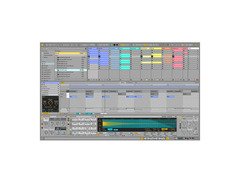
Step into a world of sonic exploration with the Ableton Standard Stock Plugins, an all-encompassing suite designed for musicians who demand versatility and creativity in their music production. Whether you're sculpting new soundscapes or fine-tuning your latest track, this collection offers a robust set of tools that integrate seamlessly with your workflow. With over 38GB of content at your fingertips, including 13 software instruments and 55 effects, you'll find endless possibilities to express your musical ideas.
The Ableton Standard Stock Plugins provide an intuitive platform that caters to both linear and nonlinear music creation. Utilize the Session View to experiment with loops and grooves, or switch to the Arrangement View for a more traditional composition experience. This flexibility ensures that you can capture inspiration the moment it strikes, whether you're in the studio or performing live.
Dive into a vast array of integrated processors and effects, from classic EQs and compressors to cutting-edge delays and distortions. The suite's powerful MIDI capabilities make it easy to control both software and hardware instruments, and its advanced warping functions allow for real-time time stretching and audio manipulation. Ableton's commitment to innovation is evident in features like MIDI Transformations and Generators, which open new avenues for crafting melodies, chords, and rhythms.
Key Features:
- Over 38GB of content with 13 software instruments and 55 effects
- Dual views: Session View for nonlinear creation, Arrangement View for linear composition
- Multitrack recording up to 32-bit/192kHz with nondestructive editing
- Advanced warping and real-time time stretching
- Includes a wide range of built-in audio effects
- VST and Audio Unit support for your favorite plug-ins
- MIDI sequencing, automation, and control for a dynamic production environment
- REX file support and native sliced audio file creation
- Video import/export for scoring to picture
- Multicore/multiprocessor support for optimized performance
Product specs
| Brand | Ableton |
| Model | Live 9 Standard (Download) |
| Categories | DAW Software |
FAQs
-
What types of plugins are included with Ableton Live 9 Standard?
-
Ableton Live 9 Standard includes a variety of stock plugins, such as instruments, audio effects, and MIDI effects, designed to cover a wide range of music production needs. These plugins are well-integrated into the DAW, offering functionality for mixing, sound design, and composition.
-
Are Ableton Live 9 Standard stock plugins suitable for professional music production?
-
Yes, Ableton Live 9 Standard's stock plugins are capable of producing professional-grade results. They are versatile and efficient, allowing producers to create high-quality music without the need for additional third-party plugins.
-
Can I use Ableton Live 9 Standard stock plugins with other DAWs?
-
Ableton Live 9 Standard stock plugins are designed to work exclusively within the Ableton Live environment and are not available as standalone plugins for use in other DAWs.
-
How do Ableton Live 9 Standard stock plugins compare to third-party plugins?
-
Ableton Live 9 Standard stock plugins are highly efficient and seamlessly integrated into the DAW, offering a streamlined workflow. While they may lack some of the advanced features or interfaces of certain third-party plugins, they provide robust functionality suitable for most production tasks.
Videos

Seed To Stage
6 things you don’t need expensive plugins for (use Ableton instead)

6 things you don’t need expensive plugins for (use Ableton instead)
Seed To Stage

This Is Why Stock Ableton Plugins Are BETTER!

Zdrewe

Mastering A Beat with Stock Plugins in Ableton - Setting up a mastering chain

ACT BEATS TUTORIALS
Every Ableton Stock Plugin Explained in 15 Minutes | Ableton Live 11 Tutorial

DaniMusiX
Reviews
PROS
-
Highly user-friendly setup with extensive features for both beginners and pros
-
Excellent for live performances and studio recordings
-
Seamless integration with third-party plugins like EZ Drummer II
-
Effective for creating complex loops and song backbones
-
Multi-platform compatibility enhances versatility
-
Automatic parameters simplify the production process
-
Continual discovery of new features boosts creativity
-
Push functions offer untapped potential for advanced users
-
Well-known for reliability in music production and performance
CONS
-
Requires initial learning curve to fully utilize all features
Owner Insights
We analyzed real musician discussions from forums and Reddit to find what players love, question, and tweak about Ableton Starndard Stock Plugins.
Use cases and applications
-
The Multiband Compressor in single band mode is praised for reducing noise floor and room sounds effectively.
Source -
Erosion is effectively used on hi-hat sequences within main drum loops to add unique texture and character.
Source -
Pedal and Overdrive are considered underrated; adjusting input gain prevents distortion, providing a rich, full-bodied sound.
Source -
Utility's mid/side mode is a powerful but lesser-known feature for mixing in the stereo field, allowing for nuanced placement of sounds.
Source -
The new Auto Shift feature in Ableton beta is anticipated to replace third-party autotune plugins for many users by offering native pitch correction.
Source -
Saturator is favored for taming peak volumes using specific algorithms like Soft Sine and Analog Clipper, indicating its effectiveness for dynamic control.
Source -
Drum Buss enhances kick drum presence with its tunable 'boom' feature, making it ideal for electronic and dance genres.
Source -
Grain Delay and Pitchloop89 are praised for creating unique soundscapes and textures, suitable for experimental and ambient music.
Source
User experience
Features and functionality
-
Users highlight EQ8's simplicity and speed, making it a staple on every track despite the allure of more advanced EQs like Fabfilter Pro-Q.
Source -
Ableton's Multiband Compressor is preferred over some mastering plugins for its effective noise reduction capabilities.
Source -
Utility plugin is essential for gain staging, mono conversion, and independent volume automation without affecting channel fader levels.
Source -
Users note that Ableton's Drum Rack can modulate individual drum sounds extensively, replacing the need for third-party drum samplers like NI Battery 4.
Source -
Autopan is effectively used for creating tremolo effects and subtle movement within tracks, adding spatial dynamics to mixes.
Source -
Glue Compressor's soft clipper helps control peaks, enhancing track dynamics without additional third-party plugins.
Source
Comparisons
5.0 out of 5
Based on 1 Review and 1 Rating
Genre Usage
Based on how artists on Equipboard use this gear, it is most commonly found in the following genres.
More Complete Collection

$769.00 - $1,069.00
in Complete Collection Rank


$399.00 - $599.00
in Complete Collection Rank


.jpg?v=1784656553)


$119.00 - $143.00
in Complete Collection Rank

$143.00 - $199.00
in Complete Collection Rank

$522.00 - $549.00
in Complete Collection Rank

$53.00 - $69.99
in Complete Collection Rank

$30.00 - $399.00
in Complete Collection Rank


$149.99
in Complete Collection Rank

$147.00 - $599.99
in Complete Collection Rank

$85.00 - $134.00
in Complete Collection Rank


$162.00 - $179.00
in Complete Collection Rank


$33.00 - $34.99
in Complete Collection Rank


$800.00 - $1,799.00
in Complete Collection Rank


$287.00 - $329.00
in Complete Collection Rank

$849.00
in Complete Collection Rank

$315.00 - $359.00
in Complete Collection Rank

$999.00 - $1,599.00
in Complete Collection Rank

$105.00 - $113.00
in Complete Collection Rank


$999.95 - $1,099.95
in Complete Collection Rank

$485.00
in Complete Collection Rank

$437.00 - $599.99
in Complete Collection Rank

$169.00 - $319.00
in Complete Collection Rank

$1,699.00 - $1,799.00
in Complete Collection Rank

$24.99
in Complete Collection Rank

$1,159.00 - $1,199.00
in Complete Collection Rank

$81.00 - $349.00
in Complete Collection Rank

in Complete Collection Rank


$432.00 - $499.00
in Complete Collection Rank

in Complete Collection Rank


in Complete Collection Rank


$57.00 - $3,421.95
in Complete Collection Rank


$249.00 - $499.00
in Complete Collection Rank


$149.99
in Complete Collection Rank


Accessories & Related Items




Artist usage


Community setups


Similar


Gear Guides









Most Popular Complete Collection
Most Popular Brands
-
Added to Equipboard on by
 nextgen
GearIQ 481
-


