

Pricing and availability
We compare 600+ stores and found this item at 3 stores. Prices updated .
Store
Reviews
Price


Average Price: $46
Budget/Beginner
$49
$150+
Price Tier
Budget
Standard
High-end
Price History
Based on price data from 2 merchants for "AIR Music Technology Sprite". Prices shown reflect NEW condition. Tracking began Apr 2, 2026.
* Product prices and availability are updated by Equipboard every 24hrs and are subject to change. Equipboard may receive compensation for purchases made at participating retailers linked on this site. This compensation does not affect what products or prices are displayed, or the order of prices listed. For more information, please refer to our affiliate disclosure.
Description
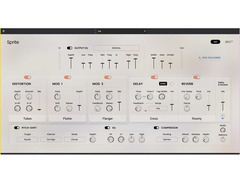
Elevate your audio creations with the AIR Music Technology Sprite, a multi-effect plugin that bridges the gap between vintage hardware and modern digital versatility. Sprite is a contemporary nod to the iconic multi-effects processors of the 80s and 90s, offering a comprehensive suite of tools that can transform your music production. Whether you’re looking to add subtle warmth to your synths, bring your guitars to life, or add ethereal depth to your vocals, Sprite provides an intuitive interface that allows for both quick adjustments and deep dives into sound customization.
Sprite stands out with its powerful edit mode, enabling users to meticulously craft their effects from the ground up. From subtle distortion to intense sonic breakups, Sprite offers a range of modulation options that will take your audio from gentle waves to intense flanging. Customize delays from crisp to vintage tape echoes, and set your reverb to emulate anything from intimate rooms to grand stadiums. With additional tools like EQ, compression, and pitch-shifting, Sprite is more than just a plugin—it's an all-encompassing sound design toolkit.
Perfect for both budding music producers and seasoned professionals, Sprite empowers you to create unique sounds with ease, ensuring your audio stands out in any mix. With a vast array of presets and a sleek user interface, Sprite makes achieving sonic perfection as straightforward or as intricate as you desire.
Key Features:
- Comprehensive multi-effect processor for diverse sound design
- Intuitive interface with quick-access controls and deep customization options
- Nine distortion models with filtering and mix controls
- Two modulation slots with a choice of eight classic effects
- Dedicated delay and reverb sections with extensive customization
- Pitch-shifter with adjustable parameters
- EQ and compressor sections with advanced routing and controls
- Extensive library of presets for instant sound enhancement
- Compatible with macOS 11.7 Big Sur to macOS 13.2 Ventura and Windows 10 to Windows 11
- Requires an internet connection for software authorization
Product specs
| Software Type | Effects library |
| Platform | Mac, PC |
| Upgrade/Full | Full |
| Download/Boxed | Download |
| Bit Depth | 64-bit |
| Format | AAX, AU, VST |
| Hardware Requirements - Mac | 2.5GHz Intel Core i5 or higher, 4GB RAM or more recommended |
| Hardware Requirements - PC | 2.5GHz Intel Core i5 / AMD Ryzen or higher, 4GB RAM or more recommended |
| OS Requirements - Mac | macOS 11.7 or later |
| OS Requirements - PC | Windows 7 SP1 or later |
FAQs
-
What types of effects are included in the AIR Music Technology Sprite plugin?
-
The AIR Music Technology Sprite plugin includes a range of effects such as EQ, distortion, modulation, delay, and reverb, allowing for versatile sound shaping and creative audio processing.
-
Is AIR Music Technology Sprite compatible with my DAW?
-
AIR Music Technology Sprite is compatible with DAWs that support AAX, AU, and VST formats, making it suitable for a wide range of digital audio workstations on both Mac and PC.
-
What are the system requirements for running AIR Music Technology Sprite on a Mac?
-
To run AIR Music Technology Sprite on a Mac, you need macOS 11.7 or later, with a 2.5GHz Intel Core i5 processor or higher and at least 4GB of RAM.
-
Can AIR Music Technology Sprite be used on Windows computers?
-
Yes, AIR Music Technology Sprite can be used on Windows computers running Windows 7 SP1 or later, with a 2.5GHz Intel Core i5 or AMD Ryzen processor and a minimum of 4GB RAM.
-
How does AIR Music Technology Sprite enhance music production?
-
AIR Music Technology Sprite enhances music production by providing a powerful multi-effects processor with intuitive controls and deep editing capabilities, enabling users to create unique and dynamic soundscapes.
Videos

AIR Music Tech
AIR Sprite - Go Beyond The Magic
AIR Sprite - Go Beyond The Magic
AIR Music Tech
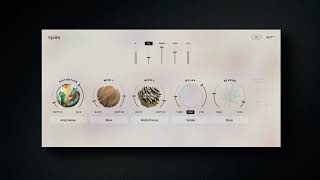
AIR Sprite Walkthrough - Go Beyond The Magic
AIR Music Tech
AIR Sprite Preset Demo
AIR Music Tech
Air Sprite Brand NEW Multi-Effect Plugin - Review | Presets Demo | Tutorial

Musician Paradise
Air Music Technology Sprite Multi FX Plugin Review

Audio Tech TV

Transforming Loops with the Air Sprite Plugin!

Kickback Couture
AIR Sprite - We Take Our First Look

Production Expert
Reviews
Owner Insights
We analyzed real musician discussions from forums and Reddit to find what players love, question, and tweak about AIR Music Technology Sprite.
Features and functionality
-
Users note that AIR Sprite performs better on sends/returns rather than directly on tracks to avoid CPU/MEM issues.
Source -
The AIR Sprite and Ether plugins recently became available in standalone mode, a significant update allowing use without integration into other software.
Source -
Ether and Sprite offer presets that serve as effective starting points, allowing users to either stack plugins or tweak settings for desired outcomes.
Source
Software and compatibility
-
The AIR plugins require MPC version 3.5 for activation; users experienced issues with older versions like 3.4.3.
Source -
MPC XSE users report no issues with AIR plugins, suggesting hardware compatibility is robust across new models.
Source -
Users report that the standalone version of these plugins may not appear in the MPC Key 61 Preferences Activations page initially, suggesting a potential delay in activation visibility.
Source -
Purchasers encountered errors trying to buy the bundle directly, with successful transactions reported through the MPC store, implying site-specific purchasing issues.
Source -
Buyers experienced difficulties with product activation on older firmware versions, indicating potential compatibility issues with MPC versions prior to 3.5.
Source -
Official clarification states AIR plugins function only on MPC version 3.5 or higher, with earlier indications of compatibility being a rollout misprint.
Source
Use cases and applications
-
Sprite and Ether are praised for creating unique textures and are seen as essential for sound design and covering creative effects bases.
Source -
The Stereo Delay 8D preset on Air Ether is used effectively on lead tracks, creating distinct soundscapes like risers in EDM production.
Source -
Ether is recommended for pad chords with long decays, such as 8 seconds, to achieve rich soundscapes.
Source
User experience
Value and pricing
-
A notable promotion offers both AIR Sprite and Ether at 70% off as a bundle, with additional savings possible using the promo code WELCOME10 on thempcstore.com.
Source
Critic Reviews
Based on 0 Reviews and 0 Ratings
More Air Music Technology Multi-Effect Plugins

$29.00 - $99.99
in Multi-Effect Plugins Rank

$0.00
in Multi-Effect Plugins Rank


$12.00
in Multi-Effect Plugins Rank


$29.99 - $149.00
in Multi-Effect Plugins Rank

$85.00 - $89.00
in Multi-Effect Plugins Rank


$149.00
in Multi-Effect Plugins Rank


$99.00
in Multi-Effect Plugins Rank


$143.00 - $149.00
in Multi-Effect Plugins Rank


$99.00
in Multi-Effect Plugins Rank


$29.99 - $39.99
in Multi-Effect Plugins Rank
.jpeg?v=1784733415)


$29.99 - $65.00
in Multi-Effect Plugins Rank


$76.00 - $79.00
in Multi-Effect Plugins Rank


$29.00
in Multi-Effect Plugins Rank


$10.00 - $69.00
in Multi-Effect Plugins Rank


$63.00 - $69.00
in Multi-Effect Plugins Rank

$49.00 - $55.00
in Multi-Effect Plugins Rank

$79.00
in Multi-Effect Plugins Rank

$39.90
in Multi-Effect Plugins Rank

$36.00
in Multi-Effect Plugins Rank

-m.webp?v=1784620323)
$69.00
in Multi-Effect Plugins Rank
-m.webp?v=1784273166)

$63.00
in Multi-Effect Plugins Rank


$33.00 - $39.99
in Multi-Effect Plugins Rank


$12.50 - $50.00
in Multi-Effect Plugins Rank

$39.99 - $124.00
in Multi-Effect Plugins Rank
-m.webp?v=1784620296)
$79.00
in Multi-Effect Plugins Rank

$99.00
in Multi-Effect Plugins Rank


$39.99 - $149.00
in Multi-Effect Plugins Rank


$39.00 - $39.90
in Multi-Effect Plugins Rank

$0.00
in Multi-Effect Plugins Rank

$33.00 - $34.99
in Multi-Effect Plugins Rank


$99.99 - $299.99
in Multi-Effect Plugins Rank


$24.99 - $49.99
in Multi-Effect Plugins Rank


$15.00
in Multi-Effect Plugins Rank

$139.00 - $199.00
in Multi-Effect Plugins Rank

$49.00 - $50.00
in Multi-Effect Plugins Rank

$59.90
in Multi-Effect Plugins Rank


$9.00 - $79.00
in Multi-Effect Plugins Rank

$33.00 - $35.99
in Multi-Effect Plugins Rank


Accessories & Related Items
-s.webp?v=1784785869)






Artist usage


Community setups


Similar


Gear Guides









Most Popular Multi-Effect Plugins
Most Popular Brands
-
Added to Equipboard on by
 equipboard
GearIQ 4934
-



