


Pricing and availability
We compare 600+ stores and found this item at 10 stores. Prices updated .
Store
Reviews
Price









Price History
Based on price data from 7 merchants for "iConnectivity mioXM". Prices shown reflect NEW condition. Tracking began Apr 2, 2026.
* Product prices and availability are updated by Equipboard every 24hrs and are subject to change. Equipboard may receive compensation for purchases made at participating retailers linked on this site. This compensation does not affect what products or prices are displayed, or the order of prices listed. For more information, please refer to our affiliate disclosure.
Description
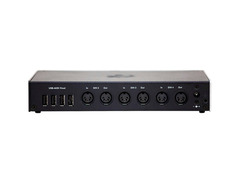
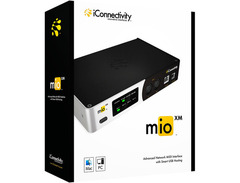
Introducing the iConnectivity mioXM, the versatile MIDI interface redefining connectivity. No need to juggle cables or worry about limited USB ports. With mioXM, you can seamlessly connect all your MIDI devices, be it USB-MIDI, DIN-MIDI, or Ethernet-MIDI. Whether on stage or in the studio, you can streamline your MIDI setup, do it faster, better, and in exciting new ways.
MioXM takes connectivity further with its Ethernet-MIDI capability, liberating you from cable length constraints and limited USB ports. This allows you to place an interface anywhere in your studio or venue, up to 330 feet away. The unique network technology is as easy to use as USB, giving you hassle-free MIDI power.
With mioXM, you can use your 12 network MIDI ports any way you want. Connect each of the 12 RTP-MIDI sessions to any combination of physical or virtual I/O ports. It's the ultimate flexibility in MIDI connectivity.
Key Features:
- 4 in x 4 out 5-pin DIN-MIDI ports
- 4 USB-MIDI Host ports supporting multiple USB-MIDI CLASS COMPLIANT devices
- Ethernet RTP-MIDI Network port
- 12 virtual network ports for expandable connectivity
- Plug and Play - no drivers required thanks to class compliant connectivity
- Up to four user-definable presets storable and accessible from mioXM's control panel
- iConnectivity's Auracle 2.0 configuration software for easy creation and saving of filtering/routing/merging presets
- Connect iOS devices via CCK to mioXM's USB device port, Wi-Fi, or wired ethernet connections
- Easy renaming of network ports for customized DAW integration
- Access to more than 12 ports per interface.
Product specs
| Available since | October 2019 |
| Amount Of Inputs | 4 |
| Amount Of Outputs | 4 |
| SMPTE Timecode | No |
| Serial Port | No |
FAQs
-
How many MIDI connections does the iConnectivity mioXM support?
-
The iConnectivity mioXM supports 4 MIDI inputs and 4 MIDI outputs, allowing you to connect multiple MIDI devices for complex setups.
-
Can the iConnectivity mioXM interface be used with a computer?
-
Yes, the iConnectivity mioXM can connect to a computer via USB, enabling integration with your DAW and other music software.
-
Does the iConnectivity mioXM support SMPTE timecode?
-
No, the iConnectivity mioXM does not support SMPTE timecode synchronization.
-
Is the iConnectivity mioXM suitable for live performances?
-
Yes, the iConnectivity mioXM is designed for both studio and live performance settings, offering reliable MIDI routing and connectivity for various devices.
-
Does the iConnectivity mioXM require an external power supply?
-
Yes, the iConnectivity mioXM requires an external power supply, which is included with the device, to function properly.
-
Can the iConnectivity mioXM be used with both Mac and Windows systems?
-
Yes, the iConnectivity mioXM is compatible with both Mac and Windows operating systems, providing versatile connectivity options for different setups.
Videos

Westlake Pro
Henry Strange introduces the new mioXM and mioXL from iConnectivity | Westlake Pro

Henry Strange introduces the new mioXM and mioXL from iConnectivity | Westlake Pro
Westlake Pro
How to Setup the MioXM and your MIDI Controller with Ableton Live

fromstudiotostage

Effortlessly Split Your MIDI with the iConnectivity Mio XM

iConnectivity

How to Merge Multiple MIDI Outputs to a Single Destination with mioXM
iConnectivity

iConnectivity mio XM - unboxing and introduction

Hakon Soreide
Reviews
PROS
-
Supports complex MIDI routing with assignable inputs and outputs
-
USB Host ports for unpowered USB MIDI devices
-
Seamless integration with Mac and Windows systems
-
Plug and play with USB-C and USB-A compatibility
-
Allows for Ethernet MIDI networking with low latency
-
Provides control over routing presets via touch buttons
-
Software prevents MIDI cross-talk effectively
-
Future-proof with class-compliant design
-
Compact size fits well in tight spaces
-
Facilitates clean stage setups with single CAT6 cable
CONS
-
Software may crash with sudden disconnections
-
Complex setup process for advanced configurations
-
Limited compatibility with non-class compliant devices
-
Auracle software names not displayed in Windows
-
Requires additional downloads for setup and tutorials
Owner Insights
We analyzed real musician discussions from forums and Reddit to find what players love, question, and tweak about iConnectivity mioXM.
Software and compatibility
-
The mioXM functions as a USB host, not a hub, which can prevent your PC from recognizing connected USB devices directly.
Source -
DAW-specific functions might require direct USB connections to the PC, as mioXM transmits MIDI messages via HST ports.
Source -
Enabling SYNC and CONTROL on ports allows the transmission of MIDI time code and CC data, which is crucial for synchronizing devices in a MIDI setup.
Source
User experience
-
Transitioning from a regular USB hub to mioXM can complicate setup due to its different method of handling USB device connections.
Source
Setup and maintenance
-
When using the mioXM, routing in the device is required if connecting the Akai Force via a normal host port instead of the USB-B connection.
Source
Features and functionality
-
Users can customize and rename ports on devices like the RK006 connected through the mioXM, and these settings persist after disconnecting and reconnecting.
Source
Critic Reviews
Based on 0 Reviews and 0 Ratings
Artist usage
Add artist

At 23:38 in the "Blink-182 Rig Rundown" video by Premier Guitar on YouTube, an iConnectivity mioXM 4x4 USB/networkable MIDI interface is visible just below the Radial Engineering JR5, confirming its use by Thomas DeLonge.


In this photo of Jonny's rig backstage at a Coldplay gig, a iConnectivity mioXM 4x4 Midi Interface can be seen.


In the video Linkin Park Rig Rundown with Mike Shinoda, Dave "Phoenix" Farrell & Alex Feder (Brad Delson) by Premier Guitar, at the timestamp 1:03:02, an iConnectivity mioXM MIDI Interface is visibly integrated into the rack setup of bassist Dave Farrell.


Genre Usage
Based on how artists on Equipboard use this gear, it is most commonly found in the following genres.
Used With
Based on how musicians on Equipboard use iConnectivity mioXM, it is most commonly used with the following gear.


-s.webp?v=1784958498)

Similar
Add recommendation1 alternative for iConnectivity mioXM, curated by the Equipboard community.

More iConnectivity MIDI Interfaces

$348.00 - $399.99
in MIDI Interfaces Rank
.jpeg?v=1784917540)


$34.99 - $39.99
in MIDI Interfaces Rank


$268.08
in MIDI Interfaces Rank


$99.00 - $285.00
in MIDI Interfaces Rank
.png?v=1784755332)


$54.99 - $69.00
in MIDI Interfaces Rank


$89.00 - $549.96
in MIDI Interfaces Rank


$354.00 - $500.00
in MIDI Interfaces Rank


$182.50 - $226.37
in MIDI Interfaces Rank


$45.99 - $324.63
in MIDI Interfaces Rank


$177.00 - $199.99
in MIDI Interfaces Rank

$109.99 - $139.00
in MIDI Interfaces Rank


$222.00
in MIDI Interfaces Rank


$29.99 - $47.90
in MIDI Interfaces Rank


$115.00 - $139.00
in MIDI Interfaces Rank


$475.00
in MIDI Interfaces Rank


$80.00
in MIDI Interfaces Rank


$69.95 - $89.00
in MIDI Interfaces Rank


$95.00 - $130.90
in MIDI Interfaces Rank

$56.00 - $78.40
in MIDI Interfaces Rank

$40.00 - $124.95
in MIDI Interfaces Rank

$19.00 - $82.10
in MIDI Interfaces Rank


$95.00 - $130.90
in MIDI Interfaces Rank

$44.45 - $52.94
in MIDI Interfaces Rank

$544.00
in MIDI Interfaces Rank


$73.00 - $99.99
in MIDI Interfaces Rank


$39.00 - $39.99
in MIDI Interfaces Rank

$168.00 - $240.90
in MIDI Interfaces Rank

$169.99 - $219.00
in MIDI Interfaces Rank


$39.00 - $451.07
in MIDI Interfaces Rank


$100.86
in MIDI Interfaces Rank


$148.24 - $158.00
in MIDI Interfaces Rank


$89.00
in MIDI Interfaces Rank


$29.95 - $58.95
in MIDI Interfaces Rank
Accessories & Related Items


Community setups


Gear Guides







Most Popular MIDI Interfaces
Most Popular Brands


