

Pricing and availability


* Product prices and availability are updated by Equipboard every 24hrs and are subject to change. Equipboard may receive compensation for purchases made at participating retailers linked on this site. This compensation does not affect what products or prices are displayed, or the order of prices listed. For more information, please refer to our affiliate disclosure.
Description
The Smartelectronix s(M)exoscope Plugin is a powerful tool for musicians and producers looking to gain detailed insights into their audio signals. This spectral analysis plugin is designed to give you real-time visualization of audio waveforms, allowing you to see exactly what you're hearing. Whether you're mastering a track, fine-tuning a mix, or just curious about the waveform of your latest creation, s(M)exoscope provides an intuitive and informative interface.
The plugin features a simple yet effective display, offering a range of adjustable parameters that cater to both novice users and seasoned pros. You can zoom in and out to view your waveforms at different resolutions, making it easy to identify peaks, troughs, and other critical aspects of your sound. Its user-friendly design means you can focus on your music without getting bogged down in complex settings.
Compatible with a variety of DAWs, the s(M)exoscope Plugin integrates seamlessly into your existing setup. It's a versatile addition to any producer's toolkit, helping to improve your understanding and control over your audio projects. Ideal for visual learners and those looking to refine their audio engineering skills, this plugin is an essential resource for precise audio analysis.
Key Features:
- Real-time waveform visualization
- Adjustable zoom for detailed analysis
- User-friendly interface for intuitive operation
- Seamless integration with multiple DAWs
- Supports both novice and professional users
- Ideal for mastering, mixing, and audio analysis tasks
Product specs
| Plugin Format | AU, VST |
| Downloadable | free |


Reviews
Owner Insights
We analyzed real musician discussions from forums and Reddit to find what players love, question, and tweak about Smartelectronix s(M)exoscope Plugin.
Software and compatibility
-
The s(M)exoscope plugin was updated to 64-bit, but some users report issues with the AU version on newer Mac models like the M1.
Source -
Some users switched to Melda plugins due to compatibility issues with the s(M)exoscope on modern Macs.
Source -
Users experienced issues with the s(M)exoscope plugin not appearing in Ableton 10 on Mac, even after correct installation in the VST folder.
Source -
Some users found success by downloading the plugin from the original Smartelectronix site after encountering issues with alternative download sources.
Source -
A potential compatibility issue involves using the 32-bit version of s(M)exoscope with Ableton 10, which lacks a bridge for 32-bit plugins. Jbridge is suggested as a workaround.
Source -
A potential solution for waveform asymmetry is applying a high-pass filter below the fundamental frequency to adjust phase relationships and center the waveform visually.
Source
Features and functionality
-
There are alternative spectrogram options available, such as those found in Ableton's utility tools, which some users prefer for spectral analysis.
Source -
The plugin displays audio as a waveform, not as an analysis, which can cause confusion when interpreting amplitude in relation to the center line.
Source -
The plugin's linear waveform view shows the center line as -50 dB, with vertical edges at 0 dB, which can create misunderstandings about amplitude peaks.
Source -
DC offset correction might not resolve asymmetrical waveforms in this context, as the fundamental frequency is often already centered around DC.
Source
Comparisons
-
Wave Observer by Press Play Music is recommended as an alternative, praised for its visual appeal and being free, offering a modern option for waveform observation.
Source
Use cases and applications
-
Users find that asymmetrical waveforms like those from certain synths can lead to headroom issues during mastering, affecting overall track volume.
Source
4.5 out of 5
Based on 3 Reviews and 16 Ratings


one of the best free plugins... i use it in every production. every boddy should download it.
That it is free is make it very usefully and every body can use it. what i like in this plugin that it doesn't add a effect to the sound..
Artist usage
Add artist
At 1:46, S(m)exoscope is seen on the master channel.


In Nicky Romero's "Studio Masterclass #01 - Ready 2 Rumble," at the 4:44 mark, he uses the Smartelectronix s(M)exoscope plugin to analyze the sidechain effect between the kick and bass. He explains this technique ensures the sidechain is both effective and powerful. Nicky also demonstrated this approach during his 2016 ADE masterclass.

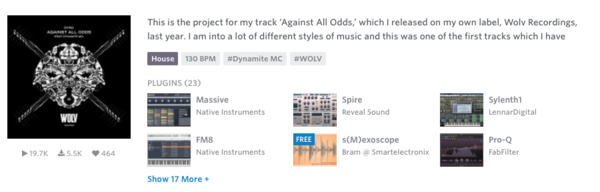
On this Splice upload, Dyro lists Smartelectronix s(M)exoscope plugin among the plugins that he used.


At 5:23 in the video: "I always recommend this thing too, it's called Smartelectronix. It's free, and it's just... I can see what [the waveform] is doing. It's like opening up Serato. Without having to bounce it out you can actually see what it's doing while working on the track."

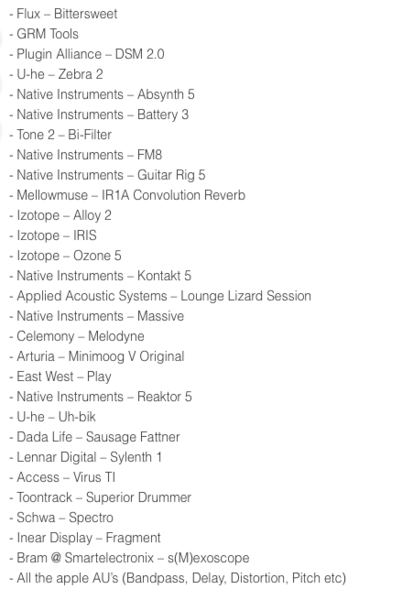
Mr. Bill utilizes the Smartelectronix s(M)exoscope plugin, as shown in the user-uploaded photo on Imgur.


Fox Stevenson utilizes the Smartelectronix s(M)exoscope Plugin for mastering, as seen in his Instagram post discussing his ongoing work on new tracks while on tour.


In this video Ran-D posted on Instagram, Ran-D's demonstrating how he made this kick. At the left you can see s(M)exoscope on his master.



Album Usage
The Smartelectronix s(M)exoscope Plugin has been featured on the following albums:

Genre Usage
Based on how artists on Equipboard use this gear, it is most commonly found in the following genres.
Used With
Based on how musicians on Equipboard use Smartelectronix s(M)exoscope Plugin, it is most commonly used with the following gear.



-s.webp?v=1784556039)

More Smartelectronix Spectral Analysis Plugins

$33.00 - $35.99
in Spectral Analysis Plugins Rank


$0.00
in Spectral Analysis Plugins Rank


$0.00
in Spectral Analysis Plugins Rank


$0.00 - $99.00
in Spectral Analysis Plugins Rank

$149.25 - $207.00
in Spectral Analysis Plugins Rank


$50.00 - $65.00
in Spectral Analysis Plugins Rank

in Spectral Analysis Plugins Rank


$120.00
in Spectral Analysis Plugins Rank


in Spectral Analysis Plugins Rank


$29.99
in Spectral Analysis Plugins Rank

$46.00 - $49.00
in Spectral Analysis Plugins Rank

$149.00 - $4,771.25
in Spectral Analysis Plugins Rank

$29.00 - $69.00
in Spectral Analysis Plugins Rank

$94.00 - $99.00
in Spectral Analysis Plugins Rank

$99.00
in Spectral Analysis Plugins Rank


$19.99 - $27.00
in Spectral Analysis Plugins Rank

$49.00 - $129.00
in Spectral Analysis Plugins Rank

$92.00 - $99.00
in Spectral Analysis Plugins Rank


in Spectral Analysis Plugins Rank


$79.99
in Spectral Analysis Plugins Rank


in Spectral Analysis Plugins Rank


$75.00 - $79.99
in Spectral Analysis Plugins Rank


$99.99
in Spectral Analysis Plugins Rank


$29.00
in Spectral Analysis Plugins Rank

$24.00
in Spectral Analysis Plugins Rank


in Spectral Analysis Plugins Rank

in Spectral Analysis Plugins Rank

in Spectral Analysis Plugins Rank

in Spectral Analysis Plugins Rank


Community setups


Similar


Most Popular Spectral Analysis Plugins
Most Popular Brands
-
Added to Equipboard on by
 equipboard
GearIQ 4934
-


