

Pricing and availability
We compare 600+ stores and found this item at 1 store. Prices updated .


Price History
Based on price data from 1 merchant for "Supertone CLEAR". Prices shown reflect NEW condition. Tracking began May 2, 2026.
* Product prices and availability are updated by Equipboard every 24hrs and are subject to change. Equipboard may receive compensation for purchases made at participating retailers linked on this site. This compensation does not affect what products or prices are displayed, or the order of prices listed. For more information, please refer to our affiliate disclosure.
Description
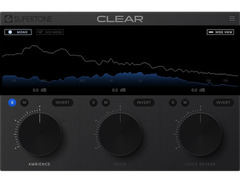
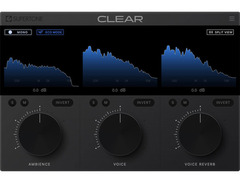
Unlock the full potential of your vocal tracks with the Supertone CLEAR plugin. This innovative vocal processing tool is designed to effortlessly separate audio into three distinct channels: ambience, voice, and voice reverb. With the powerful Supertone AI, you can achieve unparalleled clarity and precision in your mixes, making it an indispensable addition to any music producer's arsenal.
Supertone CLEAR leverages cutting-edge neural network models to provide best-in-class de-noise and de-reverb performance. It features an intuitive three-knob control interface, allowing you to seamlessly adjust each channel to suit your creative needs. Whether you're aiming for a pristine podcast or a polished vocal track, the Supertone CLEAR offers the clarity and control essential for professional results.
Designed with versatility in mind, this plugin includes a low CPU option, making it accessible for a wide range of setups. The combined and split three-channel audio visualization ensures quick and accurate monitoring, so you can make precise adjustments in real-time. Whether you're working online or offline, Supertone CLEAR's workflow adapts to your production environment, providing flexibility and efficiency.
Key Features:
- Best-in-class de-noise and de-reverb performance
- Intuitive three-knob control for effortless adjustments
- Combined and split three-channel audio visualization
- Low CPU option for broader compatibility
- Versatile online & offline workflow
- MacOS 10.13 and above with native Apple Silicon support
- Windows 10 and above (64-bit only)
- Compatible with AU, VST3, VST, and AAX formats
- Supports sample rates of 44100Hz, 48000Hz, and 96000Hz
- Recommended I/O buffer size of 256 or higher for optimal performance
Videos

Supertone
Supertone Clear Demo
Supertone Clear Demo
Supertone

Can this Resolve Plugin replace Voice Isolation?

George Kamenov
ИДЕАЛЬНЫЙ ШУМОДАВ ДЛЯ ГОЛОСА / SUPERTONE CLEAR ПЛАГИН

pereudin
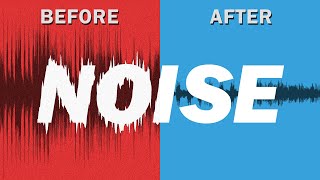
How to fix noisey audio with A.I. | Supertone Clear vs Adobe Enhanced Speech

Chris Tarroza
Reviews
Owner Insights
We analyzed real musician discussions from forums and Reddit to find what players love, question, and tweak about Supertone CLEAR.
Features and functionality
Software and compatibility
-
Users report frequent crashes in DAWs like Reaper and Cubase, though some have found it works after reinstalling without a version update.
Source -
The plugin is reported to use significantly less CPU in its official release, reducing from over 100% to about 30% in resource consumption.
Source -
Users mention that combining multiple noise reduction tools, each targeting different noise types, yields the best results, suggesting Supertone Clear as part of a larger toolkit.
Source -
Users report Supertone Clear often resets to trial mode due to registration issues, particularly after updates, requiring re-entry of the activation key.
Source
User experience
-
Some users experience a debugger error in Windows 10 and Studio One, requiring troubleshooting or updates to resolve.
Source -
Some owners successfully resolved registration issues by entering the serial number through Audacity rather than their primary DAW.
Source -
Despite registration issues, users who bought the beta version express satisfaction, highlighting the plugin's effectiveness when properly licensed.
Source
Use cases and applications
-
Effective in cleaning up poorly treated recording environments, even reducing noise from external sources like a drum band outside.
Source -
Supertone Clear is effective for general noise reduction but may struggle with specific challenges like bird chirping when frequencies overlap with voice.
Source
Value and pricing
-
The introductory price of $69 is considered worthwhile for its noise reduction capabilities, though concerns about communication and updates affect perceived value.
Source
Comparisons
-
While excellent at noise removal, it struggles more with heavy reverb compared to iZotope RX, which excels in reverb reduction.
Source -
Acon Digital Dialog Extract stands out for its precise frequency range adjustments, offering a different noise reduction approach compared to Supertone Clear.
Source
Based on 0 Reviews and 0 Ratings
Genre Usage
Based on how artists on Equipboard use this gear, it is most commonly found in the following genres.
More Supertone Vocal Processing Plugins


$37.00 - $39.99
in Vocal Processing Plugins Rank


-m.webp?v=1784008458)
$83.50 - $99.00
in Vocal Processing Plugins Rank


$37.00 - $39.99
in Vocal Processing Plugins Rank

.jpeg?v=1784002496)


$199.00 - $206.00
in Vocal Processing Plugins Rank


$35.99 - $49.99
in Vocal Processing Plugins Rank


$250.00 - $500.00
in Vocal Processing Plugins Rank


$309.00 - $399.00
in Vocal Processing Plugins Rank


$70.00 - $79.00
in Vocal Processing Plugins Rank

$37.00 - $39.99
in Vocal Processing Plugins Rank


$34.99
in Vocal Processing Plugins Rank
.png?v=1783787053)


$122.00 - $330.00
in Vocal Processing Plugins Rank


in Vocal Processing Plugins Rank


$39.99 - $49.99
in Vocal Processing Plugins Rank


$115.00 - $230.00
in Vocal Processing Plugins Rank


$37.00 - $39.00
in Vocal Processing Plugins Rank

$205.00 - $349.00
in Vocal Processing Plugins Rank


$199.00
in Vocal Processing Plugins Rank

$29.99 - $34.99
in Vocal Processing Plugins Rank


$87.00 - $171.00
in Vocal Processing Plugins Rank


$47.00 - $49.99
in Vocal Processing Plugins Rank


$149.00
in Vocal Processing Plugins Rank


$66.00 - $199.00
in Vocal Processing Plugins Rank

$37.00 - $39.99
in Vocal Processing Plugins Rank

$29.99 - $34.99
in Vocal Processing Plugins Rank


$14.99 - $17.00
in Vocal Processing Plugins Rank

$199.00
in Vocal Processing Plugins Rank

$29.99 - $34.99
in Vocal Processing Plugins Rank

$75.00 - $80.00
in Vocal Processing Plugins Rank


$142.00 - $160.00
in Vocal Processing Plugins Rank

$39.00 - $69.00
in Vocal Processing Plugins Rank

$94.00 - $99.00
in Vocal Processing Plugins Rank

$35.99 - $39.99
in Vocal Processing Plugins Rank


$37.00 - $47.00
in Vocal Processing Plugins Rank

$190.00 - $399.00
in Vocal Processing Plugins Rank

$99.00
in Vocal Processing Plugins Rank

$29.99 - $34.99
in Vocal Processing Plugins Rank


$47.00
in Vocal Processing Plugins Rank
Artist usage


Community setups


Similar


Most Popular Vocal Processing Plugins
Most Popular Brands
-
Added to Equipboard on by
 peppeartist
GearIQ 42
-

