

Pricing and availability
We compare 600+ stores and found this item at 5 stores. Prices updated .
Store
Reviews
Price




Price History
Based on price data from 4 merchants for "Antares Auto-Tune EFX+". Prices shown reflect NEW condition. Tracking began Apr 2, 2026.
* Product prices and availability are updated by Equipboard every 24hrs and are subject to change. Equipboard may receive compensation for purchases made at participating retailers linked on this site. This compensation does not affect what products or prices are displayed, or the order of prices listed. For more information, please refer to our affiliate disclosure.
Description
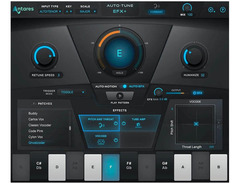
Unleash your vocal creativity with the Antares Auto-Tune EFX+, a powerhouse plugin designed to elevate your music production. Whether you’re in the studio or on stage, this versatile tool offers both automatic and manual pitch correction, ensuring your vocals hit the right note every time. With its Auto-Motion pitch-shifting melodic pattern generator, you can effortlessly craft new melodies without the need for multiple takes.
The EFX+ comes equipped with a modular multi-effects rack that includes 13 unique effect modules such as Pitch & Throat, Vocode, and Reverb. These effects, crafted in collaboration with renowned artists and audio engineers, provide an array of sonic possibilities. The XY pad offers real-time parameter control, allowing for dynamic performance adjustments, while the Humanize function ensures your vocals maintain their natural warmth and character.
Designed to integrate seamlessly with your DAW, the Auto-Tune EFX+ also features automatic pitch and scale detection, making it the perfect companion for any music producer. The intuitive interface, complemented by two switchable designs, makes navigation a breeze, ensuring you spend more time creating and less time configuring. Whether you’re looking to fine-tune your vocals or experiment with cutting-edge effects, Auto-Tune EFX+ delivers professional-grade results with ease.
Key Features:
- Real-time automatic and manual pitch correction
- Auto-Motion for creating melodic patterns
- 13 effect modules including Vocode, Reverb, and Pitch & Throat
- Humanize function to maintain vocal warmth
- XY pad for real-time parameter control
- Compatible with Auto-Key for pitch and scale detection
- Scalable user interface with two switchable designs
- Seamless DAW synchronization with MusicXML library support
Owner's manual
Antares Auto-Tune EFX+ User ManualProduct specs
| Available since | May 2019 |
| Los artikel / bundelartikel | Los artikel |
| Delay | No |
| Dynamics | No |
| Effect Filter | No |
| Encoder/Decoder | No |
| Equalizer | No |
| Guitar amps/-effects | No |
| Channel Strip | No |
| Metering / Analysis / Correction | No |
| Modulation Effects | No |
| Multieffect / Plugin-Host | No |
| Overdrive/Distortion | No |
| Preamp / Saturation | No |
| Psychoacoustic tool / Enhancer / Exciter | No |
| Restauration | No |
| Reverb | No |
| Special FX | No |
| Summer / Mixing Consoles | No |
| Tape Simulation | No |
| Pitch Shifter / Harmonizer / Timestretching | Yes |
| Transient Processing | No |
| Vocoder / Vocal effect | No |
| Mastering Tools | No |
| Hardware Controller | No |
| Download | 1 |
FAQs
-
What are the main features of Antares Auto-Tune EFX+?
-
Antares Auto-Tune EFX+ offers seven powerful effects including Breath, Reverb, Echo, Chorus, Compress, Low-pass, and EQ, along with four reorderable modular EFX slots. It also features a refreshed UI with Light and Dark Modes and comes with a preset browser loaded with updated artist presets.
-
Is Antares Auto-Tune EFX+ compatible with Auto-Key 2?
-
Yes, Antares Auto-Tune EFX+ is compatible with Auto-Key 2, allowing for seamless key and scale detection to enhance your vocal processing workflow.
-
Can Antares Auto-Tune EFX+ be used for live performances?
-
While primarily designed for studio use, Antares Auto-Tune EFX+ can be used in live settings if your DAW supports low-latency processing, allowing for real-time pitch correction and effects application.
-
Does Antares Auto-Tune EFX+ support pitch shifting and harmonizing?
-
Yes, Antares Auto-Tune EFX+ includes pitch shifting and harmonizing capabilities, which are ideal for creating complex vocal arrangements and effects.
-
What system requirements are needed to run Antares Auto-Tune EFX+?
-
Antares Auto-Tune EFX+ requires a compatible DAW and a computer that meets the minimum system requirements specified by Antares, typically including a modern operating system and adequate CPU and RAM resources for plugin processing.
Videos

Wayne.wav
The Best Way to Use Auto-Tune EFX+ | Free AutoTune Giveaway!

The Best Way to Use Auto-Tune EFX+ | Free AutoTune Giveaway!
Wayne.wav
Antares Auto-Tune EFX+

Auto-Tune® / Antares Audio Technologies
THIS PLUGIN MAKES YOU AN AMAZING VOCALIST | Auto Tune EFX+

imamusicmogul
Tutorial: Introduction to Auto-Tune EFX+
Auto-Tune® / Antares Audio Technologies
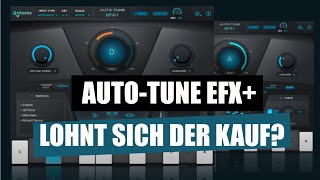
Auto-Tune EFX+: Für wen lohnt sich das Plugin? Alle Parameter erklärt! | abmischen-lernen.de

abmischenlernen
Reviews
PROS
-
Exceptional control capabilities for precise vocal processing
-
Smooth operation even on older laptops, low CPU demand
-
Versatile effects, suitable for both subtle and extreme vocal enhancements
-
Identifiable sound quality, making vocal effects recognizable
-
Additional features beyond typical autotune, such as distortion for mixing
-
Offers strong pitch alignment with adjustable intensity
CONS
-
Registration and activation issues reported by multiple users
-
Customer support is slow and inadequate
-
Retune speed may not meet expectations compared to previous versions
-
Software updates and authorization process can be problematic
-
Some effects may be overwhelming without careful adjustment
Owner Insights
We analyzed real musician discussions from forums and Reddit to find what players love, question, and tweak about Antares Auto-Tune EFX+.
Features and functionality
Comparisons
-
EFX+ provides the signature Antares sound and is significantly better than Waves Tune Real Time according to multiple users.
Source
Use cases and applications
User experience
Value and pricing
-
For those on a budget, EFX+ is a more affordable option than Pro, offering essential autotune features with additional effects.
Source
Setup and maintenance
-
Installation of EFX+ requires the iLok License Manager for activation; ensure it's downloaded and set up before scanning in FL Studio's plug-in manager.
Source
Software and compatibility
-
After installing EFX+, use FL Studio's plug-in manager to rescan for new plug-ins; the software should appear unchecked, ready for activation.
Source -
Antares plugins operate independently from FL Studio and must be purchased directly from Antares, with no integration into FL's purchasing system.
Source -
EFX+ and EFX+10 cannot be installed and activated simultaneously; users must uninstall one to use the other.
Source
Critic Reviews
5.0 out of 5
Based on 1 Review and 2 Ratings

80
cool effects
good for that autotune effect plus extras. nice distortion to make vocals sit in mix
Artist usage
Add artist

Used for "some of the hook and ad libs" on "Intro", as stated by Kirk mix engineer Kevin "Black Pearl" McCloskey in this December 2019 Sound on Sound interview.
"Some of the hook and ad libs audio tracks have the Antares Auto-Tune EFX, because Jon wanted a small amount of tuning to lock them in. It's on the default setting of 25 with Humanize at 100 percent, so it's not very noticeable. The main vocal don't have Auto-Tune."

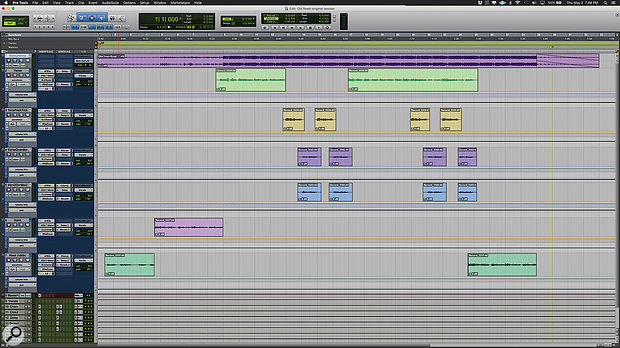
Used for the vocals on "Old Town Road (Remix)", as stated by mix engineer Andrew "VoxGod" Bolooki in this August 2019 Sound on Sound interview. An image of the settings can be found here.
Bolooki's 'Old Town Road' session also has an incredibly [sic] amount of plug-ins. Most tracks have plug-ins on the inserts, in some cases up to six, and many tracks also have sends to the aux tracks. A complete analysis of exactly what they all do would take up several pages, so Bolooki selected some of the most important processors, starting with Nas X's tracks.
"I did not really mess much with what they sent me. If you listen to the original, there were some Auto‑Tune anomalies, because the plug-in had some notes out of scale. The key of the song is a little weird, so I had to do automation on Nas' Auto‑Tune EFX instances to bypass certain notes in certain passages, to make sure the AT did not warp notes in the wrong way. I also did a lot of vocal riding, nudging the volume of each phrase, so that every single word was crystal-clear, and I did some panning automation in the stacked parts. They wanted Billy and Nas to sing at the same time in the pre-choruses, and I wanted to prevent Billy's harmonies from overwhelming Nas' lead vocals, so I used panning to give them each their own space.
"All Nas X's vocal tracks have an insert effect chain that consists of Antares Auto‑Tune EFX, Avid EQ3 7-band, Waves SSL Channel, Waves Renaissance De-Esser and Waves L2. I made some basic changes, also to some of the delay and reverb sends, but nothing crazy. There's a lazy half-note delay in the intro of the song, that becomes part of the flow of the song, and I did not want to mess with that. The aux track with the AIR Phaser added some modulation in the pre-chorus, and the Waves RVox and UAD Precision K-Stereo made Nas' lead vocal stand out a bit more.
"Also, the original engineer who recorded Nas' vocals did something that I would not normally do, but that made a big difference. I picked it up as a trick. It's having the L2 hit really hard at the end of the effects chain for every single vocal track. Initially I thought: that is pretty extreme to put that on every single vocal track, and it breaks all the rules for gain-staging, so I took it off, but then I realised he had put it there for a saturation effect, and it greatly helped the tone of his vocal. It was part of Nas' sound."


In this YouTube breakdown video of LUCKY, Bad Snacks can be seen using Auto-tune EFX+ at 23:34. She mentions not being ashamed using it at 22:34.

Used sparsely for Ray's vocals on "Old Town Road (Remix)", notably for the outro whistle, as stated by mix engineer Andrew "VoxGod" Bolooki in this August 2019 Sound on Sound interview. An image of Lil Nas X's vocal chain specifies EFX+.
"I comp with only a click track, and sometimes I'll put a low-pass filter on the beat, playing at very low volume, so you only hear the bass in the background. I'll have very little or no Auto‑Tune on the vocals, because it's easier to comp without Auto‑Tune, and zero effects. The vocal will be entirely dry, apart from that I'll add a ton of compression, to bring up all the room and microphone noises. When you comp with the high end only coming from the vocals, you select takes not only on performance, but also on tone, particularly if they're bright. The brighter ones tend to have the best emotion, too. They may not be in time or in tune, but those things are fixable. I'll also do a lot of clip gaining when comping. When you comp in this way, by the time you're done, it's perfect. If you make the vocal sound good with just a click track, you know you have nailed it. Very little EQ is necessary, and then all you have to do is add some tasteful effects, and your vocal rides, as well as tuning and timing. But you don't have to cover up any of what you did."
(...) Bolooki explains that he makes frequent use of Celemony's Melodyne as well as Antares' Auto‑Tune. "I usually use both. My process depends on the song. For this song, I actually didn't use Auto‑Tune on Billy's verse at all. I am really proud of how hard he worked in the booth and how little tuning was needed. The Auto‑Tunes I used on some of his chorus tracks are extremely subtle and purposely on slow, automated retune speeds along with automated bypasses so they only kick in exactly when needed with the least amount of correction possible. There was really no stone left unturned when it came to his comps. I spent a ridiculous amount of time tediously combing through all of his takes down to the syllable, so little to no Auto‑Tune was necessary in the end.
"I used Melodyne to keep the timing of his doubled parts together, since they were all recorded separately. I always have Melodyne as the first insert, then basic EQ, de-essing, compression, and then Auto‑Tune if needed. I don't use the stand-alone version of Melodyne anymore, because I like to have Melodyne and Auto‑Tune running into each other at the same time. When I have Auto‑Tune after Melodyne, I tend to not over-tune things, because for me Melodyne is basically just a timing tool. Pitch-wise you have more flexibility with Melodyne than Auto‑Tune, but each has their own strengths. Also, Melodyne purposely does not make things perfect, which I like. When you stack vocals and use Melodyne for adjustments, even corrected vocals will stay somewhat naturally out of tune with each other. So instead I focus mostly on timing in Melodyne, and keep Auto‑Tune on after it, set to a slow retune speed, and I use the Flex-Tune knob quite a bit to allow a lot of humanising."
Album Usage
The Antares Auto-Tune EFX+ has been featured on the following albums:



Genre Usage
Based on how artists on Equipboard use this gear, it is most commonly found in the following genres.
Used With
Based on how musicians on Equipboard use Antares Auto-Tune EFX+, it is most commonly used with the following gear.


-s.webp?v=1784815394)


More Antares Vocal Processing Plugins

$250.00 - $500.00
in Vocal Processing Plugins Rank


$122.00 - $330.00
in Vocal Processing Plugins Rank


in Vocal Processing Plugins Rank

.jpeg?v=1784733415)


$205.00 - $349.00
in Vocal Processing Plugins Rank


$75.00 - $80.00
in Vocal Processing Plugins Rank


$143.00 - $160.00
in Vocal Processing Plugins Rank

$41.00
in Vocal Processing Plugins Rank
.png?v=1784580320)

$77.00 - $80.00
in Vocal Processing Plugins Rank


$150.00 - $180.00
in Vocal Processing Plugins Rank


$32.00 - $39.99
in Vocal Processing Plugins Rank

-m.webp?v=1784815472)
$49.00 - $99.00
in Vocal Processing Plugins Rank

$33.00
in Vocal Processing Plugins Rank


Accessories & Related Items


-s.webp?v=1784815472)




Community setups


Similar


Gear Guides









Most Popular Vocal Processing Plugins
Most Popular Brands
-
Added to Equipboard on by
 thatlkjguy
GearIQ 4716
-


