

Pricing and availability
We compare 600+ stores and found this item at 5 stores. Prices updated .
Store
Reviews
Price




Price History
Based on price data from 3 merchants for "Antares Auto-Tune Pro". Prices shown reflect NEW condition. Tracking began Apr 2, 2026.
* Product prices and availability are updated by Equipboard every 24hrs and are subject to change. Equipboard may receive compensation for purchases made at participating retailers linked on this site. This compensation does not affect what products or prices are displayed, or the order of prices listed. For more information, please refer to our affiliate disclosure.
Description
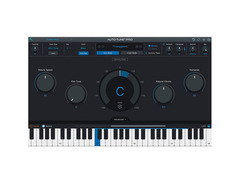
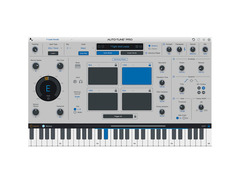
Transform your vocal performances with the Antares Auto-Tune Pro, the industry-standard for pitch and time correction. This powerful software offers a sleek, intuitive interface, making it accessible for both beginners and seasoned producers. Whether you're fine-tuning a single note or crafting complex vocal harmonies, Auto-Tune Pro’s diverse features cater to all your creative needs.
The enhanced Auto-Key feature automatically detects the key and scale of your project, streamlining your workflow and saving you precious time. Dive into nostalgia with Classic Mode, delivering the iconic "Auto-Tune 5 sound" cherished by pop artists over the years. For those who love hands-on control, the MIDI Parameter Control lets you manipulate retune speed, vibrato, and more in real-time, transforming your MIDI controller into an expressive instrument controller.
Auto-Tune Pro also boasts ARA support for seamless integration with your digital audio workstation, ensuring efficient data exchange and enhanced creative possibilities. From basic pitch correction to innovative vocal effects, Auto-Tune Pro is an indispensable tool for any modern music producer striving for perfection.
Key Features:
- Streamlined user interface for ease of use and efficient workflow
- Auto-Key automatically detects the key and scale of your music
- Classic Mode for the "Auto-Tune 5 sound"
- Real-time control of key parameters via MIDI controller
- Industry-standard pitch and time correction
- Flex-Tune and Humanize technologies for natural vocal tuning
- Low Latency Mode for real-time performance without delay
- ARA support for closer DAW integration
Owner's manual
Antares Auto-Tune Pro User ManualProduct specs
| Available since | April 2024 |
| Los artikel / bundelartikel | Los artikel |
| Delay | No |
| Dynamics | No |
| Effect Filter | No |
| Encoder/Decoder | No |
| Equalizer | No |
| Guitar amps/-effects | No |
| Channel Strip | No |
| Metering / Analysis / Correction | No |
| Modulation Effects | Yes |
| Multieffect / Plugin-Host | No |
| Overdrive/Distortion | No |
| Preamp / Saturation | No |
| Psychoacoustic tool / Enhancer / Exciter | No |
| Restauration | No |
| Reverb | No |
| Special FX | No |
| Summer / Mixing Consoles | No |
| Tape Simulation | No |
| Pitch Shifter / Harmonizer / Timestretching | Yes |
| Transient Processing | No |
| Vocoder / Vocal effect | Yes |
| Mastering Tools | No |
| Hardware Controller | No |
| Download | 1 |
FAQs
-
What DAWs is Antares Auto-Tune Pro compatible with?
-
Antares Auto-Tune Pro is compatible with popular DAWs such as Logic Pro, Studio One, and Cubase/Nuendo, supporting ARA2 for enhanced integration and real-time processing.
-
Can Antares Auto-Tune Pro be used for live performances?
-
Yes, Antares Auto-Tune Pro offers real-time pitch correction, making it suitable for live performances where immediate vocal tuning is required.
-
What are the main features of Antares Auto-Tune Pro?
-
Antares Auto-Tune Pro features advanced pitch correction, real-time processing, and a comprehensive set of modulation effects, making it ideal for both subtle tuning and creative vocal effects.
-
Is Antares Auto-Tune Pro suitable for beginners?
-
While Antares Auto-Tune Pro offers advanced features, it also includes user-friendly interfaces and presets, making it accessible for beginners who want to explore vocal tuning.
-
Does Antares Auto-Tune Pro support polyphonic tuning?
-
Antares Auto-Tune Pro is primarily designed for monophonic vocal tuning, focusing on precise pitch correction and modulation effects for single vocal tracks.
Videos

Sweetwater
How To Auto-Tune Vocals Using Antares Auto-Tune Pro
How To Auto-Tune Vocals Using Antares Auto-Tune Pro
Sweetwater
Complete Guide to AutoTune Pro 11 | All New Features

Reid Stefan
Tutorial - Auto-Tune Pro - Basic Vocal Tuning

Auto-Tune® / Antares Audio Technologies
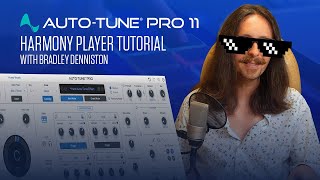
Auto-Tune Pro 11 - Harmony Player Tutorial with Bradley Denniston
Auto-Tune® / Antares Audio Technologies
Reviews
PROS
-
Unparalleled precision and flexibility in pitch correction and vocal processing
-
Offers both real-time pitch correction and detailed pitch/time editing
-
Advanced features like vocal effects mode and scale detection
-
Seamless integration with DAWs, including support for ARA
-
Renowned for its iconic "Auto-Tune Effect"
-
Highly user-friendly and easy to use
-
Permanent license option available, avoiding monthly subscriptions
-
Recognized as the best and most natural pitch correction VST
CONS
-
Hefty price point compared to other options
-
Performance for price may not meet expectations for some users
Owner Insights
We analyzed real musician discussions from forums and Reddit to find what players love, question, and tweak about Antares Auto-Tune Pro.
Features and functionality
-
Auto-Tune Pro provides a characteristic sheen to vocals, enhancing pop, hip-hop, and metal genres, while Melodyne offers a more transparent, subtle pitch correction.
Source -
Antares Auto-Tune Artist is noted for having no latency during recording, which some users prefer over the Pro version for real-time applications.
Source -
Auto-Tune Pro includes additional tweakable options for mixing, providing more control over the final sound compared to the Artist version.
Source
Use cases and applications
-
Combining Melodyne for initial manual tuning with Auto-Tune's auto mode can achieve a polished pop sound without the exaggerated T-Pain effect.
Source -
Auto-Tune's live tuning capability is essential for those requiring real-time pitch correction, unlike Melodyne, which is post-production only.
Source -
It's suggested that Auto-Tune Artist is more suited for recording sessions due to its low latency, while Pro is better for post-recording mixing.
Source
Software and compatibility
Critic Reviews
5.0 out of 5
Based on 1 Review and 13 Ratings

Artist usage
Add artist

In his YouTube video, "Charlie Puth's 30-Day Songwriting & Production Class," Charlie Puth demonstrates the use of Antares Auto-Tune Pro at the 1:34 mark.


At 1:37:28, he uses autotune as a vocoder


Used for J. Cole's backing vocals on 21 Savage's "A Lot", as is visible in track "Cole BV" in a downloadable photo of the "A Lot" Pro Tools session (available in this .zip file) from this March 2019 Sound on Sound interview with producer Maddmix.

Koen Heldens (mixing engineer for XXXTENTACION) claimed they used Auto-Tune Pro for the vocal chain on "SAD!" in this Youtube short.


Jordan uses Autune in this video, at 1:23 https://www.youtube.com/watch?v=dhLaJB7Cvxk&t=706s

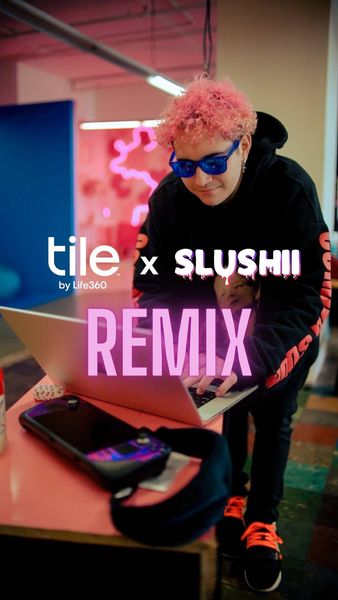
In this Instagram Video, You can see Slushii making a track and at 0:48 you can see Antares Auto-Tune Pro on the screen.

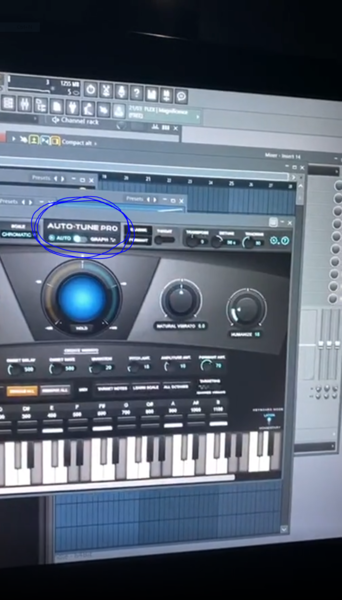
During Sam's latest IGTV video on his Instagram (https://www.instagram.com/p/B_lDmy2A-lr/), he showcases some up and coming tunes inside of FL Studio. We see him using Antares Auto-Tune Pro inside of multiple projects. The software is clearly shown in the provided screenshot!

.jpg)


Used on "A Lot", as mentioned by producer Maddmix in this March 2019 Sound on Sound interview and as visible in a downloadable photo of the "A Lot" Pro Tools session (available in this .zip file).
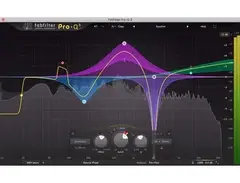
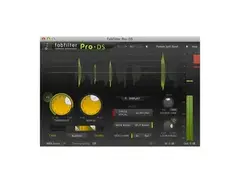
Although there are relatively few plug-ins on the drums and hardly any on the music, Maddox uses dozens on the vocals. 21 Savage's five vocal aux tracks, for example, all pass through a signal chain comprising Antares Auto-Tune, UAD 1176LN E, Waves Renaissance Vox, FabFilter Pro-DS, Waves C6, another Pro-DS, FabFilter Pro-Q2 and another C6, with only the latter one or two plug-ins dropping out on a couple of tracks.
All these tracks go the '21 Lead' aux (42), which has nine plug-ins, including compressors, de-essers, and four(!) more instances of Pro-Q2, as well as four sends. Both 21 Savage and J Cole's aux group vocal tracks then go to a vocal aux called 'MadVoxComp', and from there to the 'All Vocals' aux, each of which hosts two plug-ins; so in total, every 21 Savage vocal track passes through 19 to 21 insert plug-ins, as well as being sent to up to seven auxes. The situation with J Cole is even more elaborate, though complicated by the fact that some of the sends came with the vocal session that Maddox received from Cole's engineer.
"I guess my thought process behind my mixing is kind of messy!" laughs Maddox. "The thing is that I will start with adding compression and EQ on a vocal, and then if I hear something else that needs correcting, I will just add another compressor or EQ. I never go back and take plug-ins off or reset them, because I don't want to go back on what I already have, because I might mess it up. So I just keep going forward and adding plug-ins until I get the sound I want. That works for me. Some people like mixing with very few plug-ins, but I will mix with whatever I need to get what I want.
"The plug-ins I have on these inserts I use frequently. I guess you could call them my clean-up plug-ins. The 1176LN worked on 21's vocals in this session. I may also use the UAD Tube-Tech CL 1B or the Waves RCompressor. In this session the 1176 made 21's vocals really full and in your face. Next is the RVox, which is also is a good plug-in for bringing the vocals up front and making them really full. It is very subtle, but it makes a big difference. If I feel like the vocal does not sit up front enough I put that on, compress it a little bit, and it usually fixes the problem for me. The 1176 has a similar function, but I use it more for actual compression and the RVox more for tone and to make it sound bigger.
"Next is the Pro-DS, which as a de-esser obviously helps with the sibilance. Some vocals have more sibilance than others, and sometimes I use just one, but in this case I felt I needed two. I love using multiband compressors, and the C6 is here for some general compression, but there always are some frequencies that need adjusting, but that I don't want to take out with an EQ, because you need those frequencies. When I use a multiband, I find the frequency that bugs me, and set a threshold, so the frequency is only dipped when it needs to be dipped. If you look at my C6 plug-ins, they often address harsh frequencies that a de-esser can't take out. I'll have a really tight notch on the C6, and then just compress that frequency a couple of dB."
Of the '21 Lead' aux, Maddox says: "There are four instances of the Pro-Q2 on the signal chain, which is again an example of me working cumulatively. I now use the Pro-Q3 a lot, which is a dynamic EQ, which can do pretty much the same thing as the C6. Then insert 4 is the McDSP MC404 multiband compressor, which I use pretty often, and then I have the Eiosis Air EQ, the C6, the Kush Clariphonic EQ and the SSL G EQ. I use different EQs for different purposes. The Q2 has unlimited bands, so I use that to search and dip frequencies I don't like. I really like the high end on the Air, which opens up the vocal and makes it sound really good. I also often do some scooping in the lower mid-range with the Air, because it does a really good job of that. I use the Clariphonic mainly for the Clarity knob, which widens the vocal just by having that on. I really like that on vocals and use that in almost every session.
"The sends go to several aux effect tracks with delays and reverbs, but for this project they told me that they wanted the keep the vocals pretty dry, so I didn't use much reverb. Mostly just a small room reverb really subtly in the background to give it some space. The main reverbs that I have in my template are the Slate Digital VerbSuite Classics. They have great emulations of popular reverbs like the Bricasti and so on, that sound really good. I also use the UAD Lexicon 480 a lot. Those are my go-to reverbs. I occasionally use the Waves RVerb and TrueVerb. My main delays are the Soundtoys EchoBoy and the Waves H-Delay. For distortion I use the Soundtoys Decapitator and Devil-Loc, sometimes the Dada Life Sausage Fattener, which is fun, and the distortion pedal in the Waves GTR3 Stomps plug-in.
"The 'Slap' is a send to one of my aux effect tracks, just with a 30-millisecond EchoBoy delay, to widen the vocals a bit. (...) Finally, both '21 Leads' and 'Leads' go to the 'Lead All' [40] and parallel 'MadVoxComp' [41] tracks, and the latter has the Waves CLA-76 and L1, both for more presence and volume."

In the video by Sound On Sound magazine titled "Oak Felder - Recording Demi Lovato's 'Sorry Not Sorry'," Oak Felder is observed using Antares Auto-Tune Pro at the 28:59 mark, as he demonstrates its application in his track.

(@12:45) "I have Auto-Tune Pro, Melodyne and a couple other pitch correction plug-ins"

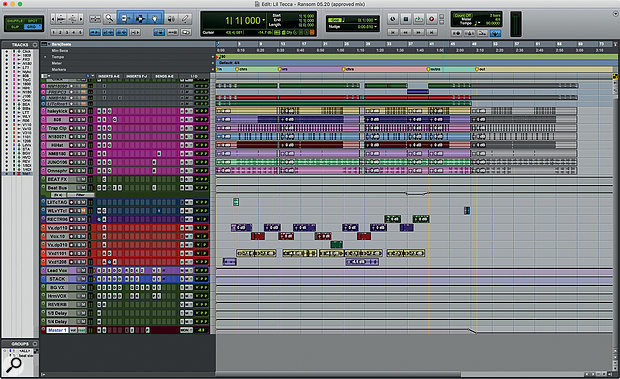
Used on vocals for "Ransom", as mentioned by mix engineer Joseph Colmenero in this November 2019 Sound on Sound interview.
"Many of the plug-ins on the vocal tracks came with the session. The vocal audio tracks all have Antares Auto-Tune Pro because the session came with Auto-Tune Live, and I didn't have my licence with me, so I put Auto-Tune Pro on. Without seeing the Live plug-in I had to use my ears to make sure that the settings were exactly right. They had recorded Tecca's vocals with Auto-Tune on, playing Auto-Tune like an instrument.
"All audio tracks go to the LeadVox bus, on which there is a stack of plug-ins. Again many of them came with the session. The chain starts with the Waves Q6 EQ, the FabFilter Pro-C2 compressor, then a Waves SSL Channel, two Waves De-Essers, a Waves RVox used as a noise gate, the SoundToys Decapitator for vibe, and a Waves C4 to bang down some peak frequencies. There's a track with distant ad-libs that goes to the Harmony Vox aux, which has some similar plug-ins, and adds a D-Verb for some extra reverb. There are sends on the vocal busses to the reverb aux, with the Waves RVerb, and delay quarter-note aux, with the Waves H-Delay. I also have the Avid EQ7 before the reverb, to take out the low end and high end. You don't want to have esses all over your reverb. The other two aux tracks that I did not use are part of the producer's template."
Album Usage
The Antares Auto-Tune Pro has been featured on the following albums:

Genre Usage
Based on how artists on Equipboard use this gear, it is most commonly found in the following genres.
Used With
Based on how musicians on Equipboard use Antares Auto-Tune Pro, it is most commonly used with the following gear.




-s.webp?v=1784815476)
Similar
Add recommendation1 alternative for Antares Auto-Tune Pro, curated by the Equipboard community.

$248.00 - $359.00
The Headrush VX5 features the Antares Autotune software along with compression and harmony effects, neatly housed in a physical hardware unit designed for touring.
More Antares Vocal Processing Plugins

$122.00 - $330.00
in Vocal Processing Plugins Rank


in Vocal Processing Plugins Rank

.jpeg?v=1784733415)


$115.00 - $230.00
in Vocal Processing Plugins Rank


$205.00 - $349.00
in Vocal Processing Plugins Rank


$75.00 - $80.00
in Vocal Processing Plugins Rank


$143.00 - $160.00
in Vocal Processing Plugins Rank

$41.00
in Vocal Processing Plugins Rank
.png?v=1784580320)

$77.00 - $80.00
in Vocal Processing Plugins Rank


$150.00 - $180.00
in Vocal Processing Plugins Rank


$32.00 - $39.99
in Vocal Processing Plugins Rank

-m.webp?v=1784815472)
$49.00 - $99.00
in Vocal Processing Plugins Rank

$33.00
in Vocal Processing Plugins Rank


Community setups


Gear Guides









Most Popular Vocal Processing Plugins
Most Popular Brands
-
Added to Equipboard on by
 thatlkjguy
GearIQ 4716
-


