

Pricing and availability
We compare 600+ stores and found this item at 3 stores. Prices updated .
Store
Reviews
Price


Price History
Based on price data from 3 merchants for "Unfiltered Audio (Plugin Alliance) Sandman Delay Plug-in". Prices shown reflect NEW condition. Tracking began Apr 2, 2026.
* Product prices and availability are updated by Equipboard every 24hrs and are subject to change. Equipboard may receive compensation for purchases made at participating retailers linked on this site. This compensation does not affect what products or prices are displayed, or the order of prices listed. For more information, please refer to our affiliate disclosure.
Description
Unfiltered Audio Sandman is a dynamic delay plugin that invites musicians and producers to explore a universe of sonic possibilities. This powerful tool offers a seamless blend of traditional delay parameters with innovative features, making it a versatile choice for creative sound design. At its core, Sandman embraces both the classic and the experimental, providing everything from ambient textures to glitched-out mayhem.
One of its standout features is the Sleep button, which allows users to "freeze" audio at any moment, creating loops based on the delay value. This can lead to mesmerizing granular and wavetable synthesis, perfect for crafting otherworldly soundscapes. The plugin also includes dual LFOs, offering swift bipolar modulation for nearly every parameter, ensuring that your sound remains vibrant and ever-changing.
For those who crave a touch of nostalgia, the Sample Rate feature can lower the sample rate of the DSP engine, adding vintage grime or even decimating a sound. The Dirt switch adds an additional layer of lo-fi character, reminiscent of retro recordings. And when your creative experiments venture too far into chaos, the Kill switch is there to bring you back to sonic reality.
Key Features:
- Traditional delay parameters: host-syncable delay time, ping-pong feedback, wet/dry mix, and filter
- Sleep button for freezing audio and creating loops
- Dual LFOs for extensive modulation options
- Sample Rate control for vintage effects
- Dirt switch for lo-fi character
- Granular and wavetable synthesis capabilities
- Kill switch for resetting sound
- Perfect for ambient textures, tape-like delays, and glitched sound design
Videos

Mr. Bill
Unfiltered Audio Sandman
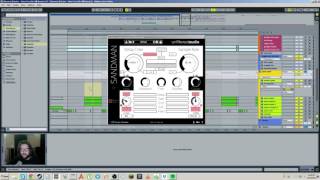
Unfiltered Audio Sandman
Mr. Bill
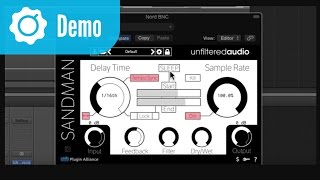
Unfiltered Audio Sandman - Intro and Overview

Plugin Alliance
Reviews
Owner Insights
We analyzed real musician discussions from forums and Reddit to find what players love, question, and tweak about Unfiltered Audio (Plugin Alliance) Sandman Delay Plug-in.
Features and functionality
-
Sandman Pro offers seven delay modes, including unique options like Glitch Shifter and Reverse, enhancing creativity in delay effects.
Source -
The plugin includes a comprehensive modulation system with eight assignable modulators like LFOs and envelope followers, providing extensive sound-shaping possibilities.
Source
Use cases and applications
-
The Freeze and Sleep buffer features can be manipulated with pitch shifting, down-sampling, and filtering, allowing for experimental sound design.
Source
Comparisons
-
Unlike standard delays, Sandman Pro integrates unique modulation and manipulation features that set it apart from simpler delay plugins like H-Delay.
Source
4.5 out of 5
Based on 1 Review and 5 Ratings
268
Fantastic and cheap plugin
Sandman by Unfiltered Audio is a massively fun delay VST than can be used subtly to add reverb, delay or the odd lo-fi or glitchy effect or can be used wildly such that the effect rather than what you play into it is the focus.
This is a very versatile effect with a lot of different possible uses and more importantly it's a lot of fun to play with such that you end up looking at the clock and realizing that either you have been abducted by aliens or you got carried away and spent far longer than you expected on tweaking sounds.
When I first started playing with the VST I loaded up FL Studio, put a radio into the mic jack on the PC and just tried to learn by twiddling. I had massive amounts of fun but I wasn't really learning the VST's functions properly. Most of my good effects came when I slammed a control hard left or right and caused a cool noise, sounding like a tape speeding up or slowing down, or sometimes like a glitchy percussive noise. I also enjoyed the pitch shifting and speed effects I was able to get from changing the delay time and sample rate.
I poked around and found the manual on the homepage of the software, which is linked on the steam store page: http://sandmanplugin.readthedocs.org/en/latest/controls.html#main-controls
I carefully read the information and then rather than using the radio I used repeating simple sounds so that my changes were easier to understand. I thoroughly recommend this approach.
The main controls I would say are the two big ones: delay time and sample rate. The delay time can be in tempo sync or not. In Sync mode it is synced to the bpm of your DAW and can be selected from 1/64 triplet to 1 whole note (1 bar, as in 2 seconds at 120 bpm). The longest the delay time can be is 5s if using best sample rate; it can be a lot longer if using lo-fi sample rates! 500 secs!
So the most basic effects you can get are a kind of reverb or a delay. You leave the sample rate on 100% and put the delay time on really short for reverb or longer for delay. It's at this point that you will want to investigate the feedback and filter controls: whack each of them up a bit or your delay will only repeat once and your reverb will be a micro one-shot delay rather than a reverb. The dry/wet you will probably want to set somewhere in the middleish so you hear your original sound and the reverb/delay.
At first I was a bit confused about the filter. I read on the main features page or somewhere that it was a low pass filter to reduce hiss and high-pitched artifacts so I was confused when turning it on full even seemed to do nothing. Likewise the feedback on its own seemed to do nothing either. Feedback on its own = nothing, no matter how much I moved it, same with filter, all the way left and right, no effect if feedback was turned off.
I then read in the controls page of the manual that the filter only affected the feedback so it started to make more sense. The last piece of the puzzle fell into place when I worked out (don't think it's in the manual) that double clicking a control returned it to its default setting. The default setting of the filter was all the way to the right, while feedback was all the way to the left. Basically it seems that the filter is counter-intuitively designed such that turning it all the way to the right is "low pass filter is totally off" and turning it all the way to the left is "low pass filter is totally on". So "on" in fact that it completely cancels out any feedback at all if you have it in that position. All now made sense!
The next thing to note and play around with is the sample rate, which controls the sampling rate of the engine, funnily enough. Use it in conjunction with the leftmost "lock" button, which locks the delay buffer at the time specified on the control, either in terms of your tempo, or absolute time. If the lock button is off then the buffer's length will change with the sample rate.
There's a lot of fun to be had even with the controls I've talked about so far. When you move the sample rate and delay time controls you get lovely tape style noises generated before the state settles. Add to this the "dirt" control which adds subtle pink noise into the mix for a bit of retroness , and the two controls that control input and output gain and that would be great value as it is.
But there's more.
The 2 main extra features are sleep mode and the LFO section.
Sleep mode is entered by pressing the sleep button and basically it locks the loop: no new sound will be recorded into the loop. The feedback and filter controls grey out as they have no effect now. The two central bar controls unlock though: they control the start and end position of the loop. Playing just sections of the loop is great fun. If you set the start greater than the end the loop will play backwards!
You can still adjust the sample rate and delay time in sleep mode and now you can use the rightmost lock button which locks the loop so it remains the same length no matter where you set the start and end points.
The LFO controls, lastly, reached by clicking the drop down arrow on the left, under "SANDMAN" allow a whole new dimension of fun. I'm getting near steam's max review size but basically you have two LFOs, settable to 6 different wave types, variable speed or sync to sample rate. Each LFO can modify 5 variables, each one either up or down: delay, start, end, sample rate and feedback.
The LFOs make a good VST great. There is a massive amount of flexibility here.
Another thing you can try: using multiple independent instances of Sandman is great fun You basically use each one as a sampler: you get to wait until you hear something interesting in your input, then lock the loop, move the start and end positions until you isolate the good part and move on to another channel. You end up with a load of cool samples looping and can go roundt tweaking each one and make ambient tunes. You can also connect Sandman in series but things get chaotic pretty quickly that way!
To sum up: this is a fantastic value for money VST that is great fun to play with and has so many uses. I really think you should buy it right away, but try the demo to be sure! (on their website). Bear in mind it will sound worse as it inserts regular noise on purpose.
There are some ways the VST could be improved, mainly in the area of giving feedback to the user.
For example it would be nice to have a visual representation of where abouts in the locked loop is currently playing, to help you when setting start and end points. A small waveform drawn on the locked loop would help too for picking things out you want to include or not when setting end points.
Would be nice to have a display of time elapsed and time remaining since you exited sleep mode, to help when recording long loops (e.g. 60s when samp rate is 8.4%) and/or a visually filling bar.
When in sleep mode would be nice to have a note of what sample rate and delay time were when you were last recording (i.e. out of sleep mode) so you can twiddle the knobs back to that position for accurate playback of the stored loop.
Also show length of stored (frozen) loop when in sleep mode, markers not on very start and end and frozen loop sync is set to off.
Maybe show sample rate in hertz too rather than just as a percentage.
Would be nice to have direct numeric input to set some things particularly delay time.
Ability to export frozen loop as wav would be nice but it can be done in most DAWs with a little more fiddling, e.g. Edison in FL Studio.
Ability to LFO mod the dry/wet setting and filter setting.
Maybe a higher max recording time at max samp rate? 5s seems a bit low and arbitrary?
I'm a bit concerned demo version on website is higher version than one on steam (1.0.2 vs. 1.0.0)
demos
https://soundcloud.com/moop_records/inside-this-shell https://soundcloud.com/moop_records/mary-anne-hobbs-sandman-test
Artist usage
Add artist


Genre Usage
Based on how artists on Equipboard use this gear, it is most commonly found in the following genres.
Used With
Based on how musicians on Equipboard use Unfiltered Audio (Plugin Alliance) Sandman Delay Plug-in, it is most commonly used with the following gear.



-s.webp?v=1784905256)
More Unfiltered Audio Delay Plugins

$30.00 - $50.00
in Delay Plugins Rank


$19.99 - $24.90
-m.webp?v=1784872236)
$69.00 - $199.00
in Delay Plugins Rank


$32.00 - $34.99
in Delay Plugins Rank


$139.00 - $149.00
in Delay Plugins Rank


.jpeg?v=1784891088)
-m.webp?v=1784871698)
$80.00 - $99.00
in Delay Plugins Rank
.jpg?v=1784921365)


$138.00 - $149.00
in Delay Plugins Rank


$29.99 - $30.00
in Delay Plugins Rank


$0.00 - $40.00
in Delay Plugins Rank


$19.00 - $89.00
in Delay Plugins Rank


$50.00 - $99.00
in Delay Plugins Rank


$0.00
in Delay Plugins Rank
-m.webp?v=1784455253)
$53.00 - $89.00
in Delay Plugins Rank


$66.00 - $69.00
in Delay Plugins Rank

$29.99 - $34.99
in Delay Plugins Rank


$35.00
in Delay Plugins Rank


$25.00
in Delay Plugins Rank


$0.00
in Delay Plugins Rank

$99.00
in Delay Plugins Rank


$49.00
in Delay Plugins Rank


$63.00 - $69.00
in Delay Plugins Rank

$0.00
in Delay Plugins Rank


$42.00 - $49.00
in Delay Plugins Rank

Accessories & Related Items


Community setups


Similar


Gear Guides









Most Popular Delay Plugins
Most Popular Brands


