

Pricing and availability




Average Price: $55
Budget/Beginner
$200
$1001+
Price Tier
Budget
Standard
High-end
* Product prices and availability are updated by Equipboard every 24hrs and are subject to change. Equipboard may receive compensation for purchases made at participating retailers linked on this site. This compensation does not affect what products or prices are displayed, or the order of prices listed. For more information, please refer to our affiliate disclosure.
Description
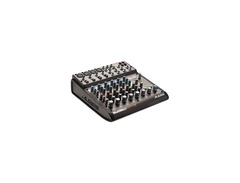
The Alesis MultiMix 8 FireWire Mixer combines versatility and performance in a compact design, making it an ideal choice for musicians and recording enthusiasts. This 8-channel analog mixer not only provides the essential mixing capabilities but also integrates a FireWire audio interface, allowing seamless connectivity with your digital setup. With its four high-gain mic/line inputs, you'll be equipped to handle various microphones and instruments, while the phantom power ensures compatibility with condenser mics. For those who appreciate high-quality sound, the MultiMix 8 features 24-bit A/D and D/A conversion, ensuring your recordings are crystal clear.
Beyond its mixing capabilities, the Alesis MultiMix 8 FireWire boasts 100 built-in 28-bit digital effects, including reverbs, delays, and chorus, eliminating the need for additional outboard effects units. This feature, combined with its flexible routing options, makes it a powerhouse for both live performances and studio sessions. Whether you're recording directly to your computer via the FireWire interface or using it as a standalone mixer, the MultiMix 8 adapts to your needs effortlessly.
With the inclusion of Steinberg Cubase LE, you have a robust software solution right out of the box, enhancing your recording and editing capabilities. Compatible with both Mac OSX and Windows, this mixer is as user-friendly as it is powerful, offering remarkable value for its price point.
Key Features:
- 8-channel mixer with integrated FireWire audio interface
- 4 high-gain mic/line inputs with phantom power
- 100 built-in 28-bit digital effects
- 3-band EQ per channel
- 24-bit, 44.1/48 kHz A/D and D/A conversion
- Compatible with Mac OSX and Windows
- Includes Steinberg Cubase LE software
Product specs
| Brand | Alesis |
| Model | MultiMix 8 FireWire 8-Channel Mixer |
| Year | 2000s |
| Categories | Audio Mixers, Consoles and Summing Boxes |
FAQs
-
How do I connect the Alesis MultiMix 8 FireWire to my computer?
-
To connect the Alesis MultiMix 8 FireWire to your computer, use a FireWire cable to link the mixer to your computer's FireWire port. Ensure your system is running Mac OS X or Windows XP, as these are the supported operating systems for this mixer.
-
Does the Alesis MultiMix 8 FireWire support phantom power for microphones?
-
Yes, the Alesis MultiMix 8 FireWire provides phantom power on its mono channels, allowing you to use condenser microphones that require external power.
-
What type of effects does the Alesis MultiMix 8 FireWire offer?
-
The Alesis MultiMix 8 FireWire features 100 preset effects, including reverbs, delays, chorus, flanging, pitch, and combination effects, enhancing your audio mixing capabilities.
-
Is the Alesis MultiMix 8 FireWire suitable for live sound environments?
-
Yes, the Alesis MultiMix 8 FireWire is compact and versatile, making it suitable for both studio recording and intimate live sound environments.
-
What are the main output options on the Alesis MultiMix 8 FireWire?
-
The Alesis MultiMix 8 FireWire offers separate 1/4" balanced main and monitor outputs, providing flexibility for different audio routing setups.
Videos

gearwire
Alesis MultiMix
Alesis MultiMix
gearwire
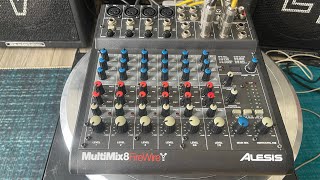
Mixer alesis bãi mỹ multimix8 FireWire hàng xuất Nhật có effecfs đẹp xuất sắc

NHƯ Ý AUDIO BÌNH ĐỊNH
Reviews
Owner Insights
We analyzed real musician discussions from forums and Reddit to find what players love, question, and tweak about Alesis MultiMix 8 FireWire 8-Channel Mixer.
Features and functionality
Software and compatibility
-
In Adobe Audition, activating the "Toggle Recording" mode is essential for capturing input from the mixer.
Source -
The Alesis MultiMix 8 FireWire is limited to sending and receiving only stereo audio over USB, not individual channel streams.
Source -
Users face difficulties with ASIO4ALL, finding its control panel confusing and struggling with idle status of the USB mixer.
Source
User experience
Setup and maintenance
-
Buzzing noises occur even when only the power lead is connected, hinting at possible power supply problems.
Source
Use cases and applications
-
Recording electric guitars through a DI box without using the gain knob is recommended for optimal sound.
Source
Critic Reviews
Based on 0 Reviews and 0 Ratings
More Alesis Mixers

$99.00 - $179.00
in Mixers Rank


$79.00 - $212.49
in Mixers Rank


$335.39 - $399.00

$143.71 - $199.99


$28.00 - $415.00
in Mixers Rank


$677.00 - $989.00
in Mixers Rank


$1,462.00 - $1,999.00
in Mixers Rank


$214.78 - $250.74
in Mixers Rank


$106.25 - $449.99
in Mixers Rank


-m.webp?v=1785020465)
$340.69 - $379.00
in Mixers Rank


$219.00 - $329.99
in Mixers Rank


$45.30 - $89.00
in Mixers Rank


$180.25 - $219.99
in Mixers Rank


$200.00 - $573.74
in Mixers Rank


$129.00 - $209.00
in Mixers Rank


$1,737.36 - $3,299.99
in Mixers Rank

$310.00 - $479.99
in Mixers Rank


$185.00 - $309.00
in Mixers Rank


Accessories & Related Items


Artist usage


Community setups


Similar


Gear Guides








Most Popular Mixers
Most Popular Brands
-
Added to Equipboard on by
 equipboard
GearIQ 4934
-


